


Remote workforce management works when distributed work has clear ownership, visible progress, and fewer coordination gaps.
Remote workforce management is the operating system a company uses to coordinate people who do not share the same office. For many teams, that includes employees, contractors, freelancers, agencies, vendors, and specialists across time zones. The goal is not to monitor everyone closely. The goal is to make work easier to understand, assign, review, approve, and pay for when people are not sitting together.
Teams usually struggle because expectations live in meetings, approvals hide in messages, documents scatter across tools, and blockers surface late.
What’s in this article?
- Why remote workforce management matters
- A practical workflow for distributed teams
- Ownership across managers, operations, finance, IT, and workers
- Common mistakes and where Workhint fits
Why remote workforce management matters
Remote workforce management has become a normal operating challenge, not a temporary workplace policy. SAP describes workforce management as coordinating labor, scheduling, time, productivity, and related workforce processes; it also notes that external workforce management covers freelancers, contractors, consultants, and service providers. That matters because many remote teams are blended teams, not just employees working from home.
Distributed work increases the cost of ambiguity. A vague assignment becomes a delayed project. A missing approval becomes an invoice dispute. An unclear access rule becomes a security risk. A contractor who does not know where to submit work may wait quietly while the internal team assumes progress is happening.
There is also a management-risk side. Harvard Division of Continuing Education emphasizes communication, trust, and intentional leadership for remote teams. For external workers, the operating model must also handle scope, onboarding, permissions, work acceptance, and payment status.
Remote workforce management operating model
A remote workforce model should answer six questions before work begins.
- Who is doing the work? Identify whether the person is an employee, contractor, freelancer, agency partner, vendor, or consultant.
- What work is assigned? Define scope, deliverables, deadlines, quality standard, and business owner.
- What access is required? Give only the systems, files, customers, or data needed for the work.
- How will progress be visible? Decide where updates, blockers, milestones, and approvals are tracked.
- How will work be accepted? Clarify who reviews deliverables, what counts as approved, and how revisions are handled.
- How will payment or closeout happen? Connect timesheets, milestones, invoices, approvals, and offboarding to the same workflow.
Many remote-work guides focus on communication culture but skip operational control. A remote workforce also needs intake, assignments, permissions, approvals, payments, and reporting.
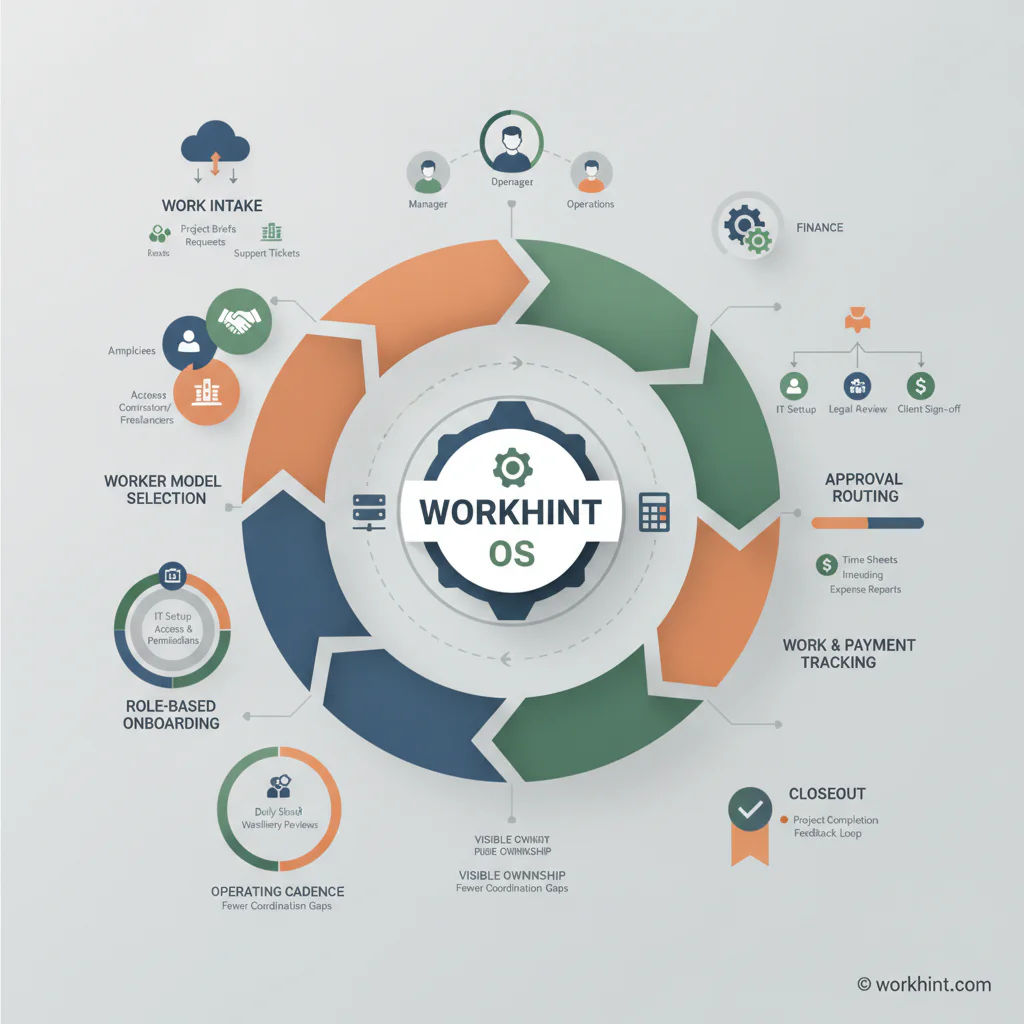
Remote workforce management workflow
Use this workflow when remote employees, contractors, agencies, or distributed partners deliver recurring work.
- Create a work intake path. Managers should request remote support with scope, desired outcome, budget, start date, end date, location constraints, and access needs.
- Assign the right worker type. Decide whether the work belongs with an employee, contractor, agency, vendor, or automation path. For contractor-heavy work, keep classification and control questions visible before the engagement starts.
- Build a role-based onboarding flow. Collect agreements, payment details, security acknowledgements, project context, and tool access in one process.
- Define the operating cadence. Replace status meetings with written priorities, milestone updates, blocker flags, and decision checkpoints.
- Route approvals in the work system. Deliverables, timesheets, expenses, scope changes, and invoices should move to named approvers instead of disappearing into email.
- Track work and payment together. A completed milestone should connect to acceptance, invoice readiness, payment status, and reporting.
- Close the loop. When the work ends, revoke access, archive deliverables, confirm final payment, collect feedback, and decide whether the worker or vendor should be reused.
Responsibility table for remote workforce management
Remote workforce management breaks when ownership is assumed instead of assigned.
| Area | Primary owner | What they control | Evidence to keep |
|---|---|---|---|
| Work request | Manager or program owner | Scope, outcome, deadline, and worker need | Approved intake request |
| Worker model | Operations, HR, or procurement | Employee, contractor, agency, vendor, or partner route | Classification notes, contract path, vendor record |
| Access | IT or system owner | Tools, permissions, data, and revocation | Access log and offboarding confirmation |
| Delivery | Manager or project lead | Milestones, quality standard, blockers, and acceptance | Status updates, approved deliverables, revision notes |
| Payment | Finance or operations | Timesheets, invoices, milestone approvals, and payout status | Approved invoice, payment record, budget usage |
| Reporting | Operations leader | Capacity, spend, cycle time, quality, and reuse decisions | Dashboard, review notes, vendor or worker score |
What should remote workforce managers track?
Remote workforce metrics should show whether work is moving, where risk is building, and whether external capacity is worth the cost. Track active workers, open assignments, overdue milestones, approval cycle time, onboarding completion, access exceptions, invoice aging, payment delays, quality issues, budget variance, and reuse rate.
For teams that include independent contractors, keep compliance-sensitive tracking separate from day-to-day supervision. The IRS explains that worker classification considers behavioral control, financial control, and the relationship of the parties. The U.S. Department of Labor’s Fair Labor Standards Act guidance focuses on economic realities. This article is not legal advice, but remote workforce systems should help teams document scope, independence, approvals, and payment terms instead of blurring every worker into an employee-style model.
Common remote workforce management mistakes
- Managing remote work only through meetings. Meetings create conversation, but they do not create durable assignment records, approvals, or payment trails.
- Using the same onboarding path for everyone. Employees, contractors, agencies, and vendors need different documents, access, and payment processes.
- Separating work status from payment status. If delivery approval and invoice approval are disconnected, finance becomes a manual follow-up function.
- Giving broad access by default. Remote teams need fast access, but access should be tied to role, project, and end date.
- Measuring activity instead of outcomes. Strong remote workforce management tracks deliverables, blockers, acceptance, and value, not just online presence.
Where Workhint fits
Workhint fits when remote workforce management needs to become a live operating system rather than a stack of disconnected tools. A company can use Workhint to create intake forms, define worker roles, collect onboarding documents, route approvals, assign work, manage permissions, track milestones, connect accepted work to payments, and report on external workforce activity.
That is useful for blended teams with employees, contractors, freelancers, agencies, vendors, and distributed partners. Workhint helps operations leaders turn the remote-work model into repeatable workflows, so managers are not rebuilding onboarding, approvals, status tracking, and payment follow-up.
FAQ
What is remote workforce management?
Remote workforce management is the process of coordinating people who work from different locations. It includes intake, onboarding, communication rules, assignments, approvals, access, payment workflows, reporting, and offboarding.
How is remote workforce management different from project management?
Project management focuses on tasks, deadlines, and deliverables. Remote workforce management includes the people-operating layer around those tasks: worker type, onboarding, access, approvals, compliance notes, payment status, and closeout.
What tools are needed to manage a remote workforce?
Most teams need communication, documentation, work tracking, approval routing, access management, payment or invoice tracking, and reporting. The more external workers are involved, the more important it becomes to connect these processes.
How do you manage contractors in a remote workforce?
Start with clear scope, contract terms, deliverables, approval points, access limits, and payment rules. Track outcomes and accepted work rather than managing contractors exactly like employees. For legal or classification-sensitive questions, use qualified HR, tax, or legal advice.
What is the biggest remote workforce management mistake?
The biggest mistake is relying on informal communication to coordinate formal work. Remote teams need written ownership, visible status, clear approval paths, and connected payment or closeout steps.
Conclusion
Remote workforce management is not about watching people work. It is about designing the system that lets distributed people deliver without confusion. The strongest operating models make work requests clear, onboarding role-based, access controlled, progress visible, approvals accountable, payments connected, and closeout consistent. When those pieces are in place, remote and external teams can move quickly without creating hidden work.
Leave a Reply