


A clean contractor invoice prevents payment delays, approval confusion, and end-of-month reconciliation mess.
A contractor invoice template gives small businesses a standard way to receive bills from freelancers, consultants, agencies, and independent contractors. The best template does more than list a total. It shows who performed the work, what agreement the work belongs to, what was delivered, who needs to approve it, when payment is due, and what records should be kept.
This resource is not legal or tax advice. Contractor payment rules vary by country, state, contract type, and tax status. In the United States, the IRS explains that businesses should collect contractor tax information with Form W-9 when needed and maintain records for independent contractor payments. Use the template below as an operating format, then adapt it with your finance, legal, or accounting team.
What’s included
This contractor invoice template includes the core fields most small businesses need to review and pay contractor invoices without chasing missing details:
- Contractor and client information
- Invoice number, issue date, billing period, and due date
- Contract, statement of work, purchase order, or project reference
- Line-item description of services, hours, rates, deliverables, expenses, and totals
- Payment terms, method, tax details, and remittance notes
- Internal approval fields for the receiving business
How to use the template
Use the template as a shared standard before work starts, not after the contractor has already submitted a vague bill. Add the invoice requirements to the statement of work, vendor onboarding checklist, or contractor payment policy. Tell contractors which fields are required, what backup documentation is needed, and where to send the invoice.
QuickBooks recommends clear business information, client details, invoice numbers, dates, due dates, and project descriptions in contractor invoices. MBO Partners also emphasizes detailed service descriptions, dates, hours, rates, and additional charges so clients can review the bill without guessing what the contractor completed.
Contractor invoice template
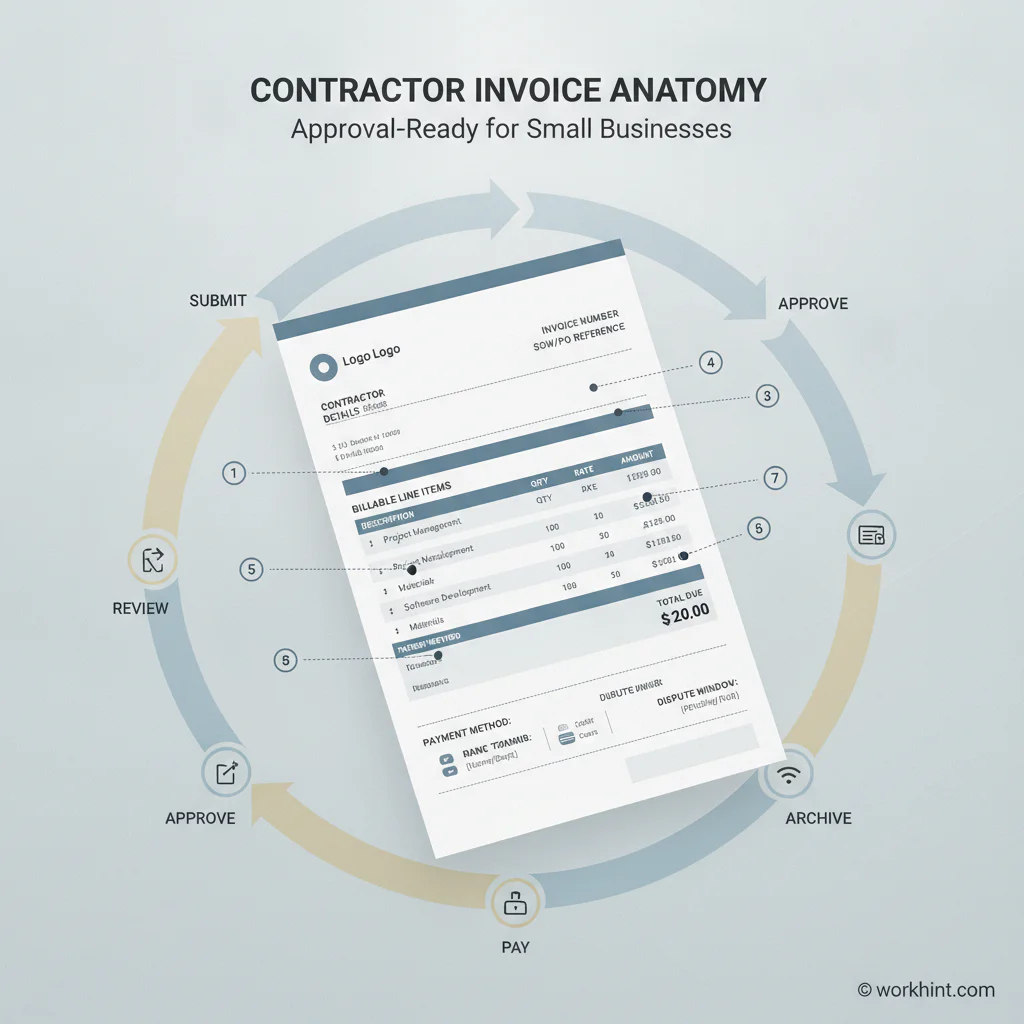
| Section | Field | What to enter |
|---|---|---|
| Contractor | Legal name, business name, email, address | Use the same name tied to the contract and tax records. |
| Client | Company, department, billing contact | Route the invoice to the correct business unit and approver. |
| Invoice details | Invoice number, issue date, due date | Use a unique invoice number and a clear payment deadline. |
| Agreement reference | SOW, PO, contract, project, or milestone ID | Connect the invoice to the approved scope and budget. |
| Billing period | Start date and end date | Show the exact period covered by the invoice. |
| Line items | Description, quantity, rate, amount | Break out deliverables, hours, retainers, materials, and expenses. |
| Totals | Subtotal, discounts, taxes, expenses, total due | Make the payable amount obvious and easy to audit. |
| Payment | Payment method, account details, terms | Include only the payment information your company allows. |
| Approval | Approver, approval date, dispute notes | Keep internal review visible before payment is released. |
Copy-ready contractor invoice format
Invoice number: INV-0001
Issue date: July 20, 2026
Due date: August 19, 2026
Contractor: Contractor legal name, business name, email, address
Client: Company name, billing contact, department
Agreement reference: SOW-2026-014, PO-1182, or project name
Billing period: July 1 to July 15, 2026
Payment terms: Net 30 after approved invoice
Payment method: ACH, wire, check, card, or approved platform
| Description | Quantity | Rate | Amount |
|---|---|---|---|
| Discovery workshop facilitation | 1 | $1,200 | $1,200 |
| Workflow documentation | 8 hours | $150 | $1,200 |
| Approved travel expense | 1 | $180 | $180 |
| Total due | $2,580 |
Approval checklist before payment
- Confirm the contractor is approved to work with the company.
- Match the invoice to the contract, SOW, purchase order, or milestone.
- Check that the billing period does not overlap with another invoice.
- Validate rates, quantities, deliverables, expenses, and taxes where applicable.
- Confirm required tax or vendor records are on file. The IRS guidance for forms and taxes for independent contractors is a useful reference for U.S. recordkeeping context.
- Send disputes back to the contractor before the payment clock creates confusion.
- Record the approval owner, approval date, and payment status.
Example application
Say a small software company hires a product consultant for a two-week workflow audit. The SOW says the consultant will run two stakeholder interviews, document the current process, and deliver a prioritized improvement plan for $4,500. The invoice should reference the SOW, list the completed deliverables, show the billing period, attach any approved expenses, and route to the operating owner who accepted the final deliverable.
Without those fields, finance has to ask whether the work was completed, whether the amount matches the agreement, and who approved the deliverable. With the template, the invoice becomes a payment-ready record instead of a loose email attachment.
Common mistakes
- No agreement reference: The invoice cannot be matched to approved scope or budget.
- Vague line items: “Consulting services” is harder to approve than deliverables, dates, hours, and rates.
- Missing due date: Payment timing becomes a negotiation instead of a process.
- No expense backup: Reimbursable costs should tie to receipts, policy limits, or preapproval.
- Unclear approval owner: Finance should not have to guess who can confirm the work.
- Tax details collected too late: Contractor records should be handled during onboarding, not after the first invoice arrives.
Where Workhint fits
Workhint helps teams turn a contractor invoice template into a live payment workflow. Instead of keeping invoice requirements in a document and approvals in email, a company can structure contractor intake, W-9 collection, SOW references, invoice submission, approval routing, dispute notes, payment status, and reporting in one connected work system.
That matters when a business works with many contractors across projects, departments, or locations. The template sets the standard. Workhint helps digitize the handoff from submitted invoice to approved payment without losing the contract, deliverable, approver, or record trail.
FAQ
What should a contractor invoice include?
A contractor invoice should include contractor details, client details, invoice number, issue date, due date, billing period, agreement reference, line-item services, rates, expenses, total due, payment method, and any internal approval fields the client requires.
Is a contractor invoice the same as a receipt?
No. An invoice requests payment for work completed or billable services. A receipt confirms payment was received. Keep both records when possible, especially for contractor, vendor, and accounting reconciliation.
Should contractors include tax information on invoices?
It depends on the jurisdiction, business type, and payment arrangement. U.S. businesses commonly use Form W-9 to collect taxpayer identification details from independent contractors, but invoices should follow the requirements set by the contract, accounting team, and applicable tax rules.
When should a contractor send an invoice?
The best timing is defined in the agreement. Common triggers include project completion, milestone acceptance, weekly or monthly billing periods, or retainer cycles. The invoice should not arrive before the approval event it depends on.
Who should approve a contractor invoice?
The approver should be the person who can confirm scope, deliverables, budget, and acceptance. In many small businesses, that is the project owner, department lead, operations manager, or finance-approved budget owner.
Conclusion
A contractor invoice template helps small businesses pay contractors faster while keeping scope, approvals, taxes, and records under control. Use the template to standardize what contractors submit, then connect the invoice to the agreement, approval owner, and payment process. The result is fewer delays, cleaner records, and less back-and-forth every time a contractor needs to be paid.
Leave a Reply