


The fastest way to improve a workflow is to know whether work is slow, waiting, or both.
Cycle time vs lead time is a useful distinction for any operation that depends on repeatable work. Cycle time shows how long work takes once it is actively moving. Lead time shows how long the requester, customer, partner, or internal team waits from request to outcome.
That difference matters because teams often fix the wrong problem. They pressure people to work faster when the real delay is a backlog. A better work system measures both metrics and uses each one to diagnose a different kind of delay.
What’s in this article?
- The practical difference between cycle time and lead time
- How to decide when each metric matters
- A comparison table for business operations
- A workflow for measuring both metrics cleanly
- Common mistakes that distort the numbers
- Where Workhint fits
Why cycle time vs lead time matters
The primary reason cycle time vs lead time matters is that each metric points to a different operating fix. If cycle time is long, the active work itself may be too complex, poorly staffed, unclear, or full of rework. If lead time is long but cycle time is short, the work is probably waiting in queues, approvals, handoffs, prioritization meetings, missing-information loops, or overloaded owner lists.
The Lean Enterprise Institute defines cycle time as the time required to produce a part or complete a process, measured by actual observation. ASQ’s quality glossary similarly describes cycle time as elapsed time across one process cycle. In business operations, that may be the time from “work started” to “work completed” for a request, invoice review, onboarding step, approval, customer issue, vendor intake, or implementation task.
Lead time is broader. Tulip’s operations guide explains that lead time captures the whole customer-facing journey, while cycle time measures what happens inside the process. For internal operations, the “customer” might be a department waiting for a purchase approval, a manager waiting for onboarding, or a client waiting for a service request to close.
Cycle time vs lead time operating model
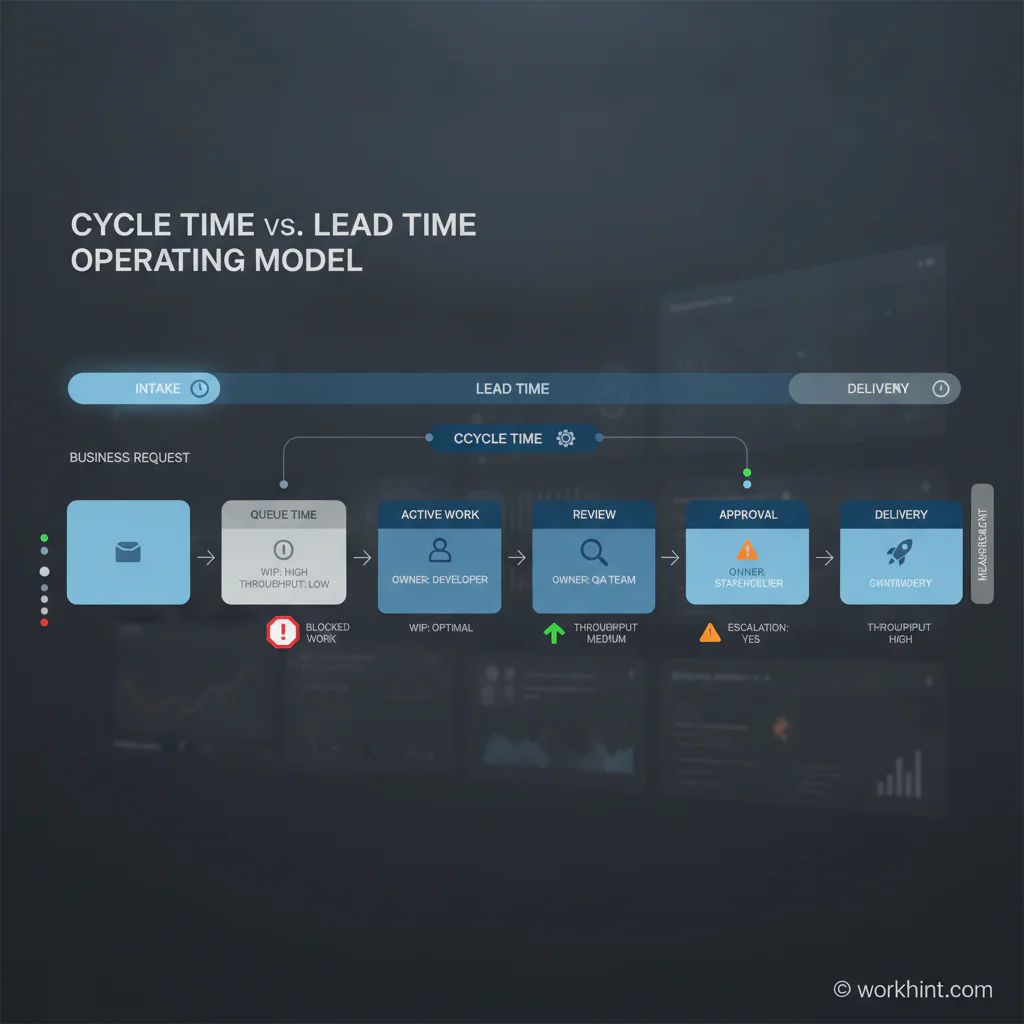
Think of lead time as the full promise window and cycle time as the execution window. A request may sit in intake for two days, wait for assignment for one day, take four hours of actual work, wait overnight for review, and close the next morning. The cycle time might be four hours or one business day depending on your definition. The lead time is closer to four days. The requester feels the lead time.
| Metric | What it measures | Best used for | Common fix |
|---|---|---|---|
| Lead time | Total elapsed time from request to delivery | Customer expectations, SLA design, request backlog health, service responsiveness | Reduce queues, clarify priority, improve routing, remove approval delays |
| Cycle time | Elapsed time once active work begins | Execution efficiency, process design, staffing, rework, task complexity | Simplify steps, improve instructions, reduce rework, add capacity, automate repeatable work |
| Throughput | How many work items are completed in a period | Capacity planning, forecasting, WIP control, staffing decisions | Limit active work, unblock owners, standardize work types, balance demand |
| Work in progress | How many items are active but unfinished | Queue management, overload detection, flow control | Set WIP limits, stop starting too much work, finish blocked items first |
These metrics are connected. Kanban University describes Little’s Law as the relationship between average throughput, work in progress, and cycle time in a stable environment. The practical lesson: when too much work is open at once, completion slows and waiting grows.
How to measure cycle time and lead time
Start by defining the workflow boundary. Do not measure an abstract department. Measure a repeatable work type, such as vendor approval, customer escalation, purchase request, creative review, contractor onboarding, invoice exception, or field service visit.
- Define the request trigger. This is where lead time starts. Use a clear event such as form submitted, ticket created, order received, or client request logged.
- Define the active-work start. This is where cycle time starts. It may be owner assigned, work accepted, first action taken, or status changed to in progress.
- Define completion. Use a real outcome, not a vague status. Examples include approved, delivered, paid, onboarded, resolved, signed, or closed with evidence.
- Capture waiting states. Track waiting for requester, waiting for approver, waiting for vendor, blocked by missing information, and pending review separately.
- Review by work type. Do not average urgent escalations, routine requests, and complex exceptions together. Segment the work so the metric suggests action.
What the numbers tell you
If lead time and cycle time are both high, the process is slow end to end. That may mean unclear requirements, too many steps, repeated rework, overloaded teams, or poor system support. Look for handoffs, approval loops, duplicate data entry, missing instructions, and work that keeps reopening.
If lead time is high and cycle time is low, the active work is not the main problem. The problem is usually before, between, or after the work: intake quality, prioritization, queue size, assignment delay, review delay, or response time.
Common mistakes
- Starting the clock too late. If lead time starts only after assignment, you hide the backlog.
- Mixing different work types. Averages become useless when simple requests and complex exceptions are combined.
- Ignoring reopened work. A fast close is not real if the item returns because the output was incomplete.
- Tracking metrics without owners. Every delay state needs someone accountable for improving it.
- Optimizing cycle time while lead time stays broken. The customer experiences the whole system, not only active work.
Where Workhint fits
Workhint fits when a team wants these metrics to become part of the operating system instead of a spreadsheet exercise. A business can define the request type, intake fields, owners, statuses, approval rules, service promises, blocked states, escalation paths, and dashboards around the workflow.
For example, an operations leader could describe a vendor approval workflow and track when the request enters intake, when ownership is assigned, when finance or legal review starts, when the vendor responds, and when the approval closes. Workhint can help turn that design into roles, permissions, task routing, reminders, reporting, and automation so lead time and cycle time are visible in the same system where the work happens.
FAQ
What is the difference between cycle time and lead time?
Cycle time measures how long work takes once active execution begins. Lead time measures the full elapsed time from request to completed outcome, including waiting, queues, approvals, and handoffs.
Which metric should operations teams improve first?
Improve the metric that reflects the current constraint. If work waits before anyone starts, focus on lead time. If active work takes too long or creates rework, focus on cycle time.
Can lead time be shorter than cycle time?
In a clean measurement model, no. Lead time includes the broader request-to-delivery window, so it should be equal to or longer than cycle time for the same work item.
How do WIP limits affect lead time?
When too much work is open at once, items wait longer for attention. WIP limits reduce overload by forcing teams to finish, unblock, or escalate active work before starting more.
Should approvals count in cycle time?
It depends on your definition. For business operations, approvals should at least count in lead time and should be tracked as their own waiting or review state so delays are visible.
Conclusion
Cycle time vs lead time is not a terminology debate. It is a practical way to see whether your operation has an execution problem, a waiting problem, or both.
Use lead time to understand the requester’s experience. Use cycle time to understand how active work performs. Then connect both metrics to owners, statuses, queues, approvals, WIP, throughput, and escalation rules. That is how workflow metrics become a scalable work system instead of another report nobody acts on.
Leave a Reply