


Teams improve the wrong layer when they treat every process problem as a workflow problem.
The workflow vs process distinction is practical, not semantic. A process defines how a business produces an outcome across people, policies, information, and systems. A workflow defines the ordered route that a specific piece of work follows through part of that process. Understanding the boundary helps teams fix causes instead of polishing individual task sequences.
Quick answer
A process is the broader operating system for achieving a business result, such as onboarding a customer. A workflow is an executable sequence inside that process, such as reviewing the application, approving terms, or provisioning access. Processes define outcomes, scope, controls, and measures; workflows define triggers, steps, owners, states, decisions, and handoffs.
What’s in this article?
- The practical difference between a process and a workflow
- A comparison table and operating example
- A method for designing the two layers together
- Common mistakes that create delays or weak automation
Why the distinction matters
If a customer onboarding process misses its activation target, the cause may be an unclear eligibility policy, poor ownership, missing capacity, or a broken approval workflow. Redrawing the approval steps only fixes one of those possibilities. Teams need the process view to understand the outcome and the workflow view to control how individual work items move.
IBM describes a workflow as a system for managing repetitive tasks that occur in a particular order, while a business process can include multiple workflows, systems, data, people, and activity patterns. That is a useful operating boundary: the process explains the whole result; each workflow makes a repeatable segment executable.
What is a business process?
A business process is a coordinated set of activities that transforms inputs into an outcome. It normally crosses more than one role or system and includes the rules and resources needed to deliver the result. A complete process definition should answer:
- What outcome must be produced, and for whom?
- Where does the process start and end?
- Who owns the result across functional boundaries?
- Which policies, controls, data, and systems govern the work?
- How will quality, time, cost, volume, and exceptions be measured?
For customer onboarding, the process might begin when a signed agreement is received and end when the customer can use the service successfully. It includes commercial validation, data collection, risk checks, configuration, training, activation, and follow-up.
What is a workflow?
A workflow is the defined path followed by one request, case, record, or deliverable. It begins with a trigger and moves through assigned tasks, decisions, status changes, handoffs, notifications, and exception routes until a clear completion state.
For the same onboarding process, one workflow may route a security questionnaire from intake to review, clarification, approval, and storage. Another may provision system access. Each can be executed and measured independently, but neither represents the entire onboarding outcome.
Workflow vs process differences
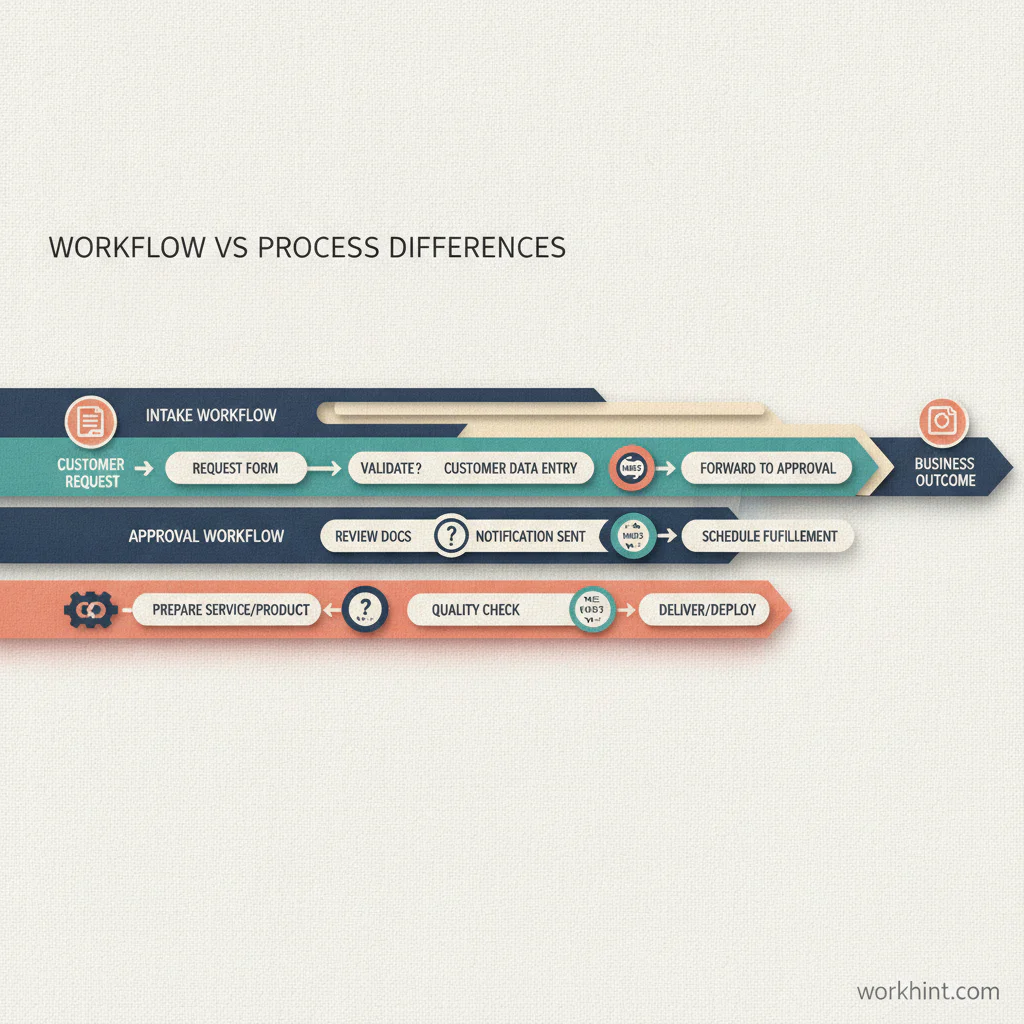
| Dimension | Process | Workflow |
|---|---|---|
| Primary purpose | Produce a business outcome | Move a work item to completion |
| Scope | End to end, often cross-functional | A repeatable route within a process |
| Design focus | Outcomes, controls, capabilities, resources | Triggers, tasks, states, owners, decisions |
| Typical measure | Outcome quality, total lead time, cost | Queue time, completion time, rework, exceptions |
| Common artifact | Process map, SIPOC, service blueprint | Flowchart, checklist, routing configuration |
| Automation target | Coordination across multiple workflows | Routing, assignment, rules, notifications |
The boundary is not universal. A small team may call invoice approval a process; a larger finance function may treat it as one workflow inside procure-to-pay. Use the boundary that preserves clear ownership and measurement.
How to design a process and its workflows
- Define the outcome. State the customer or business result, start event, end state, and success measures before listing tasks.
- Map the process stages. Identify major phases, roles, policies, systems, inputs, outputs, and controls. Keep this level broad enough to expose cross-functional gaps.
- Find repeatable work items. Look for requests, approvals, cases, documents, assignments, or deliverables that move through consistent states. These are workflow candidates.
- Specify each workflow. Define its trigger, owner, required data, task sequence, decision rules, service levels, completion criteria, and exception paths.
- Connect the layers. Record which workflow starts at each process stage, what output it returns, and what event activates the next stage.
- Measure both levels. Track workflow queues and failures without losing the end-to-end process measures that show whether the business outcome improved.
When formal notation is useful, the Object Management Group’s BPMN standard provides a shared graphical language designed to connect business process design with technical implementation. Simple workflows may only need a short diagram or checklist; complex orchestration benefits from more precise events, decisions, and handoffs.
Practical example: purchase requests
The purchase-to-receipt process starts when a need is identified and ends when the requested item or service is accepted and recorded. It may contain separate workflows for request intake, budget validation, approval, vendor onboarding, purchase-order creation, delivery confirmation, and issue resolution.
If requests wait three days for a manager, improve the approval workflow: routing, delegation, reminders, or thresholds may be wrong. If purchases arrive but fail to solve the original need, inspect the broader process: requirements, sourcing criteria, ownership, or acceptance controls may be weak.
Common design mistakes
- Automating before defining the outcome: faster routing cannot repair a process with the wrong goal or missing control.
- Making one giant workflow: an end-to-end diagram becomes hard to own, change, and measure. Separate stable work-item routes while preserving process coordination.
- Documenting only the happy path: include incomplete submissions, rejected decisions, unavailable owners, overdue work, and rework loops.
- Using task completion as the only metric: a workflow can be fast while the overall process produces poor-quality outcomes.
- Leaving boundaries implicit: every workflow needs a trigger, completion state, and output that another person or system can use.
Where Workhint fits
Once the process outcome and workflow boundaries are clear, Workhint can turn the design into a connected operating system. Teams can define intake data, roles, permissions, assignments, approvals, status rules, deadlines, exception routes, records, and dashboards around each work item while keeping the end-to-end process visible. A workflow automation system is most useful when it connects those routes to shared ownership and process-level measures instead of automating isolated tasks.
FAQ
Is a workflow part of a process?
Usually, yes. A process can contain one or several workflows plus policies, systems, resources, and controls. Very small processes may be represented by a single workflow.
Can a process exist without a workflow?
Yes. A process may be informal, highly variable, or poorly documented. Defining workflows makes its repeatable segments easier to assign, measure, and automate.
Should teams map the process or workflow first?
Start with the process outcome and boundaries, then map the highest-value workflow in enough detail to execute it. Beginning with tasks can hide missing ownership or a flawed goal.
What is the difference between workflow automation and process automation?
Workflow automation routes and controls specific work items. Process automation coordinates several workflows, systems, rules, and data exchanges to improve an end-to-end business outcome.
Conclusion
A process explains how the business creates an outcome; a workflow explains how a specific item of work moves. Design the process to establish purpose, ownership, controls, and measures. Design workflows to make repeatable execution explicit. Keeping both layers connected gives teams a clearer diagnosis, better automation boundaries, and more reliable results.
Leave a Reply