


Use this kickoff template to turn alignment into owners, decisions, risks, and next actions before project work starts.
A project kickoff template gives every new project the same starting structure: why the work matters, what is in scope, who owns what, how decisions will be made, and what happens next. Without that structure, kickoff meetings often feel productive in the room but leave teams with vague notes, unclear responsibilities, and unresolved assumptions.
This resource is designed for operators, founders, project managers, client teams, agencies, and cross-functional teams that need a practical kickoff format they can reuse. It is not a legal document or a full project plan. It is the working template that helps the team move from approval to execution without losing context.
What’s included
This project kickoff template includes the core sections most teams need before work begins:
- Project summary and business reason
- Goals, success measures, and constraints
- Scope, exclusions, deliverables, and dependencies
- Stakeholders, roles, and decision rights
- Milestones, risks, approvals, and communication rhythm
- Action items, owners, due dates, and follow-up workflow
The structure reflects common project management practice: PMI’s KICKOFF resource emphasizes practical project management from start to finish, and PMI’s project charter guidance explains why early project framing should connect goals to organizational strategy. Atlassian’s Project Kickoff Play also centers the kickoff on purpose, roles, and ways of working.
How to use this project kickoff template
Use the template in three passes. First, fill in the factual context before the meeting: the sponsor, desired outcome, timeline, budget constraints, known dependencies, and initial stakeholders. Second, use the kickoff meeting to validate the details that require discussion: success measures, scope boundaries, decision paths, risks, and communication norms. Third, convert the meeting output into tracked work within 24 hours.
The last pass matters most. A kickoff is only useful if decisions become visible, owners are assigned, and unresolved questions have deadlines. ProjectManagement.com’s project kickoff checklist frames kickoff preparation around identifying unclear items and action plans, which is the discipline most teams skip when a meeting ends.
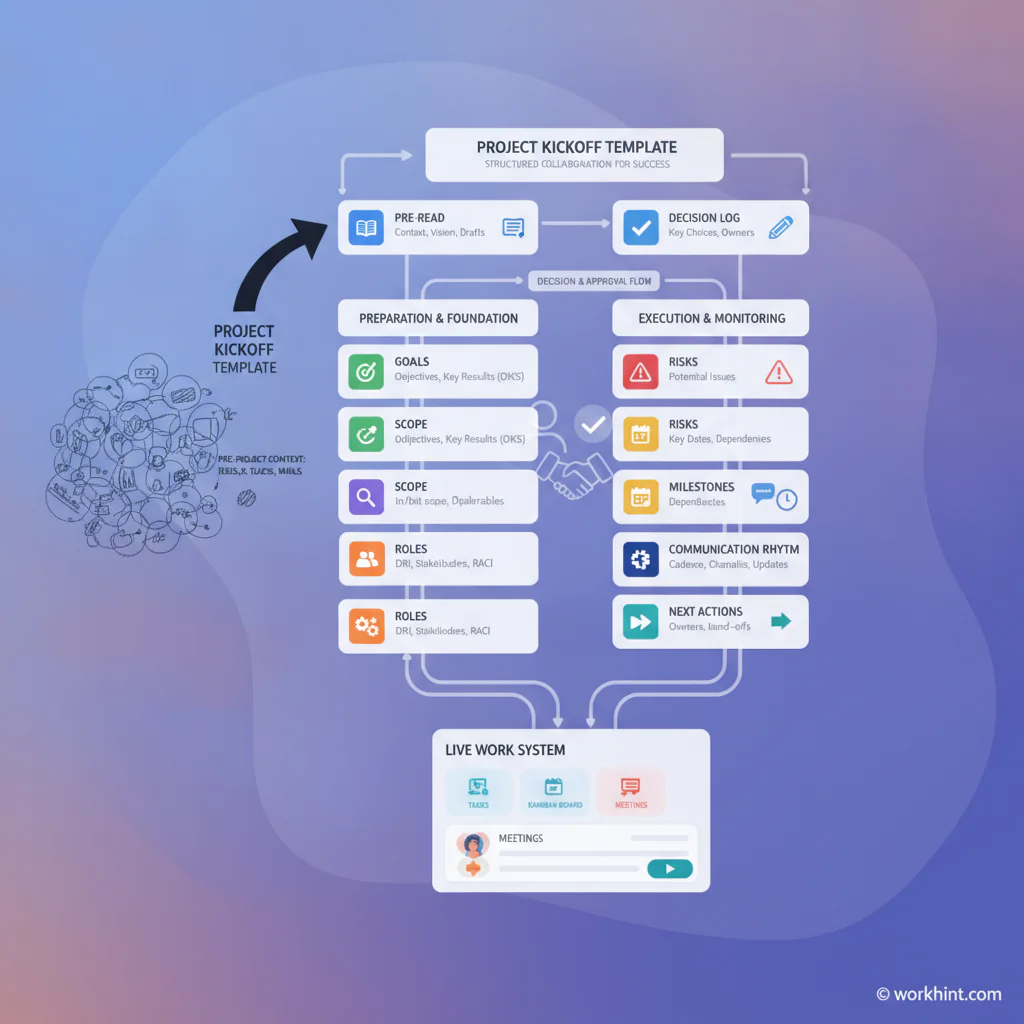
Project Kickoff Template
Copy this structure into a document, workspace, or project system and customize it for your team.
| Section | What to capture | Why it matters |
|---|---|---|
| Project summary | One paragraph on the problem, opportunity, sponsor, and expected business result. | Keeps the project tied to a real outcome instead of a task list. |
| Goals and success measures | Primary goal, secondary goals, measurable success criteria, and non-goals. | Prevents later debates about what “done” means. |
| Scope and exclusions | Deliverables, boundaries, assumptions, and what is explicitly out of scope. | Reduces scope drift and gives the team a reference for change requests. |
| Roles and decision rights | Sponsor, project owner, approver, contributors, reviewers, and consulted teams. | Makes accountability visible before work becomes urgent. |
| Milestones and dependencies | Key dates, handoffs, prerequisite work, external dependencies, and review windows. | Shows where delay risk is likely to appear. |
| Risks and open questions | Known risks, unresolved decisions, owner for each issue, and deadline for resolution. | Turns uncertainty into managed follow-up instead of background anxiety. |
| Communication plan | Status cadence, channels, escalation path, meeting rhythm, and reporting format. | Sets expectations before stakeholders start asking for updates in different places. |
| Next actions | Action item, owner, due date, dependency, and status. | Converts the kickoff into execution immediately. |
Sample 60-minute kickoff agenda
For most projects, a 60-minute kickoff is enough if the pre-read is strong. Share the project summary, known constraints, and draft scope at least one business day before the meeting.
- 5 minutes: Confirm purpose, outcome, and meeting rules.
- 10 minutes: Review the business reason, goals, and success measures.
- 10 minutes: Confirm scope, exclusions, deliverables, and constraints.
- 10 minutes: Assign roles, decision rights, reviewers, and approvers.
- 10 minutes: Review timeline, milestones, dependencies, and risks.
- 10 minutes: Agree communication rhythm, reporting format, and escalation path.
- 5 minutes: Confirm next actions, owners, due dates, and unresolved questions.
Example kickoff output
Imagine a company launching a new vendor onboarding workflow. The kickoff should not end with “everyone is aligned.” It should end with concrete outputs: operations owns workflow design, finance owns payment requirements, legal owns contract language, IT owns access rules, and the project owner tracks unresolved compliance questions by a specific date. The first milestone might be a draft process map, followed by approval routing, pilot vendor selection, and launch readiness review.
That level of output makes the kickoff operational. It also gives the team a clean way to see what changed after the meeting: decisions made, risks accepted, approvals pending, and work ready to start.
Common mistakes
- Starting with slides instead of decisions. Slides can help, but the meeting should produce agreements, not just awareness.
- Leaving scope vague. If exclusions are missing, stakeholders will fill the gap later with assumptions.
- Inviting everyone but assigning no authority. Attendance is not the same as decision rights.
- Skipping the follow-up system. Meeting notes without owners, deadlines, and status tracking create false confidence.
- Treating risks as pessimism. A good kickoff names risk early so the team can plan around it.
Where Workhint fits
Workhint helps teams turn a project kickoff template into a live work system. Instead of leaving the kickoff in a document, teams can map the project into roles, permissions, assignments, approval steps, document collection, milestone tracking, status updates, and reporting. That is especially useful when a project involves multiple departments, external vendors, contractors, clients, or approval-heavy workflows.
The template still does the thinking work: it clarifies goals, scope, owners, and risks. Workhint helps operationalize that structure so the team can manage the workflow after kickoff without relying on scattered notes, manual reminders, or disconnected spreadsheets.
FAQ
What is a project kickoff template?
A project kickoff template is a reusable structure for planning, running, and documenting the first major alignment meeting before a project begins. It usually covers goals, scope, roles, milestones, risks, communication rules, and next actions.
Who should own the kickoff template?
The project owner or project manager should own the template. Sponsors, approvers, and functional leads should contribute to the sections they control, especially scope, success measures, budget constraints, compliance needs, and approval paths.
Should a project kickoff happen before or after approval?
For most business projects, the kickoff should happen after the project has enough approval to proceed but before detailed execution begins. If the project charter or business case is still unclear, use a smaller pre-kickoff session to resolve sponsorship, goals, and constraints first.
How detailed should a kickoff agenda be?
Detailed enough to force decisions. A useful agenda names the discussion topic, time box, required decision, and owner. Avoid agendas that only list broad topics such as “scope” or “timeline” without saying what must be agreed.
What should happen after the kickoff meeting?
Send a concise recap, update the template with final decisions, assign every action item, document open questions, and move approved work into the team’s project system. The best follow-up happens within 24 hours while context is fresh.
Conclusion
A project kickoff template is valuable because it forces clarity before work accelerates. Use it to align the team on goals, scope, roles, risks, milestones, and communication rules. Then turn the output into assigned work. The meeting is the start; the operating system that follows is what keeps the project moving.
Leave a Reply