


AI workflows scale only when people review the moments where judgment, risk, and accountability actually matter.
A human-in-the-loop AI workflow is a work system where AI handles part of a process, but people review, approve, correct, or escalate specific decisions before work moves forward. The goal is to design the right review points so automation speeds up routine work while humans stay accountable for judgment-heavy or high-risk outcomes.
This matters because AI is increasingly being connected to real operations: contract review, customer support, invoice checks, compliance triage, project planning, and request routing. The NIST AI Risk Management Framework frames AI risk management as an organizational discipline, not just a model-quality problem. For operators, the workflow around the AI matters as much as the AI itself.
What’s in this article?
- What a human-in-the-loop AI workflow should control
- Where to place review gates
- A practical workflow design model
- A risk-tier table for deciding when humans review
- Common design mistakes
- FAQ
Why human review belongs in AI workflow design
Human review is often added too late. A team experiments with AI, sees promising results, then realizes the workflow has no owner, no audit trail, no exception path, and no clear rule for when AI output can be used. People either distrust the system and review everything manually, or trust it too much and let risky work move without control.
A better design starts by naming the operational risk. What happens if the AI is wrong? Does it create customer confusion, financial exposure, legal risk, data leakage, unfair treatment, brand damage, or extra rework? The review model should match that risk. Official Amazon Augmented AI documentation describes human review workflows for machine learning predictions, especially where reviewers need to step in for low-confidence or audited decisions. The same principle applies beyond ML classification: review the points where automation needs human judgment.
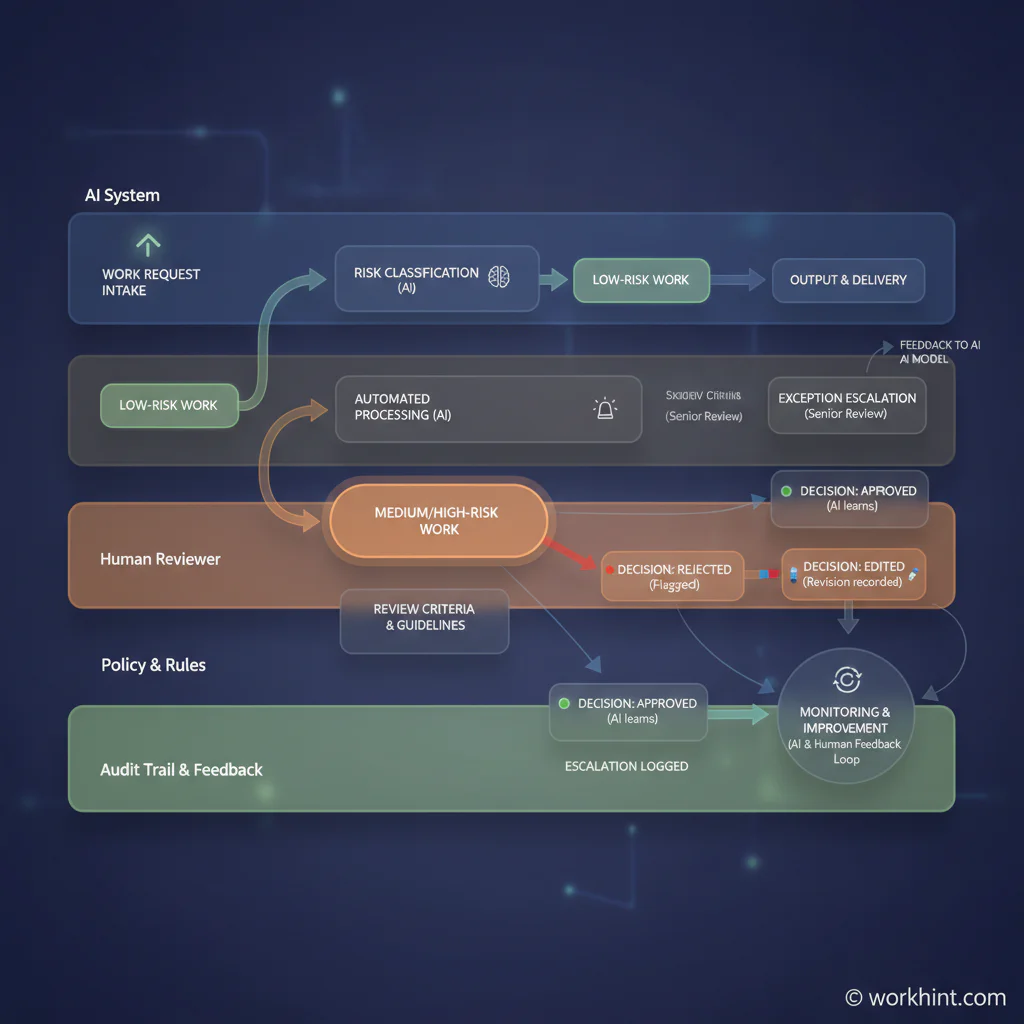
The human-in-the-loop AI workflow
A useful human-in-the-loop AI workflow has six parts:
- Request or trigger: The work enters the system through a form, event, document, message, or scheduled process.
- AI action: The AI drafts, classifies, summarizes, extracts, recommends, or prepares the next step.
- Risk check: The workflow checks confidence, dollar value, policy sensitivity, data type, customer impact, or exception conditions.
- Human review: The right person approves, rejects, edits, requests more context, or escalates.
- Decision record: The system stores the AI output, reviewer, decision, timestamp, reason, and final version.
- Execution and feedback: Approved work moves forward, rejected work stops or loops back, and review patterns improve the workflow.
Technical systems need to preserve state while waiting for people. Temporal’s human-in-the-loop AI agent example shows an AI workflow that pauses for approval when a proposed action is risky. If a review takes minutes, hours, or days, the workflow must remember what happened and resume cleanly.
Use risk tiers instead of reviewing everything
The fastest way to make human review fail is to route every AI output to a manager. Queues become overloaded, people rubber-stamp decisions, and the team learns nothing. Use risk tiers instead.
| Risk tier | Example work | Human review rule | Record required |
|---|---|---|---|
| Low | Drafting an internal summary, tagging a routine request, suggesting a checklist | No review unless confidence is low or the requester flags it | AI output and usage log |
| Medium | Customer-facing draft, vendor document summary, project recommendation | Named owner reviews before external use or decision | Reviewer, edits, decision, final version |
| High | Payment approval, compliance exception, hiring decision support, contract redline | Specialist or accountable approver must approve before action | Full audit trail, rationale, policy reference, escalation path |
| Blocked | Missing source data, conflicting policy, sensitive personal data, uncertain recommendation | Stop automation and route to an exception owner | Reason stopped, owner, resolution, follow-up action |
This table should be customized to your business. A marketing headline and a payroll exception do not deserve the same workflow. A small internal recommendation and a customer-impacting decision should not share the same approval rule.
How to build the workflow step by step
Start with one operating process, not a company-wide AI governance program. Pick a workflow where AI can reduce manual effort but mistakes would matter. Good starting points include support triage, proposal drafting, vendor document review, invoice exception checks, or operational reporting.
Next, map the work without AI. Identify the inputs, owners, decisions, handoffs, systems, and outputs. Then decide exactly where AI should help. AI might draft a response, extract fields, compare a request against policy, summarize a thread, or recommend a next step. Keep the AI role narrow enough that people can evaluate it.
Then define the review gate. A strong gate answers five questions: who reviews, what they see, what choices they have, when they must respond, and what happens if they do nothing. Review choices should usually be approve, reject, edit, request more context, or escalate. Avoid vague buttons like “looks good” if the decision has operational consequences.
Finally, define metrics. Track cycle time, review backlog, approval rate, rejection reasons, escalation volume, error rate, rework, and time saved. If reviewers approve everything without edits, adjust the threshold. If reviewers are overloaded, split the queue by risk, role, or decision type.
Common mistakes
The first mistake is treating human-in-the-loop as a safety slogan instead of a designed workflow. A checkbox that says “manager review required” is not enough. The system needs routing, context, decision options, deadlines, and records.
The second mistake is giving reviewers too little context. A reviewer should see the original request, source documents, AI output, confidence or risk signal, policy reference, prior similar decisions, and the downstream action that will happen after approval.
The third mistake is ignoring accountability. ISO’s overview of AI management systems points to governance, accountability, transparency, and data privacy as core management concerns. In workflow terms, every AI-assisted decision needs a human owner, a system owner, and a record of what changed.
Where Workhint fits
Workhint fits when a team wants the AI workflow to become an operating system, not a loose prompt sitting beside a spreadsheet. A Workhint system can connect the intake point, AI-assisted step, risk tier, reviewer role, permissions, approval path, escalation rule, decision record, and reporting view.
For example, a vendor document review workflow could collect the request, use AI to summarize contract terms, route high-risk clauses to legal, route payment terms to finance, ask for missing context, and keep the final decision connected to the vendor record. The AI speeds up preparation, but the operating system controls who decides, what is recorded, and when work can move forward.
FAQ
What is a human-in-the-loop AI workflow?
It is a workflow where AI performs part of the work and a person reviews, approves, edits, rejects, or escalates specific outputs before the workflow continues.
When should humans review AI output?
Humans should review AI output when the decision has material risk, low confidence, external impact, compliance sensitivity, financial consequences, personal data, or unclear source information.
Does human-in-the-loop mean every AI task needs approval?
No. Reviewing everything usually slows work and weakens attention. Better systems use thresholds, risk tiers, sampling, exception rules, and clear ownership.
Who should own a human-in-the-loop workflow?
The business process owner should own the workflow, with support from technical, legal, compliance, security, or operations teams depending on the risk involved.
What should be recorded in an AI review workflow?
Record the original input, AI output, reviewer, decision, edits, timestamp, rationale when needed, final version, escalation path, and downstream action.
Conclusion
A human-in-the-loop AI workflow is not about slowing AI down. It is about making AI useful inside real operations. The best design separates low-risk automation from judgment-heavy decisions, routes review to the right owner, records the decision, escalates exceptions, and measures whether the workflow is improving. When that system is clear, AI can move routine work faster while people stay responsible for the decisions that matter.
Leave a Reply