


A project intake process turns scattered requests into a clear queue, a decision path, and a measurable operating rhythm.
A project intake process is the system a team uses to collect, review, prioritize, and route new work before execution. It is especially useful when requests arrive through email, Slack, meetings, customer calls, spreadsheets, and side conversations, because those channels make demand look smaller and simpler than it really is.
The goal is not to slow people down. The goal is to create one front door for work, so the organization can decide what matters, who owns it, what is missing, and when work starts. As PMI describes it, intake acts as a bridge between stakeholders and delivery teams.
What’s in this article?
- What a project intake process should include
- How to design the workflow from request to decision
- What fields belong in an intake form
- How to prioritize, route, and measure requests
- Where automation and Workhint fit without removing human judgment
Why project intake process design matters
Most operational bottlenecks begin before work is accepted. A team says yes before it understands the request. A manager approves a project without checking capacity. A stakeholder sends a vague request to the person they know best instead of the person accountable for the workflow. A high-value request waits behind a loud but low-value one.
That is why intake is a work-system problem, not just a form problem. A form captures information. A work system decides what happens next. Asana’s guide to project intake frames the process around collecting, reviewing, prioritizing, and acting on new requests. Smartsheet’s guidance similarly emphasizes structure for submitting and reviewing requests. Work needs a controlled entry point before it becomes a commitment.
Project intake process: the operating model
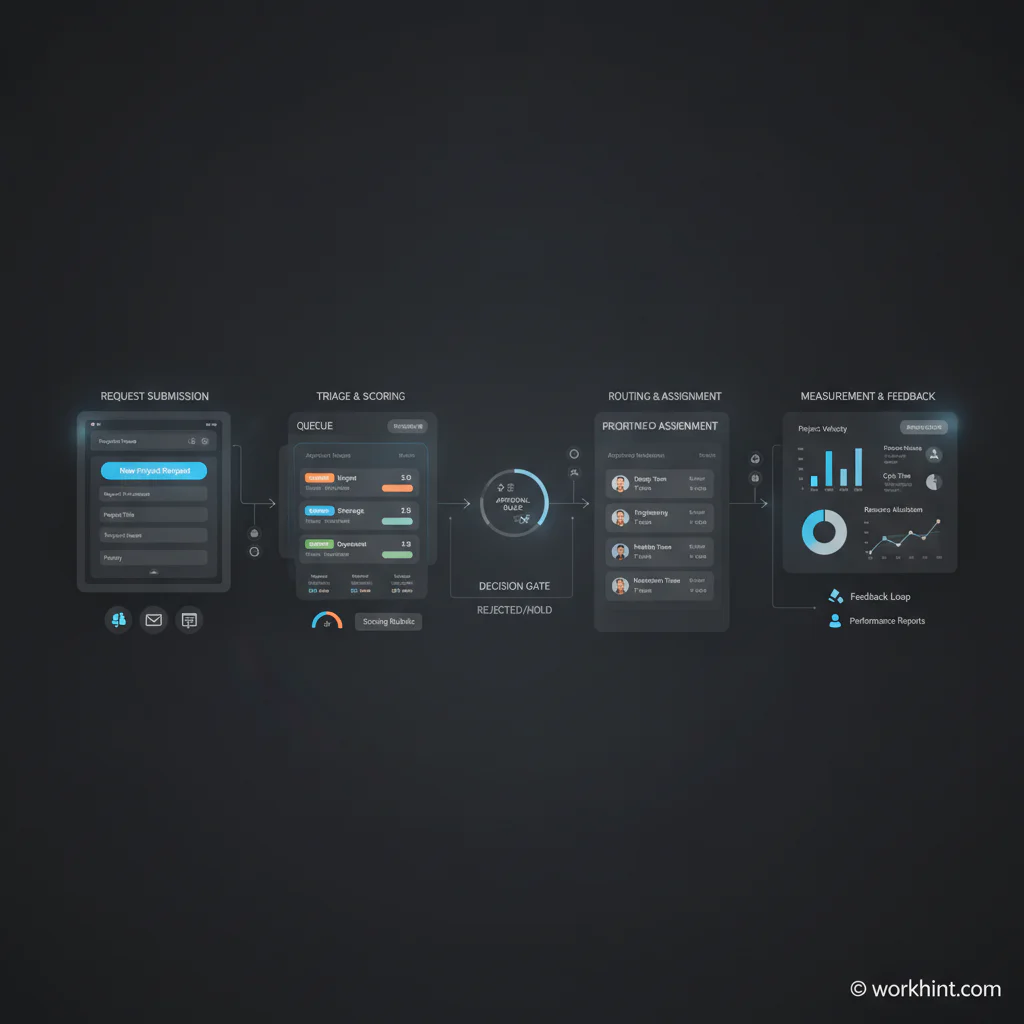
A useful intake process has six parts: a clear submission channel, standard fields, an owner who reviews completeness, criteria for priority and fit, routing rules, and visibility into status and performance.
| Stage | Purpose | Owner | Output |
|---|---|---|---|
| Submit | Capture the request in one place | Requester | Intake record |
| Triage | Check scope, urgency, missing details, and duplicate work | Intake owner | Ready for review or returned for clarification |
| Score | Compare value, effort, risk, timing, and strategic fit | Operations, PMO, or functional lead | Priority recommendation |
| Decide | Approve, reject, defer, or split the request | Decision owner | Decision with reason |
| Route | Assign the work to the right workflow, team, or backlog | Workflow owner | Execution path |
| Measure | Track volume, cycle time, approval delay, and rejected work | Operations lead | Intake dashboard |
How to build a project intake process
1. Define what belongs in intake
Do not send every small task through the same process. Define what requires formal intake: new projects, cross-functional requests, customer implementation work, vendor requests, system changes, campaign launches, hiring operations, internal tools, compliance-sensitive work, and anything requiring budget, approval, or multiple teams.
2. Create one front door
Choose one submission path: a form, portal, shared request queue, or internal workflow. The point is consistency. If requests keep arriving through private messages and side conversations, intake becomes optional and the queue becomes unreliable.
3. Ask for the minimum useful information
The best intake forms are short enough to complete and specific enough to support a decision. Include requester, business goal, deadline, affected team or customer, expected outcome, constraints, dependencies, budget impact, required approval, and urgency reason. Avoid asking for information nobody uses.
4. Separate triage from approval
Triage answers, “Do we understand this request?” Approval answers, “Should we do it now?” Keep those steps separate. A request with missing scope should not reach approval. A complete request should not sit in triage because nobody knows who can approve it.
5. Use scoring rules, not politics
A simple scoring model prevents the loudest request from becoming the highest priority. Score each request on impact, urgency, effort, risk, customer or revenue relevance, compliance exposure, and strategic alignment. The score should guide judgment, not replace it.
6. Route by decision, not by habit
Approved work should move into the right execution system with an owner, due date, next step, and status. Rejected or deferred work should still receive a reason. A clear “no” beats a silent backlog where requests disappear.
What to include in a project intake form
A practical project intake form should support the first decision, not solve the whole project plan. Use fields like these:
- Request title and short description
- Business problem or opportunity
- Expected outcome and success measure
- Requester, sponsor, and affected teams
- Deadline and reason for the deadline
- Customer, revenue, compliance, or operational impact
- Known dependencies, systems, vendors, or approvals
- Estimated effort or budget range, if known
- Priority suggestion with justification
- Attachments, examples, or supporting context
Quickbase describes project intake as gathering, evaluating, and prioritizing requests based on objectives and resources. That resource lens matters. Intake is where a team protects capacity before every request becomes urgent.
Metrics that show whether intake is working
Measure intake as its own workflow. Useful metrics include request volume by source, percentage returned for missing information, average triage time, average approval time, approval rate, rejection rate, deferred work by reason, intake-to-start cycle time, and capacity accepted versus capacity available.
These numbers reveal whether the process is helping. High clarification rates may mean the form is unclear. Long approval time may mean the wrong decision owner is assigned. High approval rates with overloaded teams may mean the process is not making tradeoffs.
Common project intake mistakes
- Turning intake into a form only. A form without routing, ownership, and status visibility does not create an operating system.
- Collecting too much information too early. Long forms cause people to bypass the process.
- Letting every department create its own queue. Local queues hide total demand and make capacity planning harder.
- Approving work without capacity checks. Intake should connect demand to available people, budget, and timing.
- Failing to close the loop. Requesters should know whether the request was approved, rejected, deferred, or sent back for clarification.
Where Workhint fits
Workhint fits when a team wants intake to become a live work system instead of another static form. A team can describe the operating challenge, then use Workhint to structure intake roles, request fields, permissions, triage steps, approval paths, assignments, notifications, dashboards, and reporting around the actual work.
That is useful for teams managing internal requests, customer implementations, vendor work, field operations, staffing requests, service delivery, or cross-functional programs. The value is not that AI writes a form. The value is that the process becomes connected to ownership, routing, status, escalation, and measurable execution.
FAQ
What is a project intake process?
A project intake process is a structured workflow for capturing, reviewing, prioritizing, deciding, and routing new work requests before they enter execution.
What is the difference between intake and project planning?
Intake decides whether the work should move forward and where it should go. Project planning defines the detailed scope, tasks, schedule, and resources after the request is accepted.
Who should own the intake process?
The owner depends on the type of work. PMO, operations, product operations, revenue operations, IT, HR, or a department lead can own intake. The key is that ownership is explicit.
How do you prioritize intake requests?
Use a scoring model that compares impact, urgency, effort, risk, customer or revenue relevance, strategic fit, and available capacity. Then let the accountable decision owner make the final call.
Can a project intake process be automated?
Yes. Automation can route requests, check required fields, notify approvers, update status, trigger escalations, and maintain dashboards. Human judgment should still handle tradeoffs and exceptions.
Conclusion
A project intake process gives work a front door. It helps teams see demand, compare priorities, protect capacity, and move approved work into the right execution path. The best version is not a heavier approval layer. It is an operating system that makes work easier to evaluate, route, and measure.
Leave a Reply