


Automated workflows only scale when the decisions inside them are explicit, governed, and easy to change.
A business rules engine helps teams automate repeatable workflow decisions without burying every rule inside custom code, spreadsheets, or private judgment. Used well, it becomes the decision layer of an operating system: requests come in, facts are checked, rules are evaluated, routine cases move forward, and exceptions are routed to the right person.
The point is not to remove humans from operations. The point is to stop asking humans to re-decide the same low-risk questions every day while still giving them control over edge cases, policy changes, and judgment-heavy work.
What’s in this article?
- What a business rules engine does inside a workflow
- Which decisions should and should not be automated
- A practical design table for turning operational policies into rules
- Common failure points that make rule-based automation hard to trust
- How Workhint fits when rules need to become live work systems
Why business rules engine design matters
Most broken workflows are not broken because the steps are unknown. They break because decision logic is scattered. One manager approves exceptions in email. Another keeps thresholds in a spreadsheet. A form asks for information that the reviewer does not actually need. A status changes, but the next team never gets the context behind the decision.
IBM describes business rules as guidance for everyday decision-making inside a business. The operational problem is that those rules often remain implicit. A business rules engine makes them explicit enough to evaluate consistently, update deliberately, and audit later.
This matters more as teams add automation and AI. Vague rules move vague decisions faster. Structured rules route routine work while preserving human review where risk, ambiguity, or customer impact is high.
Workflow engine vs business rules engine
A workflow engine coordinates the sequence of work: who receives a request, what happens next, when a task is due, and which status follows. A business rules engine evaluates decision logic: whether a request qualifies, which approval path applies, what priority level should be assigned, or whether the case needs human review. Kissflow’s comparison of workflow engines and business rule engines makes the same distinction: flow controls movement, while rules control decision criteria.
In practice, the two should work together. The workflow engine moves the case. The rules engine decides the route. A strong work system connects both, so the result is an assigned task, notification, deadline, record, and reportable outcome.
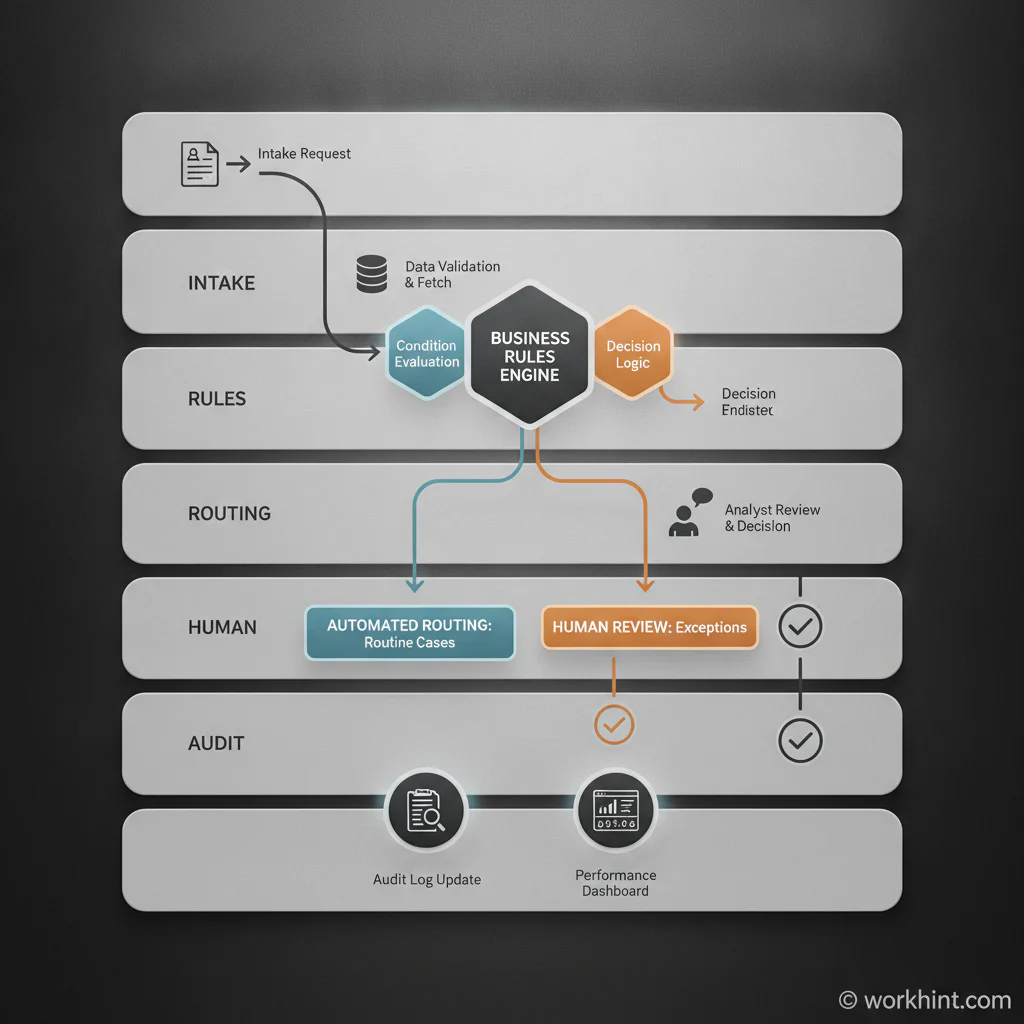
Business rules engine workflow design table
| Design question | What to define | Example |
|---|---|---|
| What decision repeats often? | The specific yes, no, route, priority, or eligibility decision | Does this request require finance approval? |
| Which facts are required? | The data fields the rule needs before it can run | Amount, vendor type, department, contract status |
| Who owns the rule? | The business owner who can approve changes | Finance operations owns spend thresholds |
| What happens on a match? | The workflow route, task, message, status, or escalation | Auto-route under $2,500; escalate above $2,500 |
| What happens on uncertainty? | The human review path for missing data or conflicting conditions | Send to operations review when vendor status is unknown |
| How is it audited? | The decision record, timestamp, inputs, version, and outcome | Log rule version and approver on every routed request |
How to build workflow decisions with business rules
Start with a decision inventory. List the points in a workflow where work branches, stalls, escalates, or waits for approval. Do not start with software. Start with the questions people repeatedly answer.
Next, separate deterministic decisions from judgment decisions. Deterministic decisions are good candidates for rules: spending thresholds, location-based routing, required document checks, eligibility criteria, SLA priority, assignment rules, duplicate detection, and status changes based on clear conditions. Judgment decisions should not be fully automated unless the risk is low and the fallback is clear.
Then define the input data. A rule cannot be reliable if the workflow does not collect the facts it needs. If the rule asks whether a contractor has an active agreement, the system needs current agreement status. Bad input data creates false certainty.
After that, write rules in plain language before translating them into system logic. For example: “If the request is over $10,000 or involves a new vendor, route to finance approval. If the vendor is already approved and the amount is under $10,000, route to department approval.” Plain language lets the business owner, operator, and technical builder confirm they mean the same thing.
Finally, design exceptions before launch. Every rule needs an escape hatch: missing data, conflicting data, urgent override, rejected request, policy exception, and manual review. The best rule systems do not pretend exceptions disappear. They make exceptions visible and assignable.
Use standards without overcomplicating the system
For more formal environments, Decision Model and Notation from the Object Management Group provides a standard way to specify business decisions and business rules. Not every operations team needs a full DMN implementation, but the discipline is useful: define the decision, required input data, source rules, owner, and outcome before automating.
If AI is involved in evaluating or recommending decisions, governance matters even more. The NIST AI Risk Management Framework is a useful reference for thinking about risk, governance, measurement, and monitoring. For ordinary business workflows, the practical takeaway is simple: know where automation is used, who owns it, how it is tested, and when a human must review it.
Common mistakes
- Automating undocumented judgment: If two managers make the same decision differently, the rule is not ready yet.
- Using too many exceptions: A rule with constant overrides is usually a policy problem, not an automation problem.
- Skipping rule ownership: Someone must own threshold changes, policy updates, and review cadence.
- Ignoring downstream work: A decision should trigger the next task, record, notification, and reporting update.
- Failing to log decisions: Without history, teams cannot explain why work was routed, approved, rejected, or escalated.
Where Workhint fits
Workhint fits when a team needs business rules to become a working operating system, not just a decision table. A rule may decide that a request needs legal review, but the system still needs to create the legal task, assign the right reviewer, show the request context, track the deadline, notify the requester, capture the decision, and update the dashboard.
In Workhint, teams can describe the operational challenge and design the work system around it: intake fields, roles, permissions, decision points, approvals, escalations, documents, assignments, and reporting. That makes the business rules part of the workflow instead of a separate spreadsheet that people forget to check.
FAQ
What is a business rules engine in workflow automation?
A business rules engine evaluates defined conditions inside a workflow and returns a decision, route, priority, or required action. The workflow then uses that result to move the work forward.
When should a decision be automated with rules?
Automate decisions that are frequent, low to moderate risk, based on clear data, and governed by stable policy. Keep human review for ambiguous, high-impact, or relationship-sensitive decisions.
Do small teams need a business rules engine?
Not always as standalone software. Small teams still need rule discipline: clear thresholds, owners, exception paths, and decision logs. A rules engine becomes more useful as volume, variation, or compliance needs increase.
How often should business rules be reviewed?
Review high-impact rules monthly or quarterly, and review any rule immediately after repeated exceptions, policy changes, customer complaints, audit findings, or operational bottlenecks.
Conclusion
A business rules engine is most useful when it is treated as part of a broader work system. The goal is not automation for its own sake. The goal is repeatable decision-making: clear inputs, explicit rules, assigned owners, visible exceptions, and a record of what happened. When those pieces are in place, workflow decisions become faster, easier to measure, and much easier to improve.
Leave a Reply