


A swimlane diagram turns messy cross-functional work into a visible system of owners, handoffs, decisions, and delays.
A swimlane diagram is one of the simplest ways to see how work actually moves through a business process. Instead of listing steps in one long sequence, it separates the workflow into lanes for each role, team, department, customer group, vendor, or system involved. That makes hidden execution problems easier to spot: who owns each step, where work waits, where information crosses teams, and where accountability is unclear.
The point is not to create a prettier flowchart. A good swimlane diagram helps an operations team decide what needs to be standardized, automated, escalated, measured, or redesigned. It is especially useful when a process touches multiple teams, such as onboarding, vendor approvals, incident response, project intake, procurement, or finance reviews.
What’s in this article?
- What a swimlane diagram shows that a basic process map misses
- When to use one for business operations
- How to build a practical swimlane diagram step by step
- A simple example for a cross-functional request workflow
- How to turn the diagram into a measurable work system
What is a swimlane diagram?
A swimlane diagram is a process map organized by responsibility. Each lane represents an actor in the process, and each step is placed in the lane of the person, team, department, or system responsible for doing it. The Minnesota Department of Health describes a swim lane map as a way to show time, people or job functions, and tasks in one view.
In business process modeling, swimlanes also connect to BPMN concepts. The Object Management Group’s BPMN introduction explains that pools and lanes are used to organize participants and activities in a process model. IBM’s BPMN overview similarly notes that lanes show activities and flow for a role or participant, which is the core accountability value of the format.
Why a swimlane diagram matters for work systems
Most broken workflows are not broken because the team forgot a step. They break because the system around the work is unclear. A request enters through the wrong channel. A manager approves late. A handoff lacks context. A customer waits while three internal teams assume someone else is moving the work forward.
A swimlane diagram forces those assumptions into the open. It shows where responsibility changes hands, where work loops backward, where a decision gate is needed, and where automation can remove manual routing. The NHS Wales Improvement Cymru toolkit frames swimlane diagrams as displaying roles and responsibilities within a process.
When to use a swimlane diagram
Use a swimlane diagram when the workflow depends on more than one actor and the main risk is coordination. A single-team checklist may not need lanes. A process involving sales, operations, finance, legal, customers, vendors, or automated systems usually does.
| Use case | Why swimlanes help | System output |
|---|---|---|
| Internal request management | Shows who submits, triages, approves, fulfills, and closes each request | Routing rules, SLAs, request statuses |
| Customer onboarding | Separates customer actions from sales, implementation, support, and billing tasks | Ownership model, handoff checklist, dashboard |
| Vendor approval | Clarifies legal, finance, security, and business-owner reviews | Approval thresholds, document requirements, audit trail |
| Incident response | Shows escalation paths and time-sensitive handoffs | Escalation rules, severity levels, reporting |
How to create a swimlane diagram
Start with the process, not the tool. The best swimlane diagrams come from interviewing the people who touch the work, reviewing recent examples, and mapping the current process before designing the ideal one.
- Define the process boundary. Name the trigger that starts the process and the outcome that ends it. Avoid mapping an entire department. Map one workflow, such as “new vendor request to approved vendor record.”
- Choose the lanes. Use roles or functions, not individual names, unless the process truly depends on one person. Common lanes include requester, manager, operations, finance, legal, customer, vendor, and system.
- Map the current steps. Place each activity in the lane of the owner. Use plain verbs: submit request, review budget, request missing documents, approve, notify vendor, update record.
- Add decisions and handoffs. Mark where a decision changes the path, where work moves to another lane, and what information must move with it.
- Mark waiting time and rework. Note where work usually stalls, returns for clarification, or repeats because input quality is poor.
- Convert findings into rules. Decide which steps need automation, service levels, required fields, approval thresholds, escalation paths, or reporting.
Swimlane diagram example for a team request workflow
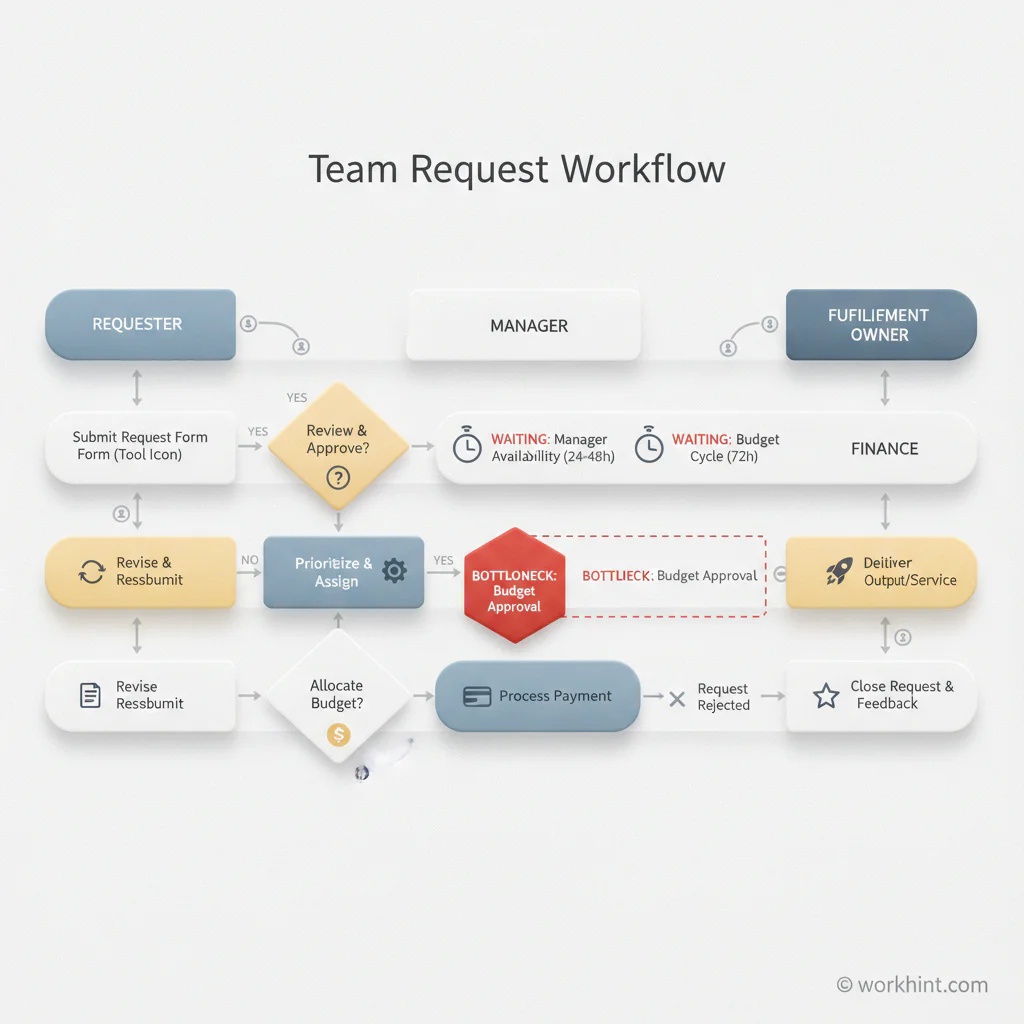
Imagine an internal request workflow for operations support. Employees submit requests through email, Slack, or a form. Some requests need manager approval. Some require finance review. Operations fulfills the approved work and updates the requester.
A useful swimlane diagram might include five lanes: requester, manager, operations triage, finance, and fulfillment owner. It should show the intake point, triage decision, approval criteria, finance review threshold, assignment step, fulfillment work, requester update, and closure. The highest-value insight is often the moment where ownership changes and the system needs to carry context forward.
What to look for in the finished diagram
Once the swimlane diagram is mapped, review it like an operator, not a designer. You are looking for execution risk.
- Unowned steps: Any box that sits between lanes or says “team” without a real owner will create delay.
- Too many approvals: Each approval should have a clear risk reason.
- Manual routing: If someone has to read every request and decide where it goes, the workflow needs better intake fields or rules.
- Missing exception paths: Every process needs a path for rejected, incomplete, and blocked work.
- No measurement points: If the process has no timestamps, owners, statuses, or completion criteria, it cannot be managed reliably.
Turning a swimlane diagram into an operating system
A swimlane diagram is only the beginning. The real value comes when the map becomes a working system. For each lane, define the role, permissions, inputs, decisions, automations, reminders, and metrics needed to make the process repeatable.
For example, the “manager” lane may become an approval role with a two-business-day SLA. The “finance” lane may become a conditional review triggered only when budget crosses a threshold. The “operations triage” lane may become an intake queue with required fields, priority rules, and automatic assignment.
Where Workhint fits
Workhint fits after the swimlane diagram has exposed how the work should run. Instead of leaving the map in a slide, teams can use Workhint to turn the process into a live work system: intake forms, roles, permissions, assignments, approval rules, escalations, dashboards, and reporting. The diagram clarifies the design. Workhint helps operationalize it across real people, systems, and exceptions.
FAQ
What is the difference between a swimlane diagram and a flowchart?
A flowchart shows the sequence of steps. A swimlane diagram adds ownership by placing each step in the lane of the responsible role, team, department, customer, vendor, or system.
How many lanes should a swimlane diagram have?
Use enough lanes to clarify responsibility, but not so many that the diagram becomes unreadable. For most business workflows, four to eight lanes is a practical range.
Should lanes represent people, teams, or systems?
Use the level that matches the operating decision. If the process needs role clarity, use roles. If it needs department handoffs, use teams. If automation owns a step, give the system its own lane.
Can a swimlane diagram be used for automation?
Yes. It is a strong starting point for automation because it identifies triggers, owners, decisions, handoffs, and exceptions. The key is to automate rules only after the current workflow and responsibility model are clear.
Conclusion
A swimlane diagram makes accountability visible. It shows who does what, where work changes hands, and where the process slows. Used well, it becomes documentation. It becomes the design layer for a scalable work system with clear roles, routing, approvals, escalation paths, and measurable execution.
Leave a Reply