


Every workflow needs a plan for the moment the normal path stops being normal.
Workflow exception handling is the operating discipline for managing the cases that do not follow the expected process. A vendor request is missing a required document. A customer onboarding task stalls. A purchase request crosses an approval threshold. An integration fails after a task is marked complete. None of these should require improvisation every time they happen.
The goal is not to eliminate every exception. Real work has judgment calls, missing information, edge cases, and external delays. The goal is to design a system that detects exceptions early, routes them to the right owner, records the decision, and improves the underlying process over time.
What’s in this article?
- What counts as a process exception
- Why exception handling matters in business workflows
- A practical model for triage, routing, recovery, and learning
- Common mistakes that create escalation noise
- How Workhint fits when exception paths need to become live operating systems
Why workflow exception handling matters
Most teams design the happy path first. That is useful, but incomplete. The happy path explains what should happen when the request is complete, the policy is clear, the approver responds, the system works, and the customer follows the expected route. Operations break down when the process has no designed response for the cases outside that path.
Process modeling standards recognize this reality. The BPMN 2.0 specification includes concepts for events, errors, escalations, and compensation because real processes need visible ways to handle alternate paths. Camunda’s documentation also distinguishes business errors from technical errors, which is a useful distinction for non-technical operations teams too.
For operators, the practical question is simple: when the workflow cannot proceed normally, what happens next?
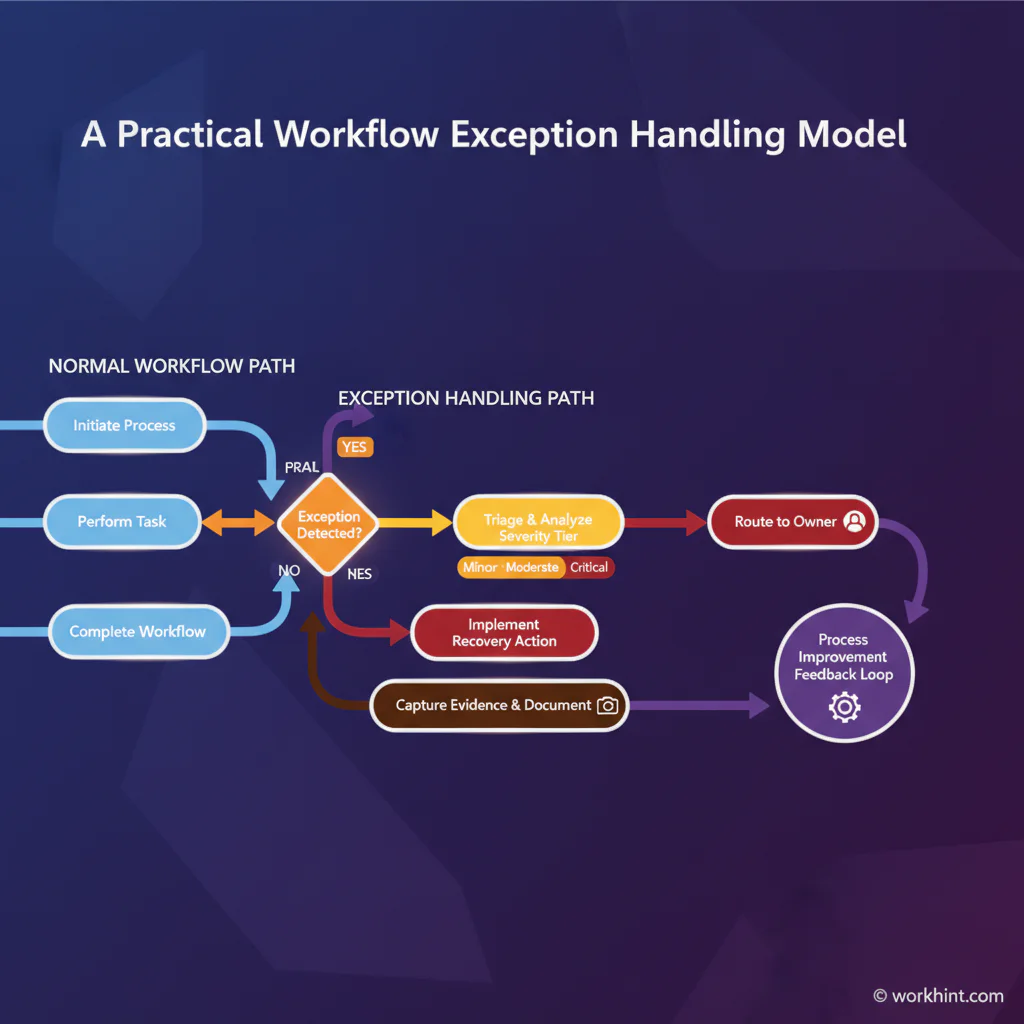
A practical workflow exception handling model
Use this model for approval workflows, service delivery systems, internal request management, onboarding, procurement, compliance reviews, field operations, customer operations, or any process where delays and edge cases create downstream risk.
- Define the normal path. Document the expected inputs, steps, owners, systems, decision criteria, and outputs.
- Name the likely exceptions. List missing information, overdue tasks, policy exceptions, failed integrations, unavailable resources, duplicate requests, rejected approvals, and external blockers.
- Classify by type and severity. Separate simple process delays from policy exceptions, compliance risks, customer-impacting blockers, and technical failures.
- Route to the lowest capable owner. Do not send every exception to leadership. Route each type to the person or role that can actually resolve it.
- Set a recovery action. Decide whether the workflow should pause, return for rework, notify a backup owner, request missing data, escalate, compensate, or continue through an alternate path.
- Capture the record. Store the exception reason, owner, timestamps, decision, evidence, and final resolution.
- Review patterns. Use exception data to fix forms, policies, training, integrations, staffing, or approval thresholds.
Exception types and response paths
| Exception type | Example | Best response | Metric to watch |
|---|---|---|---|
| Missing information | A request lacks budget code or supporting file | Return to requester with required fields and due date | Incomplete submission rate |
| Delayed action | An approver misses the review SLA | Reminder, backup owner, then escalation if unresolved | Time waiting for owner |
| Policy exception | Spend exceeds standard authority | Route to exception reviewer with business justification | Exception approval rate |
| Technical failure | Integration fails to update the next system | Retry, alert workflow admin, preserve audit record | Failed automation rate |
| Customer or delivery risk | A service handoff misses a deadline | Notify accountable owner and trigger recovery plan | SLA breach rate |
How to design exception tiers
Good exception handling uses tiers. A tier prevents small delays from becoming executive escalations while still making serious issues visible quickly.
Tier 1: Routine process recovery
These are high-volume, low-risk exceptions: missing fields, overdue routine tasks, duplicate submissions, or simple clarification requests. The workflow should usually return the item, notify the current owner, or assign a backup. Leadership should not be involved unless the exception ages past a defined threshold.
Tier 2: Judgment required
These exceptions need a person with authority or expertise: unusual pricing, a nonstandard contract term, a vendor risk flag, a schedule exception, or a customer-specific delivery change. Route to a named exception reviewer, not a generic inbox.
Tier 3: Material risk
These exceptions involve compliance exposure, financial impact, customer disruption, safety risk, or executive-level tradeoffs. They should be rare. If too many exceptions land here, the system is probably missing a clearer tier 1 or tier 2 path.
Measure exception handling like an operating system
Exception data is process intelligence. IBM’s process mining documentation points to conformance checks, process deviations, delays, and inefficiencies as areas where process data can reveal what is really happening. Even without formal process mining software, teams can track the same logic in a practical dashboard.
Start with five metrics: exception volume by type, average time to resolution, percentage resolved by the first owner, escalation rate, and repeat exception rate. The repeat exception rate is often the most useful. If the same exception appears every week, the process design is asking people to work around a known flaw.
Borrow a lesson from incident response. NIST’s incident response guidance emphasizes preparation, detection, response, recovery, and improvement. A business process exception is not always a security incident, but the operating principle is similar: prepare before disruption, respond based on severity, recover cleanly, and use lessons learned to improve the system.
Common mistakes
- Escalating everything. Too many escalations teach people to ignore alerts.
- Skipping ownership. An exception without a named owner becomes a shared delay.
- Confusing rejection with exception handling. A rejection is a decision; an exception is a path that needs resolution.
- Leaving exceptions outside the workflow. Side-channel fixes in chat or email destroy visibility.
- Failing to update the base process. Repeated exceptions should change intake fields, rules, training, permissions, or automation.
Where Workhint fits
Workhint helps teams turn exception handling from a document into a live work system. A team can describe the process, the normal path, the exception types, the roles involved, the decision rules, and the recovery actions. Workhint can then help structure the intake, permissions, assignments, approvals, escalations, dashboards, documents, and automation needed to run that system. For repeatable exception handling, workflow automation software can route the exception, assign the owner, trigger escalations, and record the final resolution.
That matters because exception handling is cross-functional by nature. A single exception may touch operations, finance, legal, customer success, compliance, and external contributors. Workhint is useful when the process needs more than a checklist: it needs role-based routing, accountable owners, status visibility, records, and a measurable improvement loop.
FAQ
What is workflow exception handling?
Workflow exception handling is the system for detecting, routing, resolving, and recording cases that do not follow the expected process path.
What is the difference between an exception and an escalation?
An exception is the deviation from the normal process. An escalation is one possible response when the current owner cannot resolve the exception within the required authority or timeframe.
Should every exception stop the workflow?
No. Some exceptions should pause the workflow, but others can continue through an alternate path, trigger a notification, request missing information, or assign a backup owner.
Who should own workflow exceptions?
Each exception type should have a named role owner. Routine exceptions should stay close to the work, while high-risk exceptions should route to people with the right decision authority.
Conclusion
Workflow exception handling keeps work moving when the normal path breaks. The best systems do not treat every exception as a crisis. They classify the problem, route it to the right owner, capture the decision, recover the process, and use the pattern to make the next version of the workflow stronger.
Leave a Reply