


Use this form to grant the right access, prove approval, and avoid permission sprawl before it starts.
An IT access request form template gives employees, contractors, vendors, and managers one controlled way to ask for system access. The goal is not paperwork. The goal is to capture enough detail to approve the request, provision the right permission level, review it later, and remove access when the business need ends.
This resource is not a substitute for your security policy or legal advice. Use it as an operating baseline, then adapt it with IT, security, HR, legal, and finance where needed.
What’s included
- A copy-ready IT access request form template.
- A field guide explaining what each section should capture.
- An approval workflow for employee, contractor, vendor, and temporary access.
- A review table for low, medium, and high-risk systems.
- Common mistakes that create access risk and rework.
How to use this resource
Use this template whenever a person needs new access, changed access, renewed access, emergency access, or temporary project access. It works for software applications, shared drives, admin consoles, customer data tools, finance systems, code repositories, analytics dashboards, physical badge systems, and role-based workspace access.
Do not let the form become a simple “please give access” ticket. A good request should name the requester, business reason, system, permission level, approver, duration, and provisioning evidence. Security frameworks emphasize account management and least privilege because access should match assigned work, not convenience. NIST’s controls for account management and least privilege are useful references.
IT access request form template
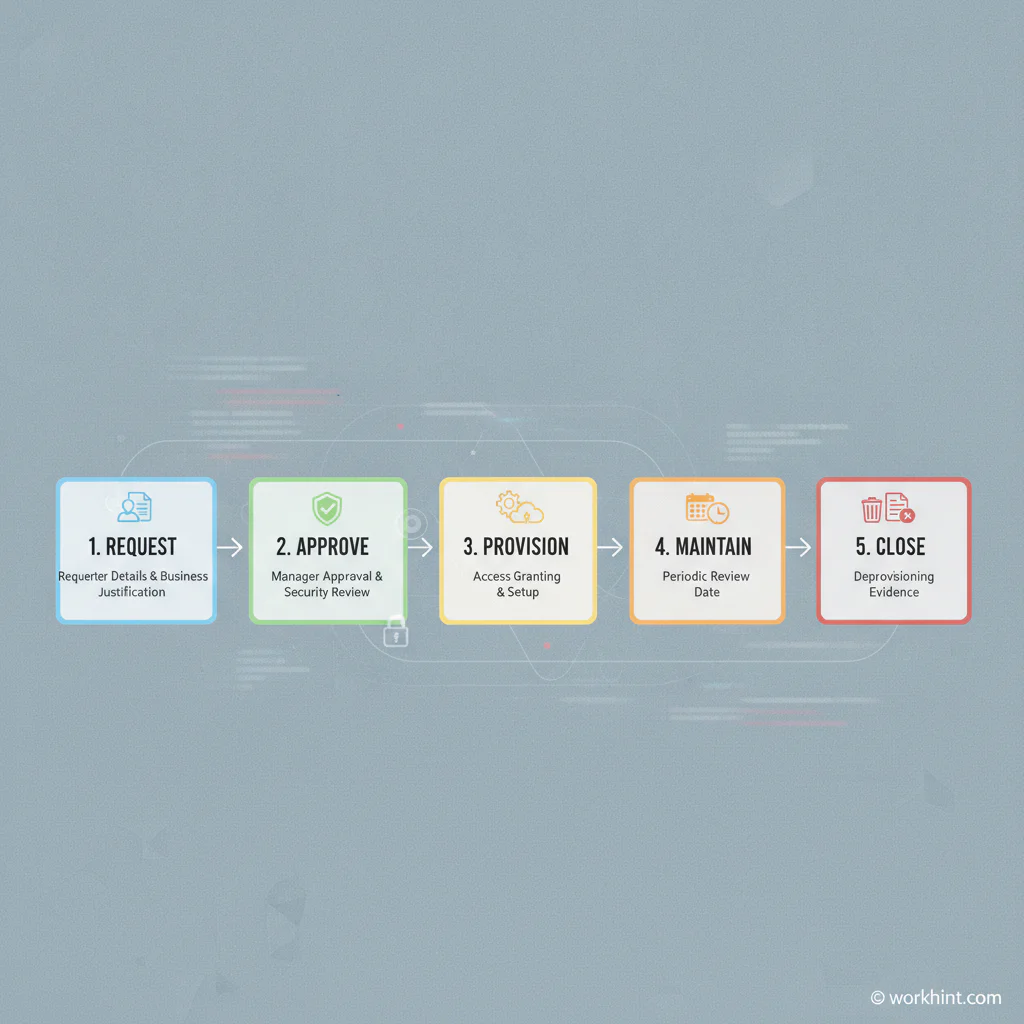
Copy this structure into your ticketing system, HR workflow, internal portal, spreadsheet, or Workhint process.
| Section | Fields to include | Why it matters |
|---|---|---|
| Requester details | Name, email, department, role, employment type, manager, location | Identifies who needs access and who owns the request. |
| Access recipient | Same as requester or another person, start date, end date, worker type | Separates the person submitting the request from the person receiving access. |
| System requested | Application, workspace, database, shared folder, facility, environment | Prevents vague requests that IT cannot safely fulfill. |
| Permission level | Read-only, editor, approver, admin, finance, customer data, production access | Supports least privilege instead of defaulting to broad access. |
| Business justification | Project, workflow, client, job duty, ticket, SOW, or approval reason | Shows why access is needed and how it connects to work. |
| Data sensitivity | Public, internal, confidential, customer data, financial data, regulated data | Routes higher-risk requests to security, legal, or data owners. |
| Duration | Permanent, temporary, project-based, emergency, review date, expiration date | Reduces stale accounts and forgotten project access. |
| Approvals | Manager, system owner, data owner, security, finance, HR, client owner | Creates a defensible approval trail before provisioning. |
| Provisioning evidence | Provisioned by, date, permission granted, ticket link, verification notes | Confirms what was actually granted, not just what was requested. |
| Removal trigger | End date, offboarding event, project completion, role change, vendor exit | Connects access approval to future deprovisioning. |
Approval workflow
- Requester submits the form. The request names the system, permission level, business reason, and duration.
- Manager confirms need. The manager verifies that the person actually needs the access for current work.
- System owner reviews scope. The owner confirms the right role, group, license, or permission level.
- Security reviews sensitive access. Route admin access, production access, customer data, financial data, and regulated data through security or compliance review.
- IT provisions access. IT grants only the approved permission, records the evidence, and notifies the requester.
- Access is reviewed or removed. Temporary access expires automatically, and ongoing access is reviewed on a defined cadence.
The CIS Critical Security Controls separate account management from access control management, which is a helpful operating distinction. One workflow creates or manages the account; the other governs what that account can reach.
Approval matrix
| Access type | Required approvers | Review cadence |
|---|---|---|
| Standard employee app access | Manager and system owner | Every 6 to 12 months |
| Contractor or vendor access | Business owner, system owner, IT | At project end or every 90 days |
| Customer, finance, or HR data | Manager, data owner, security | Every 90 to 180 days |
| Admin or production access | Manager, system owner, security lead | Every 30 to 90 days |
| Emergency access | Incident owner now, retrospective approval after | Remove immediately after incident |
Security checks to include
The access request workflow should support least privilege, per-request decisions, and clean audit records. CISA’s Zero Trust Maturity Model describes least-privilege, per-request access decisions as part of reducing uncertainty. OWASP’s Authorization Cheat Sheet also recommends least privilege, deny-by-default thinking, and logging authorization events.
- Require a named business justification, not “needed for work.”
- Use predefined roles where possible instead of custom permissions.
- Ask whether read-only access is enough before granting edit or admin rights.
- Set expiration dates for contractors, vendors, projects, and emergencies.
- Log the approval, provisioning action, permission level, and removal event.
- Connect offboarding and role-change workflows to access removal.
Example application
A customer operations manager requests CRM access for a new implementation contractor. The form names the contractor, project, client account, start date, end date, workspace, and requested read-only permission. The manager approves the need. The CRM owner confirms that read-only access is enough. IT provisions the role, records the ticket, and sets the access to expire at project close.
The form does not slow work down. It removes ambiguity before IT has to guess.
Common mistakes
- Granting access from chat messages. Chat is useful for discussion, but approval evidence should live in a system of record.
- Skipping the system owner. Managers know business need, but system owners know the right role and permission level.
- Using permanent access by default. Project, contractor, vendor, and emergency access should usually have an end date.
- Approving admin access casually. Privileged access should require stronger justification, tighter review, and faster removal.
- Forgetting role changes. When someone changes roles, old access should be reviewed rather than simply adding new access.
- Not recording what was granted. The final permission may differ from the request; record the actual result.
Where Workhint fits
Workhint helps organizations turn an IT access request form template into a live workflow. Instead of collecting requests in email, chat, spreadsheets, and help desk notes, a team can define the requester form, approval rules, system owner routing, security review, provisioning tasks, review dates, and deprovisioning steps in one connected work system.
That matters when access touches multiple teams. HR may trigger access during onboarding, operations may request vendor access, finance may approve billing-system permissions, and IT may provision the final role. Workhint keeps each owner focused on the step they control while preserving the full access record.
FAQ
What should an IT access request form include?
An IT access request form should include requester details, recipient details, system requested, permission level, business justification, data sensitivity, duration, required approvals, provisioning evidence, and a removal or review trigger.
Who should approve IT access requests?
Most requests should be approved by the requester’s manager and the system owner. Sensitive data, admin rights, production access, financial systems, and regulated data should also involve security, compliance, finance, legal, or the relevant data owner.
Should contractors use the same access request form?
Yes, but contractor requests should usually require a business owner, project or SOW reference, end date, access scope, and offboarding trigger. Temporary external access should not be treated like standard employee access.
How often should access be reviewed?
Standard access may be reviewed every 6 to 12 months, while contractor, vendor, sensitive-data, admin, and production access should be reviewed more frequently. High-risk or emergency access should expire quickly.
Conclusion
An IT access request form template is valuable because it turns permission changes into a controlled business process. The strongest version captures why access is needed, who approved it, what was granted, when it should be reviewed, and how it will be removed. Start with the template above, adapt it to your systems, and make access visible before it becomes risk.
Leave a Reply