


A contractor rate card only works when rates, scope, approvals, and payment rules stay connected.
A contractor rate card template gives business teams a standard way to define what external work costs before managers request help, contractors start work, or finance receives an invoice. It is not just a price list. A useful rate card connects labor category, work type, location, seniority, rate basis, approval rules, contract terms, and invoice controls.
Without a shared template, one team approves hourly work in email, another negotiates project fees in a spreadsheet, and finance discovers exceptions only after the invoice arrives.
What’s in this article?
- What a contractor rate card should include.
- A practical template business teams can adapt.
- A workflow for approving, using, and updating contractor rates.
- Common rate-card mistakes that create scope, budget, and compliance problems.
- Where Workhint fits when rate cards need to become live workflows.
Why contractor rate cards matter
Contractor rates affect more than budget. They shape which work is approved, which providers are used, how invoices are reviewed, and whether the business can compare external capacity across teams.
Enterprise systems often treat rate cards as part of contract administration. ServiceNow’s contract management documentation describes contract rate cards as records attached to contracts. The operating lesson is simple: the rate card should live near the agreement, scope, expense rules, and approval path.
Contractor rate card template
Use this structure as a starting point. Add columns only when they change decisions. If the table becomes too detailed, managers will stop using it.
| Field | What to capture | Why it matters |
|---|---|---|
| Work category | Design, development, field service, consulting, content, operations, support, or other category. | Lets teams compare similar work instead of comparing every contractor individually. |
| Role or service level | Junior, specialist, senior, lead, agency team, subcontractor crew, or named service package. | Prevents senior rates from being used for routine work without review. |
| Rate basis | Hourly, daily, weekly, milestone, project, retainer, per shift, per task, or per deliverable. | Shows finance how the invoice should be checked. |
| Approved rate range | Minimum, target, maximum, currency, and effective dates. | Gives managers room to negotiate without losing spend control. |
| Scope included | What is covered by the rate and what is excluded. | Reduces scope creep and invoice disputes. |
| Approval threshold | Who approves standard rates, exceptions, rush work, overtime, travel, or pass-through expenses. | Keeps expensive exceptions visible before work starts. |
| Contract reference | MSA, SOW, purchase order, vendor agreement, or contractor agreement. | Connects the price to the legal and operational terms. |
| Invoice rule | Required evidence, timesheet, milestone acceptance, project code, tax record, and invoice cadence. | Makes payment review faster and less subjective. |
How to build the contractor rate card
- Start with common work types. List recurring contractor work from the last quarter: projects, support tasks, field visits, consulting hours, creative deliverables, and agency services.
- Group work into practical categories. Avoid creating a separate rate row for every person. Group by work type, skill level, location, or service package.
- Choose the right rate basis. Hourly rates fit variable support. Milestones fit defined deliverables. Retainers fit reserved capacity. Per-task rates fit repeatable work with clear completion rules.
- Set ranges, not only one number. Use a target range with an exception path because availability, location, urgency, and specialization can change.
- Attach approval rules. Define who can approve standard rates, who can approve exceptions, and when finance, procurement, legal, or operations needs to review.
- Connect rates to contracts and invoices. The rate card should reference the agreement, SOW, purchase order, tax documentation, accepted-work evidence, and payment terms.
- Review rates on a schedule. Update the card quarterly, after major vendor negotiations, when market rates move, or when invoice exceptions repeat.
For wage benchmarking, the U.S. Bureau of Labor Statistics Occupational Employment and Wage Statistics can provide directional labor-market context. It does not tell you what every contractor should charge, but it gives finance and operations a better starting point than guesswork. Contractor rates may also include business overhead, taxes, equipment, insurance, availability risk, and specialization.
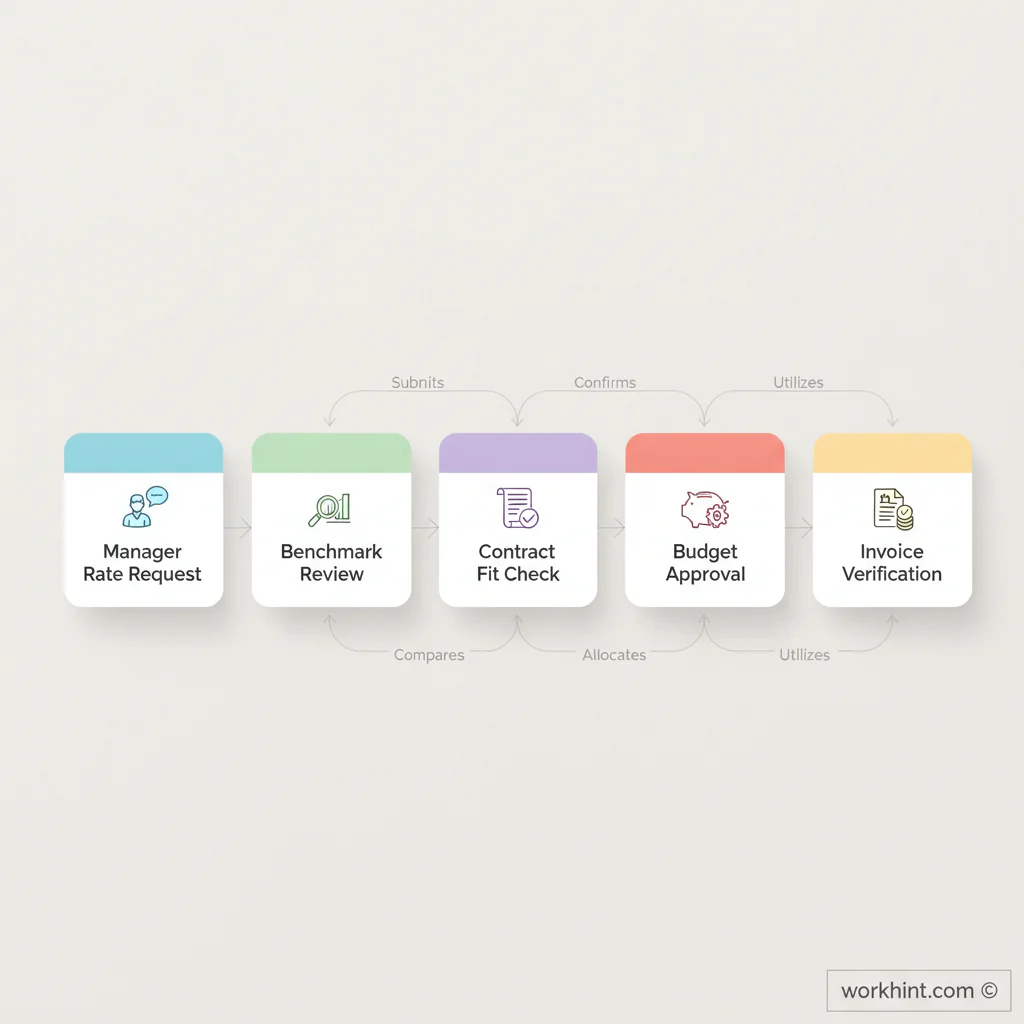
Rate card approval workflow
The rate card should be controlled like an operating record. A simple workflow keeps it usable.
- Request a new rate row. A manager or vendor owner submits the work type, business need, likely volume, and expected rate basis.
- Review market and history. Finance or operations checks prior invoices, current supplier pricing, and relevant benchmark data.
- Check contract fit. Legal, procurement, or the vendor owner confirms whether the agreement supports the rate basis and expense rules.
- Approve usage. The budget owner approves who may use the rate, what limits apply, and when an exception is required.
- Apply the rate to work. The project owner connects the approved rate to a work request, assignment, SOW, or purchase order.
- Review the invoice. Finance verifies the approved rate, accepted work, and payment terms.
Classification and control still matter
A contractor rate card should not become a backdoor employee pay band. The IRS explains independent contractor status through evidence of behavioral control, financial control, and the relationship between the parties. If the business controls how work is performed, rate-card design will not fix a classification problem.
Use the card to govern commercial terms, scope, approval limits, and payment rules. For classification-sensitive engagements, review the actual relationship with qualified legal, tax, or HR advisors before treating the work as contractor work.
Common mistakes
- Mixing rates and scope loosely: A rate without included work is hard to enforce.
- Using one rate for every location or skill level: Market, complexity, and availability can vary materially.
- Skipping exception approvals: Rush fees, overtime, premium skills, and travel can break the budget if they are approved after the fact.
- Letting old rates linger: Expired rates create disputes when vendors invoice under newer assumptions.
- Disconnecting rates from invoices: Finance needs the approved rate, accepted work, and payment terms in the same workflow.
Where Workhint fits
Workhint fits when a contractor rate card needs to become a live workflow rather than a spreadsheet that managers remember only after a dispute. A business can use Workhint to capture rate requests, route approvals, attach contract references, define role-based permissions, assign work against approved rates, track accepted deliverables, and connect invoice review to the original rate rule.
Workhint does not replace finance judgment or legal review. It helps the business keep the rate card connected to the work, approvals, documents, payment status, and reporting.
FAQ
What is a contractor rate card?
A contractor rate card is a structured record of approved rates for external work. It usually includes work category, role level, rate basis, rate range, scope included, approval thresholds, contract reference, and invoice rules.
What should a contractor rate card template include?
It should include work category, seniority or service level, hourly or project rate, currency, effective dates, scope, exclusions, approval owner, exception rules, contract reference, and invoice evidence requirements.
Who should own contractor rate cards?
Ownership is usually shared. Finance owns spend controls, procurement or legal owns contract alignment, operations owns usability, and the business owner confirms whether the rate fits the work being requested.
How often should contractor rates be reviewed?
Review rate cards at least quarterly if contractor work is frequent. Also review them after vendor negotiations, repeated invoice exceptions, major market shifts, new locations, or changes in work scope.
Conclusion
A contractor rate card template gives teams a practical way to control external workforce spend without slowing every request into a fresh negotiation. The useful version is not just a list of prices. It connects rate basis, scope, approvals, contracts, accepted work, and invoices in one operating model.
Start with recurring work, define rate ranges, attach approval thresholds, and keep the card close to the workflow where contractor work is requested and paid. That is how rate cards become a management tool instead of another spreadsheet.
Leave a Reply