


A process taxonomy gives messy workflows a shared language, so teams can organize, own, improve, and automate work.
A business process taxonomy is a structured way to name, group, and organize the work a company runs. It turns scattered workflows, departments, templates, approvals, dashboards, and automation ideas into a common operating map.
That matters because growing companies rarely suffer from a lack of process documents. They suffer from process sprawl. One team says onboarding, another says activation, another says implementation. Finance tracks approvals in one sheet, operations tracks requests in another, and leadership cannot tell which workflows are core, supporting, broken, duplicated, or ready to automate. A business process taxonomy gives operations teams the vocabulary and hierarchy needed to manage work as a system.
What’s in this article?
- What a business process taxonomy means in operations
- How taxonomy differs from a process map or SOP
- A practical hierarchy operations teams can use
- Steps for creating and maintaining the taxonomy
- Where Workhint fits when the taxonomy becomes a live work system
Why process taxonomy matters
The APQC Process Classification Framework is one of the best-known examples of a process taxonomy. APQC describes it as a taxonomy of business processes that helps organizations track and compare performance. The important idea is not that every company should copy one universal framework. It is that work becomes easier to manage when processes are named consistently and placed in a useful hierarchy.
Microsoft’s implementation guidance for business applications makes a similar point: a process taxonomy organizes processes from broad top-level categories down to detailed lower-level work, creating a common language for projects and external partners. That common language is the practical value. Without it, teams argue about tools, automation, and dashboards before agreeing on what the work is.
Business process taxonomy versus process map
A process taxonomy is not the same as a process map. A taxonomy organizes the library of work. A process map shows how one workflow moves from start to finish.
Think of the taxonomy as the table of contents for the operating system. It might show that the company has customer operations, workforce operations, finance operations, vendor operations, product operations, and internal services. Under customer operations, it may list sales handoff, implementation, support escalation, renewal, and offboarding. Each of those processes can then have its own map, SOP, dashboard, roles, and metrics.
SAP Signavio’s guidance on process mapping levels explains why levels matter: different stakeholders need different detail. Executives need the major process landscape. Operators need workflow steps, handoffs, decisions, and exceptions. Contributors need work instructions. A taxonomy keeps those levels connected instead of letting each document drift alone.
A practical process taxonomy hierarchy
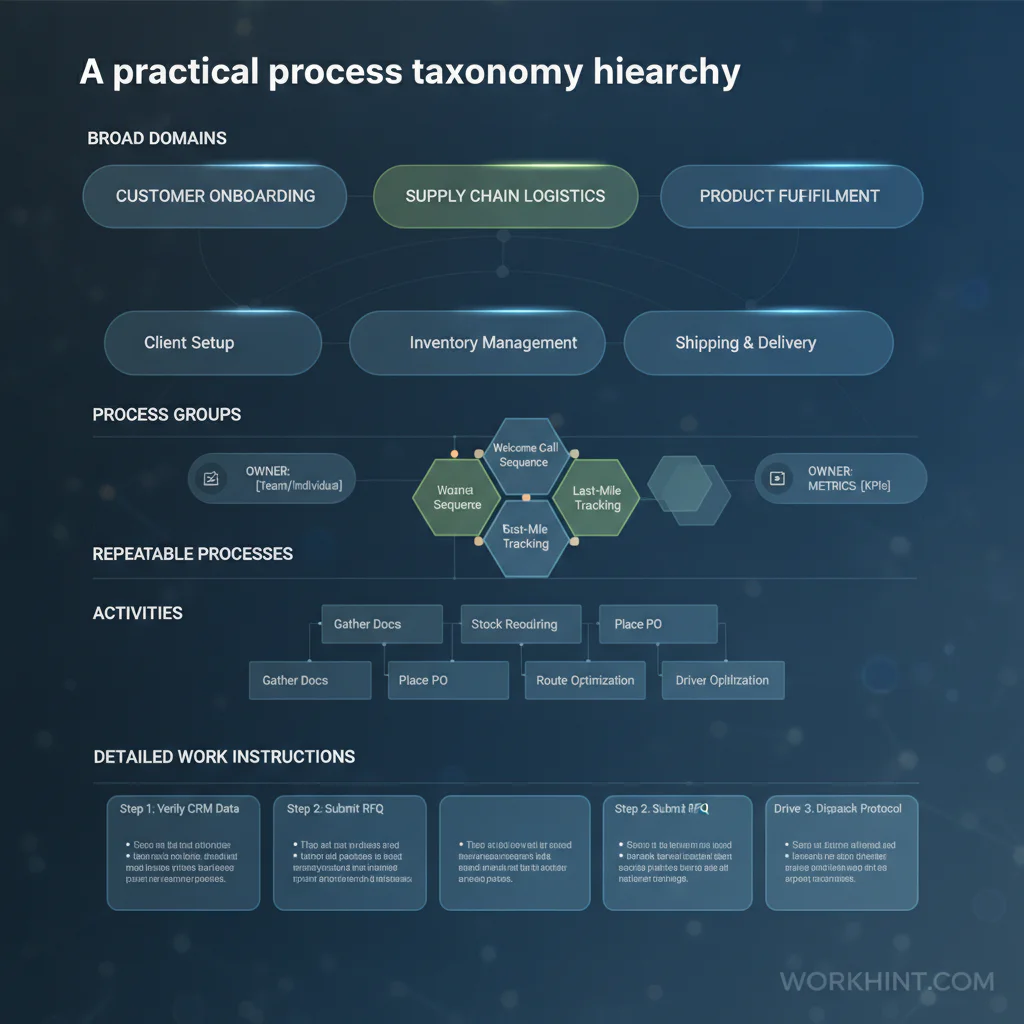
| Level | What it describes | Example |
|---|---|---|
| Level 1: Domain | Major operating area or value stream | Customer operations |
| Level 2: Process group | Related processes serving a business outcome | Customer onboarding |
| Level 3: Process | Repeatable workflow with a clear trigger and result | Implementation kickoff |
| Level 4: Activity | Major step, handoff, decision, or approval inside the workflow | Collect setup requirements |
| Level 5: Work instruction | Detailed task guidance, checklist, or SOP | Verify admin access and integration fields |
This hierarchy keeps the system usable. If the taxonomy is too shallow, it cannot guide ownership or automation. If it is too detailed, it becomes another documentation project nobody maintains. The goal is enough structure to find, compare, assign, measure, and improve work.
How to create a business process taxonomy
- Start with operating domains. Use business language people already recognize: customer operations, workforce operations, finance operations, vendor operations, internal services, compliance, product operations, or field operations.
- List recurring process groups. Group work by outcomes, not departments alone. For example, onboarding may involve sales, operations, finance, legal, support, and the customer.
- Name each process by trigger and result. A good process name makes the work clear: vendor approval, customer kickoff, refund review, access request, shift handover, invoice exception, or incident escalation.
- Assign one process owner. The owner is accountable for the health of the process, even when several teams participate.
- Connect artifacts. Link each process to its SOP, intake form, approval path, dashboard, system of record, automation, escalation rule, and metric.
- Tag process attributes. Useful tags include customer-facing, internal, regulated, high-volume, approval-heavy, manual, automated, outsourced, field-based, payment-related, or AI-assisted.
- Review for gaps and duplicates. Look for processes with no owner, duplicated intake paths, unclear handoffs, outdated SOPs, and workflows that appear under several names.
What to include in each process record
The taxonomy becomes more valuable when each process has a small operating record. Do not start with long documentation. Start with the fields that help people run and improve work.
- Process name: Plain-language name used across teams.
- Trigger: What starts the process.
- Output: What must be true when the process is complete.
- Owner: One accountable role or person.
- Participants: Teams, vendors, contractors, customers, or systems involved.
- Primary system: Where the work is tracked.
- Controls: Approvals, compliance checks, access rules, or quality gates.
- Metrics: Cycle time, backlog, error rate, SLA performance, cost, volume, or rework.
Common mistakes
- Copying a generic framework without adapting it. Reference models are useful, but the taxonomy must reflect how your company actually creates, delivers, supports, and improves work.
- Organizing only by department. Many important workflows cross departments. A department-only taxonomy hides handoffs and shared accountability.
- Using clever or inconsistent names. Searchable, plain names matter. If people cannot find the process, they will recreate it.
- Skipping ownership. A taxonomy without process owners is just a folder structure.
- Separating taxonomy from execution. The taxonomy should connect to intake, workflows, dashboards, automation, and review routines.
Where Workhint fits
Workhint fits when a process taxonomy needs to become more than a spreadsheet or documentation folder. A team can use Workhint to turn process categories into live work systems with intake, role-based permissions, assigned owners, approval paths, handoffs, documents, dashboards, automations, escalations, and reporting.
That is especially useful when the taxonomy reveals operational patterns. If several processes require the same approval, the approval can become a reusable rule. If many workflows depend on external workers or vendors, onboarding, document collection, assignments, and payments can be connected. If a process has unclear ownership, Workhint can make the owner, status, and next action visible where the work happens.
FAQ
What is a business process taxonomy?
A business process taxonomy is a hierarchy that names and organizes a company’s processes from broad operating areas down to specific workflows and activities. It helps teams use a common language for work.
How is a process taxonomy different from an SOP?
An SOP explains how to perform one process or task. A process taxonomy organizes the full set of processes so teams can find, own, compare, improve, and govern them.
Who should own the process taxonomy?
Operations, business systems, transformation, or process excellence teams often maintain the taxonomy. Individual process owners should own the accuracy and health of their assigned processes.
How detailed should a taxonomy be?
Use enough levels to connect strategy to execution. Five levels usually works: domain, process group, process, activity, and work instruction. Add detail only when it helps people run or improve work.
Conclusion
A business process taxonomy gives operations teams a practical way to organize how work runs. Start with the major operating domains, group related outcomes, name each process clearly, assign ownership, connect the supporting artifacts, and maintain the structure as the business changes. The result is not just cleaner documentation. It is a stronger work system: easier to search, easier to measure, easier to improve, and easier to automate without losing control.
Leave a Reply