


Use this template to collect feedback your team can actually read, route, measure, and act on.
A customer feedback survey template is useful only when it turns customer comments into better decisions. The best version is short, specific, easy to answer, and connected to a follow-up workflow.
This resource gives business teams a copy-ready structure for collecting feedback after onboarding, service delivery, support interactions, projects, renewals, training sessions, or product use. Customize the wording for your business, but keep the operating discipline: ask what matters, collect enough context to understand the answer, and assign ownership for the response.
What is included
- A practical customer feedback survey template.
- Question options for satisfaction, effort, experience quality, and open feedback.
- A scoring and response table your team can adapt.
- Guidance on when to send the survey.
- A follow-up workflow for turning feedback into action.
How to use this customer feedback survey template
Start by choosing one feedback moment. A post-support survey, onboarding survey, quarterly account survey, and product feedback survey should ask different questions because the customer is evaluating different work.
Use consistent scales so results are comparable over time. SurveyMonkey’s customer satisfaction guidance shows common satisfaction questions and templates, while Qualtrics separates satisfaction, product usage, and open-ended feedback questions. Those examples are useful, but the business value comes from using the results consistently, not from adding more questions.
For most teams, six to eight questions are enough. Ask one overall rating question, one effort or ease question, one outcome question, one open text question, and a few context questions that help route the response.
Customer feedback survey template
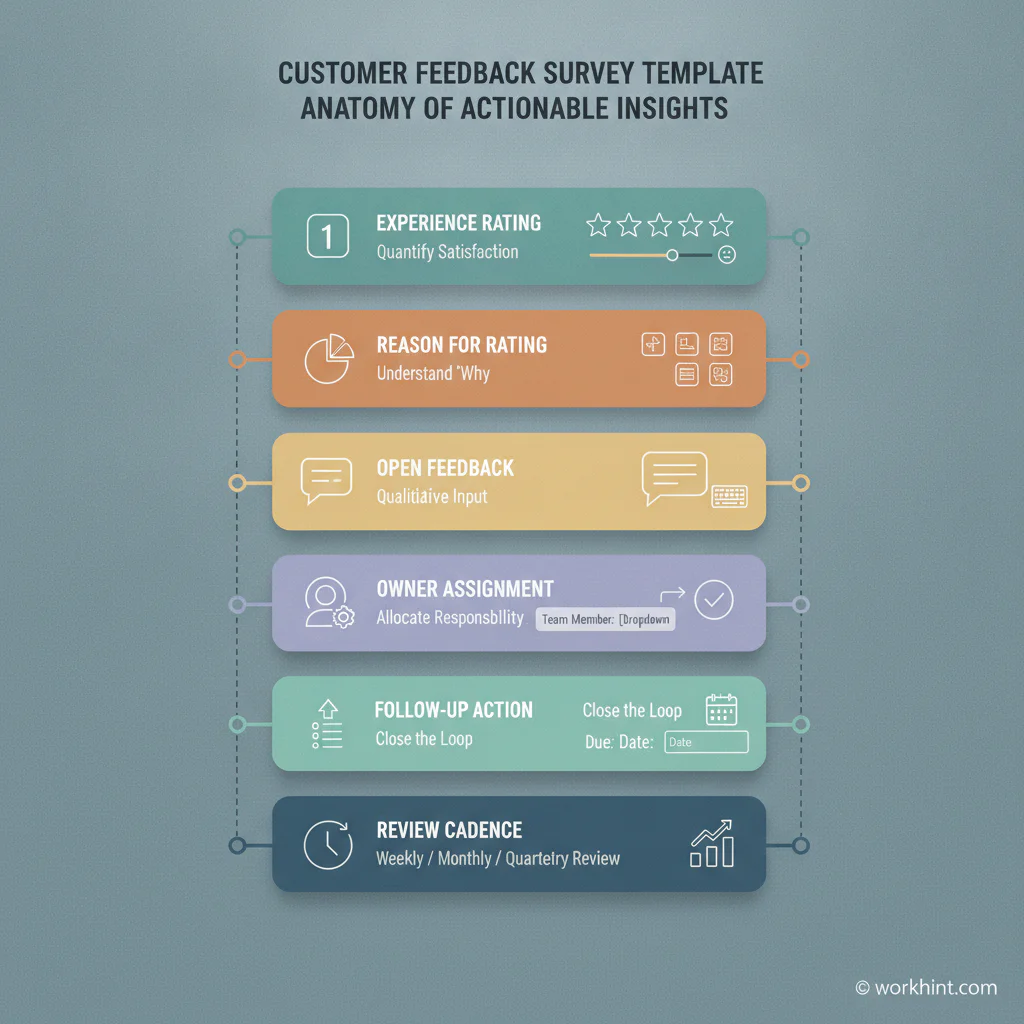
Copy the structure below into your survey tool, CRM, spreadsheet, or workflow system. Replace bracketed text with your business, product, service, or interaction name.
| Section | Question | Response type | How to use it |
|---|---|---|---|
| Overall experience | How satisfied were you with [experience/service/project]? | 1 to 5 rating | Track the headline experience score. |
| Outcome | Did we help you accomplish what you needed? | Yes, partly, no | Separate pleasant service from actual outcome. |
| Ease | How easy was it to get the help, result, or information you needed? | 1 to 5 rating | Find friction in handoffs, forms, access, timing, or communication. |
| Reason | What is the main reason for your score? | Open text | Understand the driver behind the rating. |
| Improvement | What should we improve before your next interaction with us? | Open text | Collect actionable changes, not only praise or complaints. |
| Follow-up | May we contact you about this feedback? | Yes or no | Route customers who need recovery, clarification, or deeper discovery. |
| Context | Which area does your feedback relate to? | Multiple choice | Tag responses by onboarding, support, delivery, billing, product, communication, or other category. |
Recommended question variations
Use these variations when the survey has a more specific purpose.
After customer support
- How satisfied were you with the support you received?
- Was your issue resolved?
- How clear was the communication from our team?
- What could have made this support experience easier?
After onboarding
- How confident do you feel using [product/service] after onboarding?
- Was any important information missing?
- Which step felt unclear, slow, or repetitive?
- What should we change for the next customer?
How to score and route responses
Do not treat survey results as a report that gets reviewed once a quarter. Use a simple routing model so the right person sees the right feedback quickly.
| Signal | Example response | Owner | Action |
|---|---|---|---|
| High satisfaction | 4 or 5 rating with positive text | Account owner or customer success | Save testimonial candidate, thank customer, identify repeatable strength. |
| Low satisfaction | 1 or 2 rating | Service owner or manager | Review within one business day and decide whether recovery is needed. |
| High effort | Customer says the process was hard | Operations owner | Find the friction point and assign a process improvement task. |
| Unresolved outcome | Customer says issue was not fixed | Support or delivery lead | Reopen the case or create a follow-up work item. |
| Product or service idea | Request for new capability or change | Product, operations, or service lead | Tag, group with similar feedback, and review during planning. |
If you use satisfaction benchmarks, keep them in context. The American Customer Satisfaction Index methodology explains satisfaction through expectations, perceived quality, value, complaints, and loyalty. NICE’s overview of customer effort score is useful when a team wants to measure how hard it was for customers to get something done. A score is not the whole story. The reason behind the score is what helps a business improve.
When to send the survey
Timing affects quality. Send the survey while the experience is still fresh, but not before the customer has had enough time to judge the outcome.
- Support: immediately after ticket resolution or within 24 hours.
- Onboarding: after the customer completes the first meaningful milestone.
- Project delivery: after acceptance, launch, handover, or closeout.
- Product experience: after repeated use, not after the first login unless you are testing activation.
- Relationship health: monthly, quarterly, or before renewal depending on customer size and account model.
Example follow-up workflow
- Survey response is submitted.
- The response is tagged by customer, account, interaction type, score, and theme.
- Low scores, unresolved outcomes, or follow-up requests create an owned work item.
- The owner reviews the response, decides whether to contact the customer, and logs the action.
- Recurring themes are reviewed weekly or monthly by the relevant team lead.
- Confirmed improvements are tracked as process, product, training, or communication changes.
Common mistakes
- Asking too many questions: Longer surveys reduce completion and make review harder.
- Mixing every use case: Customer support, onboarding, and account relationship surveys need different wording.
- Using leading questions: Do not ask customers to confirm that the experience was good.
- Collecting feedback without ownership: Every low score or clear issue needs a responsible person.
- Reporting averages only: Averages hide the specific friction points your team can fix.
Where Workhint fits
Workhint helps teams turn a customer feedback survey template into a live operating workflow. Instead of leaving responses in a form tool, teams can route low scores to the right owner, assign recovery actions, connect feedback to customer records, track deadlines, trigger approvals for process changes, and keep recurring issues visible across operations, product, support, account management, and leadership.
That matters when feedback points to work that crosses teams. A customer may mention onboarding confusion, billing timing, unclear ownership, missing documents, or slow approvals. Workhint helps structure those signals into roles, tasks, permissions, follow-up steps, and reporting so feedback becomes managed work instead of a static export.
FAQ
What should a customer feedback survey include?
It should include an overall satisfaction question, an outcome question, an ease or effort question, an open text reason, an improvement prompt, and a follow-up permission question. Add context fields only when they help route the response.
How many questions should a customer feedback survey have?
Most business feedback surveys should have six to eight questions. Use a shorter survey for transactional feedback and a more detailed survey for quarterly account reviews or major project closeouts.
What is the difference between CSAT and customer feedback?
CSAT is a satisfaction score, usually tied to a specific interaction or experience. Customer feedback is broader. It includes ratings, open comments, improvement ideas, complaints, feature requests, and follow-up signals.
Should customer feedback be anonymous?
Anonymous feedback can encourage honesty, but it makes service recovery harder. For customer-facing business workflows, it is often better to let the customer choose whether they are willing to be contacted about their response.
Conclusion
A customer feedback survey template should do more than collect opinions. It should help the business understand satisfaction, effort, outcomes, root causes, and follow-up needs. Keep the survey short, send it at the right moment, route important responses quickly, and review themes on a regular cadence. The goal is not more feedback. The goal is better decisions and better customer experiences.
Leave a Reply