


Use this template to turn repeated support answers into clear, owned, searchable articles your team can actually maintain.
A knowledge base article template gives support teams a repeatable structure for answering common customer, employee, vendor, or internal operations questions. The goal is to make every article clear enough to solve the issue, controlled enough to stay accurate, and structured enough that another teammate can improve it later.
Microsoft’s customer service guidance describes knowledge articles as a way to address customer questions, issues, and feedback. Zendesk’s knowledge base article template guidance makes the same practical point from a support perspective: articles need both useful content and a readable structure. The template below gives you that structure in a copy-ready format.
What is included
- A practical knowledge base article template for support teams.
- A field guide for each section so writers know what to include.
- A workflow for drafting, reviewing, publishing, and maintaining articles.
- An example article outline for a common support request.
- Common mistakes that make knowledge bases stale or hard to trust.
How to use this knowledge base article template
Start with one repeated question, not a broad topic. A good article answers a specific search phrase such as “how do I reset my password” or “how do I submit an expense receipt”. If the title is too broad, the article will either become too long or miss the reader’s actual question.
Assign one owner before drafting. The owner is accountable for accuracy, review dates, screenshots, process changes, and escalation rules. ISO 9001’s quality management standard is broader than support documentation, but its focus on documented information and process control is a useful reminder: business knowledge should be maintained, not abandoned after publication.
Knowledge base article template
| Section | What to write | Business note |
|---|---|---|
| Article title | Use the exact question or task the reader would search for. | Prefer “Submit an expense receipt” over “Expense process overview”. |
| Applies to | Name the audience, product, region, department, role, or account type. | This prevents the wrong reader from following the wrong instruction. |
| Quick answer | Give the short answer in two or three sentences. | Many readers only need confirmation before acting. |
| Before you start | List required access, documents, permissions, approvals, or data. | This reduces failed attempts and repeat support tickets. |
| Steps | Write one action per step, in the order the user should complete it. | Use verbs, visible labels, expected results, and stop points. |
| Expected result | Describe what success looks like after the task is complete. | Readers need to know whether they are done. |
| Troubleshooting | List common errors, likely causes, and what to do next. | Keep this focused on issues that actually happen. |
| Escalation | Explain when to contact support, operations, finance, IT, HR, or a manager. | Include ownership, not just “contact us”. |
| Article owner | Name the team or person responsible for accuracy. | Ownership keeps the article from becoming stale. |
| Review date | Set the next review date or review trigger. | Review after product, policy, pricing, system, or process changes. |
Field guide for writing each article
The best support articles are specific, scannable, and honest about edge cases. Write the title in the reader’s language. If customers say “invoice status”, do not title the article “accounts receivable visibility”.
Keep the quick answer near the top. A reader should know within a few seconds whether the article applies to them. Then move into steps. Each step should include one action, where it happens, and the result the reader should expect.
Use troubleshooting only for real failure points. If an issue needs human judgment, route it through an escalation path. Google Workspace’s support guidance emphasizes making help content searchable and useful for users; business teams should apply the same discipline to internal operating knowledge.
Knowledge base article workflow
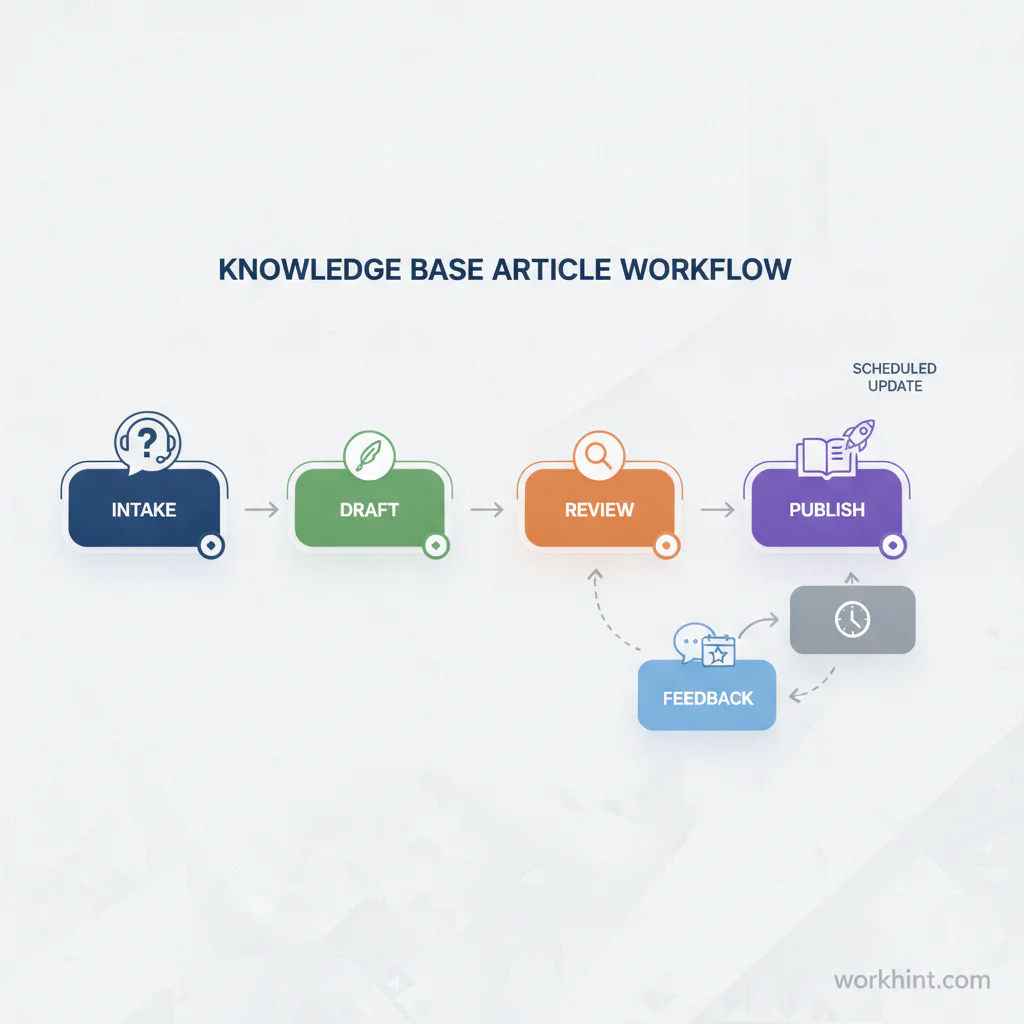
A template works best when it is connected to a workflow. Otherwise, articles get drafted once and forgotten when the process changes.
- Capture the repeated question. Use support tickets, Slack questions, onboarding issues, customer calls, field escalations, or manager requests as signals.
- Confirm the answer owner. Decide which team owns the source of truth: support, product, operations, finance, HR, legal, IT, or customer success.
- Draft the article. Use the template above and include only the steps, requirements, and exceptions the reader needs.
- Review with the process owner. Check screenshots, permissions, policy language, handoffs, and escalation rules.
- Publish in the right place. Put customer-facing content in the help center and internal instructions in the internal knowledge base.
- Measure use and gaps. Track searches with no results, tickets deflected, article feedback, repeated escalations, and outdated references.
- Review on a schedule. Review high-risk articles quarterly and ordinary support articles after workflow, product, pricing, policy, or ownership changes.
Example support article outline
Here is a simple internal article example.
| Template field | Example |
|---|---|
| Title | Submit an expense receipt for reimbursement |
| Applies to | Employees and approved contractors in the U.S. |
| Quick answer | Upload the receipt, choose the expense category, attach the project or client code, and submit before the monthly cutoff. |
| Before you start | You need the receipt, purchase date, amount, currency, business reason, and manager approval if the expense exceeds the limit. |
| Expected result | The request moves to finance review and shows a payment status once approved. |
| Escalation | Contact finance operations if the receipt is rejected, the category is missing, or payment is overdue. |
Common mistakes
- Writing for the company, not the reader. Internal terms may be accurate but useless if the reader searches another phrase.
- Skipping ownership. An article without an owner becomes risky the moment a workflow changes.
- Mixing multiple questions. Split articles when the audience, task, system, or approval path changes.
- Publishing without escalation rules. Readers need to know what to do when the normal path fails.
- Ignoring feedback. Downvotes, repeat tickets, failed searches, and support comments are maintenance signals.
Where Workhint fits
Workhint helps teams turn a knowledge base article template into a live support and operations workflow. A team can capture repeated questions, assign article owners, route drafts for review, publish approved knowledge, attach forms or intake steps, and trigger review reminders when related workflows change.
The template still matters. Workhint does not replace clear writing. It helps make the article part of the operating system around the work: who owns the answer, who reviews it, what request it supports, and when it should be refreshed.
FAQ
What should a knowledge base article include?
A practical knowledge base article should include a clear title, audience, quick answer, prerequisites, step-by-step instructions, expected result, troubleshooting notes, escalation path, article owner, and review date.
How long should a knowledge base article be?
It should be as short as the task allows. A simple how-to article may be 300 to 600 words. A policy or troubleshooting article may be longer, but it should still answer one primary question.
Who should own knowledge base articles?
The team that owns the underlying answer should own the article. Support may own the format and publishing process, but product, operations, finance, HR, legal, IT, or customer success may own accuracy for specific topics.
How often should knowledge base articles be reviewed?
Review high-risk or compliance-sensitive articles at least quarterly. Review ordinary support articles whenever the product, workflow, policy, pricing, access model, or escalation path changes.
Conclusion
A knowledge base article template helps support teams answer repeated questions with more consistency and less rework. Use the template to write in the reader’s language, define prerequisites, document steps, name escalation paths, assign ownership, and schedule review. The useful knowledge base is not just a library of answers. It is a maintained operating record for the work people need to complete.
Leave a Reply