


AI agents create value when they are assigned to real operational decisions, not when they float beside the business.
AI agents for operations management matter because operations work is full of repeatable decisions: which request is complete, who owns the next step, which approval is needed, and when an exception should escalate. The hard question is where the agent belongs in the operating system.
Used well, AI agents reduce manual coordination and speed up handoffs across HR, finance, procurement, customer operations, field teams, staffing, and marketplaces. Used poorly, they create hidden work for people to check later.
What’s in this article?
- What AI agents mean in an operations management context
- Which workflows are good candidates for agent support
- How to design boundaries, approvals, and human review
- A rollout model operations teams can use before scaling
- Where Workhint fits when agent work needs to become a configurable work system
What AI agents do in operations management
An AI agent is software that can interpret context, use tools, and take steps toward a goal with some level of autonomy. IBM describes AI agents as systems that can use reasoning, planning, memory, and tools to complete tasks on behalf of users. OpenAI’s agent-building guidance similarly emphasizes that useful agents need clear workflows, access to the right tools, evaluation, and escalation paths.
In operations management, that usually means an agent should not be treated as a general assistant. It should be assigned to a defined operational responsibility. For example, an agent might review vendor requests for missing information, route a customer escalation, summarize field updates, prepare an invoice approval packet, or flag a staffing request likely to miss its deadline.
The best operational use cases share three traits: the work is frequent, the decision criteria are explainable, and the cost of delay is high enough to matter. If a workflow is rare, unstable, or high-risk with no review layer, it is usually a poor first candidate.
Where AI agents fit best
Start with workflows where an agent can improve speed or consistency without owning the final business judgment. That makes the first rollout easier to govern and easier for teams to trust.
| Operations area | Good agent task | Human control point |
|---|---|---|
| HR operations | Check onboarding packets for missing documents and route reminders | Approve worker eligibility, contract terms, and exceptions |
| Finance operations | Match invoices to purchase orders and flag approval gaps | Approve payment release and unusual vendor changes |
| Procurement | Collect vendor due diligence materials and summarize risk signals | Decide whether the vendor can proceed |
| Customer operations | Triage requests by urgency, account type, and missing context | Handle sensitive customer decisions and escalations |
| Marketplace operations | Route provider applications, assignment requests, and payout exceptions | Approve suspensions, disputes, and policy exceptions |
AI agents are most reliable when they improve the flow of work around a decision. They can prepare, route, summarize, check, and recommend. The organization still needs explicit rules for automatic action versus human review.
A practical rollout model
Before connecting an AI agent to live operations, map the workflow like an operator rather than a technologist. Make every responsibility, permission, and exception visible.
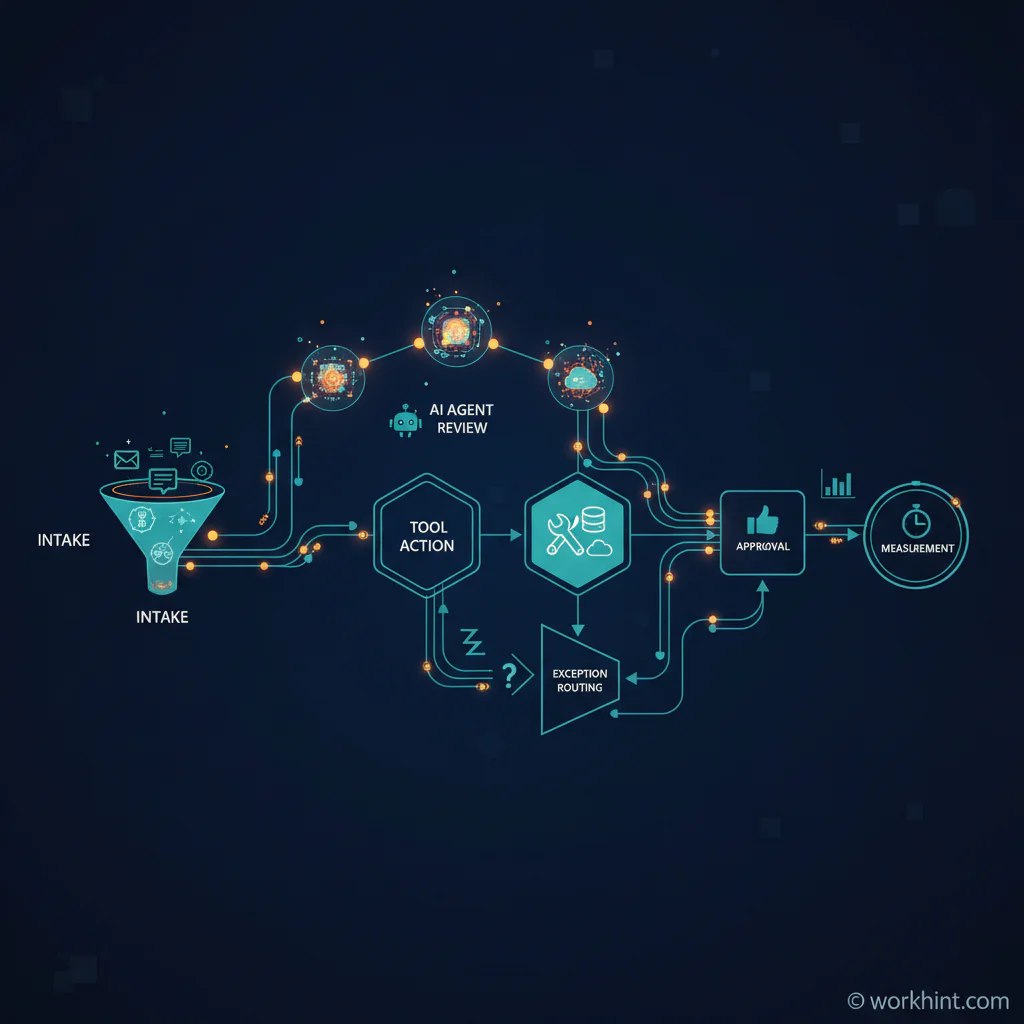
- Choose one workflow. Pick a process with clear volume, visible friction, and a known owner. Good starting points include intake triage, approval preparation, onboarding checks, vendor documentation, status reporting, and exception routing.
- Define the trigger. Decide what starts the agent’s work: a submitted form, a new email, a missing field, a status change, a due date, or a failed handoff.
- List the systems of record. Identify where the agent may read and write information. Do not let the agent create shadow records that bypass the official workflow.
- Set the action boundary. Separate actions the agent can take automatically from actions it can only recommend. Low-risk routing may be automatic. Contract changes, payments, access changes, and compliance exceptions usually need review.
- Create the escalation path. Define who receives uncertain, incomplete, sensitive, or high-value cases. Without this path, complexity returns to Slack, email, or spreadsheets.
- Measure operational impact. Track cycle time, touch count, rework, aging work, missed approvals, exception volume, and user adoption. Avoid measuring only prompts, chats, or agent activity.
NIST’s AI Risk Management Framework is useful here because it pushes teams to think about governance, measurement, management, validity, safety, accountability, and transparency. For operations leaders, that means designing the agent’s control environment before giving it broader autonomy.
Common mistakes when deploying operations AI agents
The first mistake is starting with a tool instead of a workflow. If the process is unclear, the agent will automate confusion. Clarify the owner, inputs, outputs, statuses, approvals, and exception rules first.
The second mistake is skipping permission design. Operations work often touches employee data, vendor contracts, customer information, payment status, or sensitive details. Agent access should match the role it performs, not the broad access of the tester.
The third mistake is treating human review as a vague safety promise. Human-in-the-loop only works when the review moment is specific. Define who reviews, what evidence they see, how they approve or reject, and what happens next.
The fourth mistake is scaling too early. BCG has argued that agentic AI creates business impact when companies redesign workflows and operating models, not when they simply add autonomous tools to existing work. Run one workflow, learn from exceptions, tighten the rules, then expand.
Where Workhint fits
Workhint fits when a company wants AI agents to operate inside a real work system instead of beside the work. An operations team can use Workhint to describe the process it needs to run, then configure roles, intake, permissions, stages, approvals, assignments, documents, schedules, payments, reporting, and automation around that work.
For example, a staffing company could build a request-to-assignment workflow where an AI agent checks intake quality, suggests qualified workers, flags missing compliance documents, and prepares approval packets. Managers still control sensitive decisions, while the system keeps work moving and records what happened. The same pattern can apply to procurement reviews, finance approvals, customer escalations, field service scheduling, and marketplace operations.
The point is not to replace operations judgment. The point is to make operational judgment easier to apply consistently by connecting AI assistance to the workflow, data, permissions, and review paths that already matter.
FAQ
What is the best first use case for AI agents in operations?
The best first use case is a repeatable workflow with high volume, clear rules, and measurable delay. Intake triage, approval preparation, document checks, status summaries, and exception routing are often better starting points than high-risk final decisions.
Should AI agents make operational decisions automatically?
Only for low-risk, reversible decisions with clear rules and auditability. Sensitive decisions involving payments, contracts, worker eligibility, access, compliance, customer commitments, or disputes should usually include human review.
How do operations teams measure AI agent success?
Measure operational outcomes: cycle time, handoff delays, rework, approval aging, missed deadlines, exception volume, user adoption, and quality of decisions. Agent activity by itself is not enough.
How is an AI agent different from workflow automation?
Traditional workflow automation usually follows fixed rules. AI agents can interpret unstructured context, choose among available tools, and recommend or take next steps. In business operations, the two should work together: workflow automation provides structure, while agents help with judgment-heavy coordination.
Conclusion
AI agents for operations management are most useful when they are attached to specific workflows with clear boundaries. Start with one process, define the trigger, connect the right systems, set review rules, and measure whether work moves faster with fewer errors. Once the operating model works, the agent can become part of a broader AI-powered work system rather than another experiment that lives outside the business.
Leave a Reply