


Capacity planning turns overloaded teams into a measurable system for deciding what work can actually move.
A capacity planning process is the operating rhythm a team uses to compare incoming work against real availability, skills, priorities, and constraints. It is how leaders decide what can start now, what must wait, and where the system needs more capacity.
The point is not to make people look fully utilized on a spreadsheet. A useful capacity planning process protects quality, reduces overload, and gives the business a clear way to make tradeoffs before commitments become missed deadlines.
What’s in this article?
- What a capacity planning process should include
- A workflow for matching workload to available capacity
- A capacity decision table operations teams can reuse
- Common mistakes that create overload and hidden bottlenecks
- Where Workhint fits when planning becomes a live work system
Why the capacity planning process matters
Atlassian defines capacity planning as determining resource needs by analyzing workloads, team availability, and skill sets so projects can be completed on time. Capacity is not only headcount. It is the usable mix of time, skills, focus, budget, tools, and decision authority available for a specific kind of work.
NetSuite’s guide to capacity planning frames the same idea in operational terms: businesses analyze whether personnel, equipment, and materials can meet demand. For service teams, the equivalent question is whether available people and systems can absorb the work already promised.
Without a process, capacity planning becomes a negotiation between urgency and optimism. The loudest request gets priority, managers approve too much work, and leaders discover the capacity problem after execution has slowed.
Capacity planning process: the core inputs
Before building a workflow, define the inputs that make capacity visible.
- Demand: What work is coming in, by when, and with what business value?
- Effort: How much work is required by stage, role, skill, or approval path?
- Availability: What usable time exists after meetings, support load, existing commitments, and recurring work?
- Constraints: Which work requires specific people, systems, vendors, approvals, or equipment?
- Priority rules: Which work outranks other work when demand exceeds capacity?
- Performance data: What do cycle time, rework, and utilization show about true throughput?
The practical mistake is treating all requests as equal units. Capacity planning gets useful when demand is translated into the capacity it consumes.
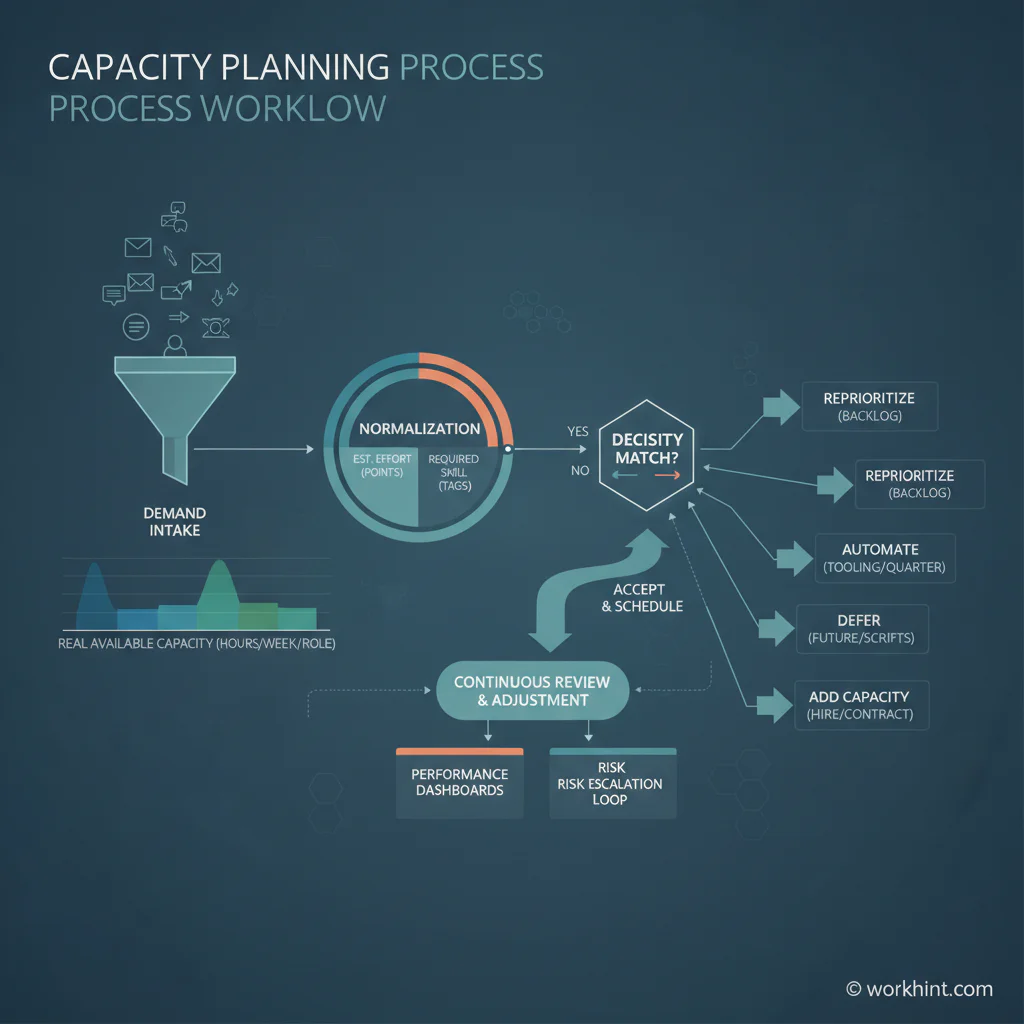
Capacity planning process workflow
Use this workflow when work is arriving through multiple channels and managers need a repeatable way to make tradeoffs.
- Centralize demand intake. Capture requests, projects, recurring work, exceptions, and planned initiatives in one place with owner, due date, value, urgency, roles, and dependencies.
- Normalize the work. Convert requests into effort bands. Add role requirements, risk level, approval needs, and expected cycle time.
- Calculate usable capacity. Start with available hours or work units, then subtract commitments, recurring work, meetings, support load, time off, and operational drag.
- Match demand to capacity by role. Compare work required with real availability by role or skill group. A team may look available while one specialist role is overloaded.
- Apply priority rules. Sort work by business value, risk, deadline, customer impact, revenue impact, compliance, and strategic importance.
- Choose the capacity action. Accept the work, defer it, descope it, reassign it, automate part of it, escalate a tradeoff, or add temporary capacity.
- Commit visibly. Once work is accepted, publish the owner, start date, delivery window, dependencies, and review points.
- Review on a cadence. Capacity changes as work arrives, blockers appear, and estimates prove wrong. Review weekly for active teams.
The Atlassian Team Playbook recommends making capacity explicit with the team instead of relying on assumptions about bandwidth. Capacity planning should be visible enough that teams can challenge unrealistic commitments before the plan breaks.
Capacity decision table
This table gives operations leaders a simple way to turn capacity analysis into decisions.
| Capacity signal | What it means | Decision to make | Operating control |
|---|---|---|---|
| Demand is below available capacity | The team can absorb planned work | Accept and schedule | Confirm owner, start date, and metric |
| Demand exceeds one role’s capacity | A specific skill is the constraint | Reassign, train, hire, or sequence work | Track role-level utilization and queue age |
| Urgent work displaces planned work | The priority model is being tested | Escalate the tradeoff | Record what was paused and why |
| Recurring work consumes hidden capacity | The plan ignores operational load | Reserve capacity or automate repeat tasks | Separate project work from run-the-business work |
| Cycle time keeps increasing | The team is over capacity or blocked | Reduce intake, remove bottlenecks, or add capacity | Review aging work and handoff delays |
How to keep capacity planning from becoming theater
Capacity planning fails when the numbers look precise but the operating behavior does not change. If leaders keep approving every request, the plan becomes a reporting artifact.
PMI’s paper on capacity and demand planning emphasizes scalable methods for capturing, tracking, and managing capacity and demand. The key word is managing. A capacity plan should trigger decisions, not merely describe overload after it happens.
Set thresholds in advance. If a role is above 85 percent committed, new work needs approval. If high-priority work enters the plan, lower-priority work must move out.
Common capacity planning mistakes
- Planning from calendar hours instead of usable capacity. A 40-hour week is not 40 hours of deliverable work.
- Ignoring role-level constraints. The team may have capacity while one approver, designer, analyst, dispatcher, or specialist is overloaded.
- Mixing planned work with interrupt work. Support, emergencies, revisions, and stakeholder follow-up need their own capacity reserve.
- Starting work before it is sized. Unsized work turns every plan into a guess.
- Treating priority as a label instead of a rule. If everything is high priority, capacity planning has no decision mechanism.
- Failing to close the loop. Estimates should be compared with actual cycle time, rework, and blocked time so the next plan gets better.
Where Workhint fits
Workhint fits when capacity planning needs to move from a spreadsheet into a live work system. A team can use Workhint to structure intake, define roles and permissions, route work by capacity signals, assign owners, manage approvals, track schedules, monitor status, and surface dashboards for demand, workload, blockers, and throughput.
That matters for teams coordinating internal requests, service delivery, vendor work, field teams, external contributors, staffing programs, and cross-functional workflows. Workhint helps connect the capacity planning process to the actual work being accepted and delivered.
FAQ
What is a capacity planning process?
A capacity planning process is the repeatable workflow a team uses to compare incoming demand with available people, skills, time, tools, and constraints. It helps leaders decide what work can be accepted, delayed, reassigned, automated, or escalated.
What is the difference between capacity planning and resource planning?
Capacity planning asks whether the team has enough available capacity to meet demand. Resource planning focuses on how specific people, budget, tools, or equipment are allocated to the work that has been accepted.
How often should teams review capacity?
Active operations teams should review capacity weekly, especially when demand changes often. Longer-range capacity planning can happen monthly or quarterly, but the live operating plan should update whenever priorities, availability, or workload changes materially.
What metrics should a capacity planning process track?
Track incoming demand, accepted work, deferred work, role-level utilization, cycle time, queue age, blocked work, rework, SLA risk, and the percentage of capacity reserved for recurring operations or urgent requests.
Who should own capacity planning?
Ownership usually sits with operations, delivery leadership, program management, or the leader accountable for throughput. The best owner has enough authority to manage tradeoffs across priorities, people, timing, and quality.
Conclusion
A good capacity planning process makes execution honest. It turns incoming demand into measurable work, compares that work against real availability, exposes constraints, and forces clear tradeoffs before commitments are made. The result is a system that helps teams protect focus, deliver reliably, and scale work without hidden overtime or constant escalation.
Leave a Reply