


A compliance workflow process keeps controls inside daily work instead of leaving proof for audit season.
A compliance workflow process is the repeatable path a team uses to make sure regulated, policy-sensitive, or risk-sensitive work follows the right rules while it is happening. It defines the trigger, required information, control checks, approvals, evidence, exceptions, owners, and review cadence for a specific business activity.
That matters because compliance often fails between the policy and the work. A policy may say vendor risk must be reviewed, customer data must be protected, payments must be approved, or employment documents must be retained. The workflow is where those requirements become normal execution.
What’s in this article?
- What a compliance workflow process includes
- How to design one for business operations
- A practical workflow table you can adapt
- Common mistakes that weaken compliance workflows
- Where Workhint fits when compliance needs to become a live system
Why compliance workflows matter
Compliance work is often treated as a separate layer: policies in one folder, approvals in email, evidence in spreadsheets, and exceptions in chat. That creates risk because the business cannot easily prove what happened, who approved it, which rule applied, or why an exception was allowed.
A stronger approach puts compliance into the operating workflow. Microsoft Learn explains that business process flows can help people enter data consistently and follow the same steps. The process should guide the work, not depend on memory.
The Australian Government Architecture business process and workflow standard frames workflow solutions as a way to consolidate processes and apply rules consistently. For operations teams, that is the heart of compliance design: make the rule visible where someone acts.
Compliance workflow process steps
Start with one workflow, not the entire compliance program. Good candidates include vendor onboarding, invoice approval, hiring documentation, data access requests, contractor onboarding, incident response, policy exceptions, regulated service delivery, or customer contract review.
- Name the compliance obligation. Identify the policy, regulation, contract clause, customer requirement, or internal control the workflow must satisfy.
- Define the trigger. Decide exactly what starts the workflow: a new request, threshold, renewal date, risk rating, failed check, missing document, or business event.
- Capture required information. Turn the compliance requirement into fields, documents, attestations, checklists, or system lookups.
- Assign control owners. Name the role that reviews each control. Avoid vague ownership such as “legal” or “finance” when a specific approver role is needed.
- Set decision rules. Define what can be approved automatically, what needs review, what must be rejected, and what becomes an exception.
- Capture evidence by design. Store approvals, timestamps, documents, reviewer notes, risk ratings, and final outcomes inside the workflow record.
- Route exceptions. Decide who receives the exception, what context they need, what actions they can take, and how the decision is recorded.
- Monitor and improve. Review cycle time, failed checks, reopened items, missing evidence, overdue approvals, and repeated exceptions.
A practical compliance workflow table
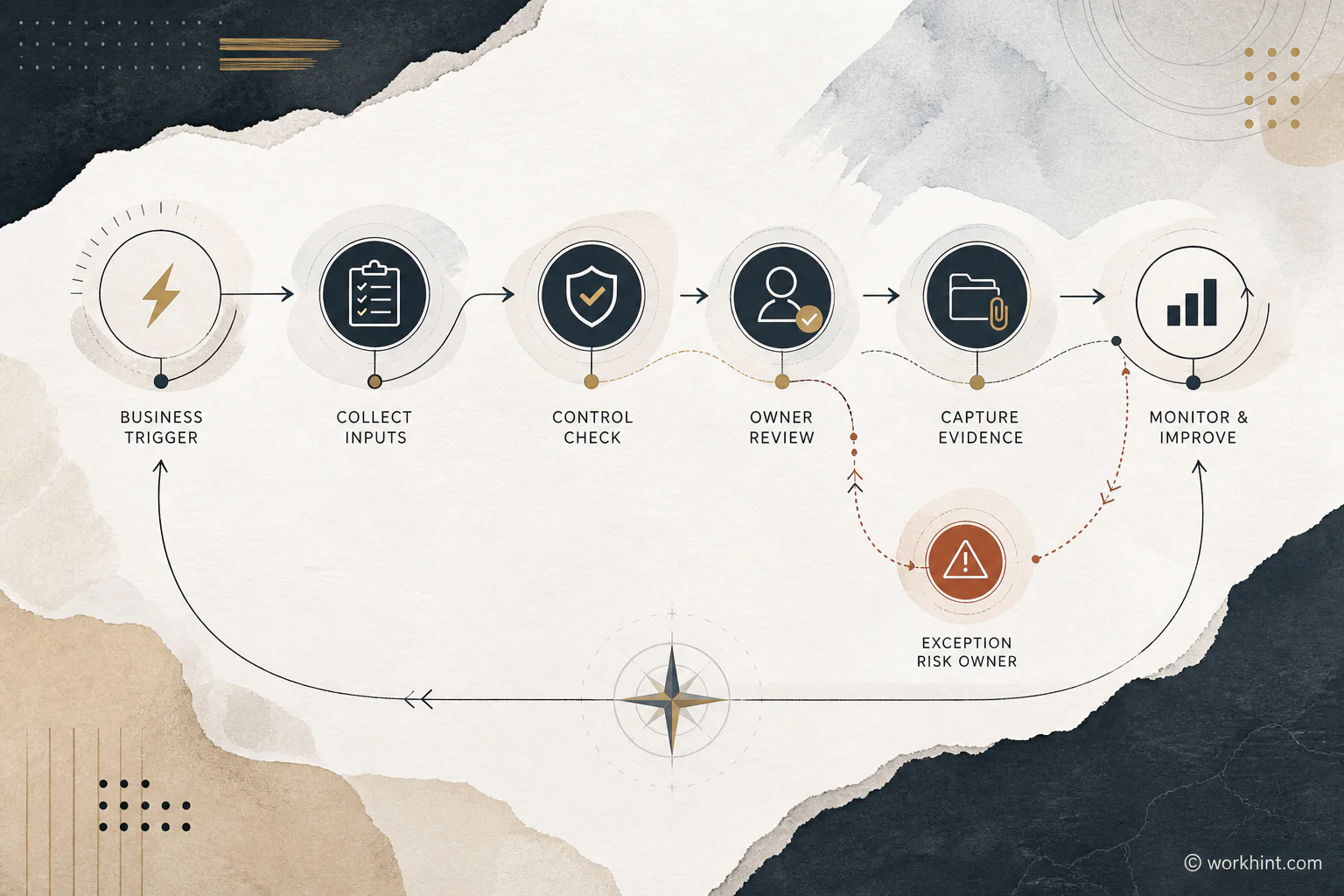
Use this table to design a compliance workflow before you automate it. The example is vendor onboarding, but the same structure works for finance, HR, procurement, operations, and data access.
| Workflow part | Design question | Vendor onboarding example |
|---|---|---|
| Trigger | What starts the process? | Business owner requests a new vendor |
| Required inputs | What must be collected? | Business need, vendor profile, tax form, contract, security questionnaire |
| Control check | What rule must be satisfied? | Risk review required before contract approval |
| Owner | Who decides? | Procurement reviewer, security reviewer, finance approver |
| Evidence | What proof must remain? | Review result, approval record, timestamp, signed agreement |
| Exception path | What happens when the rule cannot be met? | Escalate to risk owner with reason and proposed mitigation |
| Review metric | How do we know the workflow works? | Missing-document rate, approval time, exception frequency |
Design controls into the work
Compliance controls should not feel like a mystery checkpoint at the end. They should appear at the stage where the business has enough information to make a good decision. If a vendor needs security review, do not wait until after the contract is signed. If data access requires a business justification, collect it before access is granted.
BOC Group’s process compliance guidance emphasizes linking business processes with rules, controls, and traceability. That framing is useful because a workflow is not compliant merely because someone completed a task. It is compliant when the required control happened, the right person owned it, and the evidence can be retrieved later.
Handle exceptions without losing control
Every compliance workflow needs an exception path. Real work does not always fit the standard route. A customer may need urgent onboarding, a vendor may lack a usual document, or a manager may request temporary access.
The mistake is letting exceptions happen outside the system. An exception should have a reason, owner, risk level, allowed actions, expiration date, and evidence. Diligent’s compliance workflow guidance points to the need to map who initiates the task, what approvals are needed, where evidence is captured, and how exceptions are handled.
Compliance workflow metrics to track
Do not measure only whether the audit passed. That is too late. Track the signals that show whether the workflow is healthy while work is moving.
- Missing evidence rate: How often required proof is absent or incomplete.
- Approval cycle time: How long control reviews take by stage and owner.
- Exception frequency: How often the standard path fails or needs override.
- Reopen rate: How often work returns because information or review was insufficient.
- Overdue control count: How many compliance tasks are aging past threshold.
- Policy-change lag: How long it takes to update the workflow after a rule changes.
These metrics keep compliance operational. They show whether the workflow is clear, whether owners respond in time, and whether the standard path still matches real work.
Common compliance workflow mistakes
- Starting with software instead of rules: A tool cannot fix an unclear control requirement.
- Using departments as owners: Assign accountable roles, not broad functions.
- Adding approvals too late: Late controls create rework and encourage bypasses.
- Making every request high risk: Use thresholds so low-risk work moves and high-risk work receives deeper review.
- Ignoring exception design: Exceptions are predictable. Design the path before people invent one.
- Separating evidence from execution: Evidence should be captured as work happens, not reconstructed later.
Where Workhint fits
Workhint fits when a compliance workflow needs to become a live operating system instead of a policy document. A team can describe the compliance requirement, then structure the intake, roles, permissions, approval paths, evidence fields, exception routing, dashboards, reminders, and audit records around the actual work.
That is useful when compliance touches multiple teams. Vendor onboarding may involve procurement, legal, finance, security, operations, and the business owner. Workhint helps turn those moving parts into a trackable workflow with clear ownership and visible status.
FAQ
What is a compliance workflow process?
A compliance workflow process is a structured path for completing regulated or policy-sensitive work with required controls, approvals, evidence, exceptions, and ownership built into the workflow.
What should a compliance workflow include?
It should include the trigger, required inputs, control checks, decision rules, owners, approval thresholds, evidence requirements, exception paths, status tracking, and review metrics.
How is process compliance different from policy compliance?
Policy compliance asks whether people follow a rule. Process compliance asks whether the actual workflow is designed, executed, monitored, and updated so the rule is followed during daily work.
Should compliance workflows be automated?
Automate only after the rules, owners, evidence, and exception paths are clear. Automation is useful for routing, reminders, validation, and records, but judgment-heavy decisions may still need human review.
Conclusion
A good compliance workflow process turns rules into execution. It names the obligation, captures the right inputs, routes work to accountable owners, records evidence, manages exceptions, and monitors the health of the process over time. The goal is not more bureaucracy. The goal is a work system where compliant action is the normal path.
Leave a Reply