


Field schedules break when dispatch is treated like a calendar instead of an operating workflow.
Field service scheduling is the process of turning incoming work into assigned, timed, trackable jobs for field workers, technicians, subcontractors, or partner crews. The useful version does more than place appointments on a calendar. It defines how requests enter the system, how the right person is matched to the work, how updates move from the field to the office, and how completed work becomes ready for approval, invoicing, or payment.
This matters because field work has more constraints than office work. A dispatcher has to balance location, skill, customer windows, equipment, travel time, job duration, worker availability, priority, and last-minute exceptions. When those decisions happen through calls, texts, spreadsheets, and memory, the schedule becomes fragile. One delayed job can create late arrivals, missed service-level commitments, confused customers, and unpaid external workers.
What is in this article?
- Why field service scheduling fails as teams grow.
- The rules a dispatch workflow should define before work starts.
- A practical field service scheduling workflow from intake to closeout.
- A role table for dispatch, operations, field workers, customers, and finance.
- Where Workhint fits when field work needs to become a live operating system.
Why field service scheduling matters
A schedule is only useful if it reflects reality. In field operations, reality changes constantly: customers cancel, jobs run long, workers get delayed, weather changes the plan, parts are missing, or an urgent request jumps the queue. A strong scheduling workflow gives the team a controlled way to absorb those changes without rebuilding the day from scratch.
The workflow also protects the business relationship with external workers. If a company uses contractors, subcontractors, or partner crews, the process should focus on outcomes, assignments, evidence, and approvals instead of employee-style control. The U.S. Department of Labor explains that independent contractor status under the FLSA depends on the economic realities of the relationship, and the IRS independent contractor definition also turns on control and independence. This article is not legal advice, but it is a reminder to design field workflows around the work record, not unnecessary supervision.
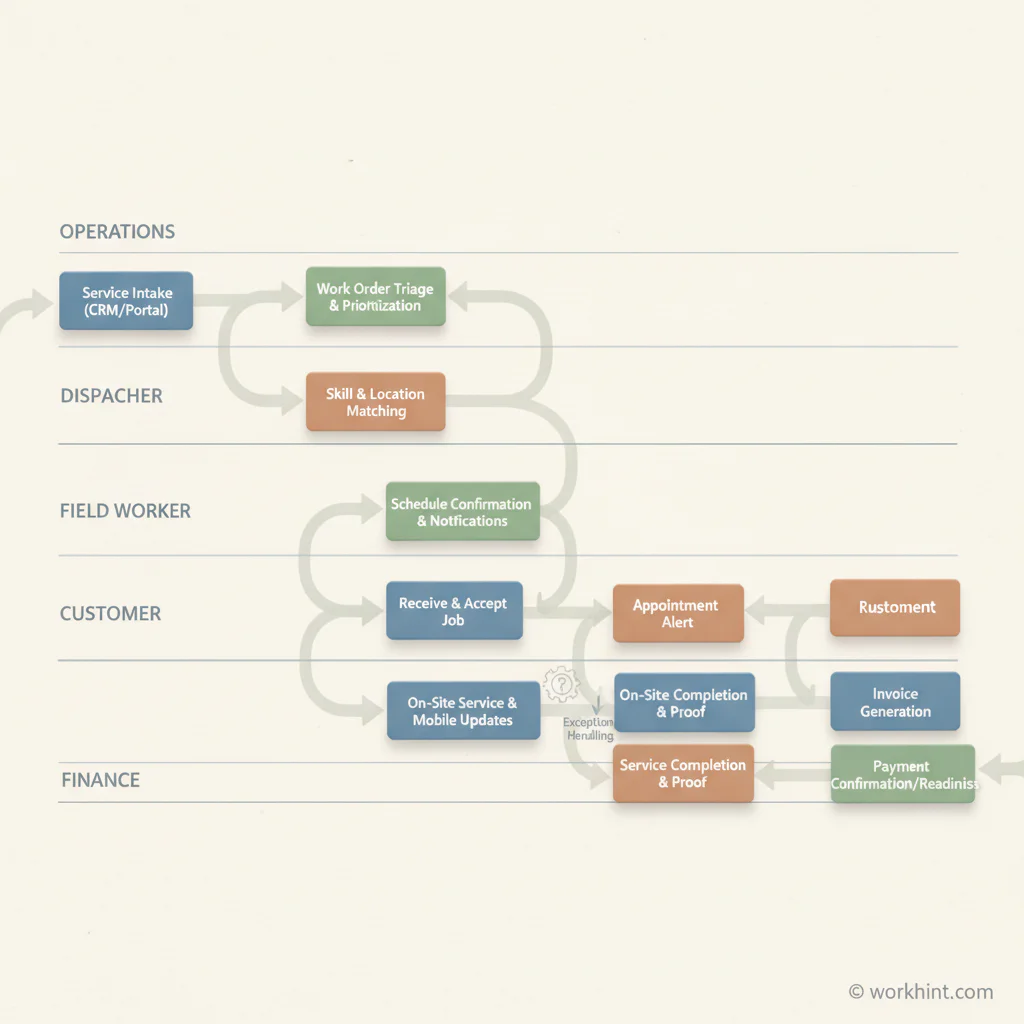
Field service scheduling workflow
Use this workflow when field jobs move through multiple hands before they are complete.
- Centralize intake. Every request should enter one queue, whether it comes from a customer form, operations team, sales handoff, account manager, or partner portal.
- Turn the request into a work order. Capture customer, location, issue, priority, expected duration, required skill, required equipment, safety notes, and evidence needed at completion.
- Classify the job before scheduling. Separate emergency, same-day, planned, recurring, and low-priority work. Different job types need different rules.
- Match work to qualified capacity. Assign based on skill, certification, location, availability, workload, equipment, route logic, and customer constraints.
- Confirm the schedule. Send the worker and customer the agreed window, location, scope, required materials, and status-update expectations.
- Track field updates in real time where possible. Use simple statuses such as assigned, accepted, en route, on site, blocked, complete, and needs review.
- Route exceptions. Missing parts, customer no-shows, scope changes, safety issues, and overtime risk should trigger a visible decision, not a private text thread.
- Close the job with evidence. Require the notes, photos, signatures, meter readings, checklist, or deliverable proof needed to approve the work.
- Connect completion to finance. Approved work should feed invoice review, contractor payment, customer billing, or payroll according to the worker model.
Rules to define before the first job is assigned
The fastest way to improve field service scheduling is to make dispatch decisions explicit. If the rules live only in an experienced dispatcher’s head, the process will not scale.
| Scheduling rule | Decision to define | Why it matters |
|---|---|---|
| Priority | Which jobs can interrupt the schedule? | Prevents every urgent-sounding request from disrupting the day. |
| Skill match | Which credentials, tools, or experience are required? | Improves first-time completion and reduces rework. |
| Travel buffer | How much travel and setup time is added by job type? | Reduces late arrivals and unrealistic route plans. |
| Exception owner | Who decides when a job is delayed, reassigned, or escalated? | Keeps blocked work from disappearing into messages. |
| Completion evidence | What proof is required before approval? | Connects field work to billing, payment, and quality review. |
Common failure points
The first failure is scheduling by availability alone. An available worker is not always the right worker. A good dispatch decision considers skill, equipment, distance, history, and the consequence of failure.
The second failure is treating exceptions as side conversations. If a job is blocked because a customer is absent or a part is missing, the status should be visible to operations and finance. Otherwise, the team may keep the job on the schedule while the worker waits, the customer receives no update, and the invoice stays stuck later.
The third failure is closing the job too early. “Done” should mean the required evidence is captured, the customer or internal owner has accepted the work where needed, and the record is ready for the next step. For mobile teams with system access, companies should also maintain clear access and offboarding controls. CISA’s Cybersecurity Performance Goals call for defined processes to revoke access for departing staff, including contractors and vendors.
Where Workhint fits
Workhint fits when field service scheduling needs to become a connected workflow instead of a calendar, inbox, and payment trail stitched together by hand. A business can use Workhint to create a field-work intake path, define roles and permissions, collect job requirements, assign work by rule, route exceptions, capture completion evidence, and connect approved work to invoice or payment status.
That is especially useful when the field workforce includes a mix of employees, contractors, subcontractors, vendors, or partner crews. Workhint helps operations see the work queue, dispatchers manage assignments, field workers receive clear job context, managers approve exceptions, and finance understand which completed work is ready for billing or payment. The value is not more oversight; it is a clearer operating record.
FAQ
What is field service scheduling?
Field service scheduling is the process of assigning field jobs to the right workers at the right time, using constraints such as location, skills, availability, job priority, travel time, equipment, and completion requirements.
What is the difference between scheduling and dispatch?
Scheduling decides when work should happen. Dispatch decides who should do it, what information they need, how they are notified, and how the job status is tracked through completion.
What KPIs should a field scheduling workflow track?
Useful KPIs include schedule adherence, first-time completion rate, travel time, job completion time, exception rate, late arrivals, reassignment volume, approval cycle time, and invoice or payment readiness after completion.
How should companies schedule contractors for field work?
Companies should define the work, expected outcome, timing window, evidence requirements, and approval path. When workers are independent contractors, avoid unnecessary behavioral control and review classification rules with appropriate counsel.
Conclusion
Field service scheduling works best when it is designed as a workflow, not a calendar habit. Centralize intake, convert requests into structured work orders, assign by clear rules, capture mobile updates, route exceptions visibly, and connect completion to payment or billing. That gives field teams the flexibility to handle real-world disruption without losing control of the work record.
Leave a Reply