


Good decisions should not disappear into meetings, chat threads, or memory.
A decision log is a structured record of important choices your team makes, why they were made, who owned them, and what happens next. If you are wondering how to create a decision log, the answer is not just “make a spreadsheet.” The answer is to design a small work system that turns decisions into visible, reviewable, and executable records.
Most teams do make decisions. The problem is that decisions often live in the wrong places: meeting notes, Slack messages, scattered docs, or individual memory. That creates repeated debate, unclear ownership, missed follow-up, and slow execution. A decision log gives the team one place to see what was decided and what the decision requires.
What’s in this article?
- When a decision is important enough to log
- The fields a strong decision log should include
- A workflow for maintaining the log
- A practical example for operations teams
- Common mistakes that make decision logs stale
- Where Workhint fits
Why decision logs matter
Decision logs matter because execution depends on shared memory. ProjectManagement.com describes a decision log as a way to keep stakeholders aligned with project decisions. That is especially important in distributed work, where people may join after the context has moved on.
The value is operational clarity. When someone asks, “Why are we doing it this way?” the team can point to a record. When a task stalls, the owner can see which decision created the dependency. When a similar issue comes up again, the team can reuse the reasoning instead of reopening the debate.
A decision log also supports accountability. NIST’s audit trail guidance explains that records hold people accountable and show what happened. Business decisions are not security audit events, but the same applies: if a decision affects customers, money, compliance, delivery, or risk, it needs traceability.
How to create a decision log
Start with a clear rule for what gets logged. If every tiny preference goes in, the log becomes noise. If only executive decisions go in, the team still loses operational context. Log decisions that change scope, ownership, priority, budget, customer commitment, process rules, compliance handling, access, schedule, or downstream work.
Then decide where the log lives. A spreadsheet is fine for a small team. A workflow platform is better when decisions trigger tasks, approvals, handoffs, or reporting. The location matters less than the habit: every logged decision should have an owner, status, and link to the work it affects.
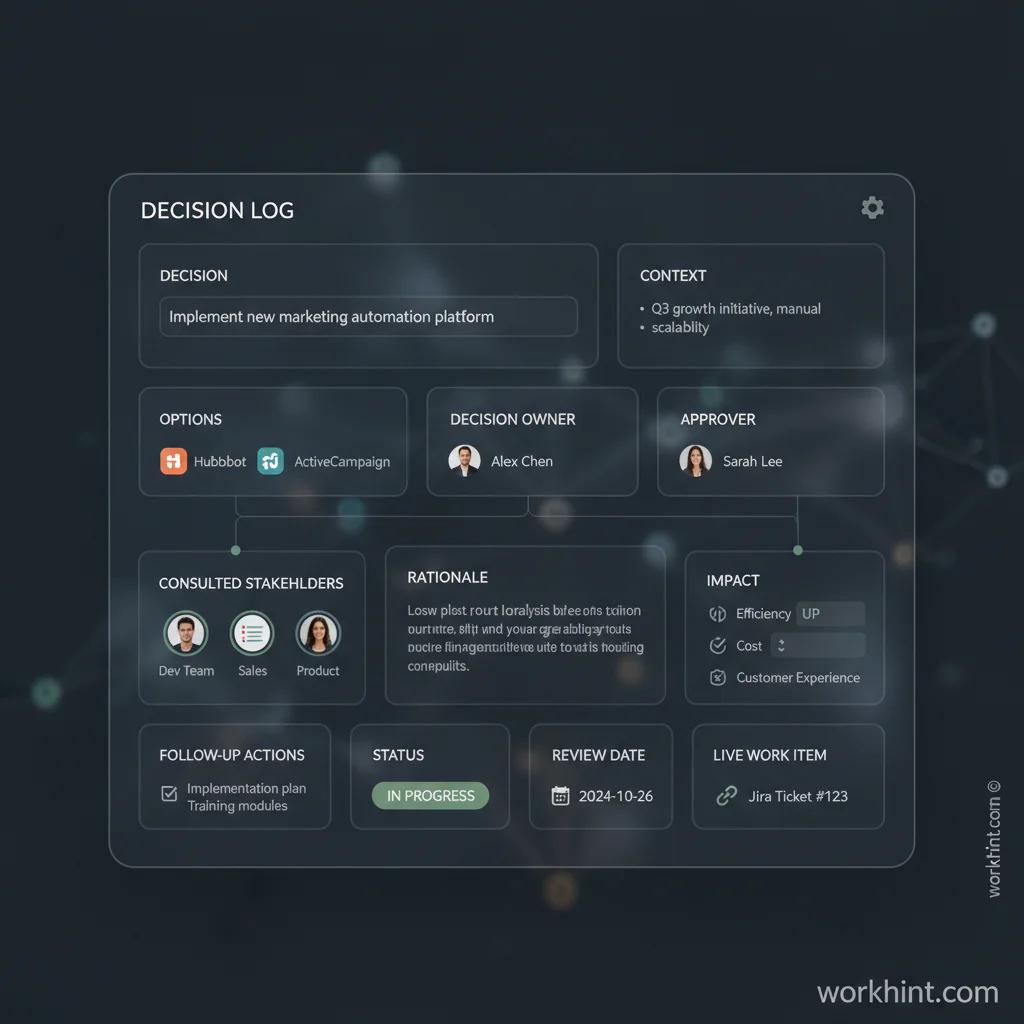
Decision log fields to include
A useful decision log is simple enough to maintain and complete enough to prevent ambiguity. Use this table as a starting model.
| Field | Purpose | Example |
|---|---|---|
| Decision | States the choice in plain language | Use a two-step approval for refunds over $500 |
| Context | Explains the problem or trigger | Refund delays are creating support escalations |
| Owner | Names who is accountable for the decision | Head of Operations |
| Consulted | Captures who gave input | Finance, Support, Legal |
| Rationale | Records why this path was chosen | Balances speed with financial control |
| Impact | Shows what changes because of the decision | Support can resolve small refunds without finance review |
| Follow-up | Turns the decision into action | Update SOP, configure workflow, train support leads |
| Status | Shows whether the decision is proposed, approved, active, changed, or retired | Active |
You can adapt those fields to your operating model. If your team uses DACI, Atlassian defines the roles as Driver, Approver, Contributors, and Informed. Include those fields directly. If your team uses RACI, map accountable and consulted roles into the log. The point is to make decision ownership visible.
A decision log workflow
A decision log works only when the workflow around it is clear. Use this sequence:
- Capture the decision trigger. Name the issue, request, risk, or opportunity that created the need for a decision.
- Assign one decision owner. Input can be shared, but ownership cannot be vague.
- Record options and rationale. Note the realistic alternatives and why the chosen path won.
- Define the execution effect. Identify the workflow, SOP, approval rule, customer promise, task, or dashboard that changes.
- Attach follow-up actions. Every important decision should update work.
- Review stale decisions. Set a review date for decisions that depend on market conditions, policy, staffing, or system limits.
This is where many decision frameworks fail. A recent Harvard Business Review discussion of decision rights argues that tools such as RACI often break down when organizations document roles without changing how decisions happen. A decision log avoids that failure only when it is connected to the work that follows.
Example: a decision log for internal request management
Imagine an operations team receives requests from sales, customer success, finance, and support. The old process is a shared inbox. People argue over priority, approvals happen in side conversations, and requesters chase updates.
The team creates a decision log for rules that shape intake. One entry says customer-impacting requests from strategic accounts are reviewed within one business day. The owner is the COO. The consulted teams are customer success and finance. The rationale is retention risk. Follow-up actions are to add a priority field, create an escalation rule, and update the intake SOP.
That log entry becomes a system change. The decision updates the form, routing rule, dashboard, and review cadence. That is the difference between documenting a decision and operationalizing it.
Common decision log mistakes
- Logging everything. Too many low-value entries make the log impossible to scan.
- Skipping rationale. Without the “why,” future teams reopen the same debate.
- Allowing shared accountability. Multiple contributors are fine; unclear ownership is not.
- Separating the log from execution. A decision that does not update work becomes trivia.
- Never retiring decisions. Old decisions should be reviewed when the operating context changes.
Where Workhint fits
Workhint fits when a decision log needs to become part of the operating system instead of another static file. A team can describe the decision process it wants, then turn that structure into roles, forms, permissions, approval steps, follow-up tasks, dashboards, and reminders.
For example, an operations leader could create a decision object, assign the owner, link consulted stakeholders, attach the affected workflow, and trigger follow-up tasks when the status changes to approved. If a decision changes an SOP, intake rule, assignment model, or escalation path, the change can live beside the work it controls.
FAQ
What is a decision log?
A decision log is a structured record of important decisions, including what was decided, who owned the decision, why it was made, who was consulted, and what follow-up is required.
What decisions should be logged?
Log decisions that affect scope, budget, priority, risk, compliance, ownership, customer commitments, process rules, workflow design, or downstream execution. Do not log every minor preference.
Who owns a decision log?
The operating owner of the work should own the log. In a project, that may be the project manager. In an ongoing business process, it may be the operations lead, program owner, or department head.
Is a decision log the same as meeting notes?
No. Meeting notes capture discussion. A decision log captures the final decision, rationale, owner, impact, and follow-up. You can link meeting notes as context, but the log should stand on its own.
How often should a decision log be reviewed?
Review active decisions during operating reviews, project checkpoints, or process retrospectives. Decisions tied to risk, policy, or customer commitments should have explicit review dates.
Conclusion
A decision log is useful because it turns memory into infrastructure. The goal is to make decisions visible, accountable, and connected to the work they shape.
Start with a simple threshold, a short set of fields, one clear owner, and a workflow that turns approved decisions into action. Then connect the log to the systems where tasks, approvals, SOPs, dashboards, and escalations already live. That is how a decision log becomes a scalable work system.
Leave a Reply