


Workflow ownership fails when responsibilities are documented but nobody owns the next decision, handoff, or result.
How to define roles and responsibilities in a workflow is one of the most practical questions an operations team can answer. A workflow can have clear steps, useful tools, and strong intent, but still stall if people are unsure who decides, who executes, who reviews, who is informed, and who is accountable when the work gets messy.
The goal is to make work scalable, repeatable, and measurable. Every important workflow should show the owner of each outcome, the people doing the work, the decision rights at each gate, and the signals that show whether ownership is working.
What’s in this article?
- Why role clarity matters in workflow design.
- The difference between roles, responsibilities, ownership, and decision rights.
- A practical workflow ownership table.
- A step-by-step method for assigning responsibility without slowing execution.
- Common mistakes that make RACI-style documents fail in real work.
- Where Workhint fits when role clarity needs to become a live operating system.
Why role clarity matters in workflow design
Most workflow problems look like speed problems, but many are ownership problems. A request waits because nobody knows who approves it. A customer handoff breaks because two teams assume the other team owns the next update. A compliance review becomes a bottleneck because the reviewer has influence but no clear service level. A dashboard turns red because the metric has no owner.
Deloitte’s research on decision rights argues that many organizations lack clarity about which decisions must be made, who is responsible for making them, and how the process should work. It also notes that ambiguity around decision responsibility is a primary cause of delay. That is why workflow design should define roles where work actually moves, not only at the department level.
A good workflow role model answers four questions: who owns the outcome, who performs the work, who contributes required input, and who needs visibility.
Roles, responsibilities, ownership, and decision rights
Teams often use these words interchangeably, but they do different jobs inside a work system.
| Term | What it means in a workflow | Practical test |
|---|---|---|
| Role | The function a person or team plays in the workflow. | Can someone explain why this role is involved? |
| Responsibility | The work, input, review, or follow-up the role must complete. | Is the expected action clear enough to perform? |
| Ownership | Accountability for the outcome, quality, timing, and resolution. | Does one person know they must drive the result? |
| Decision rights | Authority to approve, reject, pause, escalate, or change direction. | Can the team name who makes the call? |
RACI is a useful starting point because it separates execution from accountability. Cornell’s RACI guidance defines the matrix around tasks, deliverables, or decisions, and notes that each item should have only one accountable person. Microsoft Learn gives similar roles and responsibilities guidance: list the tasks and roles, assign Responsible, Accountable, Consulted, and Informed values, make sure each task has one accountable person, then share the matrix.
For workflows with complex decisions, RACI may need a decision-rights layer. BCG’s OVIS framework separates Own, Veto, Influence, and Support. That helps when legal, finance, security, or leadership needs a formal role without turning every participant into an approver.
How to define roles and responsibilities in a workflow
Start with the workflow, not the org chart.
- Name the workflow outcome. Write the business result in plain language: approved vendor, completed customer onboarding, resolved incident, published campaign, paid contractor, or fulfilled service request.
- Map the actual steps. Include intake, triage, review, approval, execution, handoff, exception handling, and closure.
- Assign one accountable owner per step or decision. A step can have multiple contributors, but the outcome needs one person or role that drives completion.
- Separate doers from deciders. The person doing the work is not always the person with approval authority. Make that distinction visible.
- Define consulted and informed roles sparingly. Consultation should mean required input, not general interest.
- Add handoff rules. Define what must be true before work moves to the next owner.
- Add escalation rules. Decide what happens when the owner is blocked or the decision exceeds normal authority.
- Connect ownership to metrics. Track cycle time, aging work, rejected requests, rework, missed handoffs, and unresolved exceptions by workflow stage.
- Review after real use. A responsibility model is only useful if it survives operational reality. Revisit it after the workflow has handled real volume.
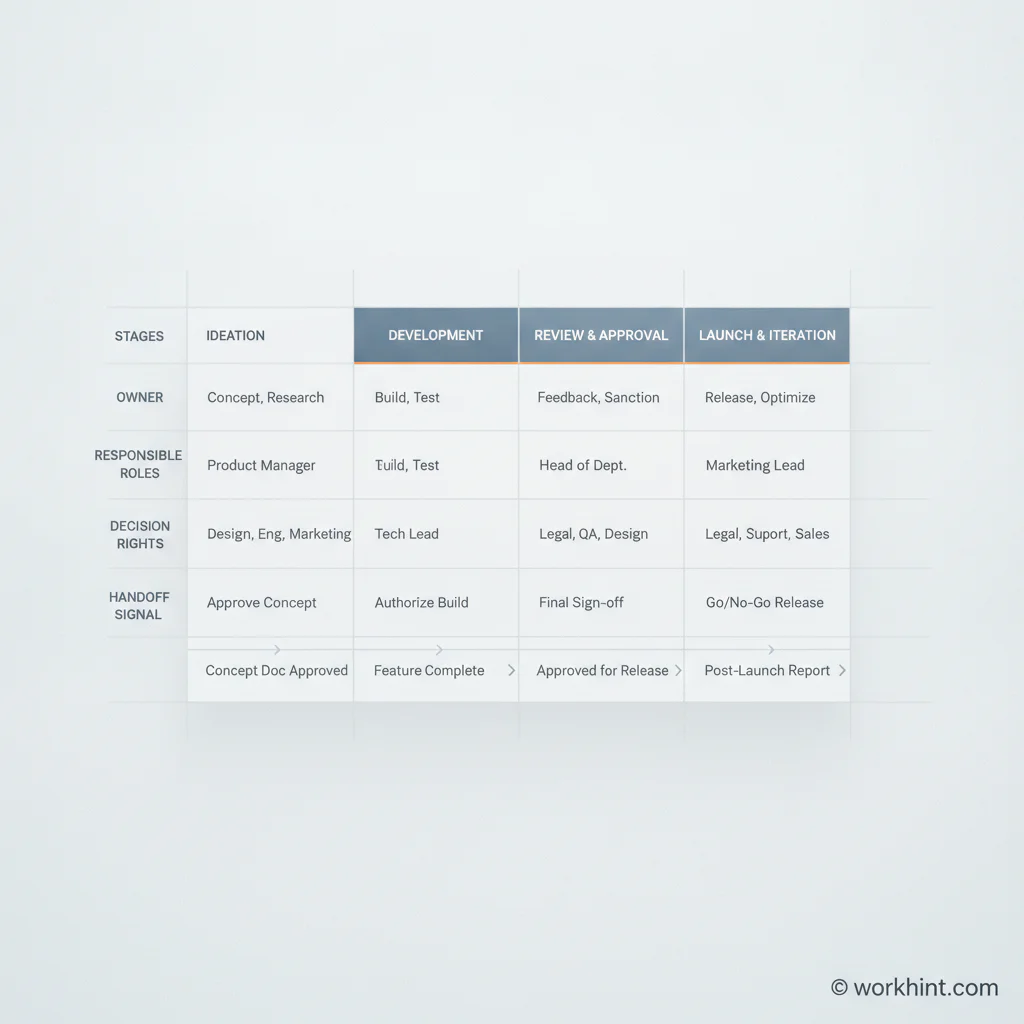
A workflow ownership matrix
Use a compact matrix for each important workflow. Keep it small enough to use during execution, not just planning.
| Workflow stage | Owner | Responsible | Decision right | Handoff signal |
|---|---|---|---|---|
| Intake | Operations lead | Requester | Return incomplete requests | Required fields complete |
| Triage | Workflow manager | Operations coordinator | Assign priority and route | Owner and due date assigned |
| Review | Functional approver | Subject expert | Approve, reject, or request changes | Decision recorded |
| Execution | Delivery owner | Assigned team or provider | Manage work plan | Output ready for acceptance |
| Acceptance | Business sponsor | Requester or customer owner | Accept deliverable | Accepted result or revision request |
| Closure | Operations lead | Workflow manager | Close, renew, or escalate | Status, records, and metrics updated |
Common mistakes
- Assigning ownership to a group: teams can contribute, but accountability needs a named role or person.
- Making everyone consulted: broad consultation slows work and hides whose input is truly required.
- Confusing visibility with approval: leaders may need to be informed without becoming a gate.
- Ignoring exceptions: the normal path is easy to document; the blocked path is where ownership usually breaks.
- Leaving the matrix outside the workflow: a spreadsheet nobody checks will not change execution behavior.
Where Workhint fits
Workhint fits when roles and responsibilities need to become part of the operating system, not a document in a folder. A team can describe the workflow, then structure intake fields, roles, permissions, assignments, approval gates, handoff conditions, escalations, dashboards, and reporting around the real work.
That matters for cross-functional workflows where the requester, operator, approver, finance reviewer, external provider, and executive stakeholder all need different access. Workhint helps turn the responsibility model into a live system: requests move to the right owner, decisions are captured, blocked items surface, and leaders can see where work is aging.
FAQ
What is the best way to define roles and responsibilities in a workflow?
Map the workflow first, then assign one accountable owner for each stage or decision. Separate who performs, who approves, who provides input, and who needs visibility.
Is RACI enough for workflow ownership?
RACI is often enough for straightforward work. More complex workflows may need decision-rights rules, escalation paths, service levels, and handoff criteria so ownership holds up during real execution.
Should every workflow step have one owner?
Every meaningful stage, decision, and handoff should have one accountable owner. Multiple people can execute or contribute, but one role should be responsible for driving the outcome.
How often should roles and responsibilities be reviewed?
Review them after major process changes, team changes, repeated delays, missed handoffs, or new compliance requirements. For high-volume workflows, review ownership metrics monthly or quarterly.
What is the difference between responsible and accountable?
Responsible usually means doing the work. Accountable means owning the result, quality, timing, and decision. One person may be both, but teams should not assume they are the same.
Conclusion
Defining roles and responsibilities in a workflow is not about adding bureaucracy. It is about removing guesswork. When every stage has a clear owner, every decision has authority, every handoff has a completion signal, and every exception has an escalation path, work becomes easier to scale and measure.
The practical test is simple: if a new request entered the workflow tomorrow, would everyone know who owns the next move? If the answer is yes, the workflow has a real operating model. If the answer is no, the system still depends on people chasing clarity after the work has already started.
Leave a Reply