


A good runbook turns repeated operational fire drills into work your team can execute, measure, and improve.
An operations runbook is a practical guide for recurring work, known exceptions, and high-pressure operational moments. It tells the team what triggers the process, who owns each step, what information is required, when to escalate, and how to confirm the work is finished.
Most runbook advice is written for IT incidents, deployments, and site reliability teams. That is useful, but the same discipline applies to customer onboarding, finance exceptions, vendor issues, staffing gaps, service delays, compliance reviews, and any process that depends on memory.
What’s in this article?
- What an operations runbook should include.
- How to choose the right process for a runbook.
- A step-by-step workflow for creating one.
- A practical runbook structure you can adapt.
- Common mistakes that make runbooks stale.
Why an operations runbook matters
Runbooks matter because repeatable work should not depend on whoever remembers the process best. If a customer implementation stalls, a supplier misses a deadline, or a system alert affects service delivery, the team needs a known path before the issue becomes a meeting.
Atlassian describes runbooks as tools operations teams use for routine maintenance and alert response. SolarWinds emphasizes that a strong runbook should be concise and give people the context needed to complete the task. For business operations, that means the runbook should not be a policy binder. It should be an executable operating guide.
The goal is to document the few moments where inconsistent execution creates risk, delay, rework, customer frustration, or avoidable escalation.
Choose the right process first
Start with one operational pattern that happens often enough to standardize and matters enough to manage. Good candidates include recurring approvals, customer handoffs, onboarding steps, incident response, month-end tasks, service recovery, access requests, vendor failures, and deadline-driven compliance work.
A process is ready for a runbook when it has a clear trigger, repeatable steps, known decision points, defined owners, and a measurable outcome. If every case is unique, map the decision framework first. If the process is stable but lives in scattered messages and spreadsheets, it is a strong candidate.
How to create an operations runbook
To create an operations runbook, work backward from the trigger and forward to the verified outcome. The runbook should make the next right action obvious without removing judgment where judgment is required.
- Name the trigger: Define the event that starts the runbook, such as a failed customer handoff, missing approval, service delay, vendor escalation, payment exception, or urgent request.
- Define the outcome: State what finished means. Examples include customer informed, issue resolved, approval recorded, payment released, access removed, replacement scheduled, or risk accepted by the right leader.
- Assign ownership: Identify the runbook owner, step owners, backup owner, approver, escalation contact, and final verifier.
- List required inputs: Capture the data, documents, customer details, system links, deadlines, screenshots, terms, or approvals needed before action starts.
- Write the steps: Use action language. Each step should say who does what, where they do it, what evidence they capture, and what status changes afterward.
- Add decisions and thresholds: Define when the team can continue, pause, escalate, reject, refund, reassign, or trigger a separate workflow.
- Build verification: Add checks that prove the work was completed correctly, not just marked done.
- Set review rhythm: Review the runbook after failures, repeated exceptions, policy changes, system changes, or a fixed monthly or quarterly cadence.
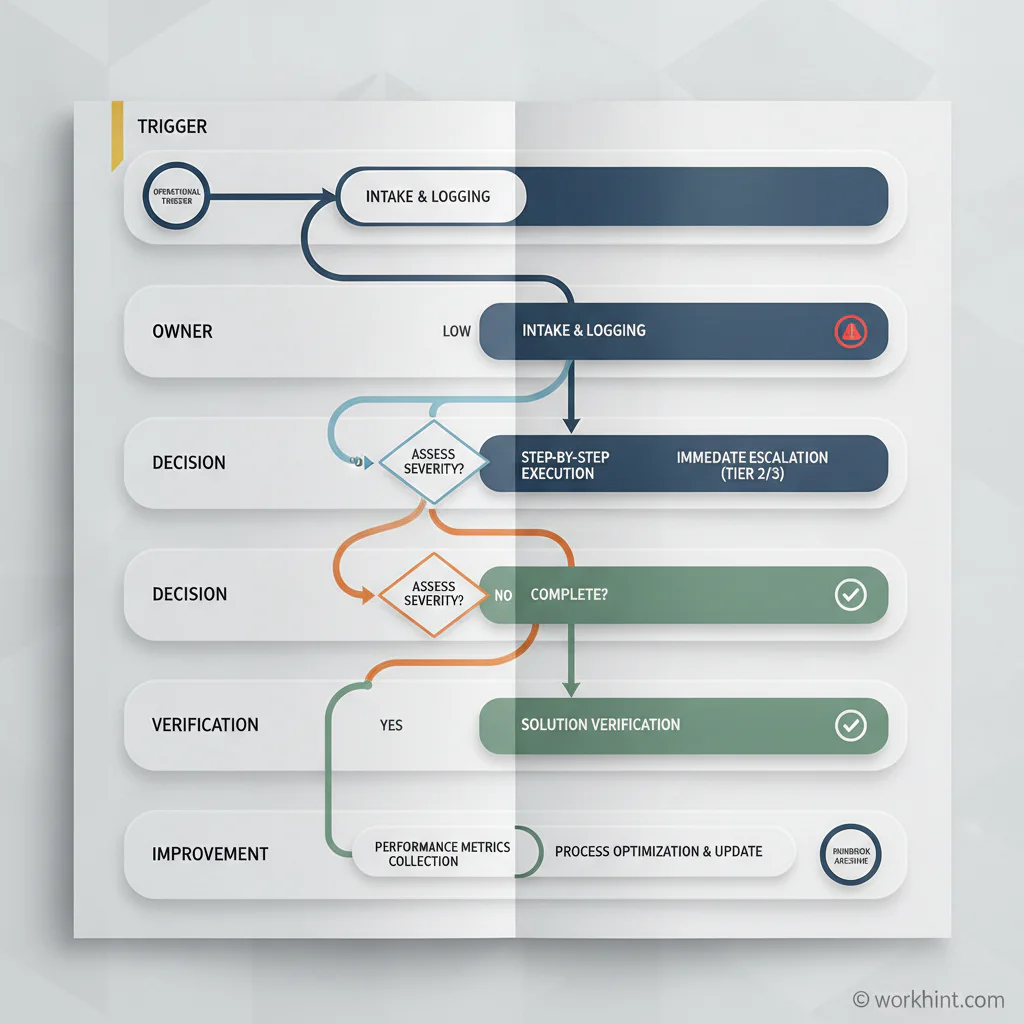
Operations runbook workflow
The runbook should show how work moves. Use this structure as a starting point:
| Runbook section | What to define | Example |
|---|---|---|
| Trigger | What starts the runbook | Customer onboarding task is blocked for more than 24 hours |
| Severity | How priority is assigned | High if launch date, payment, compliance, or customer commitment is affected |
| Owner | Who drives the process | Implementation lead owns the case; operations manager handles escalation |
| Steps | Actions, systems, evidence, and status updates | Confirm blocker, notify customer, assign fix, update launch plan, verify completion |
| Escalation | When authority changes | Escalate if no owner accepts the fix within four business hours |
| Verification | How completion is confirmed | Customer notified, blocker removed, dashboard status updated, next task assigned |
| Improvement | How the runbook gets better | Review repeated blockers every Friday and update the intake form or automation |
This structure connects the document to ownership, decision-making, status visibility, and learning.
Add escalation and measurement
A runbook without escalation rules becomes a checklist that fails at the first uncomfortable decision. Define time limits, severity levels, impact thresholds, spend limits, compliance triggers, and approval authority. For sensitive operations, document who can pause work, restore service, issue credits, notify leadership, or accept risk.
NIST incident response guidance calls for documented procedures covering roles, responsibilities, authorities, prioritization, recovery, and performance measures. Even outside cybersecurity, those categories are useful. They turn a runbook from instructions into a control system.
Measure a small set of indicators: time to acknowledge, time to resolve, reopen rate, escalation rate, customer impact, approval delay, exception volume, and recurring cause. The measure should help the owner improve the process, not create a dashboard nobody uses.
Where automation belongs
Do not automate a runbook before you understand it. Start by making the manual steps clear. Then automate stable, low-judgment steps: routing intake, assigning owners, notifying stakeholders, changing statuses, collecting evidence, checking fields, creating tasks, and generating review reports.
Keep human review where the decision carries risk, customer sensitivity, compliance impact, budget authority, or judgment about tradeoffs. Google’s incident management guidance emphasizes the value of a defined plan for coordinated response and learning. Automation should support that coordination, not hide the process.
Common mistakes to avoid
- Writing for the expert: The runbook should help a trained backup execute, not prove how much the expert knows.
- Skipping ownership: Steps without owners become suggestions.
- Ignoring edge cases: Add the most common exceptions and escalation paths, especially where delays usually happen.
- Forgetting verification: A status change is not the same as completed work.
- Letting the runbook age quietly: Every system, policy, team, and customer promise change should trigger review.
Where Workhint fits
Workhint fits when a runbook needs to become a live work system instead of a static page. A team can use Workhint to turn the trigger into intake, route work by role and permission, assign step owners, collect evidence, manage approvals, send reminders, escalate stalled cases, show status, and report on repeated exceptions.
For example, a customer onboarding runbook can become a Workhint system with intake, role-based tasks, launch approvals, document collection, service handoffs, blocker escalation, customer updates, and completion metrics. The runbook remains the operating logic, while Workhint makes the logic visible and executable.
FAQ
What is an operations runbook?
An operations runbook is a step-by-step guide for recurring operational work, exceptions, or incidents. It defines the trigger, owners, actions, decision points, escalation rules, verification steps, and review process.
What should be included in a runbook?
Include the purpose, trigger, scope, owner, required inputs, systems used, step-by-step actions, decision rules, escalation thresholds, communication rules, verification checks, metrics, and review cadence.
How is a runbook different from an SOP?
An SOP explains the standard way to perform a process. A runbook is more execution-focused and often includes triggers, exception handling, escalation paths, live response steps, and verification.
When should a runbook be automated?
Automate stable steps after the manual process is clear. Good candidates include intake routing, reminders, status changes, task creation, evidence collection, notifications, and reporting. Keep human review for judgment-heavy decisions.
Conclusion
A useful operations runbook is not a document people admire and ignore. It is a practical system for handling repeated work with less confusion, clearer ownership, and better measurement.
Start with one high-friction process, define the trigger and outcome, assign ownership, write the steps, add escalation and verification, then improve it as real cases expose weak points.
Leave a Reply