


The best automations are not shortcuts. They are repeatable work systems with clear owners, rules, exceptions, and metrics.
Workflow automation examples are useful only when they help a team choose what to automate next. A long list of ideas can inspire action, but it can also send teams into tool shopping before they understand the work. The better question is: which repeatable business processes are stable enough, measurable enough, and important enough to automate?
IBM describes workflow automation as using software to execute all or part of a process that would otherwise require manual work. Atlassian’s explanation of business process automation frames the mechanics around triggers, rules, and actions. That is the technical layer. The operating layer is harder: who owns the workflow, what starts it, what data is required, when a human reviews it, and how the business knows whether it worked.
What’s in this article?
- Ten workflow automation examples for business operations
- A practical way to decide which processes are ready to automate
- A table for comparing automation candidates
- Common mistakes that make automated workflows unreliable
- Where Workhint fits when automation needs to become a live operating system
Why workflow automation examples matter
Workflow automation matters because growing companies often scale work by adding people to bad handoffs. A request arrives in email, a manager forwards it to a teammate, someone updates a spreadsheet, an approver misses the message, and the customer or employee waits. Automation can remove that drag, but only if the process is understood first.
A useful automation candidate usually has a clear trigger, predictable steps, repeatable decisions, known owners, and a measurable outcome. A weak candidate has messy inputs, unclear authority, many exceptions, and no agreement on what “done” means. Automating the second type usually creates faster confusion.
McKinsey’s research on automation success argues that organizations need to treat automation as a strategic and operating-model effort, not just a technology rollout. That is the right lens for operations teams: automation should reduce rework, improve visibility, and make accountability easier to manage.
Workflow automation examples to prioritize
Use the examples below as a starting point, not a mandate. The best first automation is usually a high-volume workflow with clear rules and visible pain.
| Process | Automation trigger | What the workflow should do | Metric to watch |
|---|---|---|---|
| Internal request intake | Employee submits a request | Classify request type, route to owner, set priority, show status | Time to first response |
| Invoice approval | Invoice received | Validate supplier, match purchase order, route approval, notify finance | Cycle time to approval |
| Employee onboarding | Offer accepted | Create tasks for HR, IT, manager, payroll, training, and access | Readiness by start date |
| Customer support routing | Ticket created | Detect issue type, assign severity, route to queue, escalate SLA risks | Resolution time |
| Project intake | New project requested | Collect scope, score priority, request approvals, assign next owner | Approved work started on time |
| Vendor onboarding | Vendor selected | Collect documents, run reviews, approve access, track renewal dates | Days to approved vendor |
| Expense reimbursement | Expense submitted | Check policy, route exceptions, approve, send payment status | Rework rate |
| Content or asset review | Draft submitted | Route legal, brand, product, or manager review based on risk | Review turnaround |
| Incident escalation | Issue severity changes | Notify responsible roles, open response tasks, track decisions | Time to escalation |
| Recurring reporting | Reporting period closes | Pull inputs, assign commentary, flag missing data, publish dashboard | Report accuracy and timeliness |
How to choose the right automation first
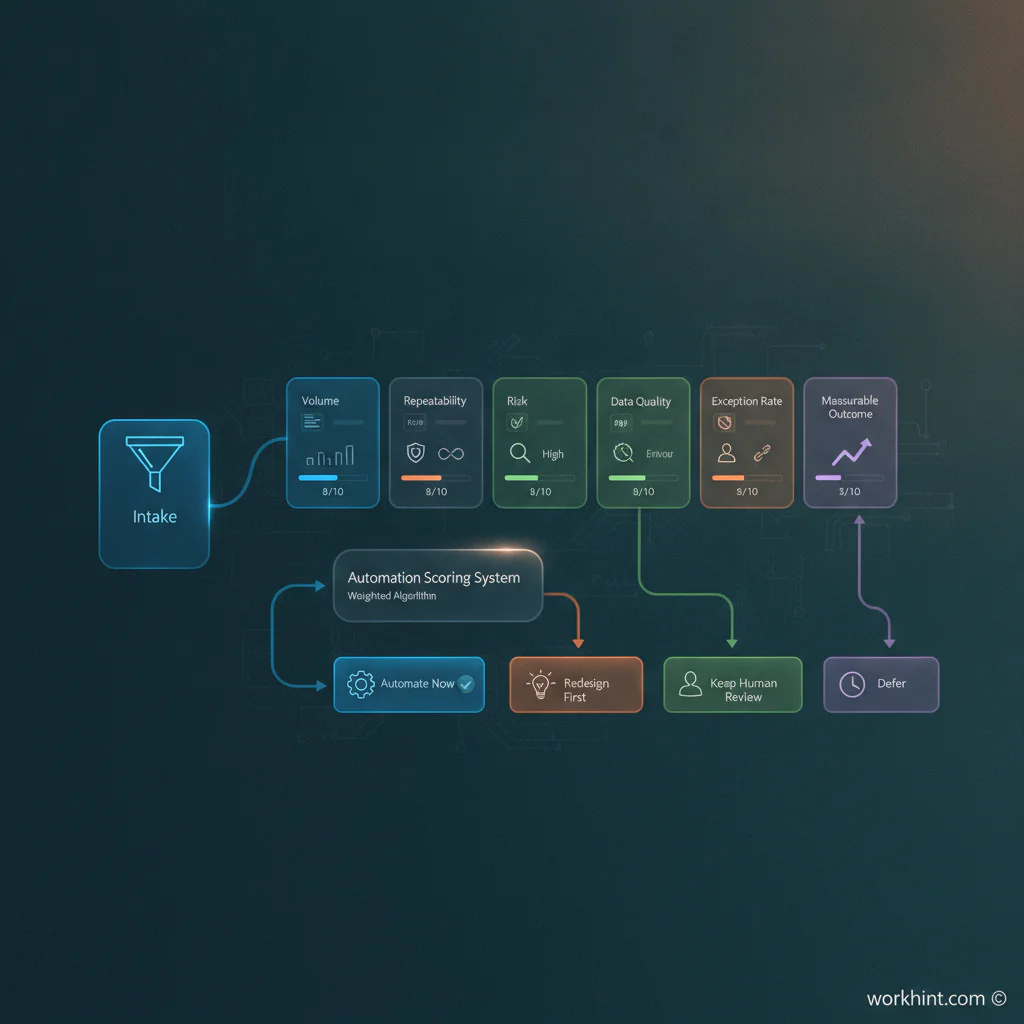
Start with the work, not the software. Pick three candidate workflows and score each one against six questions:
- Volume: Does this happen often enough to justify system design?
- Repeatability: Do most cases follow a similar path?
- Business impact: Does the workflow affect revenue, cost, service quality, compliance, or team capacity?
- Ownership: Is there a clear person or role accountable for the outcome?
- Data quality: Are the required inputs known and collectable at the start?
- Exception handling: Does the team know when automation should pause for human review?
The strongest first candidate is not always the biggest process. It is the one where automation can replace chasing, copying, reminding, routing, and status checking without removing necessary judgment.
Turn the example into an operating workflow
Once you choose a process, design the workflow in this order. First, define the trigger. Second, capture the minimum data needed to route the work correctly. Third, assign ownership by role, not by vague team name. Fourth, define approval rules, service targets, and escalation paths. Fifth, decide which steps can run automatically and which require human review. Sixth, measure the outcome in a dashboard or operating review.
This is where many automation projects fail. They automate a notification but leave the decision, exception, and recordkeeping outside the system. A reminder is helpful, but a work system should also show what is open, who owns it, what is blocked, and what changed after the automation went live.
Common mistakes
- Automating a broken process: If the workflow is unclear, map it before automating it.
- Skipping ownership: Every automated step still needs an accountable owner.
- Ignoring exceptions: The workflow needs rules for edge cases, missing data, and human review.
- Using automation as surveillance: Measure flow, quality, and responsiveness rather than micromanaging activity.
- Failing to review performance: Automated workflows need a review rhythm so the team can adjust rules as work changes.
Where Workhint fits
Workhint fits when workflow automation needs to become a connected work system instead of a stack of disconnected automations. A team can describe the business process it wants to improve, then use Workhint to shape the roles, intake forms, permissions, assignments, approval steps, escalation paths, dashboards, and automation logic around that work.
That matters because automation is rarely just a trigger and an action. Internal request management may need intake, routing, owners, deadlines, approval rules, comments, reporting, and follow-up. Vendor onboarding may need documents, reviews, access approvals, renewal reminders, and payment readiness. Workhint helps connect those parts so the automation supports the operating model rather than sitting beside it.
FAQ
What are good workflow automation examples for operations teams?
Good examples include internal request intake, invoice approvals, employee onboarding, vendor onboarding, customer support routing, incident escalation, project intake, expense reimbursement, asset review, and recurring reporting.
How do you know if a process is ready for automation?
A process is ready when it has a clear trigger, repeatable steps, known owners, good input data, measurable outcomes, and defined exception rules. If those elements are missing, redesign the process first.
What is the difference between workflow automation and business process automation?
Workflow automation usually focuses on moving work through steps, owners, rules, and systems. Business process automation is often broader and may cover end-to-end processes across departments, data, approvals, and reporting.
Should every workflow be automated?
No. Workflows with high judgment, low volume, unclear rules, or frequent exceptions may need better documentation, ownership, or human review before automation makes sense.
What metric should automated workflows track?
Track the metric tied to the business outcome. Common choices include cycle time, time to first response, rework rate, SLA attainment, queue age, approval time, error rate, and completion quality.
Conclusion
Workflow automation examples are only useful when they lead to better operating design. Start with repeatable work that has clear pain, visible volume, and a measurable outcome. Define the trigger, owner, rules, exceptions, and review rhythm before choosing tools. The goal is not to automate for its own sake. The goal is to build work systems that make execution more scalable, repeatable, and measurable.
Leave a Reply