

A useful process map does more than show steps; it exposes ownership, handoffs, decisions, delays, and improvement opportunities.
Learning how to create a process map is useful for any team trying to improve messy work. A process map shows how work moves from trigger to outcome: who starts it, what steps happen, where decisions are made, what systems are used, where handoffs occur, and where the process breaks down.
IBM describes process mapping as a way to choose a process, involve people who understand it, outline the start and end points, and capture steps, inputs, outputs, metrics, and stakeholders. That is a good baseline. The bigger opportunity is turning the map into a working system that improves execution.
What’s in this article?
- Why process maps matter
- How to create a process map
- What to include in the map
- How to use the map to improve operations
- Where Workhint fits
- Frequently asked questions
Why process maps matter
Teams often think they understand how work happens until they draw it. The map reveals that approvals happen in chat, ownership changes by exception, data is copied between tools, and customers wait while internal teams figure out who decides.
A good process map helps founders, operations leaders, HR teams, project managers, and business owners see the actual operating system behind the work. It also creates a shared language. Instead of debating symptoms, the team can point to the exact step, handoff, decision, role, or system that causes delay.
APQC notes that process maps show how steps align to the roles that perform them and how work moves between people, departments, systems, or other actors. That role-and-handoff view is what makes process mapping useful for improving execution.
How to create a process map
Start with one process that matters. Choose a workflow that affects revenue, customer experience, compliance, hiring, onboarding, payments, delivery, or team capacity. Do not map the entire company first.
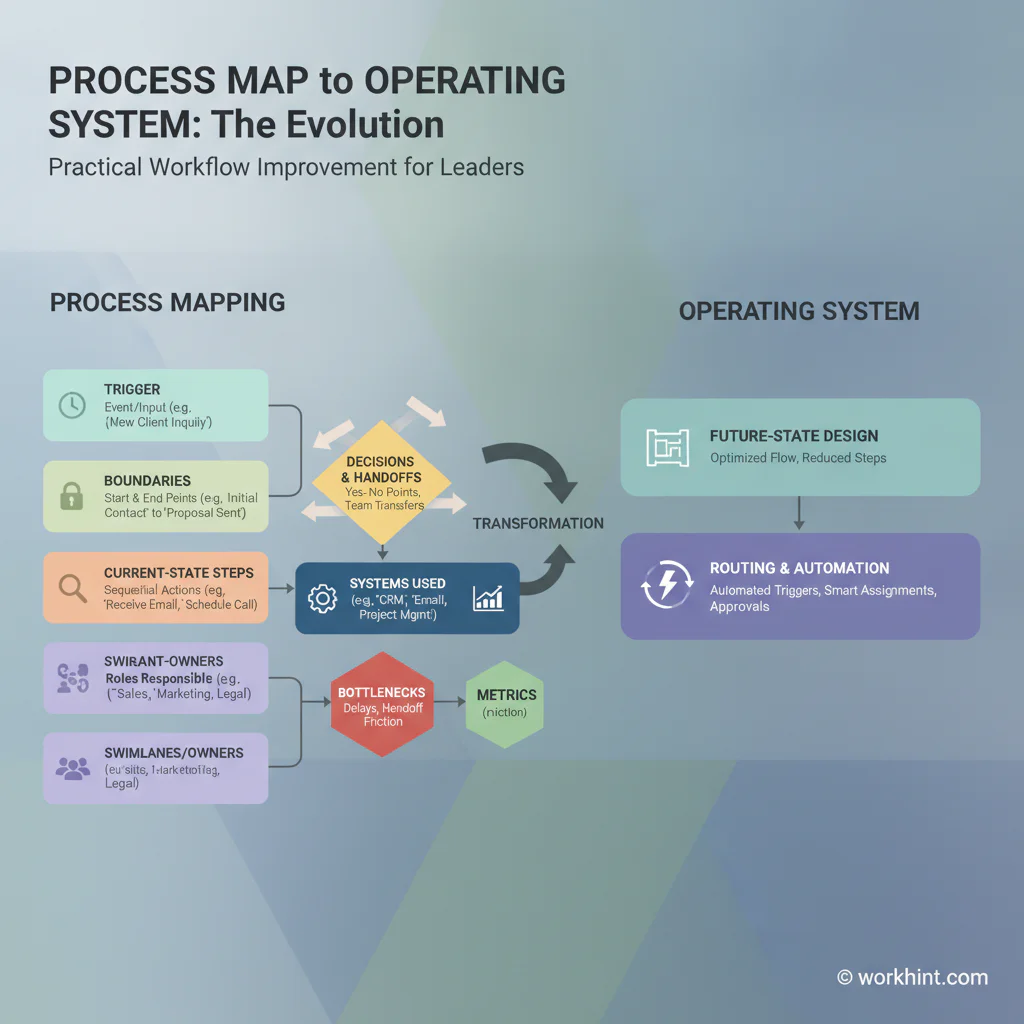
- Define the trigger and outcome. Name what starts the process and what finished means.
- Set boundaries. Decide where the map starts, where it ends, and what is out of scope.
- Bring in the people who do the work. Include submitters, reviewers, approvers, operators, system owners, and anyone who handles exceptions.
- Map the current state. Capture what actually happens today, not what the policy says should happen.
- Add owners and systems. For each step, record who owns it and where the work happens.
- Mark decisions and handoffs. Identify approval points, routing rules, dependencies, and escalation triggers.
- Review delays and rework. Look for waiting time, duplicate entry, unclear ownership, missing inputs, and manual follow-up.
- Design the improved future state. Keep the parts that work, remove unnecessary steps, clarify ownership, and define what should be automated.
If the process is simple, a basic flowchart is enough. If work crosses teams, use swimlanes so each role has a lane. If you need a formal standard, BPMN from the Object Management Group provides a standard notation for business process diagrams that can be understood by business stakeholders and precise enough for technical implementation.
What to include in the map
The map should be practical enough to improve work, not just attractive enough to present. Include the information that helps people operate the process.
| Element | Question to answer | Why it matters |
|---|---|---|
| Trigger | What starts the process? | Prevents work from entering through random channels. |
| Outcome | What counts as complete? | Aligns the team on the purpose of the workflow. |
| Owner | Who is accountable for each step? | Reduces stuck work and handoff confusion. |
| Decision | Who approves, rejects, routes, or escalates? | Makes authority visible instead of informal. |
| System | Where does the step happen? | Shows tool fragmentation and duplicate data entry. |
| Metric | How will performance be measured? | Turns the map into an improvement baseline. |
How to use the map to improve operations
After the map is complete, mark every delay, unclear owner, repeated data entry, missing approval, unnecessary approval, and manual reminder. These are the improvement targets.
Then decide what kind of change each issue needs. Some problems need a policy change. Some need a clearer owner. Some need a better intake form. Some need a dashboard. Some need automation. Some need fewer steps, not more software.
The best next version of the process should define the intake path, required fields, routing rules, owners, approvers, service-level expectations, escalation rules, status visibility, and reporting. That is where a static process map becomes a work system.
Where Workhint fits
Workhint fits after the team understands the process well enough to operationalize it. The process map can become a live system with intake forms, role-based permissions, assignments, approvals, dashboards, automated routing, status updates, escalation rules, and reporting.
For example, a vendor onboarding process map can become a Workhint system where the business owner submits the request, procurement reviews supplier details, legal checks terms, finance approves payment setup, IT grants limited access, and managers track readiness from one dashboard. The map defines the operating logic; Workhint turns that logic into the day-to-day workflow people actually use.
FAQ
What is a process map?
A process map is a visual representation of how work moves from a starting trigger to a completed outcome, including steps, owners, decisions, systems, and handoffs.
What is the easiest way to create a process map?
Start with one workflow, define the trigger and final outcome, list the real current steps, add owners and systems, then review the map with the people who perform the work.
Should I map the current process or the ideal process?
Map the current process first. If you skip straight to the ideal version, you may miss the real bottlenecks, workarounds, handoffs, and system gaps causing the problem.
What is the difference between a process map and a workflow?
A process map documents how work flows. A workflow is the operating path people follow to execute the work. A good process map should help you design or improve the workflow.
When should a process map become an automated workflow?
Automate after the team agrees on the process, owners, routing rules, required inputs, and exceptions. Automating a broken process usually makes the problem move faster.
Conclusion
The practical answer to how to create a process map is to document the real flow of work, then use that map to clarify ownership, decisions, systems, metrics, and improvement priorities. The map is not the final output. The final output is a better work system: clearer intake, fewer handoff gaps, faster decisions, better visibility, and a process people can actually run.
Leave a Reply