


A good vendor approval process lets teams move fast without letting risky vendors slip into systems, contracts, or payments.
A vendor approval process is the workflow a business uses to evaluate, approve, and activate vendors before they start work, access systems, receive purchase orders, or get paid. Vendors can touch customer data, financial records, facilities, operations, brand standards, employees, contractors, and strategic projects.
Most vendor approval advice focuses on procurement paperwork. That is useful, but incomplete. The real operating problem is coordination: procurement, finance, legal, IT, compliance, and the requesting team all need different evidence before the vendor is ready.
What’s in this article?
- Why vendor approval matters
- The vendor approval workflow
- A practical approval checklist
- How to match review depth to vendor risk
- Common failure points
- Where Workhint fits
- Frequently asked questions
Why vendor approval matters
Vendors create leverage, but they also create third-party risk. A cleaning provider may need building access. A software vendor may process customer information. A staffing agency may place workers inside daily operations. A marketing agency may handle confidential launches. A logistics partner may affect delivery promises.
That is why a vendor approval process should happen before the vendor becomes operational. Once a vendor is already serving the business, missing documents get treated as cleanup, and access or payment setup can outrun the contract.
For security-sensitive vendors, the need for structured review is not theoretical. NIST supply chain risk management guidance emphasizes identifying, assessing, and mitigating cybersecurity risks across products and services. The FTC Safeguards Rule also highlights service provider oversight for covered financial institutions. The operating lesson is simple: know what a vendor touches before approving them.
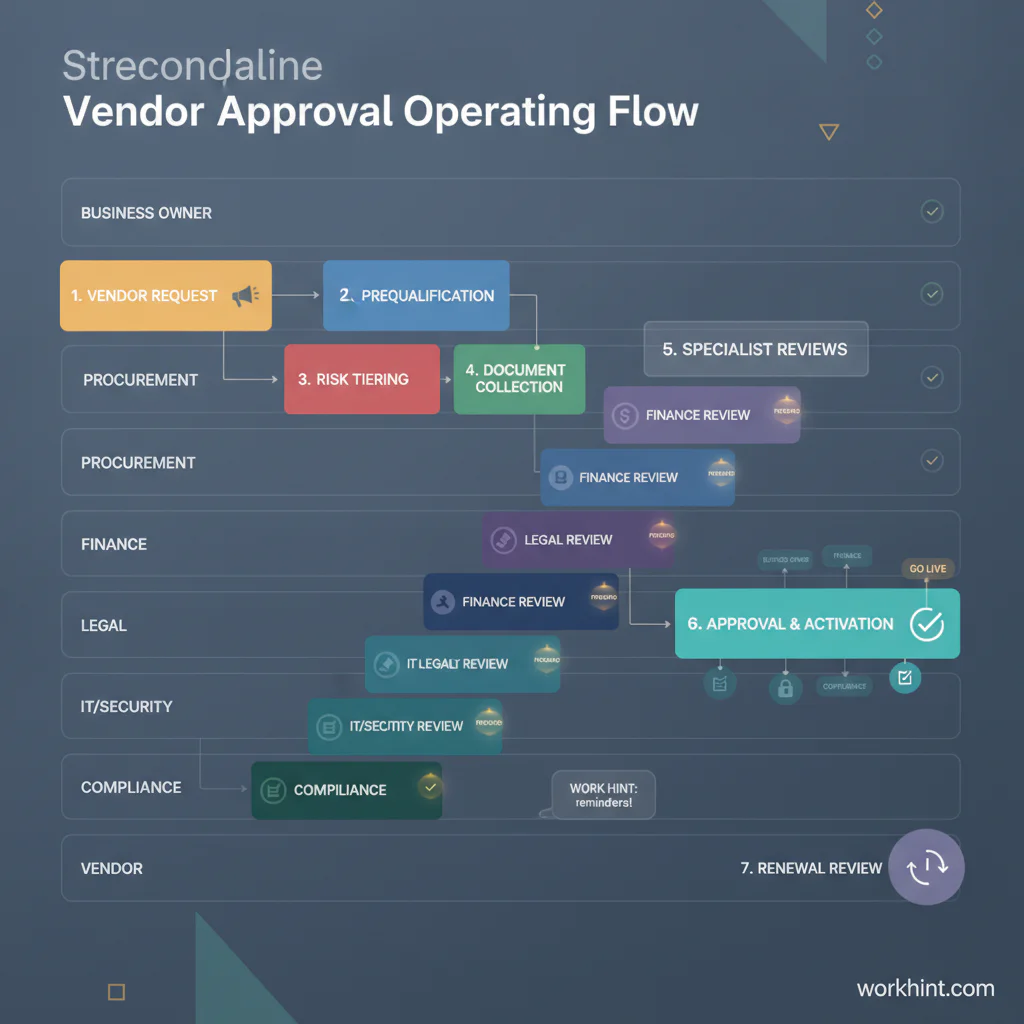
The vendor approval workflow
The best workflow is simple enough for teams to use and structured enough to create an audit trail. Each stage should have an owner, a required input, and a clear decision.
| Stage | Owner | Decision |
|---|---|---|
| Vendor request | Business owner | Why this vendor is needed, what work they will do, expected spend, and timeline. |
| Prequalification | Procurement or operations | Whether the vendor fits the need, category, budget, location, and basic requirements. |
| Risk tiering | Procurement, compliance, or IT | Whether the vendor is low, medium, or high risk based on access, spend, data, geography, and criticality. |
| Document collection | Vendor owner | Whether required tax, insurance, security, certification, and business documents are complete. |
| Specialist review | Legal, finance, IT, security, or compliance | Whether contract terms, payment setup, system access, and risk controls are acceptable. |
| Approval and activation | Approver group | Whether the vendor can be added to systems, receive a PO, start work, or access tools. |
| Renewal review | Vendor owner | Whether documents, performance, pricing, access, and risk status should be renewed or changed. |
This structure prevents the mistake of treating vendor approval as a single yes-or-no decision. A vendor may be approved for one service, location, spend limit, data scope, or contract period without being approved for everything.
Vendor approval checklist
The checklist should change by vendor type, but most companies need a core set of fields and documents. For U.S. vendors, finance teams often request taxpayer identification details using IRS Form W-9 instructions and related company processes before issuing reportable payments.
- Business need: requesting team, vendor owner, use case, budget, expected start date, and alternative options considered.
- Vendor profile: legal name, business address, website, ownership details where required, primary contacts, and service category.
- Commercial terms: pricing, contract length, renewal terms, cancellation rights, service levels, purchase order requirements, and invoice rules.
- Finance setup: tax form, banking or payment method, currency, payment terms, remittance contact, and spend limits.
- Risk evidence: insurance, licenses, certifications, sanctions or restricted-party checks where appropriate, and conflict-of-interest disclosures.
- Security and access: systems used, data processed, user permissions, authentication requirements, data retention, and access end date.
- Operational readiness: onboarding contact, communication channel, escalation path, performance measures, and renewal review date.
Match review depth to vendor risk
A slow approval process usually happens when every vendor receives the same review. A low-risk office supply vendor does not need the same scrutiny as a payroll provider, data processor, staffing partner, or facilities vendor with building access. The better approach is risk-tiered approval.
| Risk tier | Typical vendor | Review depth |
|---|---|---|
| Low | Commodity supplier with no system access and low spend. | Basic profile, tax/payment setup, requester approval, and spend limit. |
| Medium | Recurring service provider, agency, staffing partner, or vendor with operational impact. | Contract review, insurance, performance owner, payment controls, and renewal date. |
| High | Vendor with customer data, financial access, critical operations, regulated work, or cross-border exposure. | Legal, security, compliance, finance, data handling, executive approval, and recurring risk review. |
Risk tiering also improves the vendor experience. Vendors should not have to guess why approval is taking longer. If the vendor is high risk, the process should explain which reviews are required and what evidence is missing.
Common vendor approval mistakes
The first mistake is approving the vendor before defining the work. Without scope, teams cannot evaluate risk, price, access, contract terms, or performance. The second mistake is collecting documents without assigning owners. A shared inbox full of W-9s, insurance certificates, security questionnaires, and contracts is not a process.
The third mistake is skipping system access review. A vendor can be commercially approved but still not ready for tool access or data exposure. The fourth mistake is treating approval as permanent. Insurance expires, security posture changes, vendor contacts leave, pricing renews, and services expand. Approval should have a renewal date and an owner.
Where Workhint fits
Workhint fits when vendor approval needs to become a repeatable operating system instead of a chain of emails and spreadsheets. A team can build an approval flow that starts with vendor intake, routes risk-tiered reviews, collects documents, tracks what is still missing, and prevents activation until required approvals are complete.
For external workforce operations, this matters because vendors often sit beside contractors, agencies, staffing firms, and service partners. Workhint can connect vendor onboarding, role-based access, approvals, document collection, payment readiness, renewal reminders, and reporting in one workflow. The goal is to make the right approval path visible, fast, and auditable.
FAQ
What is a vendor approval process?
A vendor approval process is the workflow a company uses to evaluate, document, approve, and activate vendors before they start work, access systems, receive purchase orders, or get paid.
Who should own vendor approval?
Ownership is usually shared. The requesting team owns the business need, procurement or operations owns vendor intake, finance owns payment setup, legal owns contract review, and IT or security owns access and data risk.
What documents are needed to approve a vendor?
Common documents include tax forms, payment details, contract or terms, insurance certificates, licenses, security documentation, compliance evidence, and service-level expectations. The exact list depends on vendor type and risk.
How long should vendor approval take?
Low-risk vendors can often be approved quickly when the request is complete. High-risk vendors take longer because contract, data, security, compliance, and executive approvals may be required.
How do you speed up vendor approval without adding risk?
Use a standard intake form, assign a risk tier early, route only the required reviews, collect documents in one place, set approval deadlines, and keep the vendor owner accountable for missing information.
Is vendor approval the same as vendor onboarding?
No. Vendor approval decides whether the vendor is cleared to work with the business. Vendor onboarding activates the approved vendor through system setup, communication, purchase order rules, payment setup, and operating expectations.
Conclusion
A practical vendor approval process gives teams a clear way to say yes, no, or not yet. It does not slow every vendor through the same heavy review. It asks the right questions early, routes the right owners, documents the decision, and keeps approval tied to scope, access, payment, and renewal. When the workflow is clear, businesses can work with outside partners faster while keeping risk, spend, documents, and accountability under control.
Leave a Reply