


A timesheet only works when it captures the hours, approvals, and exceptions payroll actually needs.
A timesheet template gives employees, contractors, managers, and payroll teams a shared record of when work happened, where it happened, and what needs approval. The simplest version can be a weekly spreadsheet. The useful version is a control point: it prevents missing breaks, unapproved overtime, unclear billable hours, and late payroll handoffs.
This resource is written for small businesses, operations teams, agencies, staffing teams, field teams, and contractor-heavy companies that need something more practical than a blank time card. It is not legal advice, and wage-and-hour rules vary by jurisdiction, worker type, and industry. Use the template as an operating baseline, then confirm your requirements with payroll, HR, and counsel when needed.
What’s included
- A weekly timesheet template you can copy into a spreadsheet or operations system.
- The fields to include for payroll, project tracking, client billing, and approvals.
- A simple workflow for employee submission, manager review, exception handling, and payroll handoff.
- Common mistakes that make timesheets hard to trust.
How to use this resource
Start by choosing the main purpose of the timesheet. Payroll timesheets need accurate daily and weekly hours. Client-billing timesheets need project, client, task, and billable status. Contractor timesheets often need milestone, SOW, approval, and invoice references. Field or shift teams may need location, job code, break records, and supervisor signoff.
The U.S. Department of Labor says covered employers must keep records that include accurate information about hours worked and wages earned for covered nonexempt workers. Its recordkeeping guidance does not require one specific form, which is why a simple template can work if it is accurate, complete, and consistently reviewed.
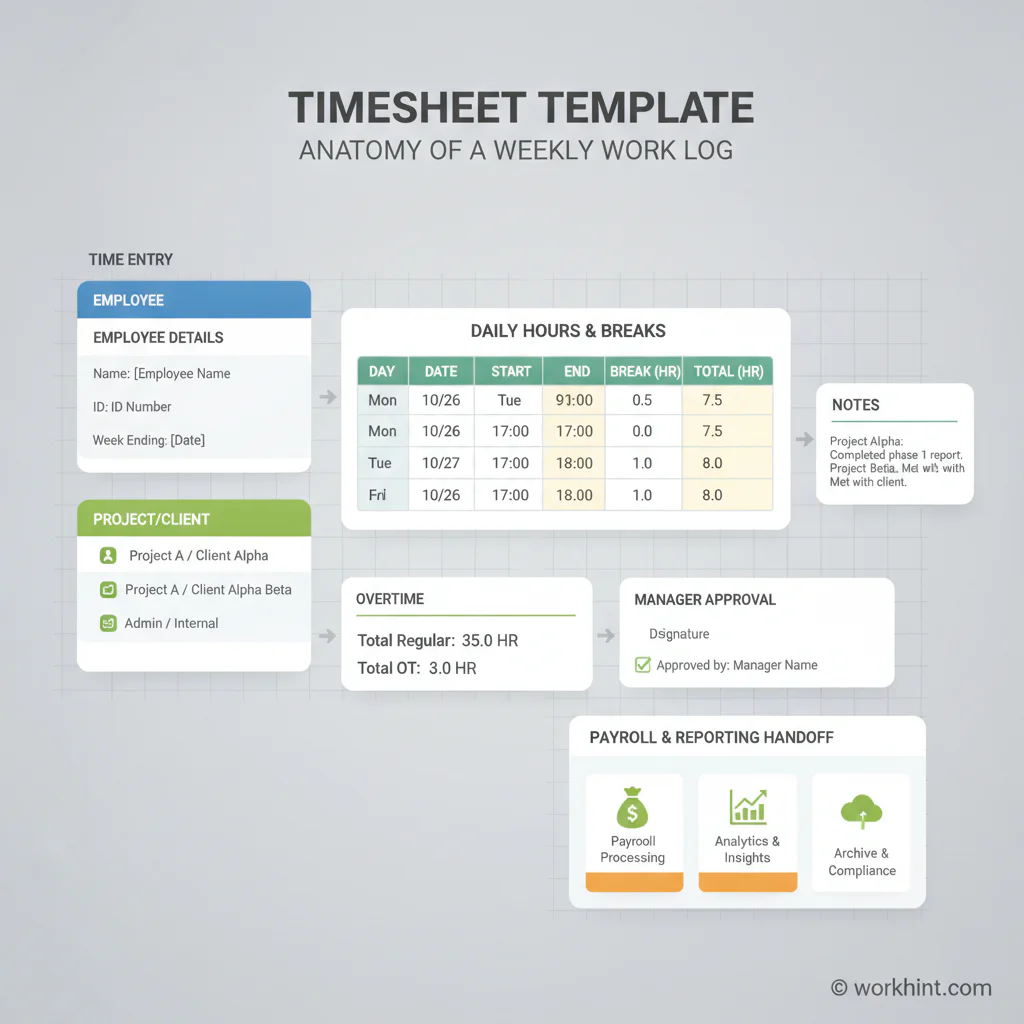
Timesheet Template
| Field | What to capture | Why it matters |
|---|---|---|
| Worker details | Name, worker ID, role, department, manager | Connects the record to the right person, team, and approval owner. |
| Period | Week start date, week end date, pay period | Prevents payroll cutoff confusion and duplicate submissions. |
| Work classification | Employee, contractor, project worker, volunteer, intern | Helps route the record to the right payroll, invoice, or compliance process. |
| Project or client | Client name, project code, job site, cost center, SOW reference | Supports billing, job costing, budget tracking, and margin review. |
| Daily hours | Start time, end time, unpaid break, regular hours, overtime hours | Creates a clean basis for pay, overtime review, and exception handling. |
| Work notes | Task summary, deliverables completed, blocker notes | Gives managers context without turning the timesheet into a status report. |
| Worker certification | Submission date and confirmation that hours are accurate | Creates accountability before manager review. |
| Manager approval | Approved, rejected, needs correction, approver name, approval date | Turns time tracking into an auditable business process. |
Weekly timesheet layout
Use one row per day when workers usually have one shift per day. Use multiple rows per day when people work across projects, clients, jobs, or split shifts.
| Day | Project/client | Start | End | Break | Regular | Overtime | Notes |
|---|---|---|---|---|---|---|---|
| Monday | |||||||
| Tuesday | |||||||
| Wednesday | |||||||
| Thursday | |||||||
| Friday | |||||||
| Saturday/Sunday |
Approval workflow
- Worker submits time: require submission by a fixed cutoff, such as Friday afternoon or Monday morning.
- System checks basics: flag missing days, impossible entries, missing breaks, unassigned projects, or overtime.
- Manager reviews exceptions: approve clean timesheets quickly and focus attention on corrections.
- Payroll receives approved records: only approved time should move into payroll, invoicing, or client billing.
- Operations reviews patterns: look for repeated late submissions, unplanned overtime, under-budgeted projects, or approval bottlenecks.
The Department of Labor’s FLSA recordkeeping fact sheet describes retention expectations for payroll records and records used for wage computations, including time cards and work schedules. The IRS also says in Publication 15 that employment tax records should be kept for at least four years. Your internal retention policy should account for both payroll operations and legal requirements.
Example application
A marketing agency with employees and contractors might use the same core weekly timesheet, but route each submission differently. Employees submit regular and overtime hours to their manager. Contractors submit hours against a project code and statement of work. Client-facing work requires billable status and a short task note. Internal work is still tracked, but it is not pushed to an invoice.
That structure lets the agency answer four questions quickly: what should payroll pay, what should finance bill, which projects are consuming more hours than expected, and which managers are holding up approvals.
Common mistakes
- Using one open notes field for everything: separate hours, breaks, projects, approvals, and exceptions so the data can be checked.
- Ignoring overtime until payroll day: overtime should be visible before approval, not discovered after the cutoff.
- Letting managers approve by email: approval should be attached to the timesheet record, not buried in a thread.
- Mixing employee and contractor workflows: the same sheet can capture time, but routing, documentation, and payment processes may differ.
- Rounding without review: federal regulations on time clocks and rounding focus on whether employees are properly compensated over time. Do not use rounding rules casually.
Where Workhint fits
A spreadsheet works when the team is small and the approval path is simple. It starts to fail when people work across clients, shifts, locations, projects, contractors, and managers. Workhint helps turn the timesheet template into a live workflow: workers submit time, managers review exceptions, approvals route by role, documents and SOWs stay connected, and payroll or finance can see what is ready for processing.
For teams coordinating flexible or external work, the real gain is not a prettier form. It is a connected work system where intake, assignments, schedules, time, approvals, payments, and reporting stay tied together.
FAQ
What should a timesheet template include?
At minimum, include worker name, pay period, daily hours, breaks, project or department, overtime, notes, worker confirmation, manager approval, and approval date. Add client, job site, or SOW fields when time affects billing or contractor payment.
Should contractors use a timesheet?
Contractors can use timesheets when they are paid hourly or when a project requires hour tracking. Keep the workflow aligned with the contract or statement of work, and avoid managing contractors in a way that conflicts with their classification.
Is a spreadsheet timesheet enough?
It can be enough for a small team if entries are complete, approvals are clear, and records are retained properly. Once you need routing, reminders, exception checks, or reporting, a workflow system is usually more reliable.
How often should timesheets be approved?
Weekly approval is common because it catches errors before payroll or client billing. Daily review may be better for field, shift, healthcare, event, or high-overtime environments.
Conclusion
A good timesheet template is simple enough for workers to complete and structured enough for managers, payroll, finance, and operations to trust. Capture the essentials, separate normal time from exceptions, attach approvals to the record, and review patterns over time. When spreadsheets become a bottleneck, turn the template into a workflow so time tracking becomes part of how the business actually runs.
Leave a Reply