


Most workflow problems are not people problems; they are process problems that have never been analyzed clearly.
Business process analysis is the discipline of studying how work actually moves through a company, finding where it breaks, and redesigning the workflow so execution becomes more repeatable. It is useful when a process feels slow, inconsistent, approval-heavy, or dependent on one person who knows how everything works.
The best analysis does more than produce a diagram. It gives operators enough evidence to decide what should be standardized, what should stay flexible, what should be automated, and who should own each step. IBM describes business process analysis as a detailed examination of operational processes to identify what works, what needs improvement, and how changes should be made. That is the right starting point, but the real value comes when the analysis becomes a better operating system.
What is in this article?
- A practical business process analysis workflow
- The evidence to collect before changing a process
- A table for translating findings into system decisions
- Common mistakes that make analysis performative
- Where Workhint fits when the process needs to become a live workflow
Why business process analysis matters
When teams skip analysis, they usually redesign around the loudest symptom. A delayed customer handoff becomes “send more reminders.” A messy intake process becomes “add another form.” A slow approval becomes “ask leaders to respond faster.” Those fixes may help briefly, but they rarely change the system that created the problem.
Business process analysis forces the team to look at work as a connected chain: trigger, intake, decision, assignment, execution, review, handoff, measurement, and improvement. Frameworks such as APQC’s Process Classification Framework give organizations a shared language for process management, which matters because teams often use the same words to describe different work.
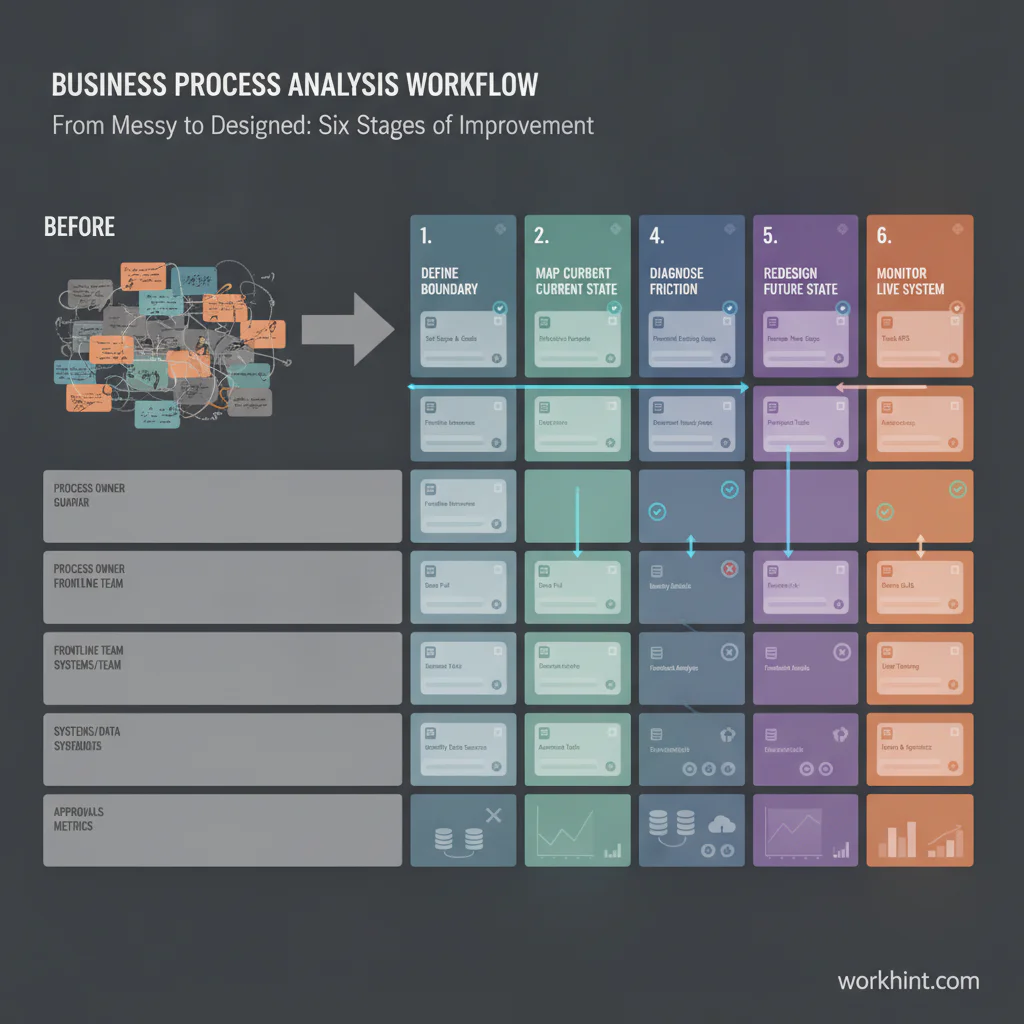
Business process analysis workflow
Use this workflow when a process is important enough to affect revenue, customer experience, compliance, delivery speed, team capacity, or decision quality.
1. Define the process boundary
Start with a narrow process, not an entire department. Name the trigger, the first step, the final output, and the customer of the process. “Customer onboarding” is too broad. “Move a signed customer from contract to first live workflow” is easier to analyze.
2. Collect evidence from the people and systems involved
Do not rely only on the documented SOP. Review forms, tickets, emails, approvals, spreadsheets, meeting notes, handoff messages, cycle times, backlog data, and exceptions. Interview the people who do the work and the people who receive the output. Ask where they wait, where they rework, where they guess, and where they leave the official process.
3. Map the current state
Create a simple current-state map that shows steps, owners, systems, decisions, dependencies, and handoffs. The Object Management Group notes that BPMN is intended for stakeholders who design, manage, and realize business processes, but most teams do not need a complex notation for the first pass. The map only needs to reveal how the work really moves.
4. Diagnose the friction
Look for repeated failure patterns: unclear ownership, duplicate intake, missing decision rights, approval thresholds that do not match risk, manual copying between tools, invisible queues, weak handoffs, no escalation path, and no metric that tells anyone whether the process is healthy.
5. Design the future state
The future-state workflow should answer five questions: who owns the outcome, what information is required, what decision rules apply, what happens when work is blocked, and how performance is measured. ISO’s process approach connects process management with continual improvement through PDCA and risk-based thinking, which is a useful reminder that redesign is not a one-time event.
6. Turn the design into a live system
A process is not fixed until the new behavior is embedded in the way work happens. That may mean a new intake form, role-based permissions, assignment rules, approval paths, automated notifications, dashboards, review cadence, or exception workflow. The deliverable is not the analysis deck. The deliverable is a process people can actually run.
Business process analysis decision table
| Finding | What it usually means | System decision |
|---|---|---|
| People ask the same clarification questions | Intake is missing required context | Add structured intake fields and validation rules |
| Work waits for one approver | Decision rights are too centralized | Create approval thresholds, backup approvers, and escalation rules |
| Status is tracked in meetings | The workflow has no visible source of truth | Use a live queue, owner assignments, and status dashboard |
| Teams copy data between tools | The process crosses disconnected systems | Integrate records or automate handoffs between systems |
| Exceptions are handled informally | The process was designed only for happy paths | Add exception categories, escalation paths, and audit notes |
Common business process analysis mistakes
The first mistake is analyzing the documented process instead of the real one. If frontline teams use side channels, personal spreadsheets, or verbal approvals, those are part of the current state whether leadership likes them or not.
The second mistake is treating every delay as waste. Some delays are controls. A compliance review, quality check, or budget approval may be necessary, but the rule should be explicit, risk-based, and visible.
The third mistake is jumping from analysis straight to automation. Automating a confusing workflow usually makes confusion faster. First clarify the owner, rule, trigger, and desired outcome. Then decide which steps are safe to automate.
The fourth mistake is finishing with recommendations instead of ownership. Every finding should become a decision: keep, remove, redesign, automate, escalate, measure, or review later. If no one owns that decision, the analysis will fade.
Where Workhint fits
Workhint fits after the business process analysis has identified how the process should work. Instead of leaving the future-state design in a slide or document, teams can use Workhint to turn it into a live work system: intake forms, roles, permissions, assignments, approvals, documents, schedules, notifications, dashboards, and automation rules around the work.
For example, if analysis shows that customer implementation stalls because requests arrive through multiple channels, Workhint can help structure one intake path, route work by customer type, assign owners, require missing context before work starts, show status to stakeholders, and escalate blocked steps. The analysis explains what needs to change. The system makes the new workflow easier to follow than the old one.
FAQ
What is the goal of business process analysis?
The goal is to understand how a process works today, identify where it creates delay or inconsistency, and redesign it so the business gets a more reliable outcome.
Who should be involved in business process analysis?
Include the process owner, people who perform the work, people who approve or depend on the output, and anyone responsible for systems, reporting, compliance, or customer experience.
How often should a business process be analyzed?
Analyze critical processes when performance drops, volume changes, roles change, systems change, or the business launches a new operating model. High-volume workflows should also have a regular review cadence.
Is business process analysis the same as process mapping?
No. Process mapping is one tool used during analysis. Business process analysis also includes evidence collection, diagnosis, decision-making, redesign, implementation, and measurement.
Conclusion
Business process analysis is most useful when it moves beyond observation. A good analysis gives teams the evidence to redesign work with clearer ownership, better rules, fewer hidden handoffs, and measurable outcomes. The point is not to create a perfect diagram. The point is to build a workflow that can scale without depending on memory, meetings, or heroic coordination.
Leave a Reply