


A content calendar only works when it shows the work, the owner, the approval path, and the publishing commitment.
A content calendar template helps a marketing team turn scattered ideas, campaign requests, social posts, newsletters, videos, and blog drafts into one operating plan. The point is not to make a prettier spreadsheet. The point is to make publishing predictable: what is being created, who owns it, where it will go live, what depends on it, and how the team will know whether it worked.
Use the template below as a working resource for any team that manages content across more than one channel. It is designed for founders, marketing leads, content managers, agencies, and operations teams that need a practical calendar they can run every week.
What’s included
- A content calendar template with the core fields most teams need.
- A simple workflow for taking content from request to performance review.
- A channel planning table for blog, email, social, video, webinar, and campaign assets.
- Common mistakes that make content calendars stale or impossible to trust.
Asana describes editorial calendars as a way to organize content, assign owners, and track deadlines in one place, while its social media calendar guidance focuses on planning posts across channels and keeping campaigns on track. HubSpot’s social media calendar resource also emphasizes planning across multiple platforms with a reusable repository for content. The practical lesson is simple: a calendar should connect strategy, production, and distribution, not just publish dates.
How to use this resource
Start by adding every planned content item for the next four to six weeks. Do not worry about making it perfect. Then add owners, status, channel, due dates, required assets, approval steps, and the metric you will review after publishing. Once the calendar is complete, use it as the agenda for a weekly content operations meeting.
Keep the calendar narrow enough to maintain. If every idea, half-formed campaign, and random request goes into the same calendar, the team will stop trusting it. Create a separate intake list for raw ideas and move only approved content into the active calendar.
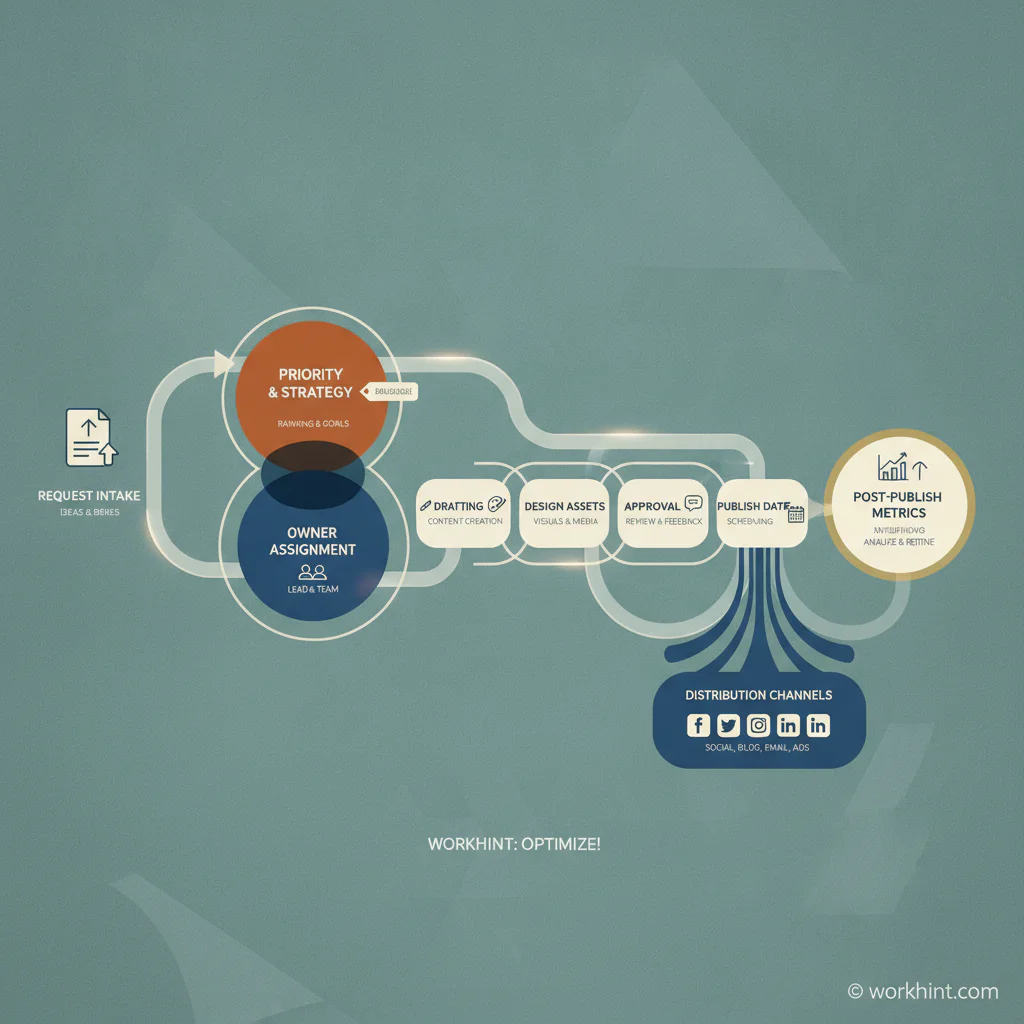
Content calendar template
| Field | What to enter | Why it matters |
|---|---|---|
| Content title | Working headline or asset name | Gives the team a clear reference point |
| Channel | Blog, LinkedIn, email, YouTube, webinar, landing page, partner channel | Prevents one calendar from hiding channel-specific requirements |
| Campaign or theme | Launch, product education, demand generation, customer proof, hiring, event | Connects each asset to a business priority |
| Audience | Founder, operator, HR lead, procurement, customer, partner, candidate | Keeps copy and examples specific |
| Owner | Person accountable for moving the item forward | Removes ambiguity when work stalls |
| Status | Idea, approved, drafting, design, review, scheduled, published, measuring | Makes progress visible without asking for updates |
| Draft due date | Date the first usable version is due | Creates time for review before publishing |
| Approval owner | Manager, client, founder, legal, subject matter expert, brand reviewer | Shows who must sign off before publication |
| Asset dependency | Image, product screenshot, customer quote, report, data point, design file | Flags work that can block publication |
| Publish date | Committed date and time | Turns the plan into an external commitment |
| Primary metric | Traffic, leads, replies, signups, demos, engagement, pipeline influence | Prevents publishing from becoming the finish line |
Content workflow to pair with the template
- Capture requests. Collect ideas and campaign requests in one intake list with source, audience, deadline, and business reason.
- Prioritize weekly. Approve only the items that support current goals, required launches, customer education, or sales needs.
- Assign owners. Every content item needs one owner, even if writers, designers, reviewers, and publishers all contribute.
- Set two dates. Use a draft due date and a publish date. Teams that only track publish dates leave no time for review.
- Track approvals. Add the reviewer before drafting starts. If legal, brand, client, or executive review is needed, make it visible.
- Publish and record links. Add the final URL, social link, campaign link, or email archive after the asset goes live.
- Review performance. Add one metric review date so the team learns which topics, channels, and formats deserve more investment.
Channel planning example
| Channel | Best calendar fields to add | Typical review owner |
|---|---|---|
| Blog | Keyword, search intent, outline, draft date, editor, URL slug, CTA | Content lead |
| Segment, subject line, send date, offer, approval, landing page | Growth lead | |
| Social | Platform, copy, creative asset, post time, campaign, repurpose source | Social manager |
| Video | Script, recording date, edit owner, thumbnail, transcript, publish channel | Producer |
| Webinar | Speaker, registration page, promo dates, deck, reminder emails, replay | Event owner |
Content Marketing Institute’s editorial calendar resources emphasize that tools and templates are most useful when they help teams plan, schedule, and coordinate publishing. That is why this template includes workflow and ownership fields, not only content topics.
Common mistakes
- Using the calendar as an idea dump. Keep ideas in intake and approved work in the calendar.
- Skipping approval owners. A publish date means little if nobody knows who must review the asset.
- Tracking only final dates. Draft, design, and review dates are what protect the final deadline.
- Ignoring dependencies. Screenshots, quotes, design files, and data points should be visible before they block work.
- Never reviewing results. A calendar should improve future planning, not just document past publishing.
Where Workhint fits
Workhint helps teams turn a content calendar template into a live work system. A marketing lead can define intake questions, roles, permissions, content stages, approval rules, asset handoffs, publishing tasks, reminders, and reporting in one operational flow. Instead of relying on a spreadsheet that someone manually updates, the calendar can become the system that routes work to writers, designers, reviewers, publishers, and campaign owners.
That matters when content work crosses functions. Product may need to approve screenshots, legal may need to review claims, sales may need enablement assets, and the founder may need visibility before launch. Workhint is useful when the calendar has to coordinate real work, not simply list planned posts.
FAQ
What should a content calendar template include?
A useful content calendar template should include title, channel, audience, campaign, owner, status, draft due date, approval owner, asset dependencies, publish date, final URL, and performance metric.
What is the difference between a content calendar and an editorial calendar?
An editorial calendar usually focuses on planned publishing themes, topics, deadlines, and editorial ownership. A content calendar is often broader and may include social posts, emails, videos, webinars, product campaigns, and distribution tasks.
How far ahead should a content calendar be planned?
Most teams should keep a committed four-to-six-week calendar and a looser quarterly theme plan. Planning too far ahead at task level creates stale work; planning only week to week creates avoidable urgency.
Who should own the content calendar?
One person should own calendar hygiene, but each content item should have its own accountable owner. The calendar owner keeps the system current; the item owner moves the work forward.
Should the calendar live in a spreadsheet or work management system?
A spreadsheet is fine for a small team or early planning. Move to a work system when approvals, dependencies, asset handoffs, permissions, or reporting become too complex to manage manually.
Conclusion
A content calendar template is most valuable when it helps the team make and keep publishing commitments. Use it to connect strategy to execution: approved topics, clear owners, visible approvals, ready assets, committed dates, and measured outcomes. The calendar should show what is happening now, what might slip, and what the team should improve next.
Leave a Reply