


Use this asset handover form to make every company property transfer clear, traceable, and easy to verify later.
An asset handover form template helps a business record when company property moves from one person, team, location, or vendor to another. It is useful for laptops, phones, badges, tools, vehicles, test devices, uniforms, keys, payment terminals, field equipment, and any other item that should not disappear into informal chat history.
The goal is simple: confirm what changed hands, who is responsible for it, what condition it was in, and what needs to happen next. For IT, HR, finance, facilities, and operations teams, that record becomes the link between real equipment, asset inventory, employee onboarding, offboarding, security, and replacement planning.
What’s included
This resource includes a copy-ready form, field guidance, a workflow table, common mistakes, and a short FAQ. It is written for business teams that need a practical handover record, not a legal agreement. For high-value assets, regulated equipment, or employee repayment clauses, have counsel review your policy language before using it.
How to use this asset handover form template
Use the form whenever an asset is issued, returned, reassigned, repaired, replaced, or transferred between locations. Keep one completed record per transfer. If the asset contains company data, credentials, customer information, or network access, coordinate the handover with your access management and device management process.
This matters because asset records are not just administrative paperwork. NIST’s IT asset management guidance describes the need to understand what assets exist, where they are, and how they are used. CIS Control 1 also emphasizes active inventory and control of enterprise assets, including end-user devices and remotely connected assets.
Asset handover form template
Copy the structure below into your document, form builder, HR system, IT service desk, or workflow tool.
| Field | What to capture | Owner |
|---|---|---|
| Transfer type | Issue, return, reassignment, repair, replacement, temporary loan, or offboarding return. | Requester |
| Asset details | Asset name, category, make, model, asset tag, serial number, IMEI, license plate, or internal ID. | Asset owner |
| Current custodian | Name, role, department, location, email, and employee or vendor ID. | HR or operations |
| Receiving custodian | Name, role, department, location, email, and employee or vendor ID. | Requester |
| Condition | New, good, fair, damaged, missing accessories, needs repair, wiped, locked, or pending inspection. | Verifier |
| Accessories | Chargers, cables, cases, keys, badges, SIM cards, tools, manuals, or issued components. | Verifier |
| Data and access status | Encrypted, wiped, reset, account removed, access revoked, MDM enrolled, or not applicable. | IT or security |
| Return terms | Expected return date, permanent assignment, replacement due date, repair ticket, or disposal path. | Asset owner |
| Approvals | Manager, IT, finance, facilities, security, procurement, or department owner approval. | Approver |
| Signatures | Person handing over, person receiving, verifier, date, and notes. | All parties |
Copy-ready handover statement
I acknowledge receipt or return of the company asset listed above. I confirm that the asset details, accessories, and condition notes are accurate at the time of handover. I understand that the asset remains company property unless otherwise stated, and I am responsible for following company policies for care, use, storage, security, reporting damage, and returning the asset when requested.
Asset handover workflow
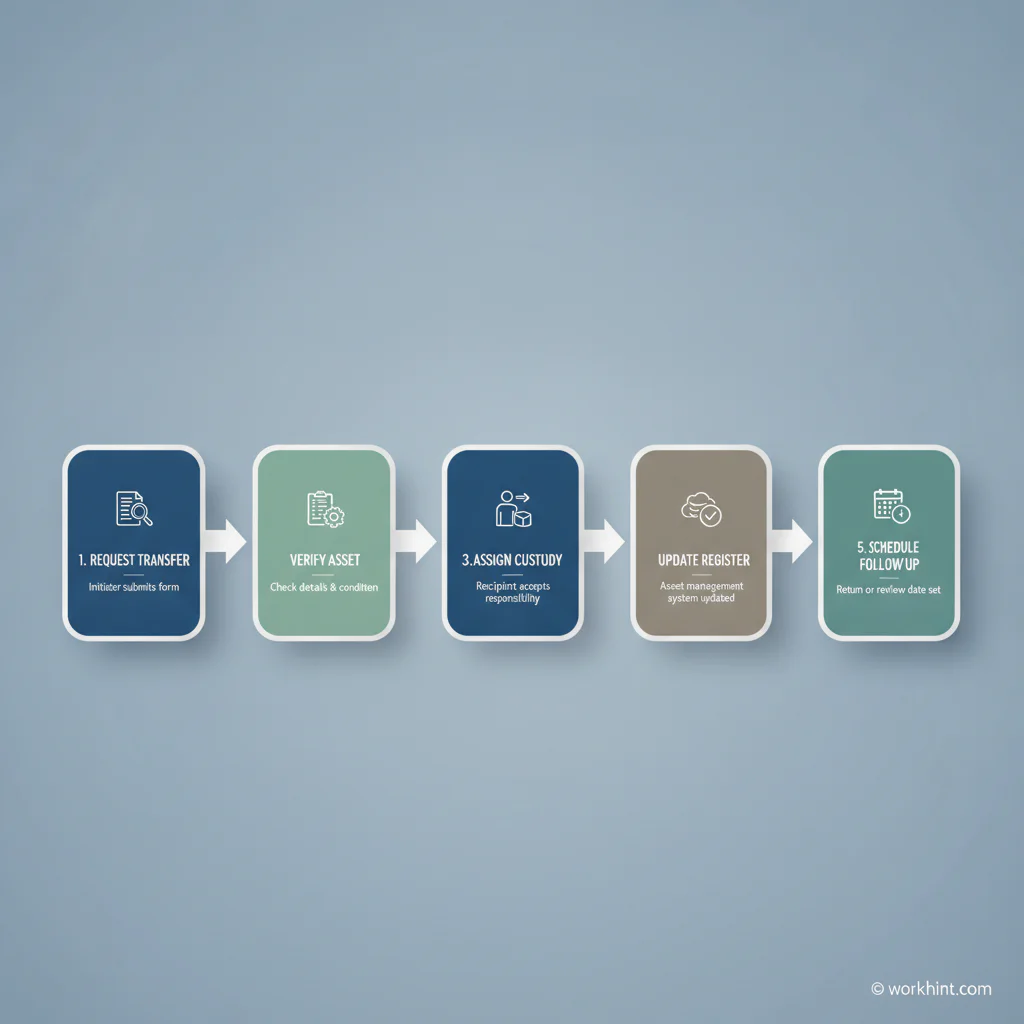
A good form is only one part of the process. The workflow should make ownership clear before the asset moves.
- Request the transfer. State why the asset is being issued, returned, repaired, replaced, or reassigned.
- Verify the asset. Match the item against the asset register using a unique identifier such as asset tag or serial number.
- Inspect condition. Record visible damage, missing accessories, warranty issues, data status, and whether photos are attached.
- Approve the handover. Route approval to the correct owner based on asset type, value, location, and data sensitivity.
- Update records. Change custodian, location, return date, device status, and any follow-up tasks in the asset system.
The broader discipline is asset lifecycle management. ISO 55000 frames asset management around managing value, risk, and performance across the asset lifecycle. Even if your company is not pursuing formal certification, the same principle applies: a handover record should improve operational control, not just collect signatures.
Example asset handover record
| Item | Example entry |
|---|---|
| Transfer type | Issue to new employee |
| Asset | Dell Latitude 7450, asset tag IT-2481, serial number recorded |
| Receiving custodian | Jordan Lee, Customer Operations Manager, Austin |
| Condition | Good condition, encrypted, MDM enrolled, charger included |
| Return terms | Return on role change, offboarding, device refresh, or request by IT |
| Approvals | Hiring manager approved; IT verified; HR onboarding task complete |
Common mistakes
- Using names without unique IDs. Names change, duplicate, and get misspelled. Use employee IDs, asset tags, serial numbers, and ticket IDs.
- Skipping condition notes. If damage is discovered later, the business needs a clean record of when the issue appeared.
- Forgetting accessories. Chargers, tools, key cards, SIM cards, and cases are often where disputes start.
- Not linking handover to access. A returned laptop is not fully recovered if accounts, credentials, or device management status are unresolved.
- Keeping forms outside the system of record. A signed PDF is useful, but only if the asset register and responsible team are also updated.
Where Workhint fits
Workhint can turn an asset handover form into a live workflow. A team can define the request intake, asset categories, custodian roles, approval rules, device verification steps, return reminders, exception handling, and reporting views in one operating system. That helps HR, IT, finance, and operations manage the process together instead of chasing screenshots, spreadsheets, and disconnected tickets.
FAQ
Is an asset handover form the same as an equipment agreement?
No. An asset handover form records a specific transfer. An equipment agreement usually sets broader employee responsibilities, acceptable use rules, loss or damage expectations, and return obligations.
Who should sign an asset handover form?
At minimum, the person handing over the asset and the person receiving it should sign. For sensitive, expensive, or regulated assets, add IT, facilities, finance, security, or manager approval.
Should asset handover forms be digital?
Digital forms are easier to search, route, update, and connect to asset records. Paper forms can work for simple operations, but they should still be scanned or logged in the asset system.
When should the asset register be updated?
Update it immediately after the handover is approved and verified. Delayed updates create gaps between who actually has the asset and what the system says.
Conclusion
An asset handover form template gives teams a simple way to document company property transfers with enough detail to prevent confusion later. The best version captures the asset, custodian, condition, approvals, access status, and follow-up obligations. Treat it as part of the operating workflow, not just a receipt, and your asset records will stay cleaner as the business grows.
Leave a Reply