


Legal automation becomes useful when AI accelerates analysis without quietly taking control of legal decisions.
AI legal workflow automation can reduce the time business teams spend collecting requests, reviewing documents, finding clauses, drafting routine language, and chasing approvals. The hard part is not generating text. It is building a dependable process around that output so privileged information stays controlled, reviewers see the right evidence, deadlines remain visible, and no high-risk action happens without authority.
Quick answer
AI legal workflow automation works best when AI handles bounded tasks such as extraction, classification, comparison, and first drafts, while a governed workflow controls intake, permissions, risk tiers, approvals, records, deadlines, and downstream actions. Start with one repeatable process, define what AI may recommend, require named human review for material decisions, and measure both speed and exception quality.
What’s in this article?
- The legal work that is suitable for AI-assisted automation.
- A practical control model from intake through audit.
- Implementation steps, metrics, and failure points.
- A business example for contract intake and review.
Why legal workflow automation needs stronger controls
Legal work mixes routine coordination with judgment that can create financial, regulatory, and contractual consequences. A model may summarize a clause correctly yet miss the policy exception that changes the decision. A document may also contain untrusted instructions that influence an AI system. The OWASP guidance on prompt injection recommends controls including least privilege, output validation, separation of external content, and human approval for high-risk actions.
The operating principle is simple: treat model output as a recommendation or structured input, not as final authority. The NIST AI Risk Management Framework places risk management across design, development, use, and evaluation. For a legal workflow, that means controls must exist before launch and continue after the workflow enters production.
AI legal workflow automation control map
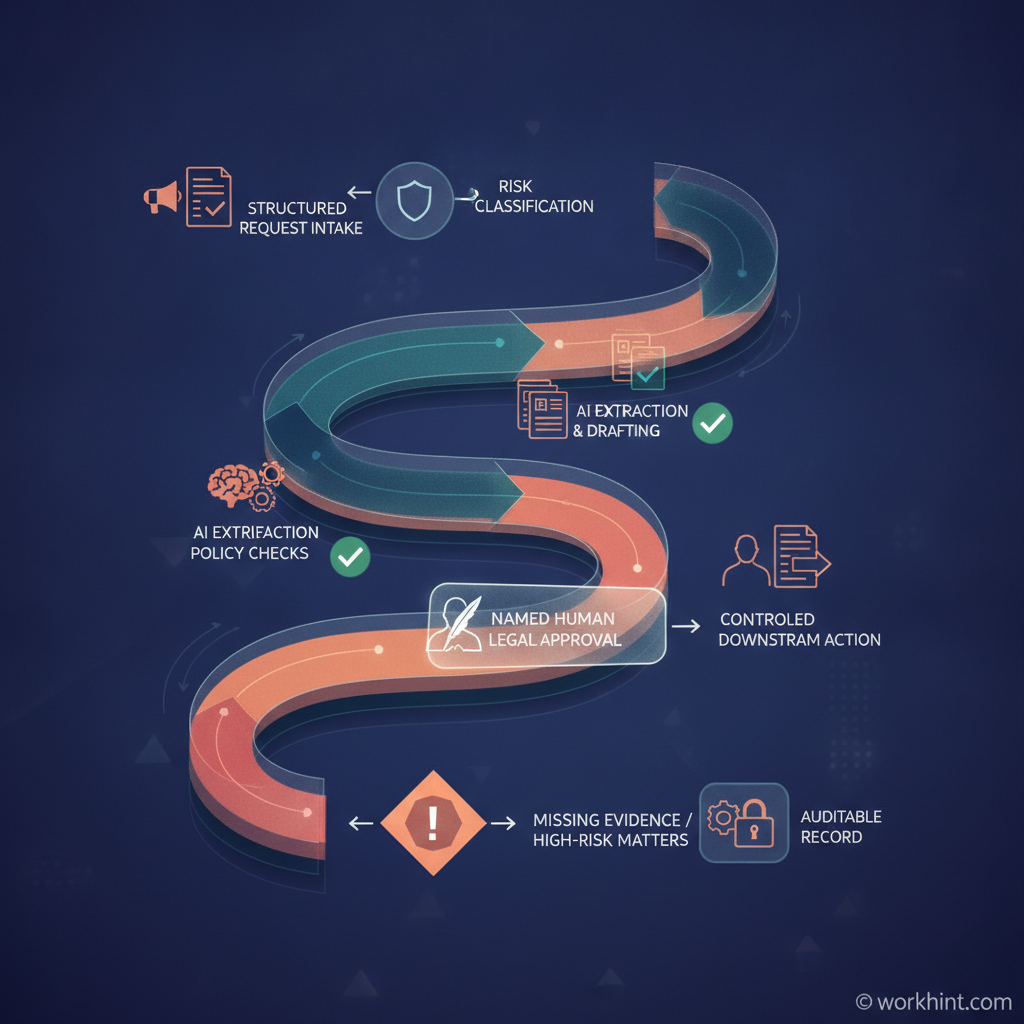
| Stage | AI contribution | Workflow control |
|---|---|---|
| Intake | Classify request and extract facts | Required fields, identity, matter type, deadline |
| Risk routing | Suggest risk tier and reviewer | Deterministic thresholds and ownership rules |
| Analysis | Compare clauses, summarize, draft | Approved sources, schema validation, citations |
| Review | Present differences and rationale | Named approver, evidence, override reason |
| Action | Prepare update or communication | Permission check and controlled execution |
| Record | Generate structured matter summary | Version, decision, reviewer, timestamp, retention |
When model output feeds another system, free-form prose is fragile. OpenAI’s Structured Outputs documentation explains how responses can conform to a supplied JSON Schema. A legal intake object might require matter type, parties, jurisdiction, deadline, document list, missing evidence, risk flags, recommended reviewer, and confidence. A valid shape does not prove the answer is legally correct, but it makes rules, validation, routing, and audit much more reliable.
How to implement the workflow
- Choose a bounded process. Start with high-volume, repeatable work such as NDA intake, policy questions, matter triage, renewal review, or outside-counsel requests. Avoid beginning with novel disputes or final legal opinions.
- Define the decision boundary. Write down what AI may extract, suggest, or draft; what deterministic rules decide; what only a qualified reviewer can approve; and what the workflow must never do automatically.
- Design structured intake. Capture requester, business unit, counterparty, jurisdiction, deadline, value, document version, requested outcome, and confidentiality level before calling a model.
- Constrain data and tools. Use approved repositories, role-based access, matter-level permissions, minimum tool privileges, and retention rules. Do not give a general-purpose agent unrestricted access to contracts, email, signatures, and payment systems.
- Create review gates by risk. Low-risk work may need sampling; medium-risk work needs named approval; high-risk or unusual matters should route to legal counsel with the original evidence attached.
- Test realistic failures. Include missing pages, conflicting clauses, scanned documents, stale policies, prompt injection, wrong jurisdictions, duplicate submissions, model timeouts, and approver absence.
- Monitor operating metrics. Track cycle time, straight-through rate, exception rate, reviewer override rate, missing-information rate, rework, deadline misses, and incidents—not token usage alone.
Practical example: contract request intake
A sales manager submits a customer agreement with a requested signature date. The workflow verifies the requester, captures the customer and deal value, stores the original file, and sends the document to an AI step for clause extraction. The model returns structured fields for governing law, term, renewal, liability, data protection, termination, and deviations from an approved playbook.
Business rules then route standard language to a legal operations queue and unusual liability or data terms to counsel. The reviewer sees the source clause beside the suggested interpretation, records approval or an override reason, and releases only the approved response. The final record retains the document version, model and prompt version, extracted fields, rule results, reviewer, decision, and timestamp. AI reduces reading and coordination; the workflow preserves accountability.
Common failure points
- Automating before standardizing. Inconsistent playbooks produce inconsistent routing.
- Using confidence as truth. A high score is not evidence; reviewers need source text and policy context.
- Mixing draft and approval authority. The same AI step should not propose language and authorize its use.
- Ignoring version control. Teams must know which document, policy, prompt, and model produced a recommendation.
- Measuring only speed. Faster intake is not progress if exceptions, overrides, or legal rework rise.
Where Workhint fits
Workhint is the operational orchestration layer, not the legal model or legal adviser. A model can analyze content, but Workhint can turn the surrounding process into structured intake, roles, permissions, assignments, review queues, approval gates, documents, deadlines, notifications, records, and reporting. Teams evaluating configurable workflow automation software can use that separation to connect AI assistance to a controlled business process instead of creating another isolated legal tool.
FAQ
What legal workflows are best for AI automation?
Start with repeatable, evidence-based work: request triage, document intake, clause extraction, playbook comparison, renewal tracking, policy Q&A, matter summaries, and first drafts. Keep novel, high-impact, or jurisdiction-sensitive decisions under qualified human review.
Can AI approve contracts automatically?
AI can recommend a route or flag deviations, but automatic approval should be limited to narrowly defined, low-risk cases with deterministic rules, tested controls, clear authority, and monitoring. Material terms should have a named accountable reviewer.
How should teams protect confidential legal data?
Apply matter-level access, approved model and vendor policies, data minimization, retention controls, encrypted storage, restricted tools, and audit logs. Confirm applicable professional, contractual, privacy, and jurisdictional duties with qualified counsel.
What should an audit record contain?
Keep the request, source documents, versions, model and prompt version, structured output, rules applied, reviewer, approval or override, downstream action, and timestamps. Retention should match the organization’s legal and records policy.
Conclusion
Effective AI legal workflow automation does not remove judgment; it makes routine analysis and coordination faster while making authority more explicit. Begin with one bounded process, structure the inputs and outputs, restrict access, show reviewers the evidence, control downstream actions, and monitor exceptions after launch. This article is operational guidance, not legal advice; requirements should be validated for the relevant organization and jurisdiction.
Leave a Reply