


Contractors need access fast, but every unnecessary permission becomes risk the business still owns.
A contractor access security checklist helps companies give external workers the systems, files, and data they need without leaving open doors behind them. This is not only an IT issue. Contractor access touches operations, legal, finance, procurement, security, and the manager who owns the work.
The risk usually comes from speed. A contractor is approved, someone shares a folder, someone else adds them to Slack, finance needs an invoice, and nobody is sure which systems they can still reach three months later. A better process does not slow the contractor down. It turns access into a controlled workflow with an owner, purpose, expiration date, and review path.
What’s in this article?
- A practical contractor access security checklist for business teams.
- A workflow for approving, limiting, monitoring, and revoking access.
- A role table showing who owns each step.
Why contractor access security matters
Contractors, freelancers, agencies, vendors, and implementation partners often need temporary access to internal tools: project boards, source files, customer records, dashboards, brand assets, code repositories, scheduling systems, or payment portals. External talent moves faster when they are not blocked by manual access requests.
The control problem is also clear. External workers may use their own devices, work across multiple clients, change projects quickly, or leave without going through the same offboarding path as employees. Security frameworks such as NIST SP 800-53 treat access control, account management, and least privilege as core security controls. For contractors, those controls need to be operational enough that managers can actually follow them.
If your company handles regulated customer information, the stakes are higher. The FTC Safeguards Rule guidance explains that covered financial institutions must maintain safeguards for customer information and address service provider safeguards. The broader operating principle still applies: external access should be intentional, limited, documented, and removable.
Contractor access security checklist
Use this checklist before granting access to a contractor, agency team member, subcontractor, consultant, or vendor user.
| Step | What to confirm | Owner |
|---|---|---|
| 1. Define the work | Scope, deliverables, dates, systems needed, and data sensitivity are clear. | Business owner |
| 2. Classify access risk | Access is low, medium, or high risk based on data, system criticality, and privilege level. | IT/security |
| 3. Verify identity and agreement status | Contract, NDA, tax/payment setup, and identity requirements are complete before access. | Operations or legal |
| 4. Grant least-privilege access | The contractor receives only the tools, folders, roles, and permissions required for the approved work. | IT/security |
| 5. Require strong authentication | MFA is enabled, recovery methods are controlled, and shared accounts are prohibited. | IT/security |
| 6. Set device and data rules | Approved devices, downloads, file sharing, local storage, AI tool use, and customer data handling are defined. | Security and business owner |
| 7. Monitor and review | High-risk access has logging, expiration dates, and recurring reviews. | IT/security |
| 8. Revoke at closeout | Access is removed when the project ends, the contract expires, or the worker changes role. | Operations and IT |
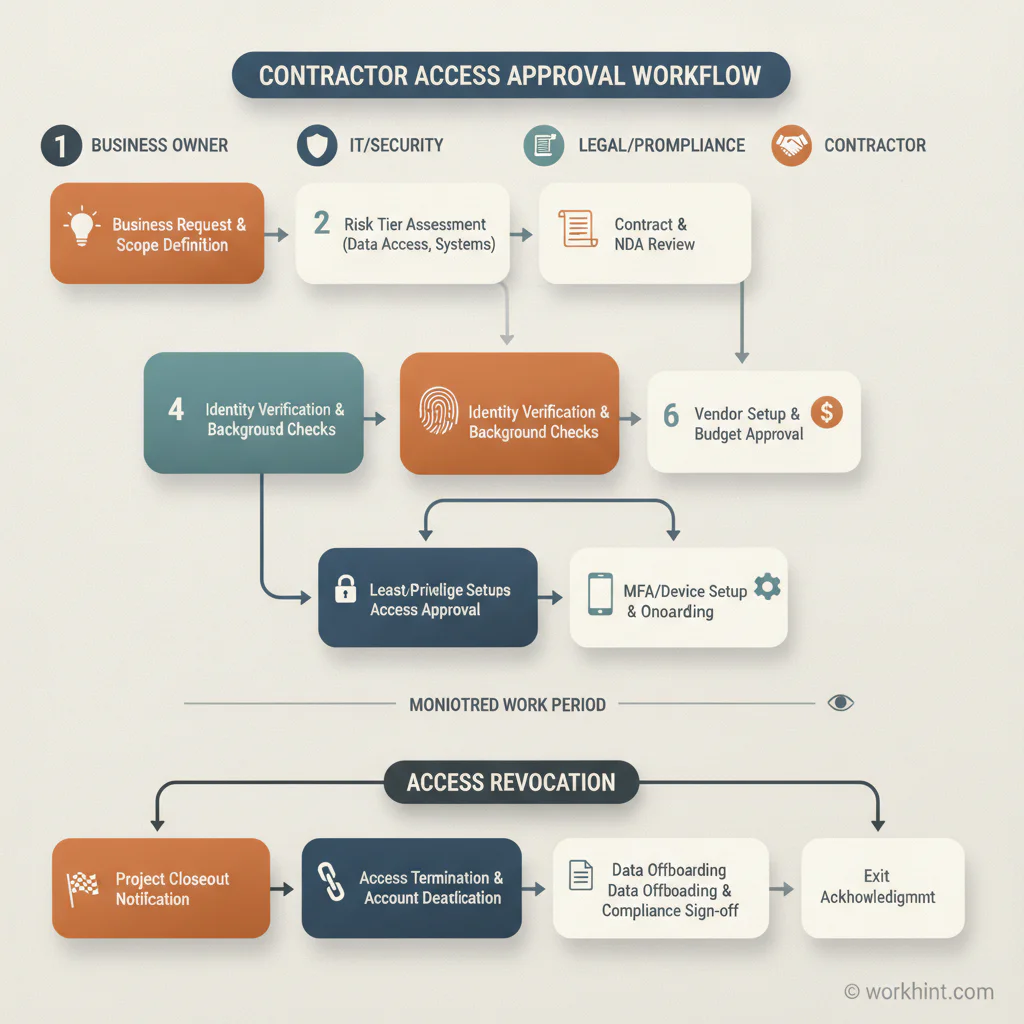
Contractor access approval workflow
The strongest contractor access process starts before anyone creates an account. The business owner should submit a request that explains the work, the contractor’s role, the systems needed, the expected duration, and whether the contractor will touch customer, employee, financial, product, or confidential data.
IT or security should then classify the request. A designer who needs a shared brand folder is different from a data consultant who needs production customer exports. A field subcontractor who needs a schedule is different from an implementation partner who needs admin access to a customer environment. Risk tiering keeps the process practical because not every contractor needs the same level of review.
Once the risk tier is clear, grant access through named accounts. Avoid shared logins, generic vendor accounts, and permissions copied from a previous project. The point is to make access auditable. CISA’s multifactor authentication guidance is a useful baseline for protecting accounts that reach company systems and applications.
Every access grant should have an expiration date. If the project continues, renew it intentionally. If the work ends, revoke it as part of closeout. This is where many companies fail: they have good onboarding hygiene and weak offboarding hygiene. Contractor access should end because the workflow says it ended, not because someone eventually remembers to ask IT.
How to decide how much access a contractor needs
A simple decision model helps managers avoid both extremes: blocking useful contractors or over-sharing sensitive systems.
- Need to know: Does the contractor need this information to complete the approved deliverable?
- Need to act: Do they need edit/admin rights, or would view/comment access be enough?
- Need to store: Do files need to stay inside a managed workspace instead of being downloaded locally?
- Need to share: Can the contractor invite others, export records, connect apps, or forward data?
- Need to persist: Should access expire at a milestone, weekly review, or contract end date?
For higher-risk vendors and agencies, add a vendor risk review. Practical vendor risk programs often include vendor tiering, audit evidence, policy requirements, and ongoing monitoring. UpGuard’s vendor risk management checklist is a useful reference for teams building that broader governance layer.
Common mistakes to avoid
The first mistake is treating contractor access as a favor instead of a workflow. When access depends on informal messages, the company loses visibility into who approved what and why.
The second mistake is granting employee-equivalent permissions by default. Contractors usually need access scoped to a project, account, location, client, or deliverable.
The third mistake is skipping expiration dates. If every contractor account is open-ended, access reviews become a painful cleanup project instead of a normal operating step.
The fourth mistake is separating access from payment and closeout. Closeout should confirm deliverables, final invoice status, asset return, data handling, and access revocation in one process.
Where Workhint fits
Workhint helps teams turn contractor access security into a live operating workflow. A business can start with an intake form for the contractor request, route approvals to legal, IT, finance, and the business owner, collect required documents, assign risk tiers, track access status, and connect the access approval to onboarding and payment readiness. For ongoing contractor operations, contractor management software can connect onboarding, assignments, access, records, performance, and offboarding in one operating system.
That matters because secure contractor access is a chain of decisions: who the contractor is, what work they are doing, what systems they need, who approved access, when it expires, whether documents are complete, and whether the project is ready for closeout. Workhint gives teams a way to coordinate those steps without scattered spreadsheets, messages, and one-off reminders.
FAQ
What is contractor access security?
Contractor access security is the process of controlling how external workers access company systems, data, documents, tools, and communication channels. It includes approval, identity checks, least-privilege permissions, authentication, monitoring, and timely revocation.
Should contractors use company accounts or shared accounts?
Contractors should use named accounts whenever possible. Shared accounts make it harder to audit activity, remove access cleanly, and understand who performed a specific action.
Who should approve contractor access?
The business owner should approve the need for access, while IT or security should approve the permission level. Legal, compliance, procurement, or finance may need to review higher-risk contractors, agencies, or vendors.
How often should contractor access be reviewed?
Review frequency should match risk. Low-risk access may be reviewed at project milestones or contract renewal. High-risk access should have shorter expiration windows and recurring checks.
Conclusion
A contractor access security checklist gives external workers enough access to do useful work without giving away more control than the project requires. The core discipline is simple: define the work, classify the risk, grant least privilege, require strong authentication, review access, and revoke it at closeout.
Companies that treat contractor access as part of workforce operations move faster because approvals, documents, permissions, and closeout steps are connected. That is the difference between access that merely gets granted and access that is actually governed.
Leave a Reply