


You do not need an office, a help desk team, or a full MSP stack to validate a remote IT support business.
A remote IT support business helps small companies fix technical issues, set up devices, manage software access, handle basic security tasks, and keep daily operations moving. The demand is real because nearly every small business depends on laptops, cloud tools, Wi-Fi, email, payments, calendars, files, and customer systems.
The mistake is starting like a traditional managed service provider before you have customers. You do not need to hire technicians, lease an office, buy a pile of tools, or promise enterprise coverage on day one. A better first version is a branded customer platform, a narrow offer, a small network of independent IT technicians, and a simple process for routing support requests.
What’s in this article?
- Why a remote IT support business works
- What you need to launch without employees
- How to price support packages and retainers
- How to get the first small-business customers
- How Workhint can power the operating system
- A first 7-day launch plan, checklist, and FAQ
Why a remote IT support business works
Small businesses need reliable technology, but many are too small to hire internal IT. They still need help with onboarding devices, email access, password resets, software setup, printer issues, remote desktop support, basic cybersecurity, backup checks, and vendor coordination.
That creates a useful opening for a lean operator. You can start by selling a clear support promise to companies with 5 to 50 employees: fast triage, remote troubleshooting, scheduled setup work, and access to vetted local technicians when an on-site visit is needed.
The recurring revenue opportunity is the main attraction. One-off computer repair can be inconsistent. A monthly support plan gives customers predictable access and gives you a base of repeat revenue. Research on managed IT pricing commonly shows monthly retainers, hourly support, and per-user pricing as standard buying patterns, which means customers already understand the model.
The provider-network model also reduces risk. Instead of hiring full-time technicians before demand exists, you can recruit independent specialists for common needs: Microsoft 365, Google Workspace, network setup, endpoint support, cybersecurity basics, and local on-site visits. Your job is to create the branded platform, sell the offer, coordinate the work, and protect quality.
What you need to launch a remote IT support business
The first version should be simple. Choose one customer profile, such as local professional services firms, clinics, agencies, accountants, trades businesses, or small distributed teams. Then define the first support offer around common problems you can fulfill through remote work and trusted technicians.
You need a branded customer portal where clients can submit requests, approve quotes, upload screenshots, see open tickets, and pay invoices. You also need an internal operations view for triage, assignment, scheduling, technician notes, and customer follow-up.
Insurance matters because IT mistakes can create business interruption, data exposure, or device damage. Talk with a qualified insurance broker about general liability, professional liability, and cyber liability for your state and services. Licensing requirements are usually lighter than healthcare or construction businesses, but business registration, contracts, privacy practices, and data handling still matter.
| Startup item | Lean launch range | What to avoid early |
|---|---|---|
| Business registration, contracts, and basic legal review | $300-$1,500 | Custom legal packages before you know the offer |
| Branded platform, intake, scheduling, payment, and provider workflows | $300-$1,200 | Building custom software from scratch |
| Insurance | $500-$2,000 | Operating without coverage for professional risk |
| Remote support tools and documentation | $100-$600 | Buying a full enterprise stack too early |
| Local marketing and first-customer outreach | $200-$1,000 | Large ad spend before sales conversations |
| Provider recruitment and onboarding | $0-$500 | Hiring employees before recurring demand exists |
A realistic lean launch budget is often $1,500 to $6,800, depending on insurance, legal setup, and marketing. The goal is not to look like a large MSP. The goal is to prove that a specific customer segment will pay for a reliable support process.
How to price remote IT support
Start with pricing that is easy to explain. Avoid unlimited support until you understand ticket volume. A good first model combines setup fees, monthly retainers, and hourly or project add-ons.
| Offer | Example price | Best for |
|---|---|---|
| Remote setup package | $300-$1,500 per project | Email, device, software, or access setup |
| Starter support retainer | $500-$1,500 per month | Small teams that need a defined block of help |
| Per-user support | $75-$200 per user per month | Teams that want predictable monthly coverage |
| Hourly overflow support | $100-$225 per hour | Work outside the plan |
| On-site technician visit | $150-$500 per visit plus parts | Local work routed to an independent provider |
For the first customers, keep the promise narrow: response windows, included support categories, excluded work, how urgent issues are handled, and how on-site visits are priced. The more specific the offer, the easier it is to sell and fulfill.
How to get first customers
Start with businesses that already feel the pain but are not ready for a full managed IT contract. Good early targets include accountants, law firms, real estate offices, home-service companies, boutique agencies, clinics, and local franchises.
Use direct outreach with a specific operational promise. For example: “We help 10- to 30-person firms handle remote IT requests, device setup, and basic support without hiring internal IT.” That is clearer than saying you do everything.
- Ask local accountants, bookkeepers, insurance brokers, and coworking spaces for referrals.
- Create a simple landing page for one customer segment and one support plan.
- Offer a paid technology cleanup session as the entry product.
- Partner with local independent technicians who already get overflow requests.
- Publish practical content around password hygiene, device onboarding, backup checks, and software access.
Your first goal is not scale. It is signal. If five similar businesses ask for the same support package, you have a stronger business than if twenty random consumers ask for unrelated repairs.
How Workhint helps launch it
Workhint can become the branded operating foundation for the remote IT support business before you invest in employees or custom software. Instead of stitching together forms, ticketing tools, spreadsheets, payment links, and technician messages, you can create a customer-facing support platform around the exact way the business will run.
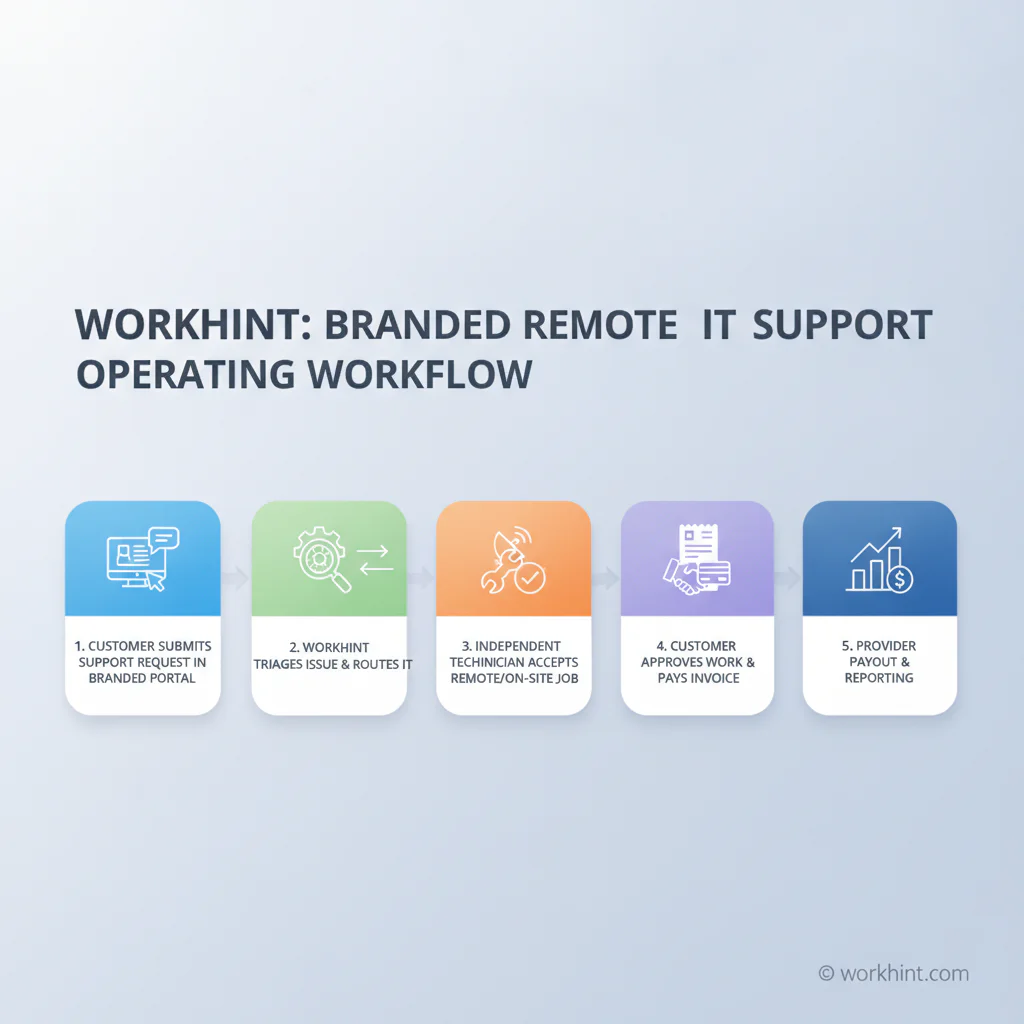
A client submits a support request through your branded portal, chooses the issue type, adds screenshots, selects urgency, and sees what happens next. Workhint routes the request to the right workflow: remote triage, quote approval, scheduled support session, on-site technician assignment, or follow-up checklist.
Independent technicians can be invited into the provider network with role-based access. They see assigned jobs, required notes, customer context, checklists, documents, schedules, and payout details without seeing parts of the business they do not need. Customers can approve work, pay invoices, review completed tasks, and submit new requests from the same branded experience.
That lets you sell the business like a modern support platform, not a loose list of contractors. You can validate demand, recruit technicians around actual jobs, measure response times, track recurring clients, and expand only when the operating model is working.
First 7-day launch plan
- Day 1: Choose the customer segment, the launch city or niche, and the first support offer.
- Day 2: Set up the branded Workhint platform basics: customer portal, request form, client dashboard, and internal operations view.
- Day 3: Create pricing, quote approval, scheduling, payment, technician assignment, and payout workflows.
- Day 4: Recruit three to five independent technicians with clear specialties and service areas.
- Day 5: Contact local small businesses, referral partners, coworking spaces, accountants, and agencies.
- Day 6: Route first conversations and trial requests through the platform instead of handling them manually.
- Day 7: Review demand, ticket types, pricing friction, technician readiness, and whether the first offer is narrow enough.
Final launch checklist
- Choose the customer segment and support category.
- Register the business and get basic contracts reviewed.
- Set insurance requirements before handling client systems.
- Create the branded Workhint customer portal.
- Build support intake, quote, scheduling, payment, and payout workflows.
- Recruit independent IT technicians before promising broad coverage.
- Define what is included, excluded, urgent, remote, and on-site.
- Sell a narrow paid offer to the first ten prospects.
- Validate recurring demand before hiring employees or buying expensive tools.
FAQ
How much does it cost to start a remote IT support business?
A lean launch can often start around $1,500 to $6,800 if you avoid an office, full-time employees, and heavy software purchases. Insurance, legal setup, a branded platform, and first-customer outreach are the important early costs.
Can I start a remote IT support business with no employees?
Yes, if you keep the first offer focused and use independent technicians for specialized or on-site work. Do not promise 24/7 coverage or complex enterprise support until you have the provider network and processes to fulfill it.
Do I need certifications to start?
Certifications are not always legally required, but they can build trust. Common areas include Microsoft 365, Google Workspace, networking, cybersecurity fundamentals, and device support. For specialized work, use qualified providers.
What should I sell first?
Start with a paid technology cleanup, device onboarding package, or monthly starter retainer for small businesses. These offers are easier to scope than broad “unlimited IT support.”
How do I find independent IT technicians?
Look for local freelancers, former MSP technicians, cybersecurity specialists, Microsoft or Google consultants, and repair professionals who want overflow work. Onboard them into a clear provider workflow before assigning customer jobs.
Is remote IT support profitable?
It can be profitable when you sell recurring support, control ticket scope, and avoid employee costs before demand exists. Profit depends on pricing, response expectations, provider costs, churn, and how efficiently requests are routed.
When should I hire employees?
Hire only after recurring revenue, ticket volume, and service expectations justify it. Until then, use the provider-network model to validate demand and protect cash.
Conclusion
A remote IT support business is a practical service company to start because small businesses need technical help, but many are not ready to hire internal IT or sign a large managed services contract. The fastest path is to launch a focused offer, build a branded customer platform, recruit independent providers, and validate recurring demand before investing heavily.
Workhint helps make that possible by giving the business an operational foundation from day one: customer requests, provider onboarding, scheduling, approvals, payments, payouts, and reporting in one branded system. That is enough to start selling, learn from real demand, and grow into a stronger support business over time.
Leave a Reply