


A good work breakdown structure turns vague work into visible deliverables, owners, dependencies, and execution control.
A work breakdown structure helps a team turn a large initiative into smaller parts that can be estimated, assigned, sequenced, and tracked. The value is not the diagram itself. The value is shared clarity about what must be delivered, where the work boundaries are, and how the pieces connect once execution starts.
Atlassian describes a work breakdown structure as a hierarchical breakdown of project scope into manageable components or work packages. Microsoft Learn connects WBS creation to work decomposition, scheduling, and cost estimation. For operations teams, that means a WBS should not stop at planning. It should become the backbone for assignments, handoffs, approvals, reporting, and escalation.
What’s in this article?
- What a work breakdown structure is and when to use one
- How to create a WBS without turning it into a task dump
- A practical operations example
- Common mistakes that make WBS documents fail in execution
- Where Workhint fits when the breakdown needs to become a live work system
Why a work breakdown structure matters
Teams usually feel the need for a WBS when an initiative is too large to manage from a single checklist. A new service launch, customer implementation, internal systems rollout, vendor program, hiring process, or compliance project may involve multiple functions, dependent deliverables, approvals, and deadlines. Without a breakdown, managers track activity instead of outcomes.
A strong WBS creates a practical contract around scope. It shows what is included, what is excluded, and which deliverables must exist before the work can be considered complete. That matters because many operational failures come from hidden work: undocumented reviews, unclear handoffs, duplicate approvals, missing setup tasks, and late discovery of dependencies.
How to create a work breakdown structure
Start with the final outcome, not the first task. The top level should describe the complete result the team is trying to deliver. For example: “Launch partner onboarding system” is stronger than “Hold kickoff meeting” because it anchors the WBS in an outcome.
Next, break the outcome into major deliverables. Deliverables are tangible outputs or completed states, not activities. Good examples include intake form configured, partner agreement approved, provider records imported, approval rules tested, dashboard published, and launch training completed.
Then decompose each deliverable into work packages. A work package is small enough to estimate, assign, and verify. It should have a clear owner, completion criteria, dependency notes, and evidence of completion. If a work package cannot be assigned to one owner, it is probably still too large or too vague.
Finally, connect the WBS to execution rules. Define the status values, handoff triggers, approval points, and escalation paths that move work forward. A WBS that sits in a document may help planning. A WBS connected to the operating workflow helps the team execute.
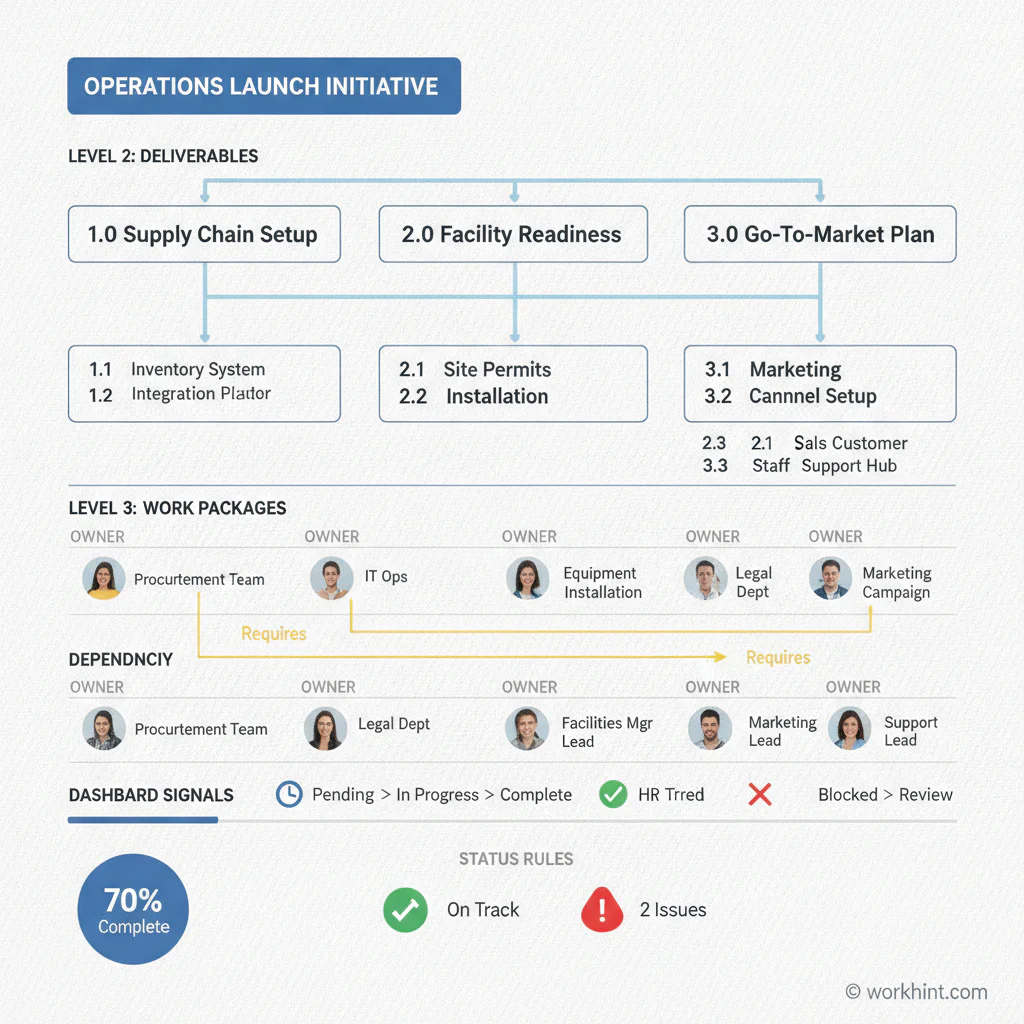
Work breakdown structure example for an operations launch
Here is a simplified WBS for a team launching a new customer onboarding workflow. The structure is not meant to capture every detail. It shows how deliverables become manageable work packages with owners and verification points.
| Level | WBS item | Owner | Completion evidence |
|---|---|---|---|
| 1 | Customer onboarding workflow launched | Operations lead | Workflow live and first customer onboarded |
| 2 | Intake designed | Revenue operations | Approved intake form and required fields |
| 3 | Define required customer data | Customer success | Field list reviewed by sales, success, and finance |
| 3 | Set routing rules | Operations lead | Routing tested for standard and exception cases |
| 2 | Approvals configured | Finance owner | Budget and contract approvals tested |
| 2 | Launch dashboard published | Business systems | Status dashboard shows active accounts and blockers |
This example keeps the WBS focused on deliverables and evidence. The team can still create task lists under each work package, but the WBS itself should stay oriented around outcomes the business can inspect.
Use the 100 percent rule
A useful WBS should cover the full scope of the outcome. PMI’s WBS guidance connects the structure to the full project scope and planning control. In practice, that means every required deliverable should appear somewhere in the breakdown, and work outside the scope should be intentionally excluded.
The 100 percent rule is especially helpful for cross-functional operations. If legal review, access setup, payment configuration, customer communication, or reporting is required for success, it belongs in the structure. If it is merely a nice-to-have improvement, label it separately so the team does not confuse launch scope with backlog scope.
Turn the WBS into execution controls
Once the WBS is clear, add the controls that make it operational. Each work package should answer five questions: who owns it, what starts it, what blocks it, what proves it is done, and what happens if it gets stuck.
For recurring operational work, add a sixth question: what should be automated? Intake routing, status reminders, approval notifications, document collection, and dashboard updates are often good candidates. Judgment-heavy work, risk exceptions, customer-specific decisions, and ambiguous approvals usually need human review.
This is where WBS design becomes work systems design. The breakdown gives the team a map. The execution controls turn that map into roles, permissions, assignments, due dates, escalations, and reporting.
Common work breakdown structure mistakes
- Writing tasks before deliverables. If the WBS starts as a to-do list, it becomes harder to see scope and completion.
- Breaking work down too far. A WBS should clarify work packages. It does not need to list every microtask.
- Skipping owners. A work package without an owner is only a planning note.
- Ignoring dependencies. Dependencies are where timelines usually fail, especially across teams.
- Leaving approvals outside the structure. If approval is required before progress can continue, it is part of the system.
- Not updating the WBS after launch. Operational work changes. The WBS should be reviewed when scope, owners, or handoffs change.
Where Workhint fits
Workhint fits when a team wants the work breakdown structure to become an operating system, not a static planning file. A team can start from the desired outcome, define deliverables and work packages, then use Workhint to configure intake, roles, permissions, assignments, approvals, documents, schedules, dashboards, and escalation rules around the breakdown.
That is useful when the same type of work will happen repeatedly: customer onboarding, vendor setup, field service delivery, hiring workflows, partner launches, internal approvals, or project handoffs. The WBS gives the structure. Workhint helps turn that structure into a live system people can actually use.
FAQ
What is a work breakdown structure?
A work breakdown structure is a hierarchical breakdown of a project or initiative into smaller deliverables and work packages. It helps teams define scope, estimate effort, assign ownership, and track progress.
What is the difference between a WBS and a task list?
A WBS organizes the scope of work around deliverables and work packages. A task list usually shows the activities needed to complete those packages. The WBS explains what must be delivered; the task list explains how the team will do it.
How detailed should a WBS be?
A WBS should be detailed enough that each work package can be assigned, estimated, and verified. If the item is too broad to own or too small to manage usefully, adjust the level of detail.
Who should own the work breakdown structure?
The overall initiative owner should own the WBS, but functional owners should review their own deliverables, dependencies, and completion criteria. A WBS created without the people doing the work will usually miss important constraints.
Conclusion
A work breakdown structure is useful because it makes complex work visible. Done well, it gives teams a shared view of deliverables, work packages, owners, dependencies, and completion evidence. The next step is to connect that structure to the way work actually moves: intake, assignment, approval, handoff, escalation, reporting, and improvement.
Leave a Reply