


A daily management system turns daily work from status chasing into visible priorities, owners, problems, and improvements.
A daily management system is the operating rhythm a team uses to see whether work is on track today, decide what needs attention, and improve the process before small issues become normal. It is a repeatable system for connecting daily work to goals, metrics, ownership, escalation, and learning.
The idea is common in lean operations, healthcare, manufacturing, construction, service delivery, and field teams, but the pattern is useful for any business where work moves across people and systems. The Lean Enterprise Institute describes daily management as a way to connect strategy with real processes by making goals specific, visible, and operational. For growing teams, execution problems appear daily in queues, handoffs, missed updates, aging tasks, quality misses, and unclear priorities.
What’s in this article?
- What a daily management system includes.
- Why daily management matters for operations teams.
- A practical workflow for building one.
- A daily management board structure you can adapt.
- Common mistakes that turn daily management into theater.
- Where Workhint fits when the system needs to become live.
Why a daily management system matters
Most teams do not need more meetings. They need a better way to see the state of work and act on it. Without a daily management system, leaders learn about problems through follow-up messages, late escalations, customer complaints, or weekly reporting. By then, the issue has usually grown.
A good daily management system gives the team a short loop: check the work, compare it to the standard, name exceptions, assign action, escalate what cannot be solved locally, and improve the process.
Daily huddles are one part of the system. The AHRQ Patient Safety Network notes that huddles help teams share information, review performance, flag concerns, increase accountability, and hardwire safety practices. Outside healthcare, the same logic helps teams see risks before they become missed commitments.
Daily management system components
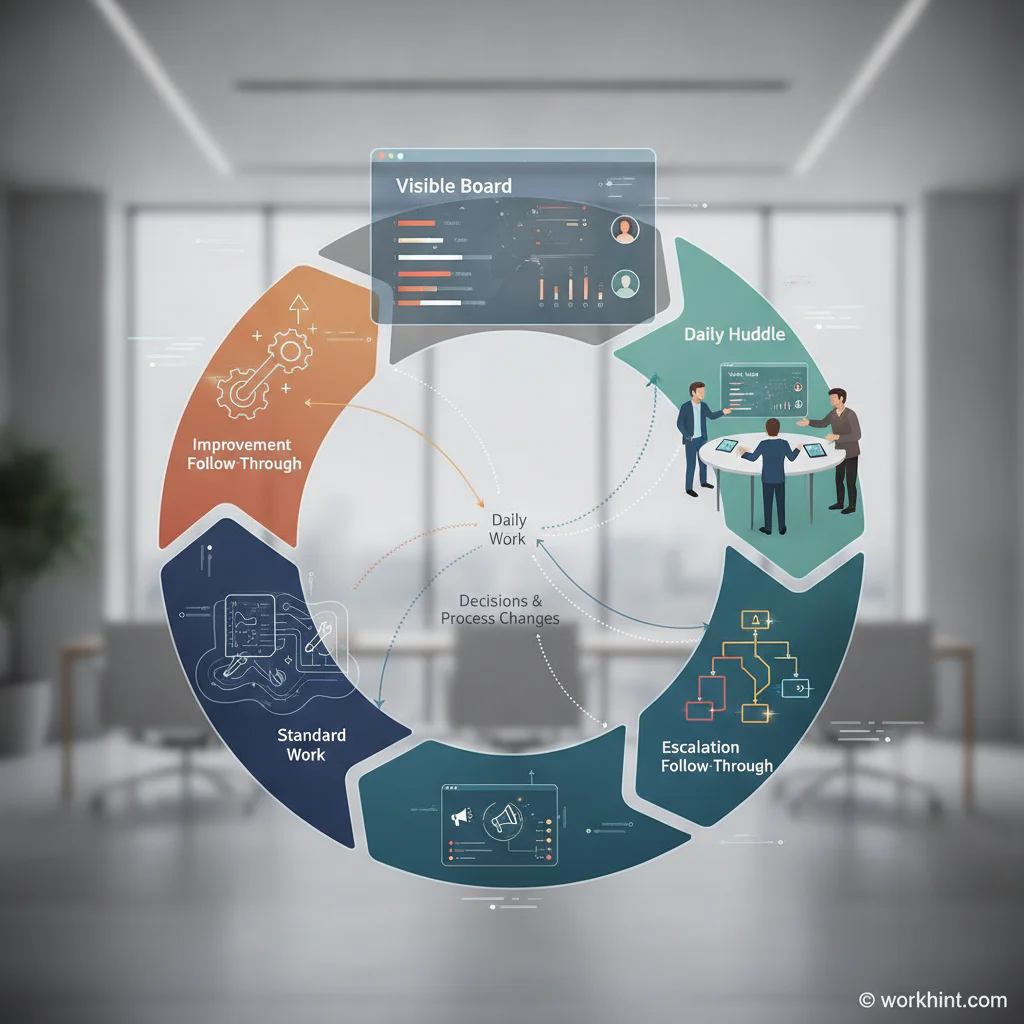
A daily management system works when it combines five pieces: a visible board, a short review cadence, standard work, escalation rules, and improvement follow-through.
| Component | Purpose | Operating question |
|---|---|---|
| Daily board | Shows priorities, work status, metrics, blockers, and owner actions. | Can the team see what matters today? |
| Huddle cadence | Creates a short rhythm for reviewing the board and adjusting the day. | Are issues found early enough to act? |
| Standard work | Defines the expected way the workflow should run. | Do people know what normal looks like? |
| Escalation rules | Routes problems that exceed local authority, timing, or risk limits. | What gets raised, when, and to whom? |
| Improvement loop | Turns recurring problems into process changes, not repeated reminders. | Is the system learning from yesterday? |
Visual management is especially important. The Lean Enterprise Institute explains that visual management supports standards, quick identification of abnormalities, daily problem solving, alignment, and leader routines. The board should not be a decorative dashboard. It should help people decide what to do next.
How to create a daily management system
Start small. Pick one workflow, queue, location, service line, or team where daily visibility would clearly improve execution.
- Define the daily outcome. Name what the team must keep under control each day: requests answered, jobs dispatched, orders fulfilled, approvals cleared, issues resolved, or service commitments protected.
- Choose the few metrics that matter daily. Use measures the team can act on quickly, such as backlog age, cycle time, missed SLA risk, blocked work, quality failures, staffing coverage, exception count, or same-day completion.
- Create a visible board. Show the current state, not a report nobody trusts. Include work status, owners, blockers, risks, decisions needed, and yesterday’s open actions.
- Run a short daily huddle. Review what changed, what is blocked, what needs escalation, and who owns each action before the next review.
- Define escalation thresholds. Decide what cannot wait: aging beyond target, customer impact, safety or compliance risk, capacity gaps, missing approvals, repeated defects, or unclear ownership.
- Close the loop. Review whether yesterday’s actions happened. If the same issue repeats, change the workflow, standard, staffing model, intake fields, approval rule, or system integration.
A practical daily management board
Your board can live on a wall, spreadsheet, dashboard, service desk, workflow tool, or operations platform. The format matters less than the behavior it creates.
| Board section | What to show | Review question |
|---|---|---|
| Today's priorities | Top commitments, urgent work, customer promises, or operational targets. | What must be protected today? |
| Flow status | New, active, waiting, blocked, overdue, and completed work. | Where is work piling up? |
| Metrics | Cycle time, backlog age, completion rate, defects, SLA risk, or capacity. | Are we inside the operating standard? |
| Blockers | Missing information, approvals, access, decisions, staff, inventory, or vendor input. | What is preventing movement? |
| Escalations | Items that exceed authority, time, risk, cost, or customer impact thresholds. | What needs help outside this team? |
| Improvement actions | Small process fixes, owner, due date, and result. | What will prevent this problem from recurring? |
The board should be updated before the huddle. The huddle is for decisions and coordination, not data cleanup.
Common mistakes
- Turning the huddle into a status meeting. If everyone reports what they did yesterday, the system will feel like theater. Focus on flow, exceptions, decisions, and actions.
- Tracking too many metrics. Daily management needs a few actionable signals. Monthly business KPIs usually move too slowly for daily control.
- No owner for the board. One person should own board quality and cadence, even if many people update their own work.
- Escalating everything. Escalation should be threshold-based. Otherwise leaders become the bottleneck the system was supposed to remove.
- No improvement follow-through. If the same blocker appears every week, the team does not have a communication problem. It has a system problem.
Where Workhint fits
Workhint fits when a daily management system needs to move from a board and meeting habit into the way work actually runs. A team can use Workhint to design the workflow, define roles and permissions, capture intake, assign owners, route approvals, track blockers, trigger escalations, collect completion evidence, and report on the daily operating signals.
For example, an operations team managing customer onboarding could use Workhint to show each onboarding by stage, owner, missing input, approval status, launch risk, and next action. The daily huddle can then focus on the exceptions: what is blocked, who can unblock it, whether escalation is needed, and what system change would prevent the same delay next time.
FAQ
What is a daily management system?
A daily management system is a repeatable operating rhythm for reviewing daily work, tracking performance, identifying problems, assigning actions, escalating blockers, and improving the process.
Is a daily management system the same as a daily standup?
No. A daily standup is a meeting format. A daily management system includes the board, metrics, standards, ownership, escalation rules, and improvement loop around the meeting.
How long should a daily huddle take?
Most daily huddles should take 10 to 15 minutes. If the meeting regularly runs longer, separate problem-solving sessions from the daily review.
What metrics belong in daily management?
Use metrics the team can act on during the day or week: backlog age, cycle time, blocked work, SLA risk, quality misses, staffing coverage, exception count, and open improvement actions.
Who should own the daily management system?
The operating owner of the workflow should own it. That may be an operations manager, service lead, team lead, program owner, or department head depending on the work.
Conclusion
A daily management system makes work visible at the pace problems actually appear. Start with one important workflow, choose a few daily signals, make the current state visible, run a short huddle, define escalation thresholds, and close the loop on recurring issues. Done well, daily management helps teams spend less time chasing status and more time improving how work moves.
Leave a Reply