


Business rules turn policy, judgment, and exceptions into decisions teams can repeat without asking around every time.
To document business rules well, do more than write down policies. Capture the decision, trigger conditions, outcome, owner, source of authority, exceptions, and review cadence. That turns a rule from tribal knowledge into an operational control.
IBM describes business rules as guidance for everyday decision-making. In operations, that guidance shows up everywhere: who can approve a discount, when a customer request needs escalation, which contractor documents are required, how work is routed, when an invoice is held, or what happens when a service promise is missed.
What’s in this article?
- What a business rule is in practical operational terms
- How to separate rules from procedures, requirements, and preferences
- A documentation structure teams can reuse
- A workflow for reviewing, approving, and maintaining rules
- Examples of rules that are ready for automation
Why business rules documentation matters
Most operational drift starts with small decision gaps. A manager approves one exception by email. Finance interprets a threshold differently from sales. A support lead remembers an old policy that no longer applies. Soon the team has a process on paper and a different process in practice.
Business rules documentation fixes that by making decision logic explicit. The goal is to make repeatable work clear enough that people, workflows, dashboards, and automation can use it consistently.
This matters most when a process crosses teams. Intake, assignment, approval, escalation, payment, compliance, and reporting all depend on rules. If rules are not visible, the process becomes a negotiation. If they are visible, owned, and measurable, they become part of the work system.
How to document business rules clearly
Start with the decision, not the document. A useful business rule answers a specific operational question: should this request be approved, routed, escalated, priced, accepted, rejected, assigned, paid, renewed, paused, or reviewed?
The Business Rules Group emphasizes that business rules are declarative. In plain terms, a rule should describe what must be true, required, allowed, or prohibited. It should not bury the reader in every procedural step for carrying out the work.
A strong rule usually follows this pattern:
When a condition is true, then a specific outcome applies, unless a named exception is approved by a specific owner.
For example: when a vendor invoice is more than 10 percent above the approved purchase order, then the invoice must be routed to the budget owner before payment, unless the overage was already approved in a documented change order.
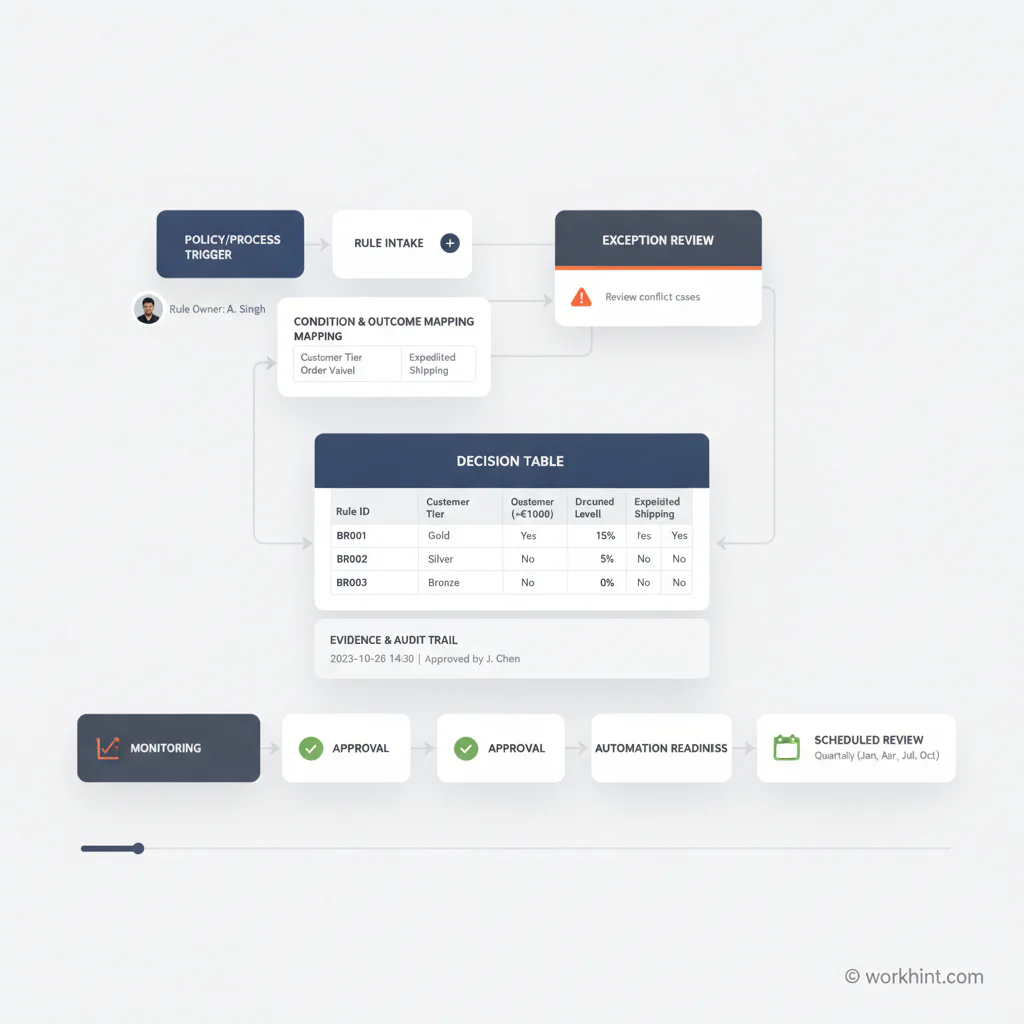
Business rules documentation workflow
Use this workflow when business rules affect work quality, approvals, compliance, customer commitments, payments, access, or automation.
- Identify the decision. Name the decision the rule controls. Avoid broad labels like “vendor policy.” Use operational labels like “invoice overage approval” or “urgent request escalation.”
- Find the source. Link the rule to its policy, contract, regulation, operating agreement, customer commitment, pricing model, or leadership decision.
- Write the rule in plain language. Use a condition and outcome. Keep one rule to one decision. Split compound rules when one exception changes only part of the logic.
- Assign an owner. Every rule needs someone accountable for accuracy, exceptions, and review. The owner is usually not the person who performs every step.
- Define exceptions. State who can override the rule, what evidence is required, and how the exception is logged.
- Test with examples. Run real cases through the rule. Include accepted, rejected, edge, and exception cases.
- Connect the rule to work. Decide where the rule appears: intake form, approval workflow, assignment logic, dashboard alert, checklist, contract review, or automation.
- Review on a schedule. Rules that affect revenue, risk, customers, or compliance should have a review owner and cadence.
Business rule documentation table
| Field | What to capture | Why it matters |
|---|---|---|
| Decision name | The operational decision the rule controls | Prevents vague rule titles |
| Condition | The trigger, threshold, status, role, or event | Makes the rule executable |
| Outcome | The required action, approval, routing, block, or notice | Creates consistent behavior |
| Owner | The role accountable for the rule | Prevents stale logic |
| Evidence | Policy, contract, data source, or decision record | Supports audit and review |
| Exception path | Who can override and what must be recorded | Keeps flexibility controlled |
| Automation status | Manual, assisted, automated, or blocked | Shows where systems can help |
Use decision tables for complex rules
When a decision depends on several inputs, a paragraph becomes hard to trust. Use a decision table. List inputs across columns, outcomes in the final column, and one row per scenario. This is useful for pricing, eligibility, routing, approval levels, service tiers, and risk scoring.
The Object Management Group’s Decision Model and Notation exists for this kind of work: specifying business decisions and business rules in a way business and technical teams can read. You do not need a full modeling program to benefit from the idea. Even a simple table makes hidden logic easier to review.
For example, a customer escalation rule might include customer tier, issue severity, days open, revenue impact, and compliance sensitivity. The outcome might be normal queue, team lead review, executive escalation, legal review, or customer success intervention. The table makes it much easier to spot missing cases.
Common mistakes when documenting business rules
- Mixing rules with procedures. “Managers review invoices every Friday” is a procedure. “Invoices over the approved amount require budget-owner approval” is a rule.
- Leaving out ownership. A rule without an owner slowly becomes a rumor.
- Writing exceptions informally. Exceptions are normal. Undocumented exceptions are where systems lose trust.
- Using unclear thresholds. Words like large, urgent, strategic, or risky need a definition or decision owner.
- Skipping examples. Examples reveal whether the rule works against real cases.
- Automating too early. If people cannot explain the rule consistently, automation will only make inconsistency faster.
Where Workhint fits
Workhint helps teams turn documented business rules into the operating system around the work. A rule can become an intake question, routing condition, role permission, approval threshold, escalation path, task assignment, payment checkpoint, reminder, or dashboard signal.
That is the difference between documenting rules and operationalizing them. The documented rule says what should happen. The work system makes it happen consistently, shows who owns the decision, captures exception evidence, and gives leaders visibility into rule performance. For AI-assisted workflows, this structure also clarifies automated decisions, human review, and accountable override.
FAQ
What is a business rule?
A business rule is a statement that defines, constrains, or guides a business decision or behavior. It explains what must happen under specific conditions, not every procedural step used to perform the work.
What is the difference between a business rule and a requirement?
A requirement describes what a system, process, or solution must do. A business rule describes the decision logic, constraint, policy, threshold, or condition that shapes how the business operates. The IIBA Business Analysis Standard is useful background for teams separating needs, requirements, stakeholders, and solution context.
How many business rules should a process have?
There is no fixed number. Capture the rules that affect decisions, risk, approvals, exceptions, customer commitments, payments, compliance, access, or reporting. If a rule does not change behavior, it may be guidance rather than a business rule.
Should business rules be automated?
Automate rules only after they are clear, owned, tested, and connected to reliable data. Some rules should remain human-reviewed because they involve judgment, risk, customer context, or unusual exceptions.
Conclusion
Business rules are one of the most practical ways to make operations scalable. They clarify who can decide, what conditions matter, when exceptions apply, and how work should move through the system. Document them as decision logic, connect them to owners and evidence, test them with real cases, and review them regularly. Once the rules are clear, the workflow around them becomes easier to automate, measure, and improve.
Leave a Reply