


Escalations should move work forward, not create panic. A clear matrix tells teams when to raise an issue and who owns the next decision.
An escalation matrix is a structured way to show when a business issue should move beyond the current owner, who should receive it, what authority they have, and how quickly they need to respond. It is most useful when work crosses teams, customer commitments, service levels, vendors, approvals, or operational risk.
Without an escalation matrix, teams rely on memory, seniority, or whoever is loudest. That slows decisions and hides accountability. With one, employees know what qualifies as normal work, what needs specialist support, and what evidence must travel with the escalation.
What’s in this article?
- What an escalation matrix should include
- How to create an escalation matrix for business teams
- A practical escalation matrix table you can adapt
- How to turn the matrix into a live workflow
- Common mistakes that make escalations noisy or political
Why an escalation matrix matters
Escalation is not just a support or IT concept. It appears anywhere the current owner lacks the authority, information, capacity, or expertise to resolve an issue on time. A stalled client implementation, blocked payment approval, missing compliance document, vendor failure, production defect, customer complaint, staffing shortage, or delayed executive decision can all need escalation.
Atlassian describes an escalation matrix as a document or system that defines when escalation should happen and who should handle issues at each level. That definition matters because escalation is a routing system, not a blame system. The point is to move unresolved work to the person or team that can remove the blocker.
For higher-risk operational environments, the same principle shows up in formal incident response guidance. NIST incident response guidance emphasizes preparation, defined roles, responsibilities, authorities, prioritization, recovery actions, and performance measures. Even if your team is not managing cybersecurity incidents, the operating lesson is useful: escalation works best when authority and severity rules are defined before pressure hits.
How to create an escalation matrix
Start by deciding which workflow the matrix is for. Do not create one generic company-wide matrix and expect it to work everywhere. Customer support, finance approvals, vendor issues, and internal requests may share a structure, but they need different triggers, owners, time limits, and evidence.
- Define the issue categories. Group issues by business type: customer impact, operational delay, financial risk, compliance risk, system access, vendor failure, staffing gap, quality issue, or executive decision required.
- Set severity levels. Use plain language. For example: routine, time-sensitive, high-impact, and critical. Avoid labels that require debate during the incident.
- Name escalation triggers. Triggers should be observable. Examples include missed SLA, blocked for 24 hours, customer affected, approval overdue, legal review required, budget threshold exceeded, or no owner assigned.
- Assign one accountable owner at each level. A role can be listed, but one person should be responsible during execution. Shared accountability is where escalations disappear.
- Define response expectations. Set time-to-acknowledge, time-to-decision, communication cadence, and backup owner rules.
- Specify required context. Each escalation should include the issue, impact, work already attempted, decision needed, deadline, affected stakeholders, and supporting documents.
- Add closure and learning steps. Escalations should end with resolution, documentation, and a process improvement note when the same problem is likely to repeat.
Jira Service Management guidance recommends practical workflow patterns such as dedicated escalation queues, escalation statuses, mentions, and linked work items across teams. The larger point is that escalation should be visible in the operating system, not buried in private messages.
Escalation matrix template for business teams
The table below gives a simple structure many operating teams can adapt.
| Level | Trigger | Owner | Response rule | Decision or action |
|---|---|---|---|---|
| Level 1 | Routine issue, owner can resolve within normal workflow | Task or request owner | Acknowledge within normal SLA | Resolve, update status, and document outcome |
| Level 2 | Blocked by missing information, specialist input, or overdue dependency | Functional lead or specialist | Acknowledge within one business day | Provide expertise, unblock dependency, or assign next owner |
| Level 3 | Customer, revenue, compliance, staffing, or delivery commitment at risk | Department lead or operations manager | Acknowledge same day | Make priority, resource, exception, or stakeholder decision |
| Level 4 | Material business impact, executive tradeoff, legal risk, or public commitment | Executive owner | Immediate review based on severity | Approve path, communicate decision, and sponsor recovery plan |
The best escalation matrix is specific enough to guide action but simple enough to use under pressure.
Turn the escalation matrix into a workflow
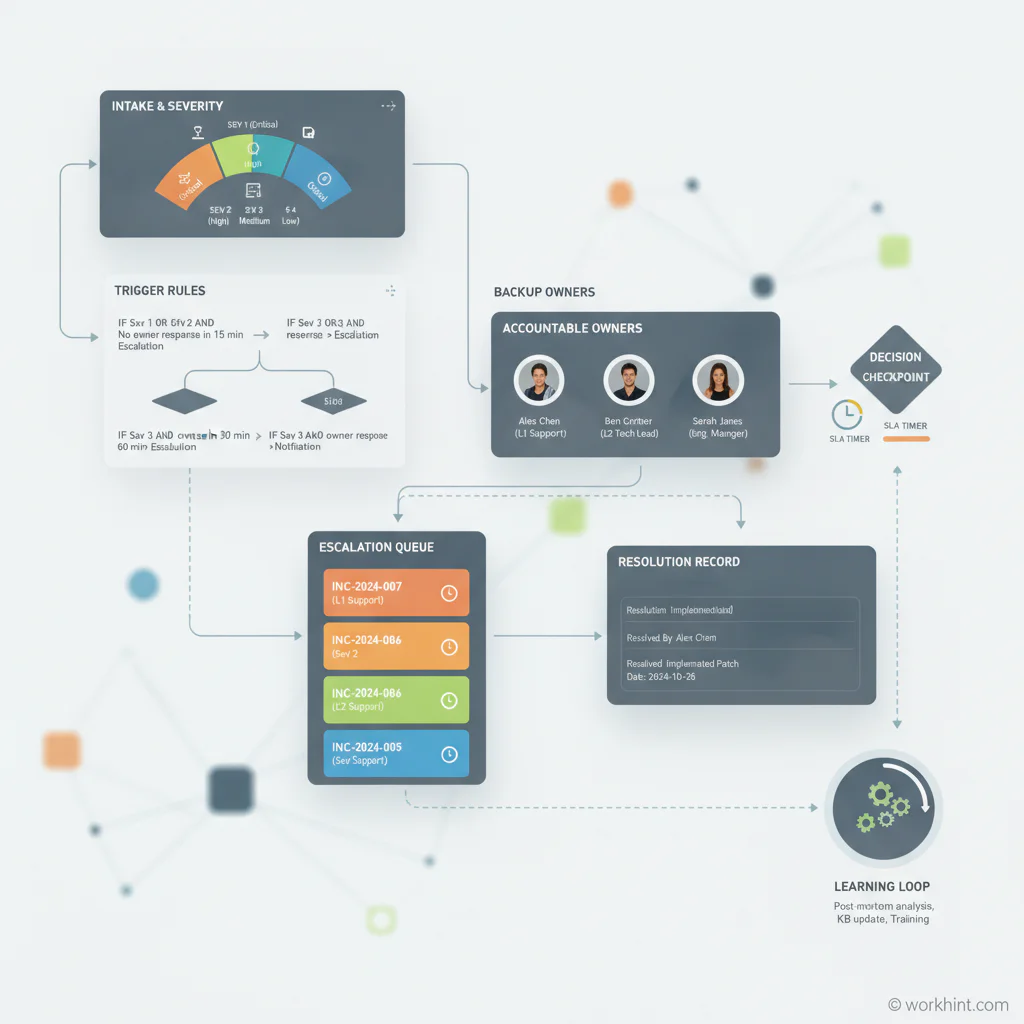
A spreadsheet matrix is a useful starting point, but it does not guarantee execution. To make escalation reliable, connect the matrix to the workflow where work actually happens.
Each request, task, ticket, approval, or project should have fields for severity, owner, due date, blocked reason, escalation level, next reviewer, and decision needed. When a trigger is met, the workflow should notify the right owner, preserve context, and show the issue in an escalation queue or dashboard. After resolution, capture the outcome so the same issue can be prevented or handled faster next time.
This is where Workhint fits naturally. A team can use Workhint to turn an escalation matrix into a live work system with intake fields, severity logic, role-based permissions, owner assignments, approval paths, backup owners, notification rules, SLA tracking, documents, dashboards, and reporting. The matrix defines the decision model. Workhint helps operationalize it so escalations are routed, tracked, and resolved instead of managed through ad hoc follow-ups.
Common escalation matrix mistakes
- Escalating everything. If every issue becomes urgent, the matrix becomes noise. Use clear severity thresholds.
- Escalating too late. A matrix should trigger before the commitment is already missed, not after the customer or leader discovers the problem.
- Confusing escalation with approval. Some escalations need a decision, some need expertise, and some need capacity. Route each to the right owner.
- Leaving out backups. If the named owner is unavailable, the workflow needs a second path.
- Moving issues without context. An escalation that lacks impact, history, options, and deadline simply transfers confusion.
- Never reviewing patterns. Repeated escalations are process data. They often reveal unclear ownership, missing authority, overloaded teams, or broken handoffs.
FAQ
What is an escalation matrix?
An escalation matrix is a table or workflow rule set that defines when an issue should be raised, who owns each escalation level, what response time is expected, and what decision or action is required.
What should an escalation matrix include?
It should include issue categories, severity levels, escalation triggers, accountable owners, backup owners, response expectations, required context, communication rules, and closure steps.
How many escalation levels should a business team use?
Most teams should start with three or four levels. Too few levels make routing vague. Too many levels create delay. Add levels only when each one has distinct authority or expertise.
How is an escalation matrix different from a RACI chart?
A RACI chart defines responsibility, accountability, consultation, and information needs for planned work. An escalation matrix defines what happens when work is blocked, delayed, risky, or outside the current owner’s authority.
Can escalation workflows be automated?
Yes. Automation can route issues based on severity, overdue status, missing approvals, customer impact, SLA risk, or blocked dependencies. Human judgment is still important for high-impact decisions.
Conclusion
An escalation matrix gives teams a practical answer to a stressful question: what happens when work cannot move forward through the normal path? Start with one important workflow, define the issue categories and severity triggers, assign owners with authority, set response expectations, and connect the matrix to the system where work is tracked. Done well, escalation becomes a disciplined operating habit instead of a last-minute scramble.
Leave a Reply