


Contractor hours are easy to collect and surprisingly hard to trust unless the workflow is designed before work starts.
If you need to track contractor hours, the goal is not to watch every minute. The goal is to connect scoped work, approved time, invoice review, and payment so the business can control costs without turning contractors into employees by process.
That distinction matters. The U.S. Department of Labor explains that independent contractor status depends on the economic realities of the working relationship, not just the label a company uses in a contract. The IRS also distinguishes independent contractors by the degree of control and independence in the relationship. This article is not legal advice, but it gives operators a practical way to track time while keeping the process focused on work, billing, and approvals.
What’s in this article?
- When contractor hour tracking is useful and when it is not
- The fields every contractor timesheet should include
- A workflow for reviewing hours before invoices are paid
- Common mistakes that create disputes, delays, or control risk
- How Workhint fits when contractor time data needs to become a live operating process
Why contractor hour tracking matters
Contractor time tracking is usually introduced after a problem appears: invoices are unclear, project budgets are drifting, managers approve hours from memory, or finance has no clean record behind payments. By then, the team is already reconciling emails, spreadsheets, project comments, calendar notes, and invoices by hand.
A better approach is to decide upfront which contractor relationships require hour tracking. Hourly contractors, retainers with capped hours, time-and-materials projects, support queues, implementation work, creative production, and field services all benefit from clear time records. Fixed-fee deliverables may not need detailed hourly logs unless the contract includes change orders, overage limits, or utilization reporting.
The operating question is simple: what decision will the hour record support? If it supports invoice approval, budget control, client billing, capacity planning, or dispute resolution, track it. If it exists only so a manager can watch activity, the process is likely overbuilt.
How to track contractor hours
The strongest contractor hour tracking process starts before the first timesheet. Define the work, the billing model, the approval owner, and the evidence needed for payment. Contractors should know what to log, how often to submit, what counts as billable, and what happens when hours exceed the agreed scope.
| Time tracking field | Why it matters | Who uses it |
|---|---|---|
| Project or workstream | Connects hours to the right budget, client, or internal initiative | Operations, finance, project lead |
| Task category | Separates delivery, meetings, revisions, admin, and support | Project lead, contractor |
| Date and hours | Creates a basic record for review and invoice matching | Finance, approver |
| Notes or output link | Shows what was completed without requiring surveillance | Approver, contractor |
| Approval status | Prevents unreviewed time from moving into payment | Finance, operations |
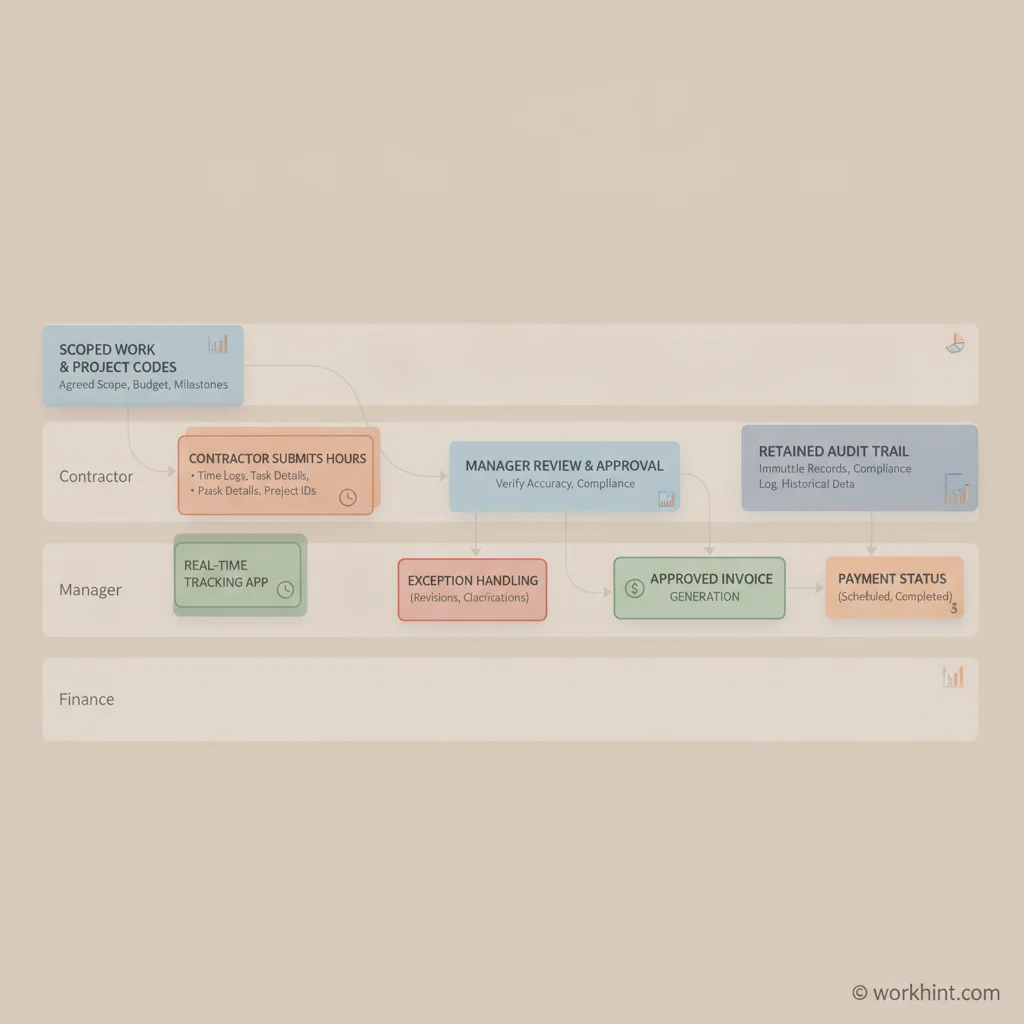
Contractor hour tracking workflow
Use a workflow that separates contractor submission from company approval. That keeps the record clean and gives each party a clear responsibility.
- Set the scope. Define the project, hourly rate, expected hours, billing cadence, and approval owner before work begins.
- Create project codes. Give contractors a short list of work categories so time does not arrive as vague free text.
- Collect hours on a fixed cadence. Weekly submission is usually enough for project work; daily may be appropriate for field or shift-based contractor work.
- Require useful notes. Ask for the deliverable, ticket, client, milestone, or output associated with the time. Avoid unnecessary monitoring.
- Review exceptions first. Flag hours above cap, missing notes, wrong project codes, or work outside scope before finance sees the invoice.
- Approve time before payment. Finance should pay from approved time records, not from an invoice that no one can verify.
- Retain the trail. Keep the scope, submitted hours, approvals, invoice, and payment status together for future review.
A practical approval model
The best approval model is lightweight. One business owner should approve the work, and finance should approve the payment only after that review is complete. If every invoice requires three managers to weigh in, payment slows down and contractors lose confidence in the process.
For small teams, the approver may be the project lead. For larger external workforces, route approvals by project, region, client account, or vendor relationship. The important part is consistency: the person closest to the work verifies whether the time makes sense; finance verifies whether the approved amount matches the contract and payment terms.
Common mistakes to avoid
- Tracking time without a scope. If the contractor does not know the expected budget or cap, every approval becomes a negotiation.
- Using employee-style controls. Overly prescriptive schedules, continuous monitoring, or manager-directed minute-by-minute work can create classification concerns. Review the Department of Labor’s employment relationship guidance and get local advice when needed.
- Approving invoices without approving hours. Once an invoice reaches finance, it is harder to challenge unclear time without delaying payment.
- Letting every contractor invent categories. Free-form time entries are difficult to compare, report, and reconcile.
- Ignoring changes in law or enforcement posture. The Department of Labor maintains current information on independent contractor misclassification, and companies should also check state and country-specific rules.
Where Workhint fits
Workhint helps turn contractor hour tracking from a spreadsheet habit into a connected work system. A company can use Workhint to structure contractor intake, assign roles and permissions, collect documents, route submitted hours to the right approver, flag exceptions, connect approvals to invoices, and keep payment status visible without scattering the process across email, forms, and finance tools. When hours and attendance affect payroll or approvals, time tracking software can connect clock-ins, timesheets, exceptions, approvals, and reporting.
The point is not to add more oversight. It is to make the workflow clear: contractors know how to submit time, managers know what to approve, finance knows what is ready to pay, and leadership can see contractor spend by project or workstream.
FAQ
Should independent contractors submit timesheets?
They can when the contract is hourly, capped by hours, or based on time-and-materials work. The timesheet should support billing and approval, not function like an employee punch clock unless the relationship and local rules support that model.
What is the best way to verify contractor hours?
Match hours to the agreed scope, project code, work notes, deliverables, tickets, or service records. Verification works best when the required evidence is defined before work starts.
How often should contractors submit hours?
Weekly is a good default for knowledge work because it reduces forgotten entries without creating daily administration. Field, shift, or high-volume service work may need daily submission.
Can tracking contractor hours create compliance risk?
It can if the process looks like employee supervision rather than contractor billing control. The IRS notes that contractor classification depends on control and independence, so companies should review the IRS independent contractor guidance and seek legal advice for sensitive cases.
Conclusion
To track contractor hours well, design the workflow before work begins. Define the scope, choose useful time categories, set approval ownership, review exceptions early, connect approved time to invoices, and keep the record in one place. Done well, contractor time tracking protects budgets, speeds payment, and gives external workers a clearer way to collaborate with the business.
Leave a Reply