


Operational issues do not disappear because someone logged them. They disappear when the system makes ownership, urgency, and closure visible.
An issue management process is the operating path a team uses to capture problems that are already affecting work, decide how serious they are, assign ownership, resolve them, and learn from the pattern. A risk may happen later. An issue is already happening now.
Most teams already have issues. They just do not have a reliable system for handling them. Problems live in chat threads, meeting notes, customer calls, spreadsheets, or someone’s memory. By the time leadership sees the pattern, the team has already lost time or trust.
What’s in this article?
- How to separate issues from risks, tasks, incidents, and requests.
- A practical workflow for logging, prioritizing, assigning, escalating, and closing issues.
- An issue log table your operations team can adapt.
- Where Workhint fits when issue management needs to become part of daily execution.
Why issue management matters
Issues are not just annoyances. They are signals that the work system is under strain. A vendor misses a deadline. A customer handoff stalls. A required approval is unclear. A field team cannot access the right document. A recurring data error forces three people to recheck the same record every Friday.
The UK Government Project Delivery guidance on issue management emphasizes identification, assessment, response, ownership, escalation, and closure. For operations teams, the lesson is simple: an issue is not managed when it is noticed. It is managed when the response is visible and owned.
Without that structure, issue handling becomes personality-dependent. The loudest problem gets attention. The quiet recurring problem keeps draining capacity. People escalate too late because they are unsure who owns the decision.
What counts as an operational issue?
An operational issue is a current problem that threatens delivery, quality, cost, compliance, customer experience, or team productivity. It may start small, but it needs management because it is blocking work.
Do not turn every comment into an issue. Use an issue management process for problems that need an owner, response, deadline, escalation path, or closure evidence. A task is work to be done. A request is work someone is asking for. A risk is a possible future problem. An incident is usually a specific event that may require formal reporting.
The issue management workflow
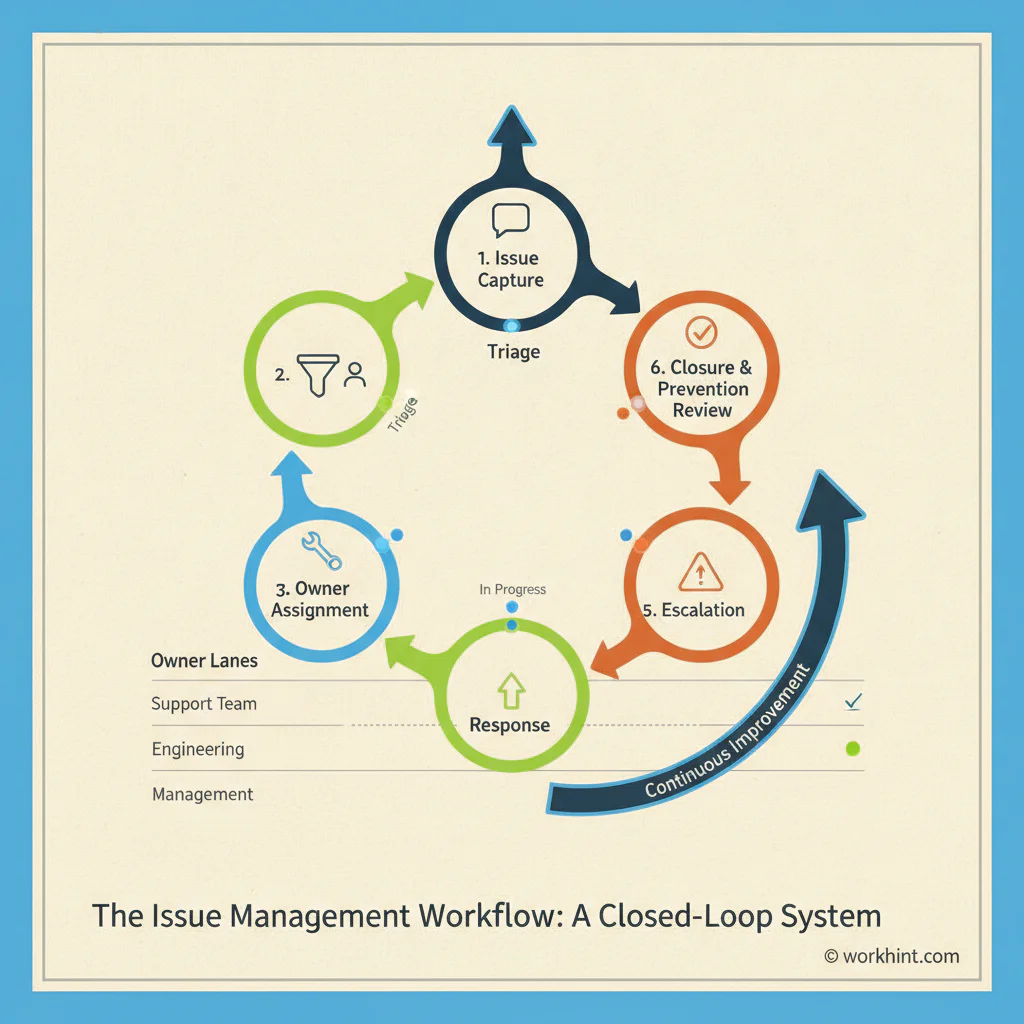
A strong issue management process does not need to be complicated. It needs to be consistent.
- Capture the issue. Record the problem in one shared place. Include who raised it, what is affected, and what evidence exists.
- Classify it. Tag the issue by type, such as customer, vendor, system, process, quality, compliance, capacity, or finance. Wolters Kluwer’s discussion of issue identification and categorization points to the same principle: categorization makes patterns easier to see.
- Prioritize it. Use impact and urgency, not whoever complained most recently.
- Assign one owner. The owner is accountable for driving resolution, even if other people contribute. Shared ownership usually means no ownership.
- Define the response. Decide the next action, due date, required decision, and success condition. If the path is unclear, assign a short investigation step.
- Escalate when needed. Set thresholds for issues that exceed normal authority, miss deadlines, affect customers, create compliance exposure, or need a tradeoff decision.
- Close with evidence. Close the issue when the fix is verified, the affected party is updated, and any prevention step is captured.
- Review the pattern. Recurring issues should feed process improvement. The point is not just to clear the log. The point is to prevent the same issue from coming back.
What to include in an issue log
An issue log or issue register is the practical record that keeps the process from becoming another meeting habit. ProjectManagement.com’s issue log guidance notes that documented issues, including resolved ones, become useful references for future work. PRINCE2-style registers commonly track fields such as issue ID, type, date raised, status, and closure date.
| Field | Why it matters | Example |
|---|---|---|
| Issue summary | States the problem clearly enough for anyone to understand. | Provider invoices are missing approval evidence. |
| Category | Helps the team spot recurring patterns. | Finance, vendor, compliance. |
| Impact | Shows what business outcome is at risk. | Payment delays and audit exposure. |
| Priority | Separates urgent issues from visible but low-impact noise. | High. |
| Owner | Makes one person accountable for progress. | Operations manager. |
| Next action | Turns the issue into executable work. | Review last 20 invoices and define required approval field. |
| Escalation rule | Prevents stuck issues from waiting quietly. | Escalate to finance lead if unresolved after 3 business days. |
| Closure evidence | Proves the issue was actually resolved. | Updated invoice workflow, tested on two new invoices. |
Common mistakes in issue management
The first mistake is logging issues without assigning ownership. A log without owners is just a list of frustrations. The second is treating every issue as equal. Teams need priority rules so the process does not reward volume over impact.
The third mistake is closing issues too early. “Fixed” should mean the change worked in the real process, not that someone sent a message. The fourth is failing to connect issues to root causes. If five issues trace back to unclear approval authority, the real work is redesigning the approval rule.
The final mistake is separating issue management from daily work. If the issue log sits outside the workflow, people will stop updating it. Issue management should connect to the request, task, customer, vendor, document, approval, or dashboard affected by the problem.
Where Workhint fits
Workhint fits when issue management needs to become a live work system rather than a static tracker. A team can use Workhint to create issue intake forms, route issues by category, assign owners, set priority rules, connect issues to the affected workflow, trigger escalation steps, collect closure evidence, and report on patterns.
Operational issues rarely live alone. A vendor issue may affect a payment workflow. A customer issue may require an approval. A quality issue may require a checklist update. Workhint helps connect the issue to the roles, permissions, tasks, documents, approvals, dashboards, and automation needed to resolve it.
FAQ
What is an issue management process?
An issue management process is the workflow a team uses to identify, record, prioritize, assign, resolve, escalate, and close active problems affecting work.
What is the difference between a risk and an issue?
A risk is a possible future problem. An issue is already happening. Risks need mitigation plans. Issues need owners, response actions, deadlines, and closure evidence.
What should be included in an issue log?
An issue log should include the issue summary, category, impact, priority, owner, date raised, next action, due date, escalation rule, status, and closure evidence.
Who should own issue management?
Each issue should have one accountable owner. The overall process is usually owned by operations, program management, project management, or the leader responsible for the affected workflow.
How often should teams review issues?
Review high-priority issues daily or several times a week. Review the full issue log weekly. Review recurring patterns monthly so the team can fix process causes, not just individual symptoms.
Conclusion
The practical value of an issue management process is not the log itself. The value is the operating discipline around the log: one place to capture problems, clear priority rules, one owner per issue, visible response actions, escalation thresholds, verified closure, and a prevention loop.
Start with one workflow where problems repeatedly get lost or rediscovered. Define what counts as an issue, create the log fields, assign ownership, set escalation rules, and review the pattern weekly. That is how issue management becomes a scalable work system instead of another spreadsheet people forget to update.
Leave a Reply