


Use this form before a contract reaches legal so review starts with facts, not follow-up questions.
A legal review request form template gives business teams a consistent way to ask legal, procurement, finance, and security for contract review. The value is not the form itself. The value is that every request arrives with the context reviewers need to make a decision: who the counterparty is, what the business is buying or selling, how much money is involved, what deadline matters, what risks are visible, and which documents are attached.
Without a standard intake form, contract review becomes an email chain. A good request form reduces that loop before it starts.
What is included
This resource includes a copy-ready legal review request form template, routing workflow, field guide, common mistakes, and short FAQ. It is designed for vendor contracts, customer agreements, statements of work, order forms, amendments, renewals, NDAs, data processing agreements, and other commercial documents.
- Requester, business owner, department, and deadline details.
- Counterparty, contract type, value, term, and renewal information.
- Risk questions for data, security, insurance, compliance, finance, and operational dependency.
- Required attachments and supporting evidence.
- Approval, decision, signature, and archive fields.
How to use the legal review request form template
Use the form before sending a contract for review, not after a negotiation is already urgent. The requester should complete the business context first. The business owner should confirm the need, deadline, budget, and operational owner. Procurement or finance should add vendor, payment, purchase order, or budget context when relevant.
Public examples from Practical Law and LexisNexis describe contract review or preparation request forms as intake documents for employees asking in-house counsel to review or draft commercial contracts. University counsel teams use the same operating idea. The University of Texas System publishes a contract and procurement solicitation intake form, and the University of Lethbridge asks users to submit complete requests with relevant documents attached.
Legal review request form template
Copy this structure into a form builder, document, spreadsheet, legal intake portal, procurement system, or Workhint workflow.
| Section | Fields to capture | Why it matters |
|---|---|---|
| Requester details | Name, department, role, email, manager, business owner | Legal needs to know who can answer business questions and who owns the decision. |
| Request type | Review existing contract, draft new agreement, amendment, renewal, NDA, SOW, order form, DPA, other | Different request types need different reviewers, documents, and timelines. |
| Counterparty | Legal name, website, contact, vendor or customer status, approved supplier ID if available | Accurate party details prevent signature, invoice, tax, and enforcement problems later. |
| Business purpose | What the agreement supports, why it is needed, affected team, expected outcome | Reviewers need to understand the business goal before judging acceptable risk. |
| Commercial terms | Contract value, payment terms, currency, term length, renewal rules, termination rights | Finance and legal can spot budget, payment, auto-renewal, and exposure issues. |
| Deadline | Requested review date, signature date, service start date, renewal notice deadline, urgency reason | A real deadline helps teams triage. “ASAP” should not be the default. |
| Risk questions | Customer data, personal data, confidential information, system access, regulated work, subcontractors, insurance, indemnity | Risk flags determine whether security, privacy, compliance, finance, or executive review is needed. |
| Attachments | Contract draft, SOW, order form, vendor proposal, redlines, prior agreement, approval record, security review | Missing files are one of the easiest ways to lose days in legal review. |
| Decision record | Reviewer, decision, required changes, approved signer, date approved, archive location | The company needs a record of what was approved, by whom, and under what conditions. |
Legal review request workflow
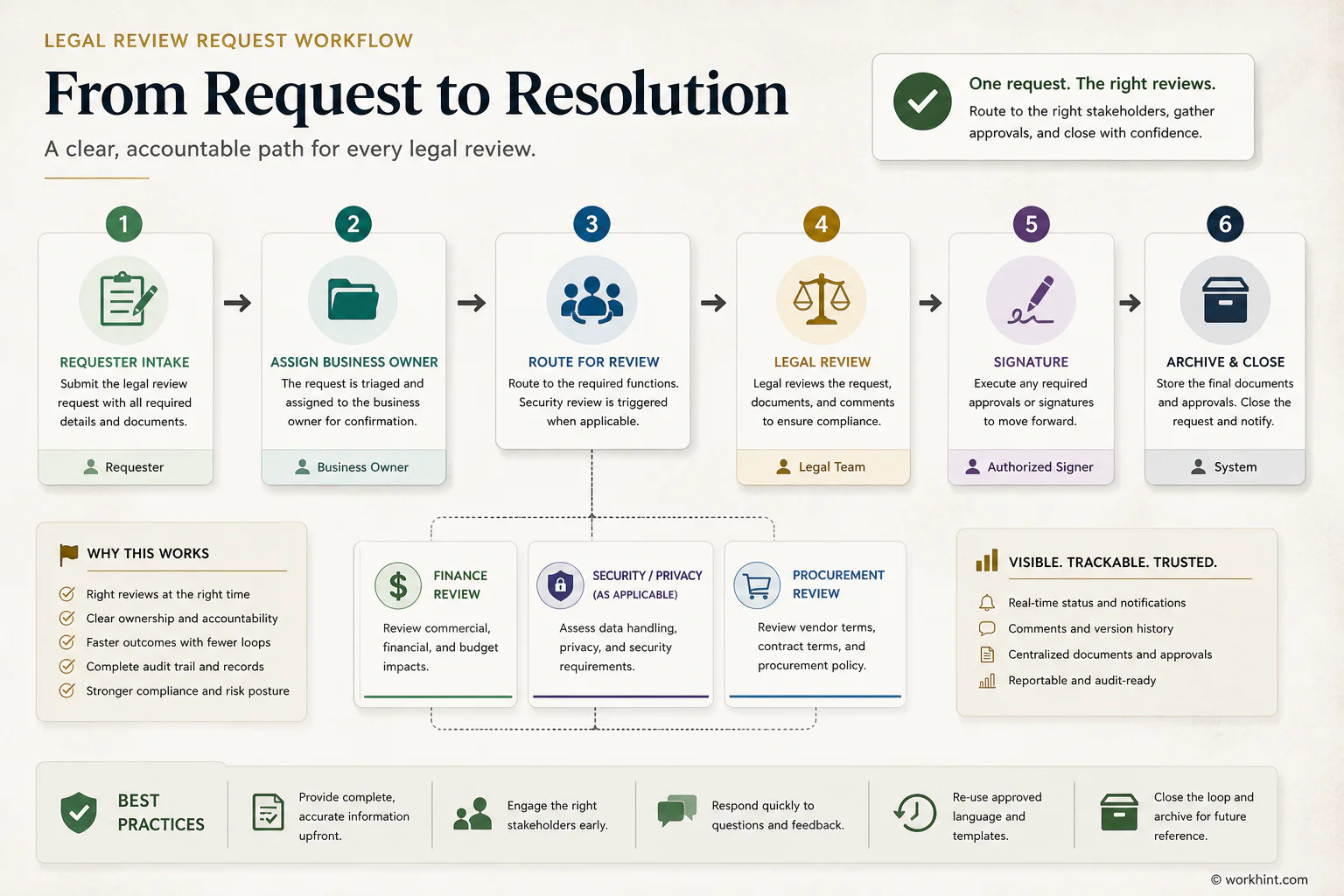
The form should create a clear workflow, not just a better document. Start with intake. If the request is incomplete, return it before legal review begins. If the agreement involves spend, route finance or procurement review. If it involves personal data, customer data, integrations, security access, regulated services, or confidential information, route the right specialist review. If the value, liability, term, or risk level exceeds policy thresholds, escalate before signature.
- Requester submits the legal review request with the draft agreement and supporting context.
- Business owner confirms the purpose, budget, timeline, and operational owner.
- Procurement or finance checks vendor status, spend approval, payment terms, and purchase process.
- Security, privacy, or compliance reviews the request only when risk questions trigger that path.
- Legal reviews the agreement, records required changes, and marks the decision.
- Authorized signer executes the final version, and the team archives the signed agreement and obligations.
Review fields by contract type
Use one core form and add conditional fields by contract type.
| Contract type | Extra fields to add | Likely reviewers |
|---|---|---|
| Vendor agreement | Service category, vendor approval status, insurance, payment terms, renewal date | Procurement, finance, legal |
| Software agreement | Data involved, integrations, users, security questionnaire, subprocessors, renewal rules | IT, security, privacy, procurement, legal |
| Statement of work | Scope, deliverables, milestones, acceptance criteria, change process, payment triggers | Business owner, finance, legal |
| NDA | Parties, purpose, confidential information type, duration, permitted use, exclusions | Business owner, legal |
| Customer agreement | Revenue value, commitments, service levels, implementation scope, data terms, nonstandard asks | Sales, finance, privacy, legal |
Common mistakes
The most common mistake is sending legal a contract with no business context. Legal can review clauses, but it cannot guess whether the pricing, timeline, scope, data use, or operational commitment is acceptable.
- Using urgency as a substitute for context. If the deadline is real, explain what happens if it is missed.
- Forgetting the current draft. Attach the editable version, not only a PDF screenshot or email thread.
- Skipping commercial terms. Legal review and finance review should not happen in separate realities.
- Ignoring data and access. A small contract can be high risk if it touches customer data, systems, or sensitive records.
- Losing the final record. The signed agreement, approval notes, and obligations should be archived where the team can find them later.
Where Workhint fits
Workhint helps teams turn a legal review request form into a live workflow. Instead of collecting contract requests through email, a team can build an intake path with required fields, conditional routing, reviewer roles, approval thresholds, document collection, status tracking, reminders, and audit records.
For example, a software agreement can trigger procurement, finance, security, privacy, and legal review only when those checks are needed. A low-risk NDA can move through a lighter path. The form stays simple, but the workflow behind it adapts to risk.
FAQ
What should a legal review request form include?
It should include requester details, business owner, counterparty, contract type, business purpose, value, deadline, risk questions, required attachments, requested decision, approved signer, and archive location.
Who should complete the legal review request form?
The person requesting review should complete the first draft. The business owner should confirm the commercial and operational context. Procurement, finance, security, privacy, or compliance can add details when the request touches their area.
Is a legal review request form the same as a contract checklist?
No. A contract checklist helps reviewers evaluate terms. A legal review request form collects the intake information needed before review starts. Many teams use both: the form opens the request, and the checklist guides the review.
How long should legal review take?
It depends on contract value, risk, negotiation history, missing information, reviewer capacity, and whether the request uses approved templates. The form should capture the real deadline and the reason behind it so the team can triage honestly.
Conclusion
A legal review request form template helps business teams make contract review faster, clearer, and easier to defend. Use it to capture the requester, counterparty, business purpose, value, deadline, risk details, attachments, approvals, and decision in one record.
The best form does not bury people in fields. It asks for the information reviewers actually need, routes the request by risk, and keeps the approval history connected to the signed agreement. That is how legal review becomes a managed business workflow instead of a last-minute inbox scramble.
Leave a Reply