

A process stays improved when the team knows what to watch, who owns it, and what happens when it drifts.
A process control plan template helps an operations team keep a workflow reliable after it has been designed, improved, or automated. It defines the control points, owners, metrics, thresholds, evidence, monitoring cadence, and response rules that prevent a process from sliding back into ad hoc work.
This matters because many process improvements fail after launch. Requests arrive incomplete, approvals wait too long, exceptions sit in messages, and nobody can tell whether the new process is still performing.
What’s in this article?
- What a process control plan is in business operations
- When to use one
- A practical process control plan template
- An operations example you can adapt
- Common mistakes that weaken process control
Why a process control plan template matters
A process control plan is the operating layer after process design. It answers: how will we know the process is working, and what will we do when it is not?
Quality teams often connect control planning to DMAIC. ASQ describes DMAIC as a structured approach for improving existing processes that do not meet performance standards or customer expectations. The final Control phase is where the improvement has to become durable. Business operations teams can borrow that discipline without turning every workflow into a formal Six Sigma project.
The plan is useful for request management, onboarding, vendor approval, implementation, support, finance, fieldwork, and staffing.
When to create a process control plan
Create a process control plan when a workflow has enough volume, risk, or business impact that drift would be expensive. Good triggers include a redesigned process, recurring bottleneck, customer-facing workflow, compliance-sensitive approval path, or automation that needs human review.
Do not wait until the process is perfect. A first version is enough if it names the critical points where work can fail. Improve it as the team learns which signals predict delay, rework, quality gaps, or customer complaints.
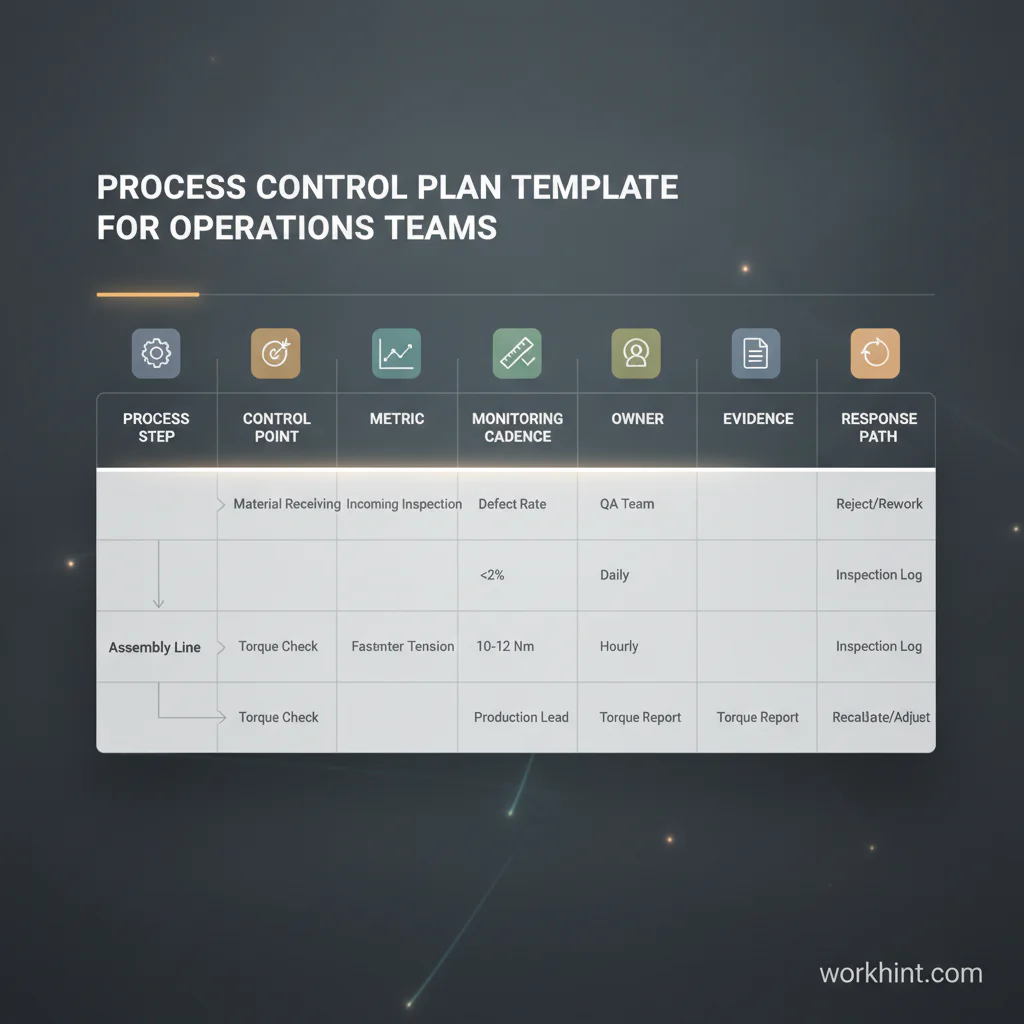
Process control plan template for operations teams
Use this structure as a starting point. The goal is to control the few points that determine whether the process produces the right outcome.
| Template field | What to define | Example |
|---|---|---|
| Process step | The stage being controlled | Vendor risk review |
| Control point | The moment where quality, timing, risk, or completeness must be checked | Risk review completed before contract signature |
| Metric | The measurable signal that shows whether the step is healthy | Review cycle time and missing-document rate |
| Threshold | The acceptable range or trigger for action | More than two business days or missing tax form |
| Owner | The role accountable for monitoring and response | Procurement operations lead |
| Cadence | How often the control is reviewed | Daily queue review, weekly trend review |
| Evidence | Where the status, document, approval, or data point lives | Vendor record, approval log, uploaded W-9 |
| Response plan | What happens when the threshold is missed | Route back to requester, alert finance, escalate after 48 hours |
Build the plan step by step
1. Start with one process outcome
Name the outcome the process must reliably produce: an approved vendor, resolved escalation, completed onboarding, paid invoice, or launched implementation. A control plan becomes weak when it covers a whole department instead of one workflow.
2. Identify the control points
Control points are the moments where failure matters. Look for intake quality, approvals, handoffs, access, document collection, budget checks, customer commitments, compliance steps, and final acceptance.
3. Choose leading and lagging metrics
Lagging metrics show the final result, such as completion time, quality score, cost variance, or customer satisfaction. Leading metrics warn the team earlier, such as missing inputs, queue age, overdue approval, blocked-owner count, or exception volume.
IBM describes business process management as work that includes analyzing, modeling, optimizing, and monitoring processes. Monitoring is the piece many teams skip. A control plan makes monitoring specific enough to act on.
4. Set thresholds before the work is late
A threshold is the point where the workflow needs attention. It should appear before the deadline is missed. A two-day approval SLA may need a warning at one business day, not a panic message on day three.
5. Assign one accountable owner
Each control point needs one owner. A department can support the process, but a named role must monitor the metric and trigger the response.
6. Define the response path
The response path separates a control plan from a report. Define what happens when inputs are missing, thresholds are crossed, risk increases, or quality slips.
Process control plan example
Imagine a company wants to control customer implementation. The outcome is a customer ready to use the service by the agreed launch date. The control plan might include these points.
| Control point | Metric | Threshold | Owner | Response |
|---|---|---|---|---|
| Sales handoff accepted | Missing handoff fields | Any required field missing | Implementation lead | Return handoff to sales before kickoff is scheduled |
| Customer access configured | Access setup age | More than one business day | Operations admin | Alert implementation lead and systems owner |
| Data or documents received | Required inputs complete | Less than 100 percent by kickoff minus three days | Customer success manager | Send customer request and flag launch risk |
| Launch readiness reviewed | Open blockers | Any blocker at readiness review | Project owner | Escalate with decision options and revised date if needed |
This is enough to make the process measurable. It tells the team what to watch, when to act, and who owns the response.
Connect the plan to your operating system
A control plan should become part of the way the workflow runs. APQC’s process frameworks provide common language for organizing business processes and benchmarking performance. That same idea applies at the team level: consistent process names, stages, owners, and measures make work easier to compare and improve.
Once the control plan is agreed, turn each field into the system that runs the work. Inputs become required fields. Control points become workflow gates. Metrics become dashboards. Thresholds become alerts. Owners become assignments. Response plans become routing rules or escalation paths.
Common process control mistakes
- Tracking too many metrics: Control the few signals that predict quality, delay, risk, or rework.
- Using vague thresholds: “Review regularly” is not a threshold. “Escalate when queue age exceeds two business days” is usable.
- Leaving ownership at department level: Assign a role that can act, not just observe.
- Measuring only outcomes: Add early-warning metrics so the team can intervene before failure is visible to customers.
Where Workhint fits
Workhint fits when a process control plan needs to become a live work system. A team can describe the workflow, control points, owners, thresholds, and response rules, then use Workhint to structure the intake, permissions, assignments, approvals, documents, alerts, dashboards, and reporting.
For example, a vendor approval plan can become a system where missing documents route back to the requester, security reviews have due dates, finance sees budget status, legal sees contract tasks, and operations tracks cycle time and exceptions.
FAQ
What should be included in a process control plan?
Include the process step, control point, metric, threshold, owner, monitoring cadence, evidence source, and response plan. Add risks, documents, and approval rules when the workflow is compliance-sensitive.
What is the difference between a process control plan and an SOP?
An SOP explains how work should be done. A process control plan explains how the team monitors whether the work is staying within the expected standard and what happens when it drifts.
Who owns a process control plan?
The process owner should own the plan overall. Each control point should also have a named role responsible for monitoring, response, and improvement.
Conclusion
A process control plan template turns process improvement into daily operating discipline. Start with one workflow, name the control points, choose practical metrics, set thresholds, assign owners, and define the response path. The result is a work system that does not depend on memory, meetings, or follow-up to stay on track.
Leave a Reply