


A purchase requisition form turns a spending request into a controlled approval path before money leaves the business.
A purchase requisition form template gives employees a consistent way to request goods or services, route approvals, document budget checks, and hand clean information to procurement or finance. It is the internal step before a purchase order, vendor contract, or invoice process begins.
Use this resource when purchases are happening through emails, chat messages, spreadsheets, or verbal approvals. The goal is simple: make every request complete enough that the right person can approve, reject, or revise it without chasing missing context.
What’s included
- A copy-ready purchase requisition form template
- A simple approval workflow from request to purchase order
- A field-by-field guide for what to collect
- An example requisition for a business software purchase
- Common mistakes that create delays, duplicate purchases, or weak audit trails
How to use this purchase requisition form template
Start by deciding which purchases require a requisition. Many companies use thresholds: small routine purchases may need manager approval only, while larger purchases may require budget owner, procurement, finance, security, or legal review. For public funds, grant funds, regulated purchases, or government procurement, confirm the applicable rules before relying on a general business template. Federal award recipients, for example, may need to follow the procurement standards in 2 CFR 200.317 through 200.327.
The form should be completed before a supplier is formally engaged, not after an invoice arrives. That timing matters because a requisition is where the business confirms the need, budget, vendor path, contract requirements, delivery expectations, and approval authority.
Purchase requisition form template
| Field | What to capture | Owner |
|---|---|---|
| Request title | Short name for the purchase or service request | Requester |
| Requester details | Name, department, location, manager, and contact information | Requester |
| Business reason | Why the purchase is needed and what operational problem it solves | Requester |
| Items or services requested | Description, quantity, specifications, dates, and delivery location | Requester |
| Estimated cost | Unit price, total price, taxes, fees, shipping, and recurring costs | Requester or finance |
| Budget code | Cost center, project code, grant code, or department budget | Budget owner |
| Preferred vendor | Vendor name, website, contact, quote, and reason for preference | Requester or procurement |
| Alternative quotes | Other quotes, comparison notes, or reason alternatives are not required | Procurement |
| Contract or terms review | Whether legal, security, privacy, or compliance review is needed | Legal or compliance |
| Approval path | Manager, budget owner, procurement, finance, legal, IT, or executive approval | Workflow owner |
| Required date | When the goods or services are needed and whether the request is urgent | Requester |
| Attachments | Quote, proposal, statement of work, contract, vendor documents, or screenshots | Requester |
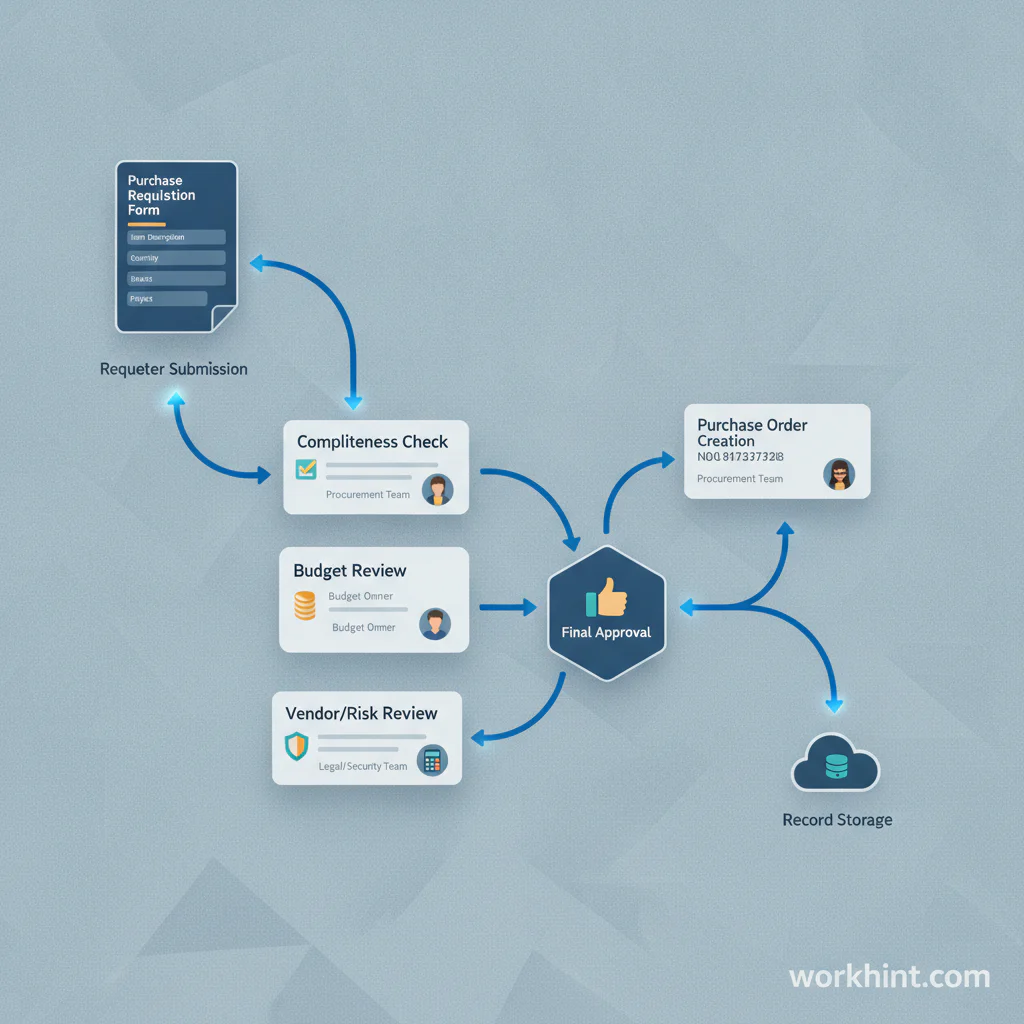
Approval workflow
- Submit the request. The requester completes the form with business reason, cost estimate, vendor information, and attachments.
- Check completeness. Procurement or operations confirms that the request has enough information to review.
- Review budget. The budget owner confirms funds, cost center, and business priority.
- Review vendor and risk. Procurement checks sourcing needs. Legal, security, privacy, or compliance reviews terms when required.
- Approve or revise. Approvers either approve, reject, or send the request back with specific changes.
- Create the purchase order. Procurement or finance turns the approved requisition into a purchase order, contract action, or approved buying instruction.
- Store the record. Keep the requisition, approval history, quote, purchase order, receipt, invoice, and payment evidence together.
Universities and enterprise procurement teams often treat the requisition as the starting record for later purchasing steps. The University of Illinois iBuy purchase requisition guidance explains that a purchase requisition form creates an electronic requisition for orders that do not use a hosted catalog or punchout supplier, and that quote details should match supplier information closely for successful invoicing.
Example purchase requisition
| Field | Example entry |
|---|---|
| Request title | Customer support knowledge base software |
| Business reason | Support team needs a searchable help center to reduce repeated tickets and standardize customer answers |
| Estimated cost | $6,000 annual subscription plus $800 implementation support |
| Budget code | Customer Operations Software |
| Preferred vendor | Vendor A, based on support workflow fit and existing CRM integration |
| Risk review | Security review required because customer data may be connected |
| Approval path | Support manager, budget owner, IT security, finance |
| Required date | Approved by August 15 for September rollout |
What makes a requisition form useful
A useful requisition form does not ask for every possible detail. It asks for the details needed to make a decision. Too little information creates rework. Too much information makes employees avoid the process. The strongest forms adjust by risk level: low-cost purchases get a lighter path, while software, contractors, regulated materials, customer data, capital equipment, or long-term commitments get deeper review.
For nonprofit, aid, and grant-funded purchasing environments, requisitions often become part of the procurement file. Catholic Relief Services describes a purchase requisition form as the staff request that starts the purchasing process and connects the request to purchasing communications. The same principle applies in ordinary businesses: the requisition should be easy to trace later.
Common mistakes
- Approving vague requests. If the business reason, amount, vendor, or delivery need is unclear, the approval is not meaningful.
- Skipping budget codes. Finance should not have to guess which budget owns the purchase.
- Letting urgency bypass review. Urgent requests still need a record, even if the path is accelerated.
- Collecting vendor terms too late. Contracts, data access, privacy terms, and renewal clauses should be reviewed before the purchase is committed.
- Separating approvals from documents. Keep the form, quote, approval notes, PO, receipt, and invoice in the same record or workflow.
Where Workhint fits
Workhint fits when the purchase requisition form needs to become a live workflow instead of another spreadsheet. A team can turn this template into a request intake path with role-based fields, budget-owner routing, procurement review, legal or security approvals, attachment collection, status tracking, reminders, and reporting.
That is useful when purchases cross departments or involve vendors, contractors, software, equipment, services, or compliance-sensitive work. Workhint can help the business define who can request what, which approvals are required by purchase type, what evidence must be attached, and when an approved requisition is ready for purchase order creation or finance handoff.
FAQ
What is a purchase requisition form?
A purchase requisition form is an internal document employees use to request goods or services before a purchase is approved. It usually includes the business reason, item details, vendor information, estimated cost, budget code, attachments, and approval path.
Is a purchase requisition the same as a purchase order?
No. A purchase requisition is an internal request for approval. A purchase order is usually the formal buying document sent to the supplier after the request has been approved.
Who should approve a purchase requisition?
The approval path depends on the purchase. Common approvers include the requester’s manager, budget owner, procurement, finance, IT security, legal, compliance, or an executive for high-value purchases.
What should be attached to a purchase requisition?
Attach the vendor quote, proposal, contract, statement of work, screenshots, comparison notes, technical requirements, tax or vendor forms, and any policy evidence needed to approve the request.
When should a company require a requisition?
Require a requisition when a purchase needs budget control, vendor review, contract review, audit evidence, manager approval, or coordination across teams. Set thresholds so routine low-risk purchases do not create unnecessary work.
Conclusion
A purchase requisition form template helps a business slow down the right part of buying: the moment before commitment. Use it to capture the need, cost, vendor, documents, budget, and approvals in one place. The form should make good purchases easier to approve and risky purchases easier to catch before they become invoices, contracts, or operational problems.
Leave a Reply