


A good work order turns a request into accountable work, with the right owner, proof, cost, and closeout record.
A work order template gives service and maintenance teams a repeatable way to capture work, assign it, track progress, and prove completion. The value is not just the form. The value is the operating record it creates when a customer, employee, contractor, technician, facility manager, or operations lead needs something done.
Use this work order template when requests can be misplaced, completed without approval, billed without evidence, or repeated because no one can see what happened last time. It works for maintenance, field service, facilities, repair, cleaning, property work, contractor jobs, IT operations, and tasks.
What’s included
- A copy-ready work order template for business teams.
- A field guide showing which details should be required, optional, or conditional.
- A simple workflow for request intake, assignment, execution, review, and closeout.
- An example service work order.
- Common mistakes that make work orders hard to track or bill.
How to use this work order template
Start by deciding when a work order is required. A good rule: create a work order when the task needs an assigned owner, a deadline, a site or asset reference, materials, labor tracking, customer approval, safety notes, billing detail, or completion proof.
Several template libraries, including Smartsheet’s work order forms, organize work orders by use case such as repair, construction, service, and maintenance. That is useful, but most teams should keep one core template and add conditional fields for special cases. Too many unrelated forms make reporting harder.
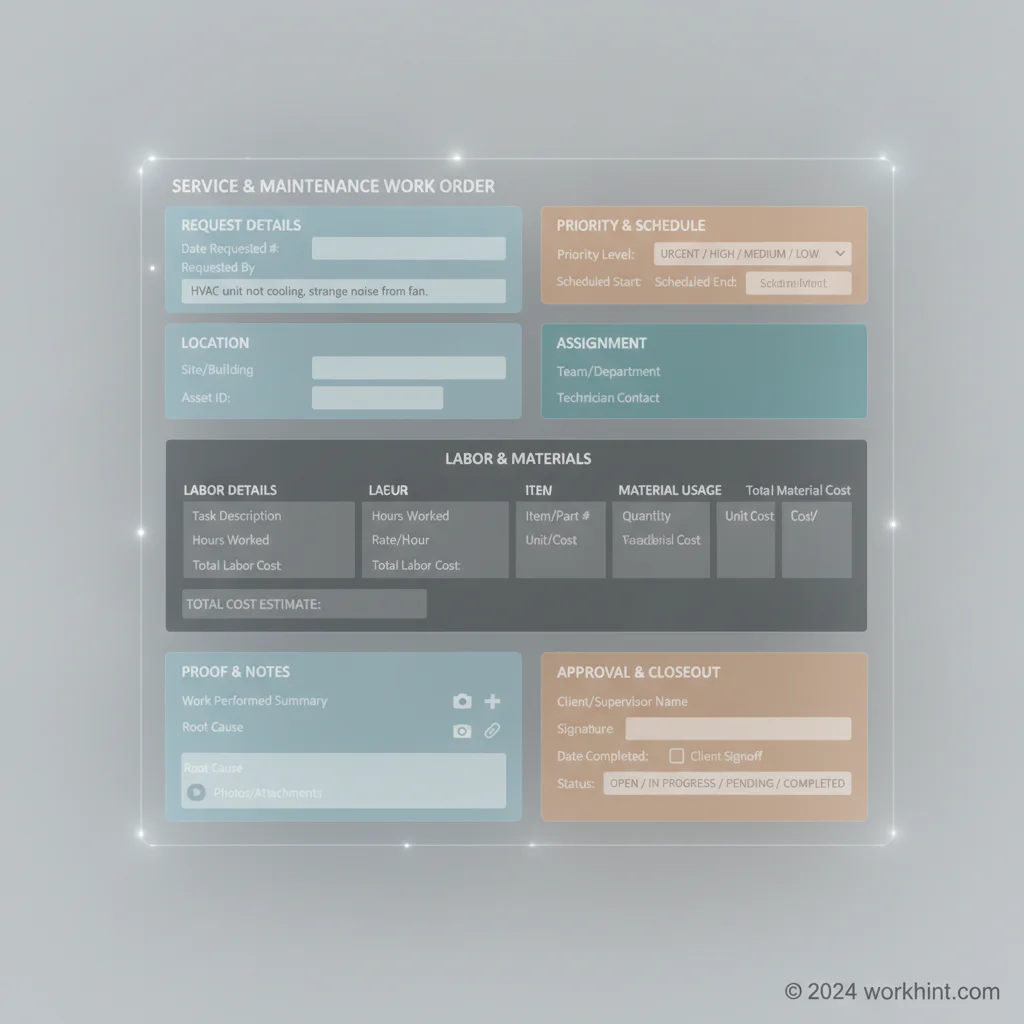
Work Order Template Fields
| Section | Fields to capture | Why it matters |
|---|---|---|
| Request details | Request title, requestor, date submitted, source, description | Creates a clear starting record and reduces back-and-forth. |
| Location or asset | Site, building, room, equipment ID, asset type, customer account | Connects the work to the right place, asset, or client history. |
| Priority and due date | Priority, target date, service level, business impact | Helps teams triage urgent work without relying on who is loudest. |
| Assignment | Owner, team, technician, vendor, contractor, approver | Makes accountability visible before work starts. |
| Work scope | Task checklist, exclusions, required access, dependencies | Defines what should be done and what is out of scope. |
| Labor and materials | Hours, rate, parts, quantities, costs, purchase references | Supports billing, margin tracking, and budget review. |
| Completion proof | Photos, notes, test result, customer signoff, completion date | Reduces disputes and creates evidence for audits or repeat work. |
| Closeout | Status, final approver, invoice status, follow-up required | Prevents completed work from staying operationally open. |
Copy-ready work order template
Work order number: [Auto-number or manual ID]
Request title: [Short description of the work]
Requestor: [Name, team, company, contact details]
Date submitted: [Date]
Location or asset: [Site, building, unit, room, equipment ID, vehicle, system, or customer account]
Priority: [Emergency, high, normal, low]
Required completion date: [Date or service-level target]
Work description: [What needs to be done, why it matters, and any symptoms or context]
Scope checklist: [Step 1], [Step 2], [Step 3], [inspection or test], [cleanup or handoff]
Assigned owner: [Employee, technician, contractor, vendor, or team]
Required access: [Keys, credentials, site contact, permits, safety requirements, customer availability]
Materials or parts: [Item, quantity, unit cost, source, purchase approval]
Labor: [Person, role, hours, rate, notes]
Cost estimate: [Labor + materials + outside services + taxes or fees]
Approval required: [Yes or no; approver; approval threshold]
Completion evidence: [Photos, checklist, inspection result, customer signature, system test, notes]
Status: [New, triaged, assigned, in progress, waiting, complete, rejected, closed]
Closeout notes: [What was done, what changed, what still needs attention]
Simple work order workflow
- Capture the request. Use a form, email intake, customer portal, employee request queue, or dispatcher view. Do not start with a private message if the work needs tracking.
- Triage the work. Confirm location, asset, priority, risk, due date, and whether approval is needed before assignment.
- Assign an owner. Give one person or vendor accountability, even if several people help complete the work.
- Execute and update status. Track start time, blockers, parts, labor, and completion notes as the work happens.
- Verify completion. Require evidence for work that affects safety, billing, customer experience, operations, or compliance.
- Close the order. Confirm final status, invoice readiness, follow-up tasks, and whether the issue should trigger preventive work.
ServiceNow’s work order template documentation highlights a useful operational principle: templates should prepopulate repeatable information so teams do not rebuild the same work order details every time. That is especially important for recurring maintenance, standard service visits, inspections, and repeat customer jobs.
Example service work order
Request title: Replace damaged keypad at Dallas warehouse loading dock.
Location: Dallas warehouse, Dock 3, exterior personnel door.
Priority: High because access delays are affecting morning receiving.
Scope: Inspect keypad, replace unit if required, test entry code, confirm access log, remove damaged hardware, upload before-and-after photos.
Assigned owner: Approved security vendor, with facilities manager as internal owner.
Materials: Weather-rated keypad, mounting hardware, wiring connectors.
Completion proof: Photo of installed unit, successful access test, vendor notes, facilities approval.
Closeout: Invoice approved only after test evidence and facilities signoff.
Common mistakes
- Using one description field for everything. Separate request details, scope, materials, proof, and closeout notes so the record is searchable later.
- Skipping priority rules. If every request is urgent, teams cannot protect time-sensitive work.
- Failing to capture cost drivers. Labor, materials, travel, outside services, and rework should be visible before billing or budget review.
- Closing without evidence. For many service and maintenance jobs, completion notes alone are not enough. SafetyCulture’s maintenance template guidance points to the need to document resources and costs involved in the task.
- Letting templates multiply. Use conditional sections instead of maintaining separate templates for every small variation.
Where Workhint fits
A work order template is useful as a document, but most teams need it to become a live workflow. Workhint helps organizations turn the template into an operating system: intake forms, role-based assignment, approval rules, status tracking, contractor access, document collection, schedules, proof uploads, payment or invoice status, dashboards, and follow-up automation. For field-service resources, field service software can coordinate service requests, technician assignment, dispatch, job status, completion proof, and follow-up.
That matters when work orders cross employees, vendors, customers, contractors, and field teams. Instead of managing requests in spreadsheets and chasing updates manually, the work order becomes the shared record for who owns the job, what was approved, what evidence was captured, and what still needs action.
FAQ
What is a work order template?
A work order template is a reusable form for requesting, authorizing, assigning, tracking, and closing a specific job. It usually captures the request, location, owner, scope, labor, materials, status, and completion evidence.
What should be included in a work order form?
Include request details, location or asset, priority, due date, assigned owner, scope, materials, labor, costs, approvals, completion proof, status, and closeout notes. For field or maintenance teams, add site access and safety notes where needed.
Is a work order the same as a purchase order?
No. A work order describes the job to be performed and tracks completion. A purchase order authorizes spending with a supplier. Some jobs need both: the work order for execution and the purchase order for procurement or billing control.
Can small businesses use a work order template?
Yes. Small businesses often benefit most because a simple template prevents verbal requests, missed follow-ups, unclear costs, and disputed completion. Start with the core fields, then add complexity only when the work requires it.
Should work orders include photos?
Use photos when work quality, site condition, customer acceptance, safety, damage, or billing could be disputed. Many service teams also use photo evidence to train new staff and improve repeat work.
Conclusion
A strong work order template gives teams more than a form. It creates a repeatable operating record for request intake, assignment, execution, proof, cost tracking, and closeout. Start with the fields above, keep the template clear, and build the workflow around the decisions your team needs to make every day.
Leave a Reply