


A work queue only helps when it has ownership, limits, priority rules, and a clear path from waiting to done.
Work queue management is the operating discipline for controlling how requests, tasks, tickets, approvals, exceptions, and automated jobs wait before someone acts on them. It matters because most teams do not fail only while doing the work. They fail while work is waiting: waiting for triage, waiting for an owner, waiting for missing context, waiting for approval, or waiting behind lower-value tasks.
A queue can live in a help desk, operations inbox, customer implementation pipeline, finance approval list, field service board, automation platform, or shared spreadsheet. The format matters less than the system around it. A useful queue tells the team what is waiting, why it matters, who owns the next move, when it becomes late, and what happens when capacity is full.
What’s in this article?
- What work queue management means in business operations
- How to design queue rules that prevent backlog growth
- Which metrics show whether a queue is healthy
- A practical queue management table you can adapt
- Where automation and Workhint fit into queue-based work systems
Why work queue management matters
When a queue is unmanaged, every item looks equally urgent until someone complains. The team starts the newest request, the loudest request, or the easiest request instead of the right request. Older work ages silently. High-risk exceptions sit beside routine tasks. Managers ask for status in meetings because the queue itself does not explain what is happening.
Queue design is a work-system problem. Microsoft describes Power Automate work queues as a way to store process-relevant data, decouple complex processes, and prioritize work across human workers, digital workers, and integrations. That same idea applies outside automation: the queue should separate demand from execution while preserving enough context to make the next action clear.
Work queue management: the core operating model
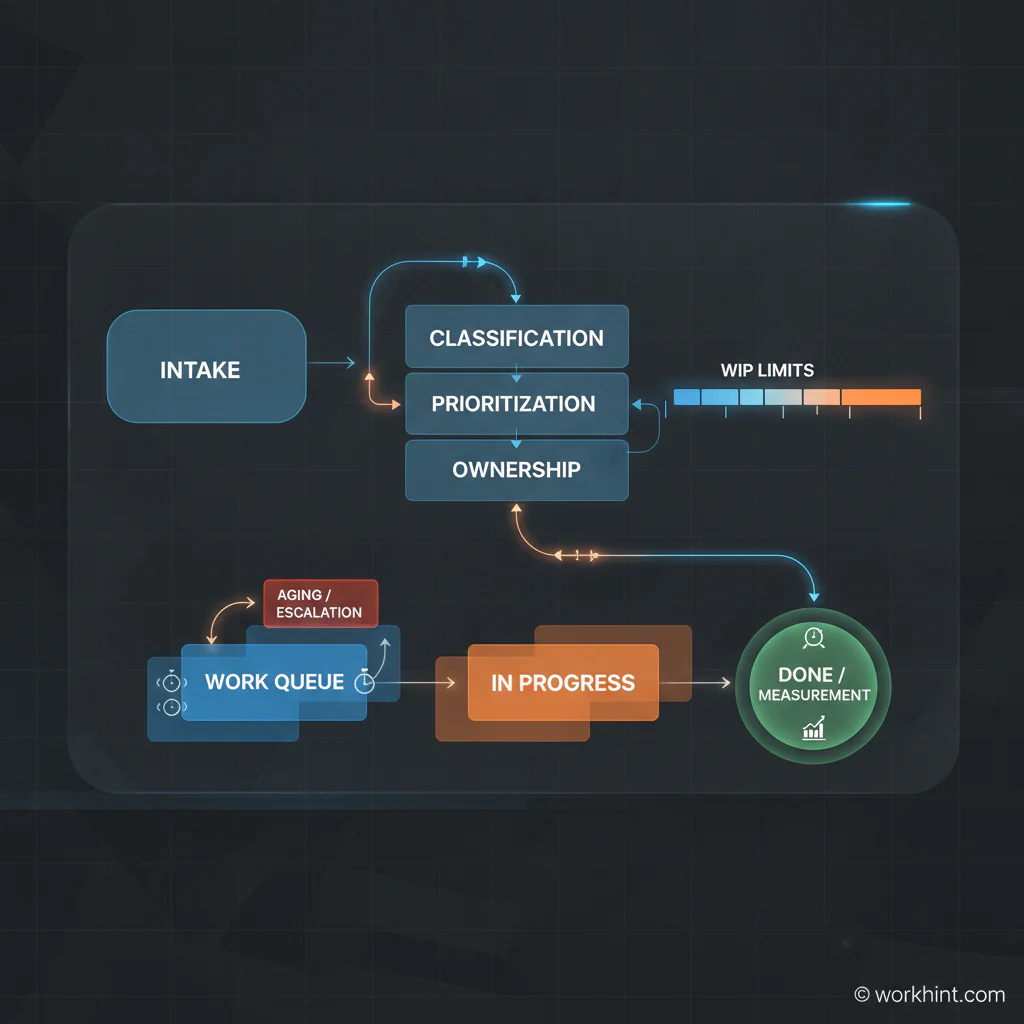
A strong queue has five parts: intake, classification, prioritization, ownership, and flow control. Intake captures work in one place. Classification identifies the type of work. Prioritization decides what should move first. Ownership assigns the next action. Flow control prevents the team from starting more work than it can finish.
| Queue rule | Question it answers | Example |
|---|---|---|
| Entry criteria | What belongs in this queue? | Only requests with required customer, deadline, category, and business impact fields |
| Priority logic | What moves first? | Compliance risk, customer impact, deadline, revenue impact, then age |
| Owner rule | Who owns the next action? | Triage owner assigns every accepted item to a role within one business day |
| WIP limit | How much can be active at once? | No more than eight active implementation requests per coordinator |
| Aging rule | When does waiting become a problem? | Items untouched for three business days move to manager review |
| Exit rule | When is the item done? | Requester notified, evidence attached, status closed, metric updated |
How to build a work queue management process
1. Define the queue’s purpose
Do not create a general holding pen for everything. Name the operational job the queue performs: IT access requests, vendor approvals, customer onboarding tasks, invoice exceptions, field service issues, hiring approvals, content reviews, data requests, or automation exceptions. A queue with a clear purpose can have clear rules.
2. Standardize the fields that drive action
Every item should carry the information needed for triage and assignment. Useful fields include request type, requester, affected customer or team, deadline, urgency reason, impact, required approval, owner, status, age, dependency, and next action. Avoid collecting fields nobody uses. Missing context should either block entry or route the item back for clarification.
3. Separate priority from urgency
Urgency is about time pressure. Priority is about business importance. A low-impact request due today should not automatically outrank a high-impact issue due tomorrow. Build a simple scoring rule that combines impact, risk, deadline, customer or revenue relevance, effort, and age. Then make the priority visible in the queue.
4. Set work-in-progress limits
Queues grow when teams keep starting work instead of finishing work. Atlassian’s guidance on WIP limits explains that limiting active work can improve throughput and reduce “nearly done” work by forcing focus. For operations teams, the same principle applies: if active work is full, the next move is to finish, unblock, reassign, or escalate before pulling more work in.
5. Measure flow, not just volume
Counting open items is not enough. Track queue age, time to triage, time in active work, blocked time, throughput, reopened items, SLA misses, escalation rate, and percentage returned for missing information. Kanban University describes Little’s Law as a relationship between average throughput, work in progress, and cycle time in a stable environment. The practical lesson is simple: if active work rises faster than throughput, cycle time usually gets worse.
Common work queue mistakes
- No clear owner. A shared queue without a named triage owner becomes everyone’s problem and nobody’s obligation.
- Too many priority labels. If everything is high priority, the queue has no priority system.
- No aging rules. Old work should become visible automatically before a stakeholder has to chase it.
- Mixing routine work with exceptions. Exceptions need different owners, deadlines, and escalation paths than standard requests.
- Optimizing the queue but ignoring the workflow. A tidy queue does not help if approved work still stalls in downstream approvals, handoffs, or systems.
Where Workhint fits
Workhint fits when a queue needs to become a live operating system instead of a list people manually police. A team can describe the queue it needs to manage, then structure request fields, roles, permissions, status stages, assignment rules, approval paths, escalation triggers, dashboards, and automation around the real workflow.
That matters when queues cross teams or worker types. A vendor approval queue may involve operations, legal, finance, IT, and the requesting manager. A customer onboarding queue may involve sales, implementation, support, billing, and external service providers. Workhint helps connect the queue to the people, decisions, documents, tasks, schedules, and reporting required to move work from waiting to done.
FAQ
What is work queue management?
Work queue management is the process of organizing, prioritizing, assigning, tracking, and improving queued work so requests move through a workflow predictably.
What should a work queue include?
A work queue should include request type, priority, owner, status, age, deadline, impact, required context, next action, and completion criteria.
How do you reduce a work queue backlog?
Start by separating old, blocked, duplicate, low-value, and high-risk work. Then assign owners, set WIP limits, close stale items with a reason, escalate aging work, and fix the intake rules that created the backlog.
Who should own a work queue?
Every queue needs one accountable owner for health, rules, and review cadence. Individual items can have different owners, but the queue itself should not be ownerless.
Can work queue management be automated?
Yes. Automation can classify requests, assign owners, apply priority rules, send reminders, trigger escalations, update dashboards, and close completed items. Human judgment should still handle exceptions, tradeoffs, and unclear requests.
Conclusion
Work queue management is not just sorting tasks. It is how an organization controls waiting work before delay becomes normal. Start with one queue that matters, define entry and exit rules, assign ownership, limit active work, measure flow, and make aging visible. The result is a work system that helps teams finish the right work instead of constantly rediscovering what is stuck.
Leave a Reply