


Workflow integration works when tools follow the process, not when the process bends around tools.
Workflow integration is the operating design that connects people, tasks, data, approvals, and systems so work can move across tools without constant manual handoffs. It is not just an API project. It is a business process design problem first, and a technical connection problem second.
Teams usually feel the need for workflow integration when work starts crossing tool boundaries: sales requests become finance checks, customer issues become engineering tasks, or onboarding steps require documents. If the handoff depends on copying data between systems, the workflow is already too fragile to scale.
What’s in this article?
- Why workflow integration matters for scalable operations
- How integration differs from automation
- A practical workflow integration design model
- A table for deciding what to connect first
- Common mistakes that create brittle integrations
- Where Workhint fits when integration needs to become an operating system
Why workflow integration matters
Modern operations rarely live in one system. A customer onboarding process might involve a CRM, contract tool, identity check, project workspace, support queue, billing system, and reporting dashboard. Each tool can be useful on its own, but the process fails if people have to remember what to move, where to update it, and who to notify next.
Current search results for workflow integration, business process integration, and workflow automation integration show strong operational intent. Competing articles explain definitions, benefits, APIs, connectors, data silos, and automation examples. The practical gap is that many guides start with tools instead of helping operators decide which events, records, roles, and controls should connect.
Oracle describes business process integration as connecting silos of automation and data, often through event-based synchronization. Workato similarly explains that workflow integration connects applications, often through APIs, so data can move between apps. Those definitions are useful, but the operator’s question is sharper: what should move, when, who owns it, and how do we know it worked?
Workflow integration vs. workflow automation
Integration and automation are related, but they are not the same thing. Integration connects systems so information, status, files, or events can move between them. Automation uses rules to perform work once the right information or event is available.
For example, connecting a CRM to an onboarding system is integration. Automatically creating an onboarding workspace when a deal is marked closed-won is automation. The best systems use both, but integration should come first because automation without clean handoffs only moves bad process design faster.
Workflow integration: a practical design model
Use this model before building connectors, zaps, scripts, or custom API work.
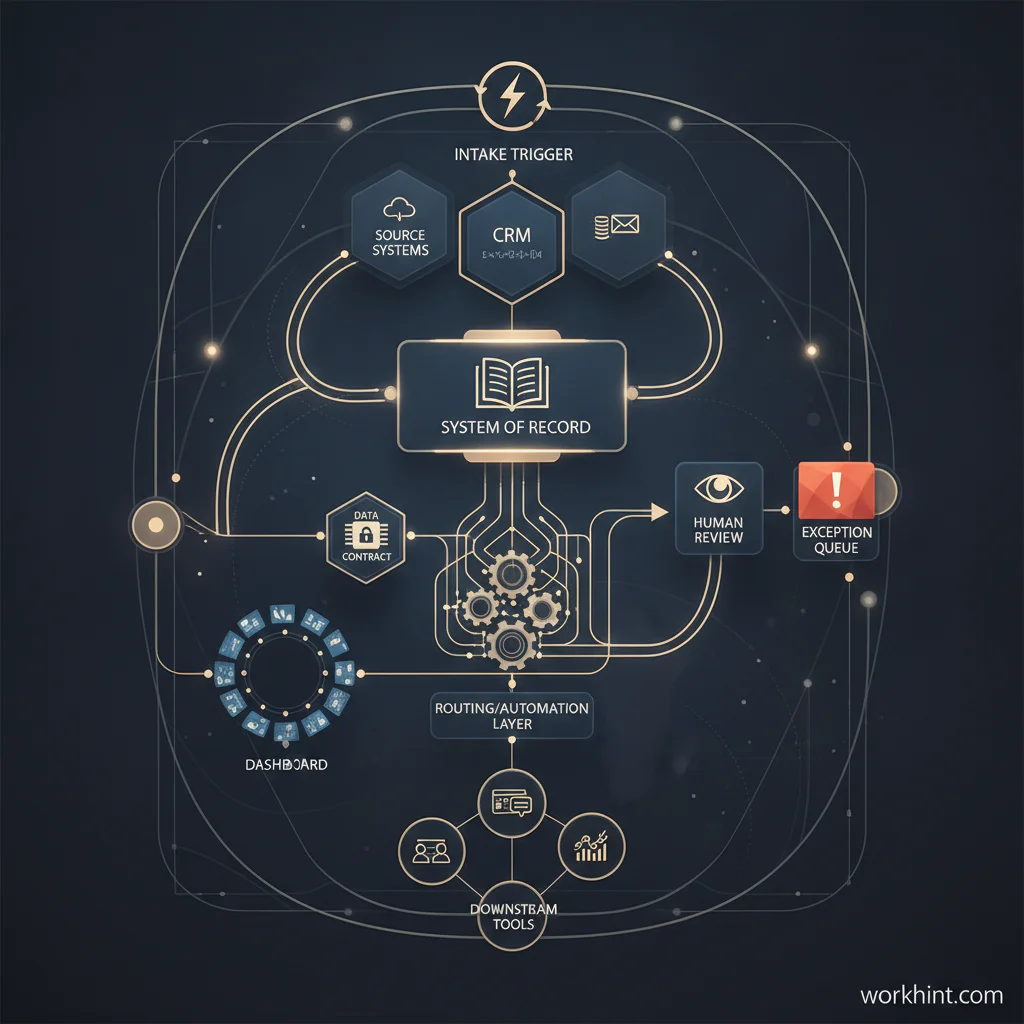
- Name the workflow outcome. Define the business result, such as approved vendor, onboarded contractor, resolved support escalation, completed customer implementation, or paid invoice.
- Map the source systems. Identify where the request begins, where the master record lives, and which tools produce supporting evidence.
- Define the event triggers. Decide which status change, form submission, approval, date, threshold, or exception should move the workflow forward.
- Choose the system of record. One system should own the canonical status for each major record. Other tools can mirror, enrich, or act on it.
- Set the data contract. Define the fields that must move between systems, acceptable formats, required IDs, and validation rules.
- Design ownership and fallback. Decide who owns failed syncs, duplicate records, missing data, permission errors, and manual override decisions.
- Add visibility. Operators need dashboards for stuck work, delayed handoffs, failed events, aging tasks, and exceptions.
- Review security and access. Integrated workflows can expose sensitive data if permissions are copied casually. NIST SP 800-53’s security and privacy control catalog is a useful reference point for teams thinking about access, auditability, and accountability.
- Measure the before and after. Track cycle time, rework, manual updates, missed handoffs, duplicate records, and exception volume.
What to integrate first
The best first integration is not always the most visible one. Start where the workflow is frequent, error-prone, measurable, and painful enough that better handoffs will change execution.
| Workflow signal | What it usually means | Integration priority | Example connection |
|---|---|---|---|
| Manual re-entry | Teams copy the same data into multiple tools | High | CRM to onboarding workspace |
| Status confusion | No one knows where work currently stands | High | Task system to operations dashboard |
| Approval delays | Work waits between systems or teams | High | Request form to approval queue |
| Duplicate records | Multiple tools create competing versions of the same object | Medium | Customer ID sync across CRM and support |
| One-off reporting | Managers assemble updates manually | Medium | Workflow events to reporting table |
| Rare edge case | The process matters but happens infrequently | Low | Documented manual runbook with review trigger |
Use process notation only where it helps
Some workflows need formal mapping. The Object Management Group describes Business Process Model and Notation as a standard notation for specifying business processes in diagrams. BPMN can help when business and technical teams need precision, especially for conditional routing, parallel paths, exceptions, and system events.
For many operating teams, a simpler workflow map is enough: trigger, actor, system, required data, decision, output, and exception path. The point is to make the handoff unambiguous.
Common workflow integration mistakes
- Integrating tools before designing ownership. A connection does not solve who owns the work when something fails.
- Syncing too much data. Moving every field creates maintenance burden and privacy risk. Move what the next step actually needs.
- Ignoring the system of record. If two tools can both update the same status, conflict is inevitable.
- Automating exceptions too early. Standardize the normal path first, then design recurring exceptions.
- Leaving operators without monitoring. Integrated workflows still need queues, alerts, and dashboards for failed handoffs.
- Treating integration as an IT-only project. Operations, finance, legal, and frontline teams often know the real handoff points best.
Where Workhint fits
Workhint fits when workflow integration needs to become a live work system rather than a loose set of connections. A team can use Workhint to define the roles, intake steps, permissions, approvals, assignments, documents, dashboards, automations, and reporting around an integrated workflow.
That is especially useful when a process spans internal teams, external contributors, customers, vendors, or contractors. Instead of connecting tools around an unclear process, Workhint helps map the work first and then orchestrate the system around it: who starts the workflow, what information is required, where human review is needed, what records are retained, and what metrics show whether the system is working.
FAQ
What is workflow integration?
Workflow integration is the practice of connecting systems, data, tasks, and events so a business process can move across tools without manual re-entry or unclear handoffs.
What is the difference between workflow integration and API integration?
API integration is a technical method for connecting systems. Workflow integration is the broader operating design: what should connect, when it should happen, which data moves, who owns exceptions, and how the business process is measured.
Which workflows should be integrated first?
Start with workflows that are frequent, cross-functional, delayed by manual handoffs, vulnerable to data errors, or tied to revenue, customer experience, compliance, payments, or operational capacity.
How do you measure workflow integration success?
Measure cycle time, manual updates avoided, error rate, duplicate records, failed syncs, exception volume, SLA breaches, handoff delays, and the percentage of work visible in a shared dashboard.
Does workflow integration require custom development?
Not always. Some workflows can use native integrations, automation platforms, or no-code connectors. Custom development is more likely when the process needs complex rules, strict permissions, unusual data models, or high reliability.
Conclusion
Workflow integration is not about connecting every tool to every other tool. It is about designing the path work should follow, then connecting the systems needed to make that path repeatable, visible, and measurable. When the workflow outcome, event triggers, data contract, ownership model, access rules, and exception paths are clear, integration becomes a scalable operating advantage instead of another layer of technical clutter.
Leave a Reply