


A good status report does not describe work; it turns progress, risk, and decisions into clear next action.
A project status report template gives teams a repeatable way to explain where a project stands, what changed, what is blocked, and what needs attention next. Without a shared format, status updates become scattered messages, long meetings, or optimistic summaries that hide risk until it is expensive.
This resource is built for operators, project managers, founders, client service teams, and department leads who need a practical weekly update format. It works for internal projects, client delivery, product launches, implementation work, agency engagements, and cross-functional operations.
What’s included
- A project status report template you can adapt immediately.
- A simple status scale for project health.
- A weekly reporting workflow for collecting inputs and assigning follow-up.
- A short example showing how the template looks in practice.
- Common mistakes that make status reports less useful.
How to use this resource
Use the template once per reporting cycle, usually weekly for active projects and monthly for slower initiatives. The goal is not to document everything. The goal is to help stakeholders understand health, movement, risk, and required decisions quickly.
The Project Management Institute notes that effective status reporting should communicate what the project team needs from the client or stakeholder, not just what happened. PMI also emphasizes that project communication benefits from a systematic and repeatable approach. In practice, that means your status report should be short, consistent, and connected to action.
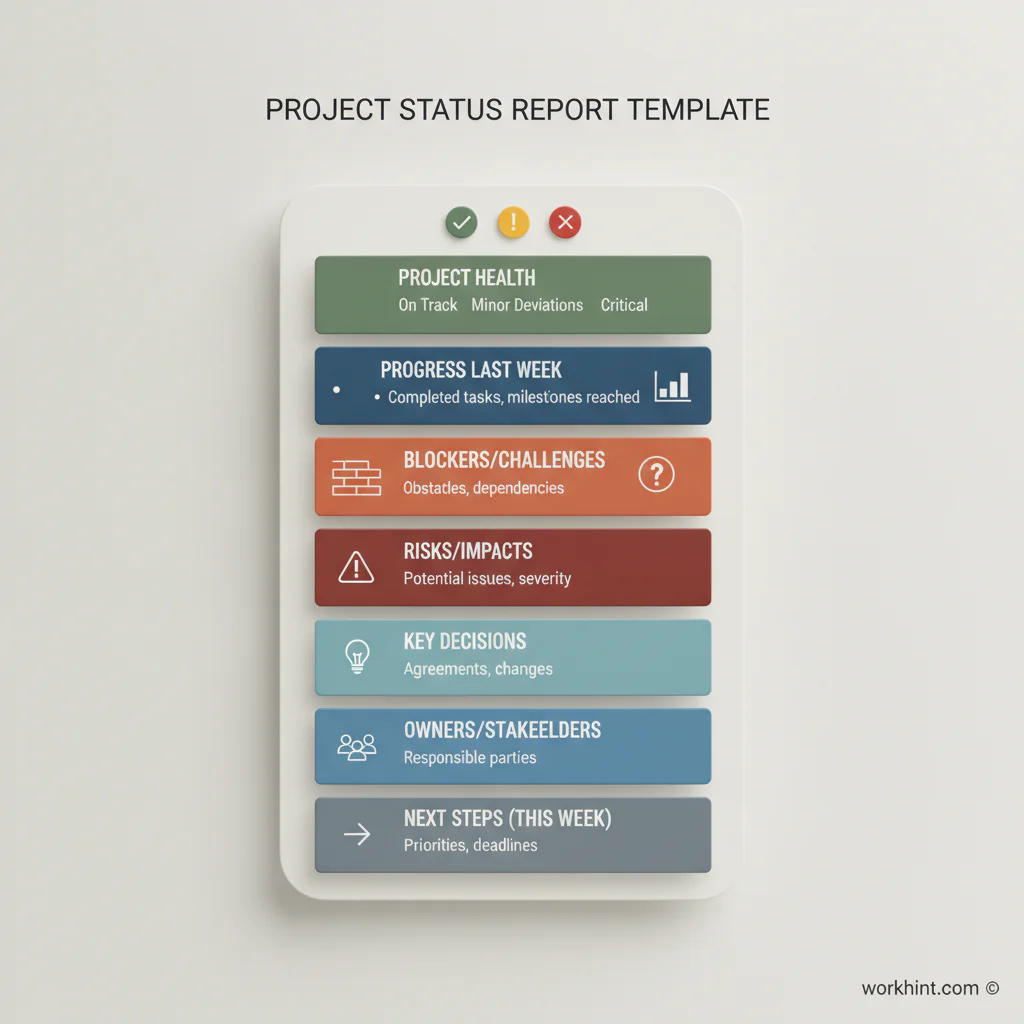
Project status report template
| Section | What to include | Example |
|---|---|---|
| Project health | Use green, yellow, or red with one sentence explaining why. | Yellow: design is approved, but vendor data access is still blocked. |
| Reporting period | State the week or month covered. | June 29 to July 3, 2026. |
| Progress this period | List completed outcomes, not activity for its own sake. | Completed data mapping, approved onboarding flow, and launched pilot training. |
| Upcoming work | Show the next few milestones or deliverables. | Finalize QA, train managers, and prepare launch communications. |
| Blockers | Name anything stopping progress and who owns resolution. | Security review pending; owner: IT lead; needed by Friday. |
| Risks | Call out potential issues before they become blockers. | Launch date could slip if payroll file format is not confirmed this week. |
| Decisions needed | Ask for specific decisions with deadlines. | Approve phased rollout or full rollout by July 8. |
| Action items | Assign owner, due date, and expected result. | Ops to confirm pilot user list by Wednesday. |
Copy-ready weekly status format
Project: [Project name]
Owner: [Project owner]
Reporting period: [Dates]
Overall health: [Green / Yellow / Red] – [one-sentence reason]
Summary: [Two to four sentences on what changed, what matters, and whether the project is still on track.]
Completed this period:
- [Outcome completed]
- [Milestone reached]
- [Decision confirmed]
Next period:
- [Upcoming milestone]
- [Workstream or deliverable]
- [Review, approval, or launch step]
Blockers: [Blocker, owner, date needed]
Risks: [Risk, likelihood, impact, mitigation]
Decisions needed: [Decision, decision owner, deadline]
Action items: [Owner, task, due date]
Example project status report
Project: Contractor onboarding workflow rollout
Owner: Operations lead
Reporting period: June 29 to July 3, 2026
Overall health: Yellow – the workflow is configured, but payment approval rules need executive confirmation before launch.
Summary: The team completed the intake form, role permissions, contractor document checklist, and manager approval path. Pilot users are ready. The launch remains possible next week if payment thresholds are approved by Wednesday.
Completed this period:
- Configured contractor intake and document collection.
- Tested assignment routing with three pilot managers.
- Drafted launch instructions for operations and finance.
Next period:
- Approve payment thresholds.
- Run pilot with first 10 contractors.
- Collect manager feedback and adjust escalation rules.
Blockers: Payment approval thresholds need CFO approval by Wednesday.
Risks: If finance rules are unclear, managers may route exceptions through email instead of the workflow.
Decision needed: Approve two-tier payment review: manager approval under $1,000 and finance approval above $1,000.
Recommended status scale
Keep the health scale simple enough that everyone understands it the same way.
- Green: On track. No major action required beyond normal execution.
- Yellow: At risk. Attention, decision, or support is needed to stay on track.
- Red: Off track. Timeline, scope, budget, quality, or compliance is materially affected.
For complex programs, add separate health ratings for schedule, budget, scope, risk, and resourcing. The U.S. General Services Administration’s monthly status report guidance for Kahua, for example, points to structured project updates around milestones, scheduling, risk registers, and project directory information. Atlassian’s project reporting guidance similarly frames status reports around progress, issues, and communication. The lesson for business teams is straightforward: status should combine narrative context with reliable project facts.
Common mistakes
- Reporting activity instead of outcomes. “Had three meetings” is weaker than “approved vendor requirements.”
- Hiding uncertainty. A yellow status early is better than a red surprise later.
- No decision owner. If a decision is needed, name who must make it and by when.
- Too much detail for executives. Put detailed task lists in the project system; keep the report scannable.
- No follow-up workflow. A status report that does not create assigned next steps becomes a record, not a management tool.
Where Workhint fits
A project status report is most useful when it is connected to the work system behind it. Workhint helps teams turn this template into a live operating workflow: intake fields collect updates, roles define who can report or approve, assignments route blockers to owners, approvals capture decisions, and dashboards show health across projects. For project execution resources, project management software can connect intake, milestones, deliverables, approvals, handoffs, and status reporting.
That matters when projects involve external teams, contractors, vendors, managers, finance, or clients. Instead of asking every owner for a manual update, teams can use Workhint to structure the reporting cadence, collect the right inputs, trigger reminders, escalate overdue decisions, and keep status history attached to the project record. The template remains useful on its own; Workhint helps operational teams make it repeatable.
FAQ
How often should a project status report be sent?
Weekly is best for active projects with moving deadlines, dependencies, or stakeholders. Monthly can work for slower initiatives. Critical launches may need twice-weekly or daily updates for a short period.
What is the difference between a project status report and a project plan?
A project plan defines the intended work, timeline, owners, and milestones. A status report explains the current reality: progress, changes, risks, blockers, and decisions needed now.
Who should receive the status report?
Send it to the people who need visibility or must act on the information: sponsors, project owners, department leads, client contacts, vendor managers, and workstream owners. Avoid sending every detail to people who only need a summary.
Should status reports include budget?
Include budget when the project has a defined financial target, vendor spend, implementation cost, or resource allocation. If budget is not relevant, use schedule, scope, quality, risk, and decisions as the main health signals.
What makes a status report executive-ready?
Executives need the short version: health, what changed, what is at risk, what decision is needed, and the consequence of waiting. Put backup detail in the project workspace, not the headline report.
Conclusion
A strong project status report template creates a rhythm of accountability. It gives stakeholders enough information to trust the project, helps teams raise risk early, and turns decisions into assigned work. Start with the simple format above, keep it consistent, and improve it as your team learns which signals actually help projects move.
The best report is not the longest one. It is the one people read, trust, and act on.
Leave a Reply