


Use this template to keep project changes visible, evaluated, approved, and implemented without losing control of scope.
A change request form template gives teams a consistent way to capture proposed changes before they disrupt scope, budget, schedule, or quality. It is useful for client projects, internal operations, software work, vendor engagements, implementation plans, and any recurring workflow where people ask to alter the agreed plan.
The form is not bureaucracy for its own sake. It creates a decision record. A change may be necessary, valuable, urgent, or unavoidable, but the team still needs to understand what is changing, why it matters, who approves it, what it affects, and how the approved work will be tracked.
What’s included
This resource includes a practical change request form template, instructions for using it, a sample completed request, common mistakes, and a workflow for turning approved changes into assigned work. The structure aligns with common project change control practice: PMI describes change control as a formal way to review and manage changes, and ProjectManagement.com’s project change request resource frames the request, impact analysis, and approval decision as separate stages.
How to use this change request form template
Use the form whenever a proposed change could affect the project baseline, delivery commitment, cost, timeline, staffing plan, compliance posture, vendor scope, customer expectation, or operational handoff. Small changes can still be fast. The point is not to make every request heavy; the point is to make the decision traceable.
Start by asking the requester to describe the change in plain business language. Then require an owner to evaluate the impact before approval. If the change is approved, convert it into work with owners, due dates, dependencies, and status. If the change is rejected or deferred, record the reason so the team does not keep relitigating the same request.
Change request form template
Copy this structure into a document, spreadsheet, form, project tool, or operating system. Keep the fields tight enough that people complete them, but specific enough that approvers can make a real decision.
| Field | What to capture | Why it matters |
|---|---|---|
| Request ID | Unique number or code | Creates a clean audit trail |
| Requester | Name, team, role, and contact | Shows who owns the request context |
| Date submitted | Submission date and needed-by date | Separates urgency from importance |
| Project or workflow | Project name, client, vendor, system, or process | Connects the change to the affected work |
| Change summary | One or two sentences describing the requested change | Forces clarity before review begins |
| Reason for change | Business need, customer request, risk, blocker, defect, regulation, or dependency | Explains why the request exists |
| Scope impact | New work, removed work, changed deliverables, exclusions, and assumptions | Prevents quiet scope creep |
| Schedule impact | Milestones, dependencies, launch dates, review windows, and delay risk | Shows timing consequences |
| Cost or resource impact | Budget, hours, staffing, vendor fees, tools, and opportunity cost | Turns vague effort into a decision factor |
| Risk impact | Compliance, security, quality, customer, operational, or contractual risk | Surfaces issues before implementation |
| Recommendation | Approve, reject, defer, split, or request more information | Gives approvers a clear decision path |
| Approver decision | Decision, approver name, date, conditions, and notes | Documents authority and rationale |
| Implementation plan | Owner, tasks, due dates, dependencies, testing, rollout, and communications | Turns approval into action |
| Closeout | Completion date, verification, final status, and lessons learned | Confirms the change was actually resolved |
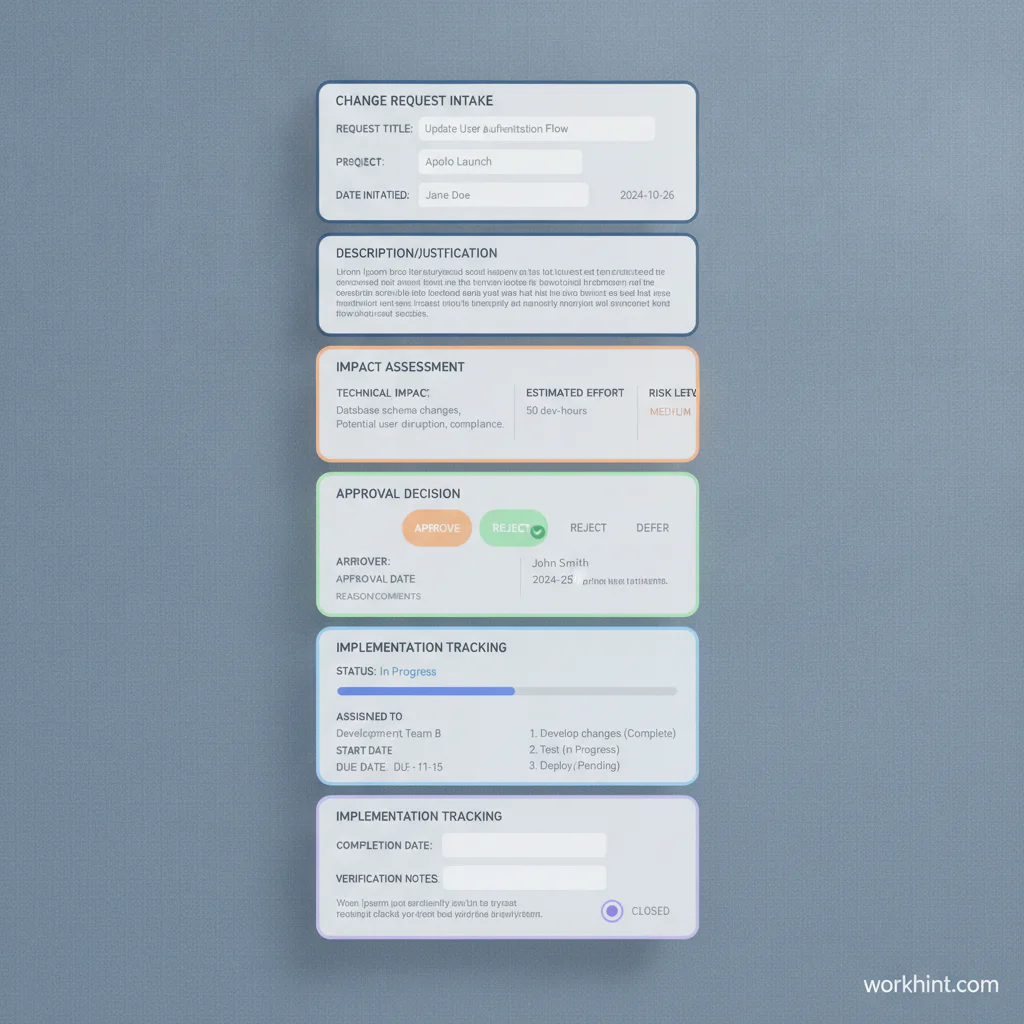
Sample completed change request
Imagine a customer implementation project where the client asks to add a second approval step before launch. The request summary might read: “Add finance approval before vendor payment files are exported.” The reason is payment control. The scope impact is one additional approval task and a revised payment workflow. The schedule impact is two extra business days unless finance approves within 24 hours. The resource impact is light, but the risk impact is positive because it reduces payment error exposure.
The recommendation might be: approve with a condition that finance approval has a defined service level and backup approver. The implementation plan would assign operations to update the workflow, finance to name primary and backup approvers, and the project owner to test the handoff before go-live.
Change request workflow
A good form needs a workflow around it. Otherwise, requests pile up as documents with no decision. Use this simple sequence:
- Submit the request with required fields completed.
- Screen for completeness and return vague requests for clarification.
- Assign an impact owner to assess scope, schedule, cost, resource, and risk effects.
- Route the request to the right approver based on impact level.
- Record the decision and any conditions.
- Convert approved changes into tracked tasks, owners, dates, and dependencies.
- Verify completion and close the request with a final note.
Institutional examples from UCOP and Prairie View A&M University show the same practical pattern: a request describes the change, identifies the reason and impact, captures approval, and tracks implementation details. Your version can be simpler, but it should preserve those decision points.
Common mistakes
- Approving before impact is clear. A request can sound small until it affects launch timing, compliance, integrations, billing, or contract terms.
- Using one approval path for every change. Low-risk edits should move quickly. High-impact changes need the right business, finance, legal, security, or customer owner.
- Leaving rejected requests undocumented. Without a recorded reason, the same request often returns through another channel.
- Forgetting implementation tracking. Approval is not completion. The change still needs owners, tasks, tests, and communication.
- Letting the form become too long. Add fields only when they improve decisions or reduce rework.
Where Workhint fits
Workhint helps teams turn a change request form template into a live workflow. Instead of collecting requests in email or a static spreadsheet, teams can build an intake flow that routes requests by project, impact, role, approval authority, and urgency. Approved changes can become assigned tasks with due dates, dependencies, documents, reminders, reporting, and closeout checks.
The template still does the thinking work: it defines what information a good change decision requires. Workhint helps operationalize that structure so scope changes, vendor changes, client requests, implementation updates, and approval-heavy work stay connected to the people responsible for moving them forward.
FAQ
What is a change request form?
A change request form is a structured document or intake form used to propose, evaluate, approve, reject, and track a change to an agreed project, workflow, system, scope, timeline, budget, or deliverable.
What should a change request form include?
It should include the requester, date, affected project, change summary, reason, scope impact, schedule impact, cost or resource impact, risk impact, recommendation, approver decision, implementation plan, and closeout status.
Who should approve a change request?
The approver should be the person or group with authority over the affected area. That may be the project sponsor, client owner, department lead, finance owner, legal reviewer, security lead, or steering committee depending on the change.
When is a change request required?
Use a change request when the proposed change affects commitments, cost, timeline, quality, risk, compliance, customer expectations, vendor scope, implementation plans, or downstream work. Minor edits can use a lighter path if they do not affect the baseline.
Is a change request the same as change management?
No. A change request is the specific proposed change and decision record. Change management is the broader discipline for planning, approving, communicating, implementing, and sustaining changes across projects or operations.
Conclusion
A change request form template gives teams a practical way to make changes without losing control of the plan. Use it to capture the request, assess the impact, route the right approval, document the decision, and track implementation through closeout. The best template is not the longest one. It is the one your team actually uses before changes become confusion.
Leave a Reply