


Automation moves tasks faster. Orchestration makes the whole operating system move in the right order.
Workflow orchestration is the practice of coordinating work across people, systems, decisions, approvals, and exceptions so an end-to-end process actually completes. It matters because most operational problems are not caused by one missing task. They are caused by handoffs, unclear ownership, disconnected tools, and exceptions that nobody designed for.
A team can automate reminders, forms, approvals, and status updates and still have a broken process. The real question is whether the work has a clear path from request to outcome. That is where orchestration becomes useful: it turns separate actions into a managed operating flow.
What’s in this article?
- What workflow orchestration means in business operations.
- How it differs from workflow automation and process orchestration.
- A practical model for designing orchestrated workflows.
- Where teams usually fail when they try to coordinate work across tools.
- How Workhint fits when a workflow needs roles, rules, dashboards, and automation.
Why workflow orchestration matters
IBM describes workflow orchestration as coordinating multiple automated tasks across business applications and services. That definition is useful, but operations leaders should read it broadly. The value is not only technical integration. The value is that work gets a reliable route through the organization.
In a scaling company, a single customer onboarding, vendor request, internal support ticket, hiring approval, or service delivery workflow may touch sales, operations, finance, legal, managers, contractors, customers, and several systems of record. If each team optimizes its own step but nobody owns the full flow, cycle time grows and accountability disappears.
Workflow orchestration gives the work a control system. It defines what starts the process, who owns each stage, what data is required, which systems must update, when decisions happen, how exceptions escalate, and how performance is measured.
Workflow orchestration vs workflow automation
Workflow automation usually improves a specific action: send a notification, route a form, generate a task, update a record, or trigger an approval. Workflow orchestration coordinates those actions into a complete process. Camunda makes the same distinction in its workflow orchestration guide: automation handles individual tasks, while orchestration manages the sequence and interaction between tasks.
| Question | Workflow automation | Workflow orchestration |
|---|---|---|
| Scope | One task or trigger | End-to-end flow of work |
| Primary goal | Reduce manual effort | Coordinate people, systems, and decisions |
| Best for | Reminders, routing, updates, simple approvals | Multi-step work with dependencies and exceptions |
| Failure mode | A task does not run | The process stalls, loops, or loses ownership |
A useful rule: automate the task only after you understand the system. Otherwise, you may make the wrong handoff faster.
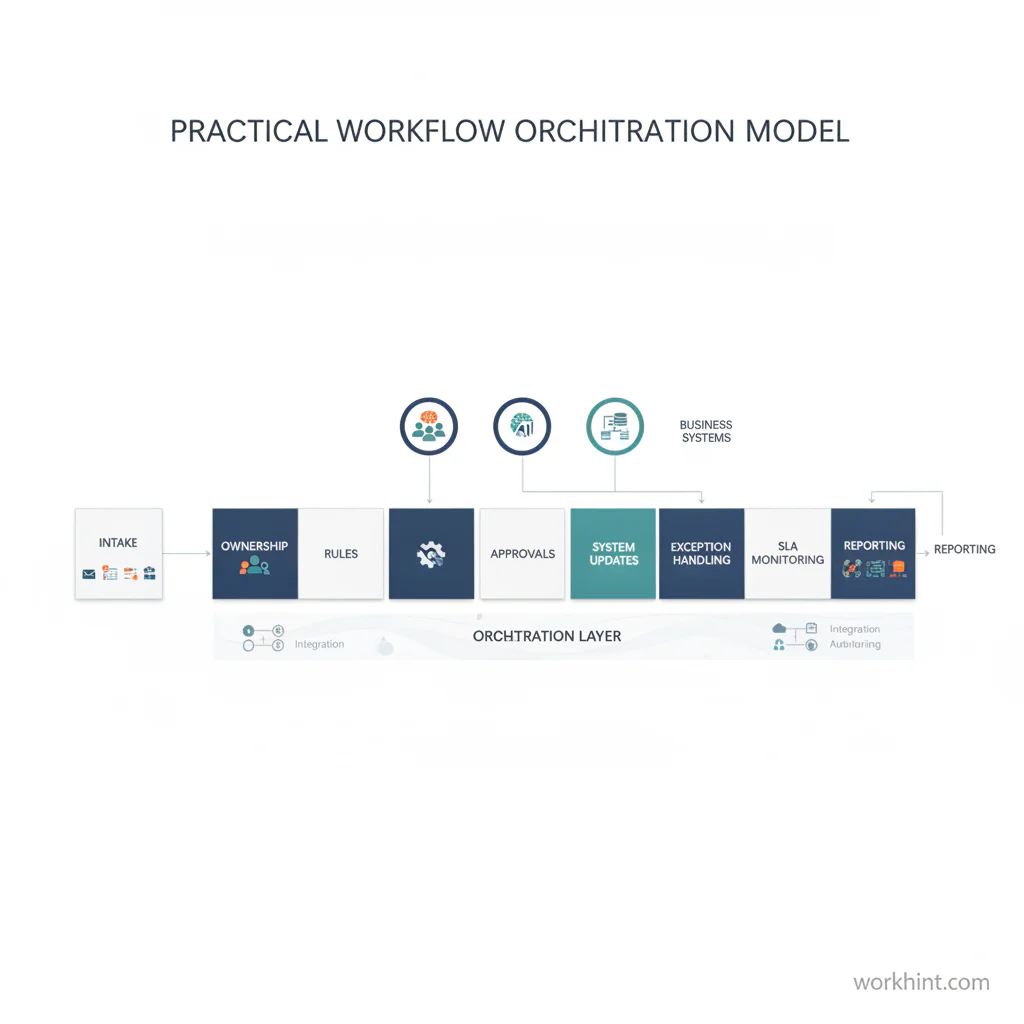
A practical workflow orchestration model
To design a workflow orchestration system, start with the operating model before the software. The model should make the process visible enough that a manager can inspect it and a team can run it repeatedly.
- Define the trigger. Clarify what starts the workflow: a request, form submission, customer event, deadline, system alert, contract stage, or manager decision.
- Set the outcome. Name the completed state. A workflow that ends with “reviewed” is weaker than one that ends with “vendor approved and ready for assignment.”
- Map the roles. Separate requester, owner, approver, contributor, reviewer, and escalation owner. Do not let “the team” own a step.
- Identify required data. Decide which fields, documents, permissions, and context are needed before the workflow can move forward.
- Sequence the work. Define the order of steps, parallel paths, dependencies, decision points, and handoffs.
- Design exceptions. Add paths for missing data, rejected approvals, overdue work, failed integrations, policy conflicts, and customer changes.
- Connect systems carefully. Decide which tools read, write, or own the record. Avoid duplicate sources of truth.
- Measure flow health. Track cycle time, queue age, rework, blocked work, SLA risk, approval time, and exception volume.
For highly standardized processes, teams may use formal notation. The Object Management Group maintains the BPMN 2.0 specification, which gives process designers a shared language for modeling events, tasks, gateways, and flows. Not every business workflow needs full BPMN, but the discipline behind it is useful: name the event, define the path, and make decisions explicit.
Where orchestration creates the most value
Workflow orchestration is most useful when work crosses boundaries. A simple personal checklist does not need orchestration. A process with multiple teams, systems, approvals, service levels, or exceptions probably does.
Good candidates include customer onboarding, vendor approval, contract review, procurement intake, field service dispatch, internal request management, contractor onboarding, finance approvals, IT incident response, and multi-step service delivery. UiPath’s current orchestration framing around people, systems, robots, AI agents, decisions, exceptions, and SLAs reflects where the market is moving: the problem is no longer just task automation. It is coordinated execution.
The strongest orchestration systems do three things at once. They help frontline users know what to do next. They help managers see where work is stuck. They help the organization change the process without rebuilding everything from scratch.
Common mistakes
- Starting with integrations instead of ownership. A connected tool stack still fails if nobody owns the end-to-end outcome.
- Ignoring exception paths. The normal path may happen 70 percent of the time, but the exceptions create most of the operational drag.
- Using status labels as process design. Labels such as pending, in review, and completed are not enough. Define what moves work between states.
- Automating unclear decisions. If humans disagree on the rule, automation will only make the conflict less visible.
- Measuring activity instead of flow. Task volume matters less than cycle time, stuck work, rework, and completed outcomes.
Where Workhint fits
Workhint fits when a team needs to turn an operating idea into a real work system. Instead of keeping the process as a diagram, spreadsheet, or loose set of automations, Workhint helps structure the roles, intake, permissions, steps, approvals, documents, assignments, schedules, payments where relevant, dashboards, and automation around the work.
For workflow orchestration, that means a team can describe the work challenge, map the operating flow, and generate a system that coordinates who does what, when decisions happen, what context is required, and how progress is reported. Workhint is not a replacement for every system of record. It is the orchestration layer that helps the business design and operate the work between people, tools, and outcomes.
FAQ
What is workflow orchestration?
Workflow orchestration is the coordination of tasks, people, systems, decisions, and dependencies across an end-to-end workflow. It helps work move through the organization in the right order with clear ownership and visibility.
How is workflow orchestration different from automation?
Automation runs a task. Orchestration coordinates the full flow. For example, an automated approval email is one task; an orchestrated approval workflow includes intake, routing, required context, approver rules, reminders, escalation, system updates, and reporting. In practice, workflow automation software is the operating layer that turns orchestration rules into routed work, approvals, assignments, and status visibility.
Do small teams need workflow orchestration?
Small teams need orchestration when work crosses roles, tools, or deadlines often enough that handoffs become unreliable. The system can be lightweight, but ownership, trigger, decision rules, and exception paths should still be explicit.
What metrics should an orchestrated workflow track?
Track cycle time, queue age, work in progress, approval time, rework rate, blocked items, SLA risk, exception volume, and completion rate. These metrics show whether work is flowing or merely being assigned.
Conclusion
Workflow orchestration is how growing teams stop relying on memory, meetings, and tool-hopping to move work forward. The practical goal is simple: make the path of work visible, owned, measurable, and adaptable.
Start by mapping one important workflow from trigger to completed outcome. Define the roles, data, decisions, exceptions, systems, and measures. Then automate only the parts that support the whole flow. That is how orchestration turns scattered operational activity into a scalable work system.
Leave a Reply