


When every request feels urgent, triage turns incoming work into clear decisions, owners, service paths, and measurable follow-through.
A triage process is the operating system a team uses to sort incoming work before it becomes a backlog, a fire drill, or a political negotiation. The goal is simple: decide what the work is, how important it is, who owns it, what path it should follow, and how quickly it needs a response.
That matters because most operational teams do not fail from lack of effort. They fail because requests arrive through too many channels, priority is negotiated case by case, and ownership is unclear until someone chases it.
What’s in this article?
- What a triage process does in business operations
- The intake fields every triage system needs
- A practical scoring model for priority and routing
- A workflow table you can adapt for internal requests, incidents, tickets, or service work
- Common failure points and where Workhint fits
Why a triage process matters
Business triage borrows from the broader idea of prioritizing scarce attention when demand exceeds available capacity. Investopedia describes triage in business as prioritizing tasks so the most critical work gets handled first. In operations, that idea becomes a workflow design problem: the team needs rules, not just judgment.
Without triage, the loudest requester often wins. Seniority can override impact. Low-value tasks can consume expert time. High-risk exceptions can sit in a shared inbox because nobody knows whether they are urgent, complex, or merely visible. The result is slower response time, more context switching, and weak reporting because the work was never categorized consistently at the start.
The best triage systems create a controlled front door. IBM’s service request management guidance defines a service request as capturing the type of service needed, when it is needed, and why it is needed. Every operational request needs enough context for someone to classify, prioritize, assign, and track it.
Triage process principles for operations
A triage process should answer five questions before work moves forward:
- What is being requested? Capture the request type, desired outcome, affected customer or team, due date, and supporting context.
- How important is it? Separate urgency from impact. Urgency asks how soon action is needed. Impact asks what happens if the work waits.
- Where should it go? Route by request type, required skill, risk level, location, customer segment, or approval requirement.
- Who owns the next action? Assign one accountable owner, even if several teams contribute later.
- How will it be measured? Track status, age, SLA target, handoffs, resolution reason, and whether the request exposed a process gap.
NIST’s incident response guidance is security-specific, but its prioritization logic is useful for serious operations workflows: evaluate impact, information needed, and recovery effort before deciding handling priority.
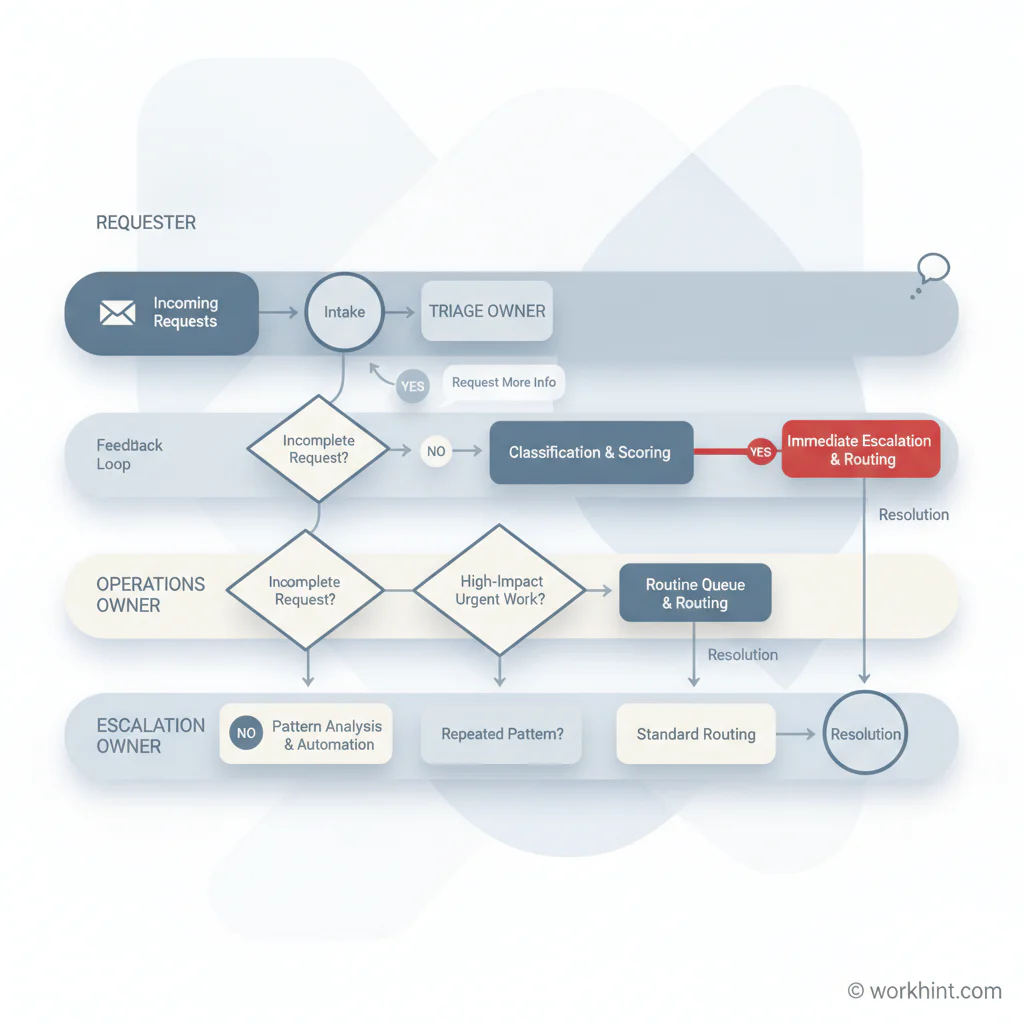
Triage process workflow: intake to resolution
Use the triage step as a decision layer, not a waiting room. If it classifies, routes, assigns, and triggers the next step, it reduces delay.
| Stage | Decision to make | Owner | Output |
|---|---|---|---|
| Intake | Is the request complete enough to assess? | Requester or intake coordinator | Structured request with required context |
| Classification | What type of work is this? | Triage owner | Category, workflow path, required skills |
| Priority scoring | What is the urgency, impact, risk, and effort? | Triage owner with business input | Priority level and SLA target |
| Routing | Which team or role should handle the next step? | Operations lead or automation rule | Assigned owner and visible status |
| Escalation | Does the request breach risk, time, or authority thresholds? | Process owner | Escalated path, approver, or exception review |
| Closure | Was the request resolved, rejected, deferred, or converted? | Assigned owner | Resolution reason and learning loop |
How to build a triage process
1. Define the front door
Pick the channels where requests are allowed to enter: form, shared inbox, Slack workflow, customer portal, CRM, ticketing system, or Workhint intake. Then reduce side doors. The team can still receive context in conversation, but the official request should land in one structured place.
2. Set required intake fields
Keep the form short but strict. Require request type, requester, business goal, affected audience, deadline, impact if delayed, links or files, and whether approval is needed.
3. Separate urgency from impact
Urgency is time pressure. Impact is business consequence. A request can be urgent but low impact, or high impact but not urgent. Atlassian’s bug triage guide treats categorization and prioritization as explicit steps before resolution.
4. Create routing rules
Routing rules should be understandable before they are automated. For example: customer-facing revenue requests go to revenue operations; compliance-sensitive requests go to legal operations; vendor access requests go to procurement; unclear requests go to a named triage owner.
5. Add escalation thresholds
Escalation should be based on thresholds, not anxiety. Define what triggers escalation: SLA breach risk, financial exposure, customer impact, legal risk, executive approval, blocked owner, missing dependency, or repeated request pattern.
6. Review the queue weekly
Triage improves when the team studies its own patterns. Review volume by category, average time in triage, reassignment rate, SLA misses, rejected requests, reopened work, and recurring causes.
Common triage process mistakes
- Using triage as a backlog label. Triage should make a decision. It should not become a permanent status.
- Letting everyone set priority. Requesters can suggest urgency, but the process should translate that into priority using shared criteria.
- Skipping rejection paths. Some requests should be declined, deferred, or converted into project work. A triage process needs a clean way to say no.
- Routing to teams instead of owners. A team queue still needs one accountable next owner.
- Automating too early. Automate stable rules after the team understands the decision model. Otherwise automation spreads confusion faster.
Where Workhint fits
Workhint fits when a team wants the triage process to become a live operating system, not just a diagram. A Workhint system can turn the intake form, roles, permissions, assignment rules, approval paths, escalation triggers, documents, dashboards, and reporting into one connected workflow. That is especially useful when triage spans several teams or external contributors and the work cannot be managed cleanly in a spreadsheet, inbox, or single-purpose ticket queue.
The practical starting point is to map the triage rules first: categories, scoring, owners, SLAs, escalation paths, and closure reasons. Workhint can then help generate and orchestrate the system around those rules so the process is easier to run, measure, and improve.
FAQ
What is a triage process in business operations?
A triage process is a repeatable workflow for assessing incoming work, classifying it, prioritizing it, routing it to the right owner, and tracking it through resolution.
What is the difference between intake and triage?
Intake captures the request. Triage evaluates it. Intake asks for context; triage decides priority, route, owner, SLA, and whether the work should proceed.
Who should own triage?
The owner should be close enough to understand the work and senior enough to enforce routing rules. In many teams, that is an operations lead, service manager, program manager, or rotating trained triage owner.
Should triage be automated?
Yes, but only after the decision rules are clear. Automate classification, routing, reminders, and escalation where patterns are stable. Keep human review for ambiguous, high-risk, or politically sensitive work.
Conclusion
A strong triage process helps teams stop reacting to every request as a special case. It creates a disciplined front door, turns priority into a shared decision, routes work to the right owner, and gives leaders the data they need to improve the system. Start small: define the intake fields, scoring criteria, routing rules, escalation triggers, and queue review rhythm. Once those pieces are clear, the process can become a scalable work system instead of another place where work gets stuck.
Leave a Reply