


A change order protects the project when the work changes after everyone already agreed to the plan.
A change order template gives teams a repeatable way to document project scope changes before extra work starts. It captures what changed, why it changed, who approved it, how much it costs, and whether the timeline moves.
Use this resource for client services, contractor work, IT projects, agency engagements, implementation projects, field operations, construction-adjacent work, or any project where informal scope changes can turn into disputes, margin loss, delayed invoices, or unclear ownership.
What’s included
- A practical change order template you can copy into a document, spreadsheet, form, or workflow
- A simple approval workflow for scope, cost, schedule, and risk review
- An example change order for a business project
- Common mistakes that make change orders hard to enforce or manage
- FAQ for operators, project managers, agencies, vendors, and finance teams
How to use this change order template
Use the template whenever a requested change affects the original scope, deliverables, timeline, assumptions, responsibilities, access requirements, pricing, or acceptance criteria. The change may come from a client, internal stakeholder, contractor, vendor, field team, product owner, or project lead.
The rule is simple: document the change before the work begins. For legally sensitive or high-value projects, have counsel review your contract language. Construction, government, regulated, and multi-party projects may have specific notice, timing, signature, or claim requirements.
Change order template
| Field | What to capture | Example |
|---|---|---|
| Change order number | Sequential identifier tied to the project record | CO-004 |
| Original agreement | Contract, SOW, purchase order, or project plan being changed | SOW dated July 1, 2026 |
| Requested change | Specific work being added, removed, replaced, or delayed | Add two approval roles to onboarding workflow |
| Reason for change | Business reason, dependency, client request, compliance need, defect, or new requirement | Finance requires invoice approval before vendor payment |
| Scope impact | What becomes in scope and what remains out of scope | Includes approval rules; excludes finance system migration |
| Cost impact | Added fee, credit, rate change, estimate, or no-cost confirmation | Additional fixed fee: $2,800 |
| Schedule impact | Days added, milestones moved, dependencies changed, or no schedule change | Launch moves from August 5 to August 9 |
| Risk impact | Security, privacy, compliance, operational, customer, or vendor risk created by the change | Finance reviewer needs limited invoice data access |
| Approvers | Authorized people who can approve the change | Client sponsor, project owner, finance lead |
| Approval date | Date the change is accepted and work may begin | July 20, 2026 |
| Record location | Where the signed change and audit trail are stored | Project folder, contract record, workflow history |
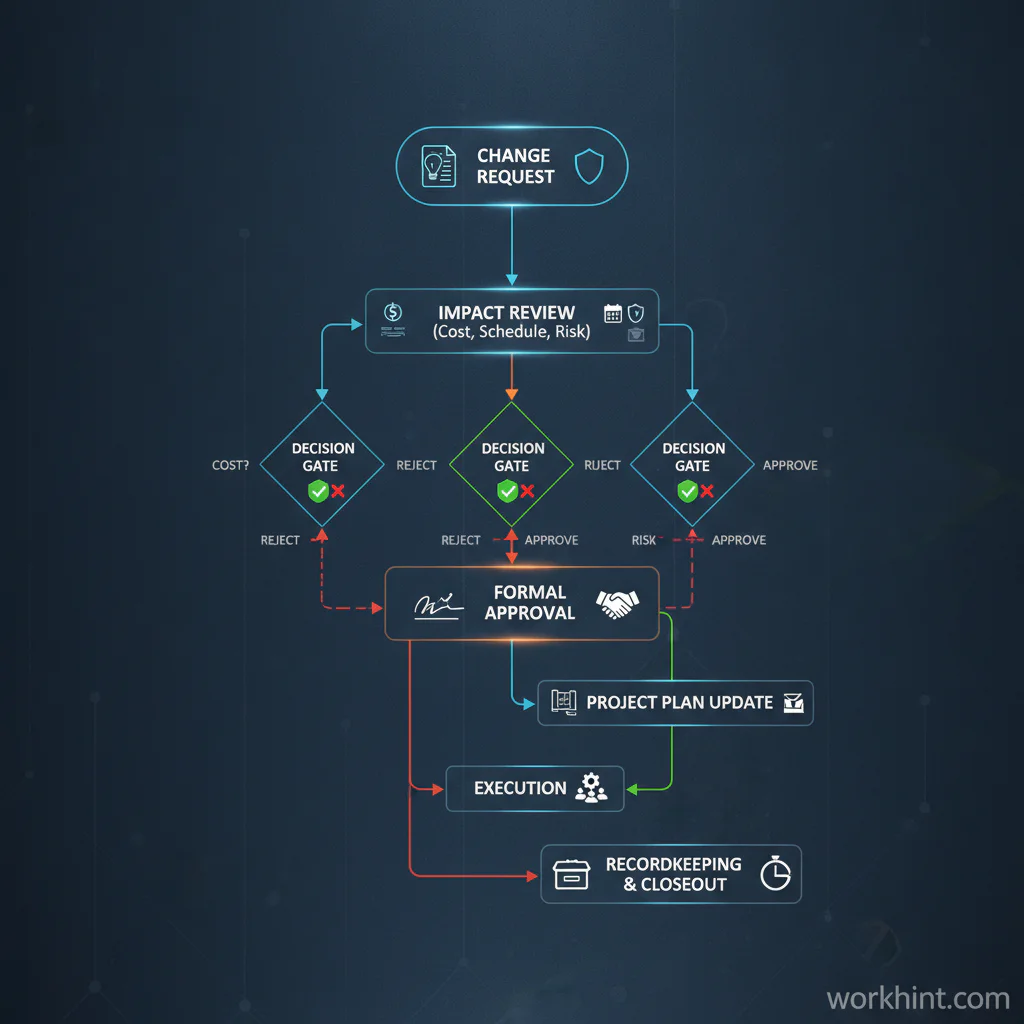
Change order approval workflow
A good change order process is short, but it should still protect the business. Start with a written request. Ask the project owner to confirm whether the request changes scope, cost, timeline, risk, or acceptance criteria. If it does, route it for impact review before anyone starts the extra work.
For technology vendors or work involving systems, data, or external providers, the risk review matters. CISA’s Vendor Supply Chain Risk Management Template gives teams a structured way to ask suppliers about governance, security, resilience, and supplier practices. NIST’s C-SCRM quick-start guide also emphasizes supplier criticality and requirements, which is useful when a change affects vendor access, sensitive data, or business continuity.
After impact review, send the change order to the authorized approvers. Approval should be explicit, dated, and stored with the project record. Electronic signatures are widely used in business, and the federal ESIGN framework, available through Cornell’s Legal Information Institute at 15 U.S. Code Chapter 96, recognizes electronic signatures in many transactions. This is still not legal advice; use your own contract terms and legal review where enforceability matters.
Example change order
Here is a simplified example for a client implementation project.
| Field | Example entry |
|---|---|
| Change order number | CO-002 |
| Original agreement | Implementation SOW signed June 24, 2026 |
| Requested change | Add manager approval before contractor profiles are marked ready for assignment |
| Reason for change | Operations wants a readiness review before contractors receive client-facing work |
| Scope impact | Add approval step, reminder, and status field; no changes to payment workflow |
| Cost impact | $1,600 fixed fee |
| Schedule impact | Adds two business days to configuration milestone |
| Approvers | Client operations sponsor and Workhint project lead |
| Decision | Approved July 18, 2026; work starts after approval |
What to attach to a change order
- The original contract, SOW, purchase order, or project plan reference
- Marked-up requirements, screenshots, drawings, tickets, or client instructions
- Cost estimate or line-item pricing backup
- Schedule impact analysis and revised milestone dates
- Risk notes for data, security, compliance, safety, or customer impact
- Approval record, signature, or written authorization
For construction-style projects, industry forms such as AIA Document G701 show how formal change orders commonly identify the project, contract, amount change, time change, and parties. Use forms that fit your industry and contract structure.
Common mistakes
- Starting work before approval. This creates payment, timeline, and responsibility disputes.
- Writing vague scope language. Describe the exact change, not a broad intention.
- Forgetting schedule impact. A no-cost change can still move the deadline.
- Skipping negative changes. Removed scope, credits, and substitutions should be documented too.
- Using names instead of roles only. Capture the authorized approver and their role so the record remains clear later.
- Not updating downstream work. Approved changes should update tasks, budgets, invoices, milestones, access, and reporting.
Where Workhint fits
Workhint fits when a change order template needs to become a live workflow instead of another document in a folder. A team can turn the template into an intake form, route it to the right project owner, calculate impact, request approvals, update assignments, attach documents, trigger reminders, and keep the decision record with the project.
That is especially useful when project changes affect multiple teams: operations, finance, legal, vendors, contractors, managers, and customer stakeholders. Workhint helps connect the form to the actual operating system around the work, so an approved change updates the people, tasks, permissions, timelines, documents, invoices, and reporting that depend on it.
FAQ
What is a change order template?
A change order template is a reusable form for documenting an approved change to project scope, cost, schedule, or responsibilities after the original agreement is already in place.
When should a business use a change order?
Use a change order when a request changes what was agreed: new deliverables, removed work, different acceptance criteria, revised timing, added cost, credits, new dependencies, or risk changes.
Who should approve a change order?
The approver should be someone with authority under the contract or internal policy. That may be a client sponsor, budget owner, project owner, finance lead, procurement owner, legal reviewer, or executive approver.
Is a change order the same as a change request?
No. A change request asks for a change. A change order documents the approved change, including scope, cost, timing, and authorization. Many teams use both: request first, change order after review.
Does every change order need a signature?
For important commercial changes, get clear written authorization from the required parties. Whether a formal signature is required depends on the contract, jurisdiction, industry, and risk level.
Conclusion
A useful change order template does more than capture a signature. It protects the project record, keeps scope visible, updates cost and schedule expectations, and gives teams a clear rule: if the work changes, document the change before the work starts. Start with the template, then make the approval path part of the workflow your team actually uses.
Leave a Reply