


Escalation should not mean panic. It should mean the right issue reaches the right owner before work stalls.
An escalation process is the operating rule that tells a team when an issue, request, decision, risk, or blocked item must move beyond its normal owner. Without one, teams either escalate too late, escalate everything, or rely on whoever is loudest in Slack. That creates delay, duplicate work, and leadership noise.
A good escalation process is not just an org chart. It defines the trigger, the required context, the next owner, the decision authority, the communication path, and the closeout record. It helps frontline teams solve what they can, while giving them a clear path when the work exceeds their role, access, budget, risk tolerance, or timeline.
What’s in this article?
- What an escalation process should control
- How to define escalation triggers, levels, owners, and response rules
- A practical escalation process design table
- Common mistakes that make escalation messy
- Where Workhint fits when the process needs to become a live work system
Why an escalation process matters
Escalation is often treated as an exception, but exceptions are part of the system. Customer promises get missed. Vendors miss documents. Legal review blocks launch. A manager is unavailable. A payment is stuck. A field team runs into an issue that requires a different role. If the escalation path is unclear, the issue sits in a queue until someone personally intervenes.
Atlassian describes escalation policies as rules for who should be notified, who takes over, and how handoffs happen when the first responder cannot resolve an incident. That same pattern applies outside IT. Business operations need defined handoffs when normal workflow ownership is no longer enough.
ServiceNow’s documentation separates escalation triggers from escalation policies: the trigger defines when the process starts, and the policy defines the audience, order, reminders, and contact methods. That distinction is useful for any operations team. A vague “escalate if needed” rule is not a process. A trigger plus a route is.
Start with the escalation trigger
The trigger is the condition that moves work out of the normal path. It should be specific enough that people do not need political judgment to use it. Strong triggers include elapsed time, risk level, customer impact, budget threshold, blocked dependency, missing approval, compliance concern, security issue, or decision authority gap.
For example, “escalate urgent requests” is weak. “Escalate any customer-impacting issue that will miss the four-hour response target, any request involving legal risk, and any budget exception above $5,000” is much stronger. The clearer the trigger, the less time the team spends debating whether escalation is allowed.
Define levels, not just people
An escalation path should route to roles and authority levels, not only named individuals. People change jobs, take leave, and become unavailable. Roles make the system durable.
A simple model usually has three levels. Level one is the normal process owner who solves routine issues. Level two is the functional owner with authority to unblock exceptions inside the department. Level three is the cross-functional or executive owner who can make tradeoffs across budget, policy, customer impact, or strategic priority.
PMI’s project management guidance notes that effective escalation procedures work issues at the lowest appropriate level first, then elevate unresolved issues until they are closed. That is the balance to preserve: escalation should unblock work, not remove ownership from the team closest to the problem.
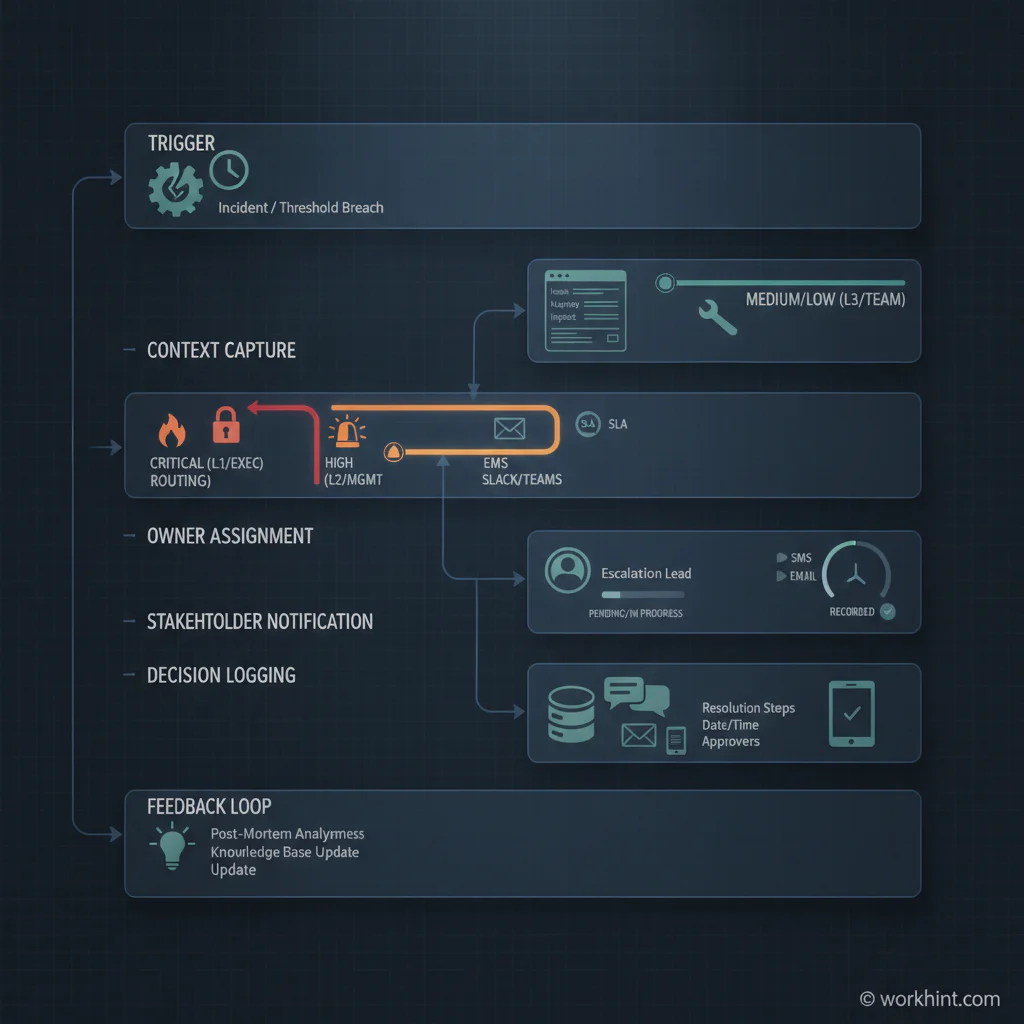
Escalation process design table
| Design element | Question to answer | Example rule |
|---|---|---|
| Trigger | When does escalation start? | Response target missed, compliance risk, blocked approval, budget exception, or customer-impacting delay. |
| Severity | How urgent is the issue? | Low, medium, high, critical, with response expectations for each level. |
| Current owner | Who owns the issue until it is accepted? | The original workflow owner keeps ownership until the escalation owner accepts it. |
| Escalation owner | Who has authority to resolve it? | Route by role: operations lead, finance approver, legal reviewer, customer owner, or executive sponsor. |
| Context packet | What information must travel with the issue? | Summary, impact, deadline, attempted fixes, decision needed, files, affected customer, and recommended next step. |
| Communication rule | Who must be notified? | Notify the requester, current owner, escalation owner, and any team whose work is blocked. |
| Closeout | How does the issue return to the system? | Record decision, owner, timestamp, reason, next task, and process change if needed. |
Build the escalation process step by step
- Map the workflow where issues appear. Identify the intake, approval, handoff, service delivery, payment, compliance, or customer support process where work most often stalls.
- List the real failure modes. Look at missed deadlines, rework, urgent messages, exception approvals, unresolved blockers, and cases where leaders had to intervene manually.
- Write the escalation triggers. Use objective criteria wherever possible: time, value, risk, impact, dependency, missing authority, or customer commitment.
- Assign escalation levels by role. Define who handles routine issues, who can approve exceptions, and who can make cross-functional tradeoffs.
- Define the context packet. Escalation should never be a vague message. Require the issue summary, impact, attempted resolution, decision needed, deadline, and supporting evidence.
- Set communication expectations. Decide who is notified, which channel is used, what response time applies, and what update cadence is required until closeout.
- Measure and improve. Track escalation volume, response time, resolution time, repeated triggers, and root causes. Repeated escalations usually reveal a broken workflow rule, missing authority, unclear SOP, or capacity constraint.
Common mistakes
- Escalating by hierarchy instead of authority. The next senior person is not always the right owner. Route to the role that can actually decide.
- Letting escalation remove accountability. The original owner should stay visible until the issue is accepted and closed.
- Using vague severity labels. “High priority” means little unless it has criteria, response times, and business impact.
- Sending incomplete context. If the escalation owner has to reconstruct the issue, the process adds delay instead of reducing it.
- Failing to learn from repeat escalations. If the same issue escalates every week, the workflow needs redesign, not more reminders.
Where Workhint fits
Workhint fits when an escalation process needs to become a live operating system instead of a document. A team can use Workhint to turn escalation rules into structured intake, role-based routing, owner assignments, approval paths, permissions, reminders, dashboards, decision records, and follow-up tasks.
That matters because escalation usually crosses teams. Operations may need legal, finance, customer success, delivery, HR, or leadership to act in the same issue. Workhint helps connect the trigger, context packet, escalation owner, resolution step, and reporting loop so blocked work does not disappear into side conversations.
FAQ
What is an escalation process?
An escalation process is a defined workflow for moving an issue, decision, request, or risk to the right owner when it cannot be resolved in the normal process.
What should an escalation process include?
It should include triggers, severity levels, current owner, escalation owner, required context, communication rules, response expectations, closeout steps, and reporting.
How is an escalation path different from an escalation process?
An escalation path identifies where the issue goes next. The escalation process includes the broader operating rules: when escalation starts, what information is required, who owns it, how communication happens, and how the issue is closed.
When should a business issue be escalated?
Escalate when the issue exceeds the current owner’s authority, threatens a deadline or customer commitment, creates compliance or financial risk, blocks another team, or remains unresolved past the agreed response window.
Conclusion
An escalation process gives teams a disciplined way to move blocked work without turning every exception into chaos. Define the trigger, route by authority, require context, keep ownership visible, communicate clearly, and learn from repeat issues. When escalation becomes part of the work system, teams move faster because they no longer have to invent the path under pressure.
Leave a Reply